
Nanolux Z OG1000
Nanolux DE OG Summit 1000W Digital Grow Light Ballast User Manual
Model: Z OG1000
1. Уводзіны
This manual provides detailed instructions for the safe and efficient operation of your Nanolux DE OG Summit 1000W Digital Grow Light Ballast. Please read this manual thoroughly before installation and use to ensure optimal performance and longevity of your product. Retain this manual for future reference.
2. Інфармацыя па бяспецы
WARNING: Risk of electric shock. Always disconnect power before installation, maintenance, or bulb replacement.
- Ensure the power supply matches the ballast's voltage патрабаванні (120В-240В).
- Do not operate the ballast with damaged cords or plugs.
- Install the ballast in a well-ventilated area to prevent overheating.
- Avoid direct contact with the bulb during operation or immediately after shutdown, as it will be extremely hot.
- Гэты прадукт прызначаны толькі для выкарыстання ў памяшканнях.
- Only use compatible double-ended (DE) HPS, MH, or CMH bulbs with the specified wattage.
- The ballast is UL listed, conforming to North American safety standards.
3. Змесціва ўпакоўкі
Праверце наяўнасць усіх кампанентаў у камплекце:
- Nanolux DE OG Summit 1000W Digital Grow Light Ballast
- 1000W HPS Bulb
4. Прадукт скончыўсяview і Асаблівасці
The Nanolux DE OG Summit 1000W Digital Grow Light Ballast is engineered for high-performance horticultural lighting. Key features include:
- Палепшанае рассейванне цяпла: Integrated fan and aluminum alloy shell ensure efficient thermal management, reducing heat buildup and extending ballast lifespan.
- Premium Ceramic Socket & Reflector: Industrial-grade ceramic lamp holder provides superior insulation and safety. The 97% reflective material enhances light penetration and uniformity.
- Wide Bulb Compatibility: Supports various double-ended (DE) grow lamps, including 1000W HPS, MH, and CMH, offering versatile lighting options.
- NCCS Smart Control Ready: Seamless integration with the Nanolux Cloud Control System allows for remote lighting management via a mobile application.
- Гнуткі Voltage & Safety Certified: Operates on a wide input voltage range of 120V–240V and is UL listed for North American safety standards.
- Dual Dimming Modes: Features both a rotary dimming knob and 0-10V control for precise light intensity adjustment.
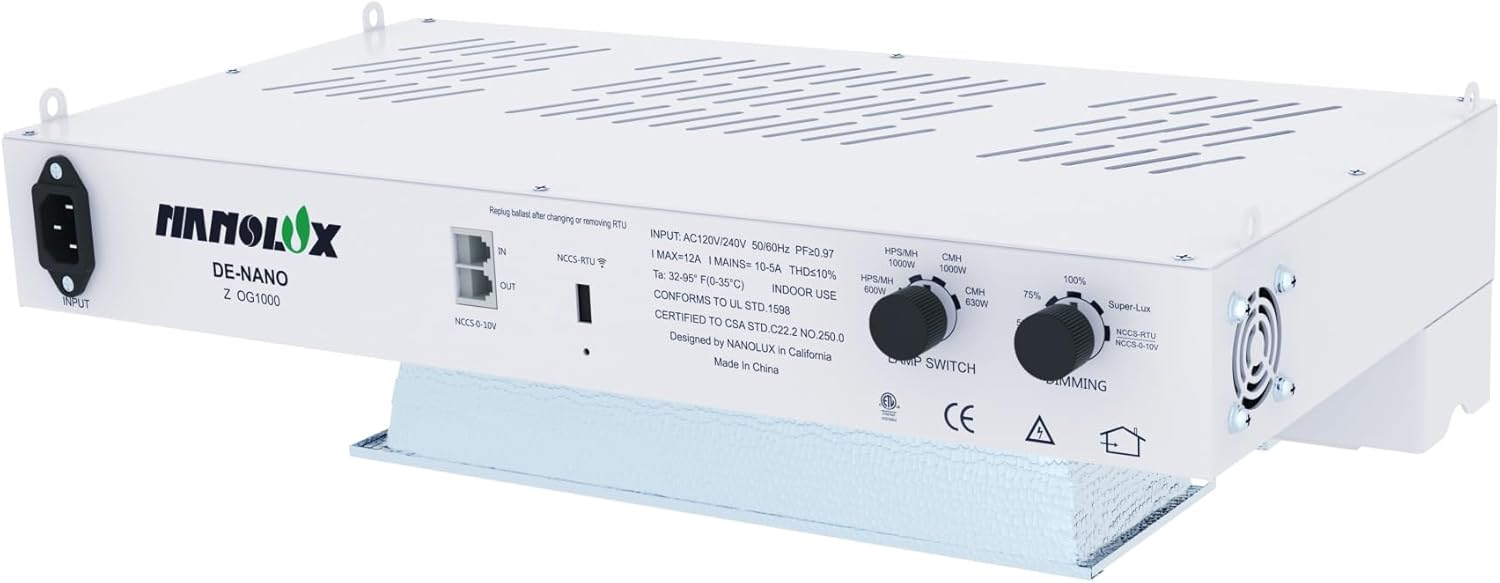
Image 1: Nanolux DE OG Summit 1000W Digital Grow Light Ballast with integrated reflector.

Image 2: Illustration of the ballast's patented reflector technology, highlighting 97% reflectivity for optimal light distribution.

Image 3: Visual representation of the multi-bulb compatibility, supporting 600-1000W HPS, MH, and CMH bulbs.
5. Інструкцыі па ўсталёўцы
5.1 Mounting the Ballast
- Select a sturdy, level surface or appropriate hanging location for the ballast. Ensure adequate clearance for ventilation around the unit.
- Use appropriate mounting hardware (not included) to secure the ballast. The ballast features integrated hanging points.
5.2 Bulb Installation
CAUTION: Handle bulbs with care. Do not touch the glass with bare hands.
- Ensure the ballast is disconnected from the power supply.
- Gently insert the double-ended bulb into the ceramic lamp holder. Ensure both ends are securely seated in the spring-loaded contacts.
- Verify the bulb is centered and properly aligned within the reflector.
5.3 Электрычнае падключэнне
- Connect the power cord to the ballast's input port.
- Plug the power cord into a grounded electrical outlet (120V-240V).
- If using the Nanolux Cloud Control System (NCCS), connect the NCCS cable to the designated NCCS port on the ballast. Refer to the NCCS manual for further setup.
6. Інструкцыя па эксплуатацыі
6.1 Уключэнне/выключэнне
Once connected to power, the ballast will initiate a self-test. The light will illuminate shortly after. To turn off, disconnect the power supply.
6.2 лamp Выбар тыпу
The ballast features a 'LAMP SWITCH' knob. Rotate this knob to select the appropriate bulb type (HPS/MH or CMH) and wattage (e.g., 1000W HPS/MH, 630W CMH). Ensure the selected setting matches the installed bulb to prevent damage.

Малюнак 4: Падрабязны view of the ballast's control panel, illustrating the lamp switch for bulb type selection and the dimming knob for output adjustment.
6.3 Кіраванне яркасцю
The ballast offers two methods for dimming:
- Rotary Dimming Knob: Adjust the 'DIMMING' knob on the ballast to set the desired light intensity (e.g., 75%, 100%, Super-Lux). This allows fine-tuning from 600W to 1000W for different growth stagэс.
- NCCS Smart Control: If connected to the Nanolux Cloud Control System, you can remotely manage and adjust dimming settings via the mobile application. Refer to the NCCS user guide for detailed instructions on app control.

Image 5: Visual explanation of the dual dimming modes, including rotary and 0-10V controls for precise light adjustment.
7. Тэхнічнае абслугоўванне
Regular maintenance ensures optimal performance and extends the lifespan of your ballast.
7.1 Ачыстка
- Ensure the ballast is disconnected from power and completely cooled before cleaning.
- Wipe the exterior of the ballast with a dry, soft cloth. Do not use liquid cleaners.
- Periodically inspect and clean the cooling fan vents to prevent dust buildup, which can impede airflow and lead to overheating. Use compressed air if necessary.
- Gently clean the reflector surface with a soft, lint-free cloth to maintain its reflectivity. Avoid abrasive materials.
7.2 Замена лямпачкі
CAUTION: Allow the bulb to cool completely before handling. Wear gloves to avoid skin oils on the glass.
- Disconnect the ballast from the power supply.
- Wait for the bulb to cool down completely (typically 15-30 minutes).
- Carefully remove the old bulb from the ceramic socket.
- Install the new, compatible double-ended bulb as described in Section 5.2.
8. Выпраўленне непаладак
If you encounter issues with your Nanolux DE OG Summit 1000W Digital Grow Light Ballast, refer to the table below for common problems and solutions.
| праблема | Магчымая прычына | Рашэнне |
|---|---|---|
| Не гарыць святло | Няма крыніцы харчавання Няправільная ўстаноўка лямпачкі Няспраўная лямпачка Няправільнае лamp налада пераключальніка | Праверце падключэнне сілкавання і разетку Ensure bulb is securely seated Замяніць лямпачку Праверыць лamp switch matches bulb type/wattage |
| Святло нечакана міргае або цьмянее | Няшчыльнае злучэнне лямпачкі Састарэлая цыбуліна Нестабільнае харчаванне Перагрэў | Re-seat bulb Замяніць лямпачку Праверце стабільнасць крыніцы харчавання Ensure proper ventilation, clean fan vents |
| Ballast is overheating | Дрэнная вентыляцыя Blocked fan vents | Relocate ballast to a cooler, well-ventilated area Ачысціце вентыляцыйныя адтуліны |
| Функцыя зацямнення не працуе | Dimming knob not adjusted NCCS connection issue | Adjust the 'DIMMING' knob Check NCCS cable and app connection |
If the problem persists after attempting these solutions, please contact Nanolux customer support.
9. Тэхнічныя характарыстыкі
| Асаблівасць | Спецыфікацыя |
|---|---|
| Марка | Nanolux |
| Назва мадэлі | DE OG Summit 1000 (Z OG1000) |
| Светлы тып | ХАВАЛІСЯ |
| Ватtage | 1000 Watts (Ballast), 1050 Watts (Power Consumption) |
| Уваходны кнtage | 120 В - 240 В |
| Прыняты Voltage Частата | Ад 100 да 240 вольт і 50 герц |
| Сумяшчальнасць лямпаў | DE HPS/MH/CMH (600W-1000W) |
| Падстава лямпачкі | G12 |
| Метад кантролю | App (NCCS), Rotary Knob |
| Яркасць | 155,000 Lumens (with 1000W HPS bulb) |
| Каляровая тэмпература | 3000 Kelvin (with HPS bulb) |
| Сярэдняя жыццё | 10,000 гадзін |
| Матэрыял | Алюміній |
| Памеры прадукту | 19.5"Ш х 8.9"В (19.5 х 19.5 х 8.9 цалі) |
| Вага прадмета | 14.8 фунта |
| Сертыфікаты | Сертыфікавана UL |
| Выкарыстанне ў памяшканні/на вуліцы | У памяшканні |
10. Гарантыя і падтрымка
For warranty information and customer support, please refer to the official Nanolux website or contact your authorized Nanolux dealer. Keep your purchase receipt as proof of purchase for any warranty claims.
Nanolux Technology
Webсайт: www.nanoluxtech.com (Напрampспасылка, праверце сапраўднасць URL)
Ask a question about this manual
Ask about setup, troubleshooting, compatibility, parts, safety, or missing instructions. Manuals+ will review the question and use this page’s manual context to help answer it.