
LTC GM022
LTC GM022 Ultralight 3-Mode Wireless Gaming Mouse User Manual
Мадэль: GM022
1. Уводзіны
The LTC GM022 is an ultralight 3-mode wireless gaming mouse designed for precision and versatility. It features a high-performance PAW3395 sensor, multiple connectivity options, and a convenient RGB charging dock. This manual provides instructions for setting up, operating, maintaining, and troubleshooting your GM022 mouse.
Змест пакета
- LTC GM022 Gaming Mouse
- Зарадная док-станцыя RGB
- USB-кабель C
- 2.4G USB Receiver (stored in mouse)

LTC GM022 Wireless Gaming Mouse with RGB Charging Dock and 2.4G USB Receiver.
2. Налада і падключэнне
The LTC GM022 mouse offers three connectivity modes: 2.4GHz wireless, Bluetooth 5.0, and wired USB-C. Select the mode that best suits your needs.

Diagram illustrating the three connectivity modes: 2.4GHz wireless, Bluetooth 5.1, and USB-C wired connection.
2.1. Бесправадны рэжым 2.4 ГГц
- Locate the 2.4G USB receiver stored in the compartment on the underside of the mouse.
- Падключыце USB-прыёмнік да вольнага порта USB на вашым кампутары.
- Перасуньце перамыкач рэжымаў на ніжняй частцы мышы ў становішча «2.4G».
- Мышка павінна аўтаматычна падключыцца да кампутара.
2.2. Рэжым Bluetooth 5.0
- Перасуньце перамыкач рэжымаў на ніжняй частцы мышы ў становішча «BT».
- На камп'ютары або прыладзе адкрыйце налады Bluetooth і знайдзіце новыя прылады.
- Select "LTC GM022" from the list of available devices to pair.
2.3. Правадны рэжым USB-C
- Падключыце кабель USB-C з камплекта да пярэдняга порта мышы.
- Падключыце другі канец кабеля USB-C да даступнага порта USB на вашым кампутары.
- The mouse will function in wired mode and charge simultaneously.

Underside of the LTC GM022 mouse with labels for mode switch, dongle storage, PTFE feet, and DPI loop button.
3. Інструкцыя па эксплуатацыі
3.1. Функцыі кнопак
The LTC GM022 mouse features 5 programmable buttons:
- Пстрычка левай кнопкай мышы: Першаснае дзеянне.
- Пстрыкніце правай кнопкай мышы: Дадатковае дзеянне/кантэкстнае меню.
- Сярэдні клік (кола пракруткі): Scroll up/down, click for universal scroll or other assigned function.
- Кнопка "Наперад": Перамяшчаецца наперад web браўзэры або file даследчыкі.
- Кнопка "Назад": Пераходзіць назад у web браўзэры або file даследчыкі.

Illustration of the LTC GM022 mouse highlighting its five programmable buttons and their default assignments.
3.2. Рэгуляванне DPI
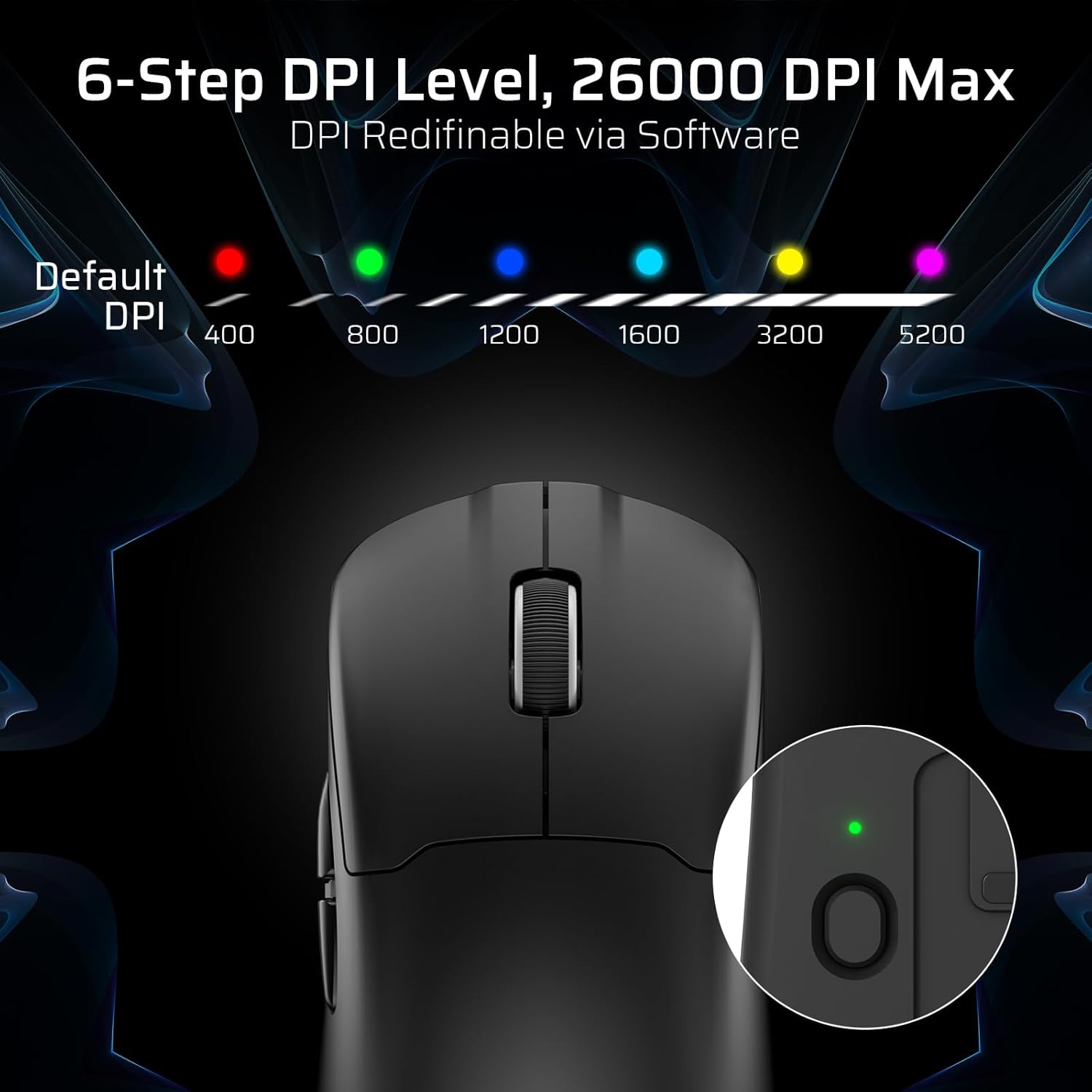
The mouse has a dedicated DPI button on its underside, allowing you to cycle through 6 preset DPI levels. Each level is indicated by a different LED color:
- 400 DPI (чырвоны)
- 800 DPI (зялёны)
- 1200 DPI (сіні)
- 1600 DPI (Cyan)
- 3200 DPI (жоўты)
- 5200 DPI (Magenta)
These DPI levels can be further customized and redefined up to 26000 DPI using the LTC software.

Visual representation of the 6-step DPI levels (400, 800, 1200, 1600, 3200, 5200) and the corresponding LED indicator colors.
3.3. Налада праграмнага забеспячэння
Download and install the official LTC software from the manufacturer's website to unlock full customization options. The software allows you to:
- Assign macros to buttons.
- Remap key functions.
- Redefine 6-step DPI levels up to 26000 DPI.
- Adjust polling rate (up to 1000Hz).
- Modify click and scroll speed.
- Сачыце за станам батарэі.

Screenshot of the LTC software interface for customizing mouse settings, including key assignments, DPI, polling rate, and battery monitoring.
4. Зарадка мышы
The LTC GM022 mouse is equipped with a 400mAh battery and can be charged using the included magnetic RGB charging dock or directly via the USB-C cable.
4.1. Using the Magnetic Charging Dock
- Connect the USB-C cable to the charging dock and then to a power source (e.g., computer USB port, USB wall adapter).
- Place the mouse onto the charging dock. The magnetic connection will secure it in place, and charging will begin automatically.
- The RGB lighting on the dock will indicate charging status.
4.2. Direct USB-C Charging
- Connect the USB-C cable directly to the mouse's front port.
- Падключыце іншы канец кабеля USB-C да крыніцы харчавання.
- Мыш можна выкарыстоўваць у правадным рэжыме падчас зарадкі.

The LTC GM022 mouse magnetically charging on its RGB illuminated dock, indicating a 400mAh battery.
5. Тэхнічнае абслугоўванне і догляд
To ensure the longevity and optimal performance of your LTC GM022 mouse, follow these maintenance guidelines:
- Уборка: Выкарыстоўвайце мяккую сухую тканіну для працірання паверхні мышы. Для ўстойлівага бруду злёгкуampПрацярыце тканіну вадой або мяккім ачышчальным растворам. Пазбягайце агрэсіўных хімічных рэчываў або абразіўных матэрыялаў.
- Сыход за датчыкам: Каб забяспечыць дакладнасць адсочвання, падтрымлівайце аптычны датчык на ніжняй частцы мышы ў чысціні і без пылу і смецця.
- ПТФЭ ножкі: The mouse comes with durable PTFE feet for smooth gliding. If they show significant wear, replacement feet may be available from the manufacturer.
- захоўванне: Калі мыш не выкарыстоўваецца працяглы час, захоўвайце яе ў чыстым і сухім месцы.
Close-up of the mouse's underside, detailing the PTFE feet for smooth gliding and the inclusion of backup feet.
6. Выпраўленне непаладак
If you encounter issues with your LTC GM022 mouse, refer to the following common problems and solutions:
| праблема | Магчымае рашэнне |
|---|---|
| Mouse not responding in 2.4G wireless mode | Ensure the USB receiver is securely plugged in. Check if the mouse mode switch is set to "2.4G". Try a different USB port. Ensure the mouse battery is charged. |
| Мыш не падключаецца праз Bluetooth | Ensure the mouse mode switch is set to "BT". Make sure Bluetooth is enabled on your device. Remove previous pairings and re-pair the mouse. Ensure the mouse battery is charged. |
| Мыш не зараджаецца | Ensure the USB-C cable is properly connected to both the dock/mouse and the power source. Verify the power source is active. Clean the charging contacts on the mouse and dock. |
| Недакладнае адсочванне або затрымка курсора | Clean the optical sensor on the underside of the mouse. Ensure you are using the mouse on a suitable surface (e.g., a mouse pad). Check for interference in wireless modes. Adjust DPI settings. |
| Кнопкі не рэагуюць | Ensure the mouse is powered on and connected. If using software, check button assignments. Try restarting your computer. |
If the issue persists after trying these solutions, please contact LTC customer support for further assistance.
7. Тэхнічныя характарыстыкі
Key technical specifications for the LTC GM022 Ultralight 3-Mode Wireless Gaming Mouse:
- мадэль: GM022
- Падключэнне: Бесправадная сувязь 2.4 ГГц, Bluetooth 5.0, правадны USB-C
- Датчык: Аптычны датчык PixArt PAW3395
- Макс. DPI: 26000 DPI (6-step re-definable via software)
- Хуткасць галасавання: 1000 Гц
- Хуткасць адсочвання: IPS 650
- паскарэнне: 50G
- кнопкі: 5 праграмуемых кнопак
- Тэрмін службы пераключальніка: 80 мільёнаў клікаў
- акумулятар: 400mAh літый-палімер
- Вага: Прыблізна 55 грам (2.01 унцыі)
- Памеры: 4.7 х 2.44 х 0.04 цалі
- Асаблівасці: RGB Charging Dock, Ultralight Design, PTFE Feet

Падрабязны view of the PixArt PAW3395 sensor specifications including 26K DPI Max, 1000Hz Polling Rate, 650 IPS Tracking Speed, and 50G Acceleration.

Illustration highlighting the durable switches with an 80 million click lifespan.
8. Гарантыя і падтрымка
LTC products are designed and manufactured to the highest quality standards. For information regarding warranty coverage, technical support, or to download the latest software and drivers, please visit the official LTC webсайт або звярніцеся ў іх аддзел абслугоўвання кліентаў.
Захоўвайце чэк аб куплі ў якасці пацверджання пакупкі для прэтэнзій па гарантыі.
Ask a question about this manual
Ask about setup, troubleshooting, compatibility, parts, safety, or missing instructions. Manuals+ will review the question and use this page’s manual context to help answer it.