
Xblitz S9 Duo (Model XBL-CAR-DR074)
Xblitz S9 Duo Front and Rear Dash Cam User Manual
Model: S9 Duo (XBL-CAR-DR074)
1. Уводзіны
Thank you for choosing the Xblitz S9 Duo Dash Cam. This device is designed to provide reliable front and rear vehicle surveillance, capturing high-quality video footage of your journeys and while parked. Equipped with advanced features such as 2K resolution, Wi-Fi connectivity, Wide Dynamic Range (WDR), and a dedicated parking mode, the S9 Duo ensures comprehensive coverage and peace of mind. Please read this manual carefully to understand the proper installation, operation, and maintenance of your dash cam.
2. Змесціва ўпакоўкі
Перад тым, як працягнуць усталёўку, пераканайцеся, што ў камплекце ёсць усе пералічаныя ніжэй элементы:
- Xblitz S9 Duo Front Dash Cam
- Задняя камера
- Мацаванне прысоскі
- Charging Cable (Car Charger)
- Інструмент ўстаноўкі
- Гарантыйны талон
If any components are missing or damaged, please contact Xblitz customer support.
3. Прадукт скончыўсяview
Familiarize yourself with the main components of your Xblitz S9 Duo Dash Cam.
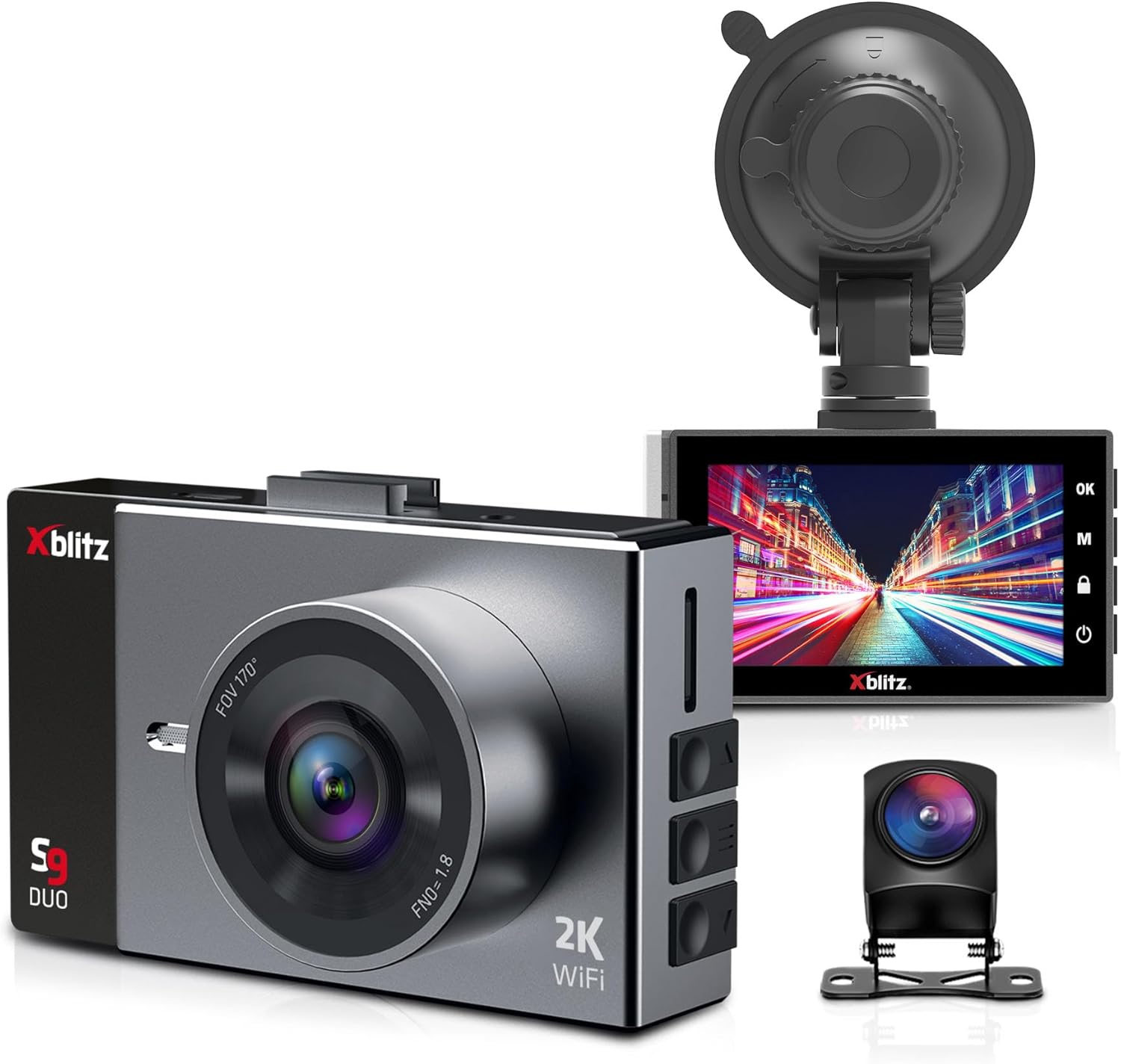
Малюнак 3.1: The Xblitz S9 Duo dash cam kit, showing the front camera with its wide-angle lens, the rear camera, and the suction cup mount. The front camera features a 2K resolution and Wi-Fi capability.

Малюнак 3.2: Буйны план view of the Xblitz S9 Duo dash cam's 3-inch display, showing the user interface with control buttons on the side. The screen provides clear visibility for settings and video playback.

Малюнак 3.3: The Xblitz S9 Duo dash cam, its rear camera, and the product packaging. This image illustrates the complete product set as it would appear out of the box.
4. Настройка і ўстаноўка
Follow these steps for proper installation of your Xblitz S9 Duo Dash Cam.
4.1. Устаўка карты памяці
- Пераканайцеся, што відэарэгістратар выключаны.
- Locate the microSD card slot on the side of the main unit.
- Insert a high-speed microSD card (Class 10 or higher, up to 128GB recommended) into the slot until it clicks into place.
- Каб выняць, акуратна націсніце на карту, пакуль яна не выскочыць.
4.2. Mounting the Front Camera
- Ачысціце лабавое шкло, дзе вы плануеце ўсталяваць камеру.
- Прымацуйце прысоску да відэарэгістратара.
- Press the suction cup firmly against the windshield, ideally behind the rearview mirror, and secure the lever.
- Адрэгулюйце кут камеры, каб забяспечыць выразны view дарогі наперадзе, пазбягаючы перашкод ззадуview люстэрка або дворнікі.
4.3. Усталёўка задняй камеры
- Connect the rear camera cable to the main front camera unit.
- Route the cable neatly along the vehicle's headliner and pillar trim to the rear of the vehicle.
- Усталюйце заднюю камеру на задняе лабавое шкло, забяспечыўшы выразны агляд view of the road behind. Use the provided adhesive or screws if applicable.
- Adjust the angle of the rear camera for optimal coverage.
4.4. Падключэнне сілкавання
- Падключыце аўтамабільную зарадную прыладу да ўваходнага порта харчавання відэарэгістратара.
- Падключыце другі канец аўтамабільнай зараднай прылады да разеткі 12 В вашага аўтамабіля (гняздо прыпальвальніка).
- Пракладвайце кабель харчавання незаўважна, каб пазбегнуць перашкод падчас кіравання аўтамабілем.
- The dash cam will typically power on automatically when the vehicle starts and power off when the engine is turned off.
5. Інструкцыя па эксплуатацыі
Understand the various functions and modes of your Xblitz S9 Duo Dash Cam.
5.1. Асноўная аперацыя
- Уключэнне/выключэнне харчавання: Прылада ўключаецца аўтаматычна разам з запальваннем аўтамабіля. Каб уручную ўключыць/выключыць прыладу, націсніце і ўтрымлівайце кнопку харчавання.
- Запіс: Once powered on, the dash cam automatically begins loop recording. A red indicator light or icon on the screen confirms recording is active.
- Дысплей экрана: The 3-inch screen offers various display configurations: split-screen for front and rear views, rear camera view within the front camera view, or quick switching between front and rear camera views.
5.2. Wi-Fi Module and Mobile Application
The S9 Duo features a built-in Wi-Fi module, allowing you to connect the camera to your smartphone for remote control and file кіравання.
- Download the dedicated mobile application (check the user manual or product packaging for the app name).
- Enable Wi-Fi on your dash cam through the settings menu.
- Connect your smartphone to the dash cam's Wi-Fi network (SSID and password will be displayed on the dash cam screen or in the manual).
- Use the mobile application to view жывы footagе, праглядаць запісаныя відэа, спампоўваць files to your phone, and adjust camera settings.
5.3. Цыкл запісу
This function ensures continuous recording by automatically overwriting the oldest unlocked files when the memory card is full. This eliminates the need for manual file выдаленне.
5.4. G-сенсор (датчык гравітацыі)
The G-Sensor detects sudden acceleration, braking, or impacts (e.g., collisions). When triggered, the S9 Duo automatically locks the current video file, protecting it from being overwritten by loop recording. These protected files can serve as evidence for police or insurance claims.
5.5. Выяўленне руху
When activated, motion detection allows the S9 Duo to record automatically when it senses movement around the vehicle. This provides surveillance when the vehicle is parked, capturing events in front of and behind the car.
5.6. Рэжым паркоўкі
In parking mode, the camera remains active (until its integrated battery is discharged) and records video and audio around the vehicle when parked. This feature helps monitor for damage attempts, theft, or other incidents. For 24/7 surveillance, the parking mode can be extended with the Xblitz R6 power kit (sold separately) for constant power supply.
5.7. Шырокі дынамічны дыяпазон (WDR)
WDR technology helps balance bright and dark areas in challenging lighting conditions, such as intense sunlight, changing tunnel lighting, or night driving. This results in clearer and more uniform images, improving detail capture.
5.8. Функцыянальнасць задняй камеры
The rear camera expands the surveillance area to cover the space behind your vehicle, providing improved visibility and assistance during reverse maneuvers. When reverse gear is engaged, the device automatically displays parking guidelines on the screen to aid in parking.
5.9. Шырокі Viewing кут
The wide-angle lens of the Xblitz S9 Duo captures a comprehensive view, typically covering three lanes in front of and behind the vehicle. This minimizes blind spots and ensures that incidents are not missed, enhancing overall driving safety.
6. Тэхнічнае абслугоўванне і догляд
Proper care will extend the lifespan of your dash cam.
- Уборка: Выкарыстоўвайце мяккую сухую тканіну для чысткі аб'ектыва і экрана камеры. Не выкарыстоўвайце абразіўныя ачышчальнікі або растваральнікі.
- тэмпература: Avoid exposing the device to extreme temperatures, both hot and cold, as this can affect battery life and component performance.
- Абнаўленні прашыўкі: Periodically check the Xblitz official webсайт для атрымання даступных абнаўленняў прашыўкі, каб забяспечыць аптымальную прадукцыйнасць і доступ да новых функцый.
- Карта памяці: Format the microSD card regularly (e.g., once a month) within the camera's settings to maintain its performance and prevent data corruption.
7. Выпраўленне непаладак
If you encounter issues with your Xblitz S9 Duo, refer to the following common problems and solutions:
| праблема | Магчымая прычына / рашэнне |
|---|---|
| Камера не ўключаецца. | Check power connection. Ensure the car charger is properly plugged into both the camera and the vehicle's 12V outlet. Verify the vehicle's 12V outlet is functional. |
| Запіс спыняецца або завісае. | Memory card may be full or corrupted. Format the microSD card. Ensure a high-speed (Class 10 or higher) memory card is used. |
| Дрэнная якасць відэа. | Clean the camera lens. Ensure the protective film is removed. Check video resolution settings. Adjust WDR settings for challenging lighting. |
| Праблемы з падключэннем да Wi-Fi. | Ensure Wi-Fi is enabled on the dash cam. Restart both the dash cam and your smartphone. Verify correct Wi-Fi password. |
| Не адлюстроўваецца выява з задняй камеры. | Check the connection cable between the front and rear cameras. Ensure it is securely plugged in. |
If the problem persists after trying these solutions, please contact Xblitz customer support for further assistance.
8. Тэхнічныя характарыстыкі
Key technical specifications for the Xblitz S9 Duo Dash Cam:
| Асаблівасць | Дэталь |
|---|---|
| Марка | Іксбліц |
| Назва мадэлі | S9 Duo |
| Нумар мадэлі | XBL-CAR-DR074 |
| Памер экрана | 3 цалі |
| Тэхналогія падлучэння | Wi-Fi |
| Сумяшчальныя прылады | Смартфон |
| Дазвол запісу відэа | 2160p (2K) |
| Метад кантролю | Ужыванне |
| Тып мацавання | Мацаванне прысоскі |
| Тып абслугоўвання аўтамабіля | Аўтамабіль |
| Склад батарэі | Літый-іённы (патрабуецца 1 акумулятар) |
| Акумулятарная батарэя | няма |
| Памеры прадукту | 3.6 Г х 8.8 Ш х 5.4 У сантыметраў |
9. Гарантыя і падтрымка
The Xblitz S9 Duo Dash Cam comes with a standard manufacturer's warranty. Please refer to the included warranty card for specific terms and conditions, including warranty duration and coverage details.
For technical support, troubleshooting assistance, or warranty claims, please contact Xblitz customer service. Contact information can typically be found on the warranty card, the official Xblitz webсайт або ўпакоўку прадукту.
It is recommended to register your product on the Xblitz website, if available, to receive updates and support.
Ask a question about this manual
Ask about setup, troubleshooting, compatibility, parts, safety, or missing instructions. Manuals+ will review the question and use this page’s manual context to help answer it.