
ATTACK SHARK X85
ATTACK SHARK X85 Gasket Mechanical Keyboard
Кіраўніцтва карыстальніка
1. Уводзіны
Thank you for choosing the ATTACK SHARK X85 Gasket Mechanical Keyboard. This manual provides detailed instructions on how to set up, operate, and maintain your new keyboard. Please read this manual thoroughly before use to ensure optimal performance and longevity of your device.

The ATTACK SHARK X85 Gasket Mechanical Keyboard, featuring a compact 75% layout with a multi-function knob.
2. Змесціва ўпакоўкі
Калі ласка, пераканайцеся, што ўсе пералічаныя ніжэй прадметы ўваходзяць у ваш пакет:
- ATTACK SHARK X85 Gasket Mechanical Keyboard
- Кабель USB-C да USB-A
- Бесправадны прыёмнік 2.4 ГГц
- Інструмент для зняцця каўпачкоў клавіш і перамыкачоў
- Additional Keycaps (Purple accent keycaps)
- Кіраўніцтва карыстальніка (гэты дакумент)
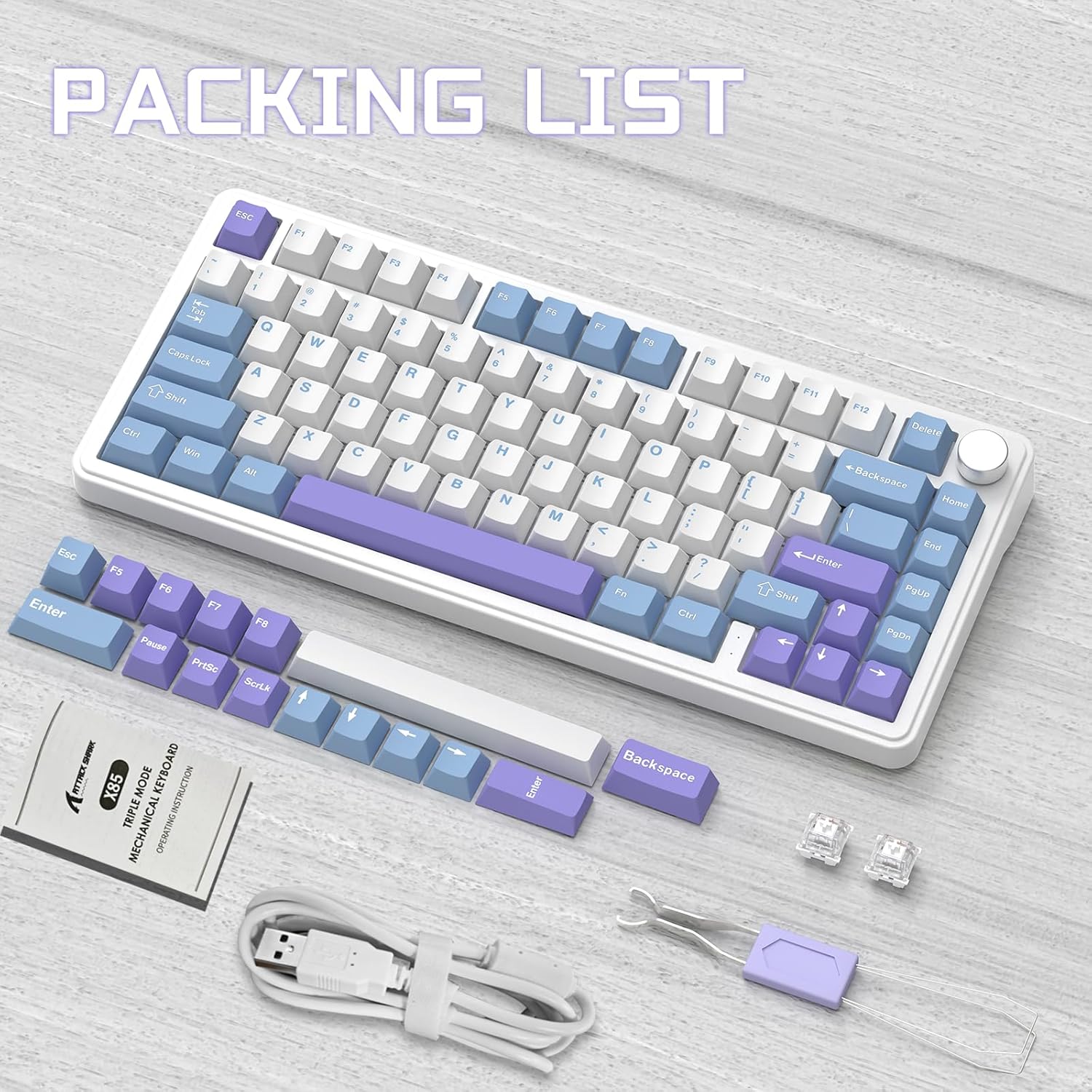
Contents of the ATTACK SHARK X85 keyboard package, including the keyboard, cables, tools, and extra keycaps.
3. Прадукт скончыўсяview
3.1 Асноўныя магчымасці
- 75% кампактная кампаноўка: 81-key design maximizing desk space.
- Трохрэжымнае падключэнне: Supports Bluetooth 5.0, 2.4 GHz wireless, and USB-C wired connections.
- Gasket Mount Design: Five-layer sound and shock-absorbing internal padding (PORON foam, IXPE switch pad, PET sound enhancement pad, bottom silicone pad) for a soft, flexible typing feel.
- Перамыкачы з магчымасцю гарачай замены: Compatible with most 3-pin mechanical switches for easy customization.
- Multi-Function Knob: Controls computer volume and keyboard backlight settings.
- Каўпачкі клавіш PBT: Durable, wear-resistant keycaps with thick walls.
- RGB-падсветка: 19 RGB modes, 7 monochrome modes, and full-color backlight with adjustable speed and intensity. Customizable via software.
- Акумулятар 5000 мАг: High-capacity battery for extended wireless use with auto-sleep power saving.
- 100% анты-прывіды: Ensures all key presses are registered accurately during fast typing or gaming.
- Шырокая сумяшчальнасць: Fully compatible with Windows and Mac operating systems.
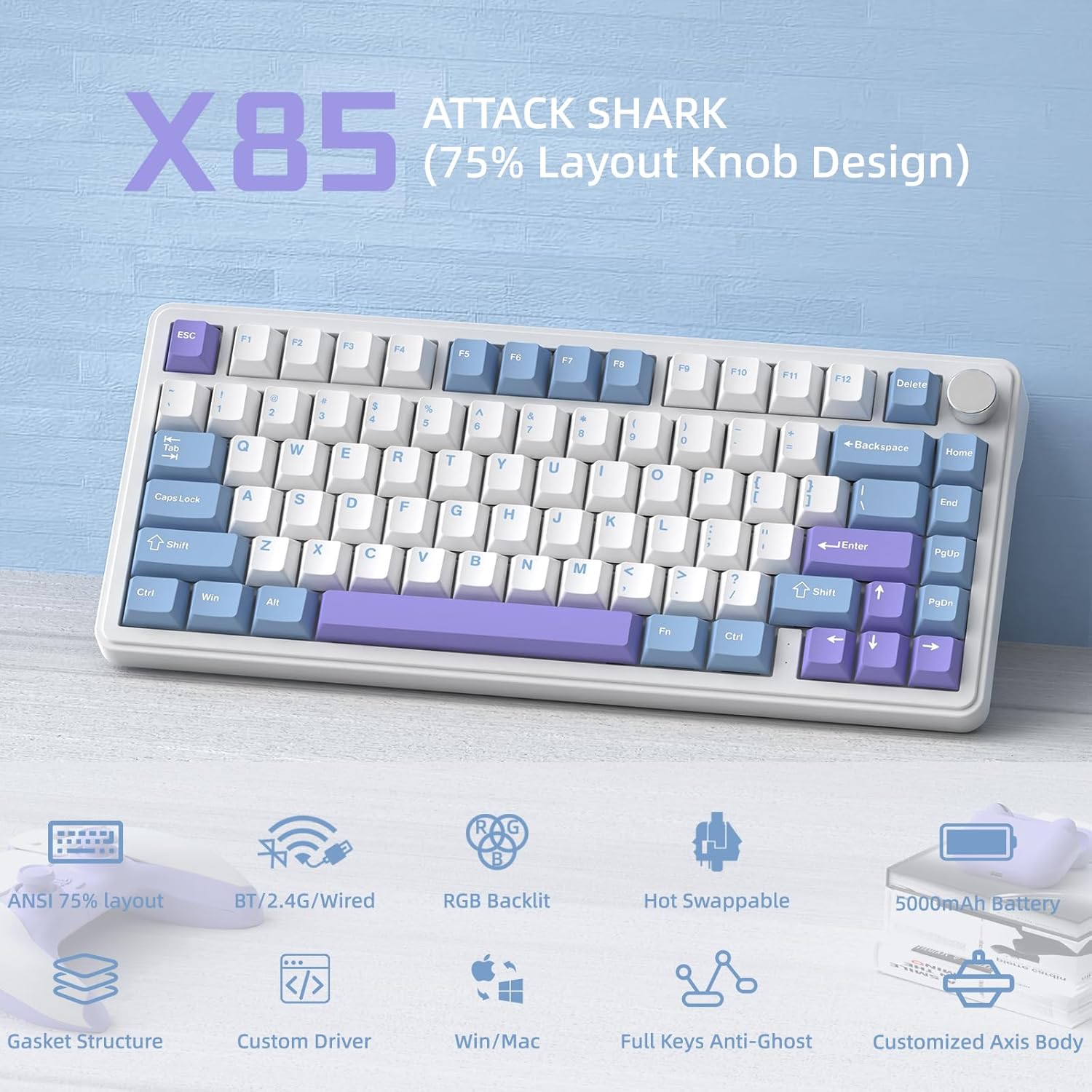
Надview of the ATTACK SHARK X85's key features, including its 75% layout, tri-mode connectivity, RGB lighting, and hot-swappable design.
3.2 Internal Structure (Gasket Mount)
The X85 features an advanced gasket mount design with multiple layers for enhanced acoustics and typing feel:
- ручка
- Клавішы PBT
- Верхняя вокладка
- Пераключальнік
- PC Horizontal Slotted Positioning Plate
- PORON Quilted Cotton
- Пераключальнік IXPE
- PET Sound Enhancement Pad
- Single Key Slotted PCB
- Switch Seat Silencer Bottom Cotton
- Сіліконавая накладка
- Ніжні корпус

Diagram illustrating the five-layer padding and gasket mount structure of the X85 keyboard, showing its various internal components.
4. Настройка
4.1 Tri-Mode Connection
The ATTACK SHARK X85 keyboard supports three connection modes: Bluetooth, 2.4 GHz wireless, and USB-C wired. The connection mode can be easily switched using the toggle switch on the back of the keyboard.

Visual guide for connecting the ATTACK SHARK X85 keyboard via Bluetooth, 2.4G wireless, and USB-C wired modes.
4.1.1 Злучэнне Bluetooth
- Toggle the switch on the back of the keyboard to the "BT" position.
- Доўгі націск Fn + Q, Fn + W, або Fn + E for more than three seconds until the corresponding key's backlight flashes rapidly. This indicates pairing mode.
- On your device (computer, tablet, or smartphone), enable Bluetooth and search for "ATTACK SHARK X85".
- Select the keyboard to connect. Once connected, the key's backlight will stop flashing and remain solid.
- Вы можаце падключыць да трох прылад Bluetooth і пераключацца паміж імі, націскаючы Fn + Q, Fn + W, або Fn + E.
Бесправадное злучэнне 4.1.2 2.4 ГГц
- Locate the 2.4 GHz wireless receiver (dongle) in the package.
- Toggle the switch on the back of the keyboard to the "2.4G" position.
- Plug the 2.4 GHz wireless receiver into an available USB port on your computer.
- The keyboard should automatically connect. If not, ensure the receiver is properly inserted and the keyboard is in 2.4G mode.
4.1.3 Правадное падключэнне USB-C
- Toggle the switch on the back of the keyboard to the "Line" (wired) position.
- Падключыце адзін канец кабеля USB-C, які ўваходзіць у камплект, да порта USB-C клавіятуры.
- Падключыце другі канец кабеля USB-A да даступнага порта USB на вашым кампутары.
- The keyboard will be recognized as a standard USB keyboard and is ready for use.
4.2 Сумяшчальнасць аперацыйнай сістэмы
The ATTACK SHARK X85 keyboard is fully compatible with both Windows and Mac operating systems. Use the toggle switch on the back of the keyboard to select between "Win" and "Mac" modes for optimal key mapping.
5. Інструкцыя па эксплуатацыі
5.1 Multi-Function Rotary Knob
The knob on the top right of the keyboard serves multiple functions, controlling both volume and backlight settings.

Instructions for using the multi-function rotary knob to control lighting and sound settings on the X85 keyboard.
- Пераключэнне рэжымаў: Press and hold the knob for more than three seconds to switch between Light Mode and Sound Mode.
- Светлавы рэжым:
- Press once to cycle through different backlight modes.
- Turn left to decrease backlight brightness.
- Turn right to increase backlight brightness.
- Рэжым гуку:
- Press once to play/mute audio.
- Turn left to decrease volume.
- Turn right to increase volume.
5.2 RGB Backlighting Customization
The X85 keyboard offers extensive RGB lighting options. You can adjust settings directly on the keyboard or through the dedicated software.
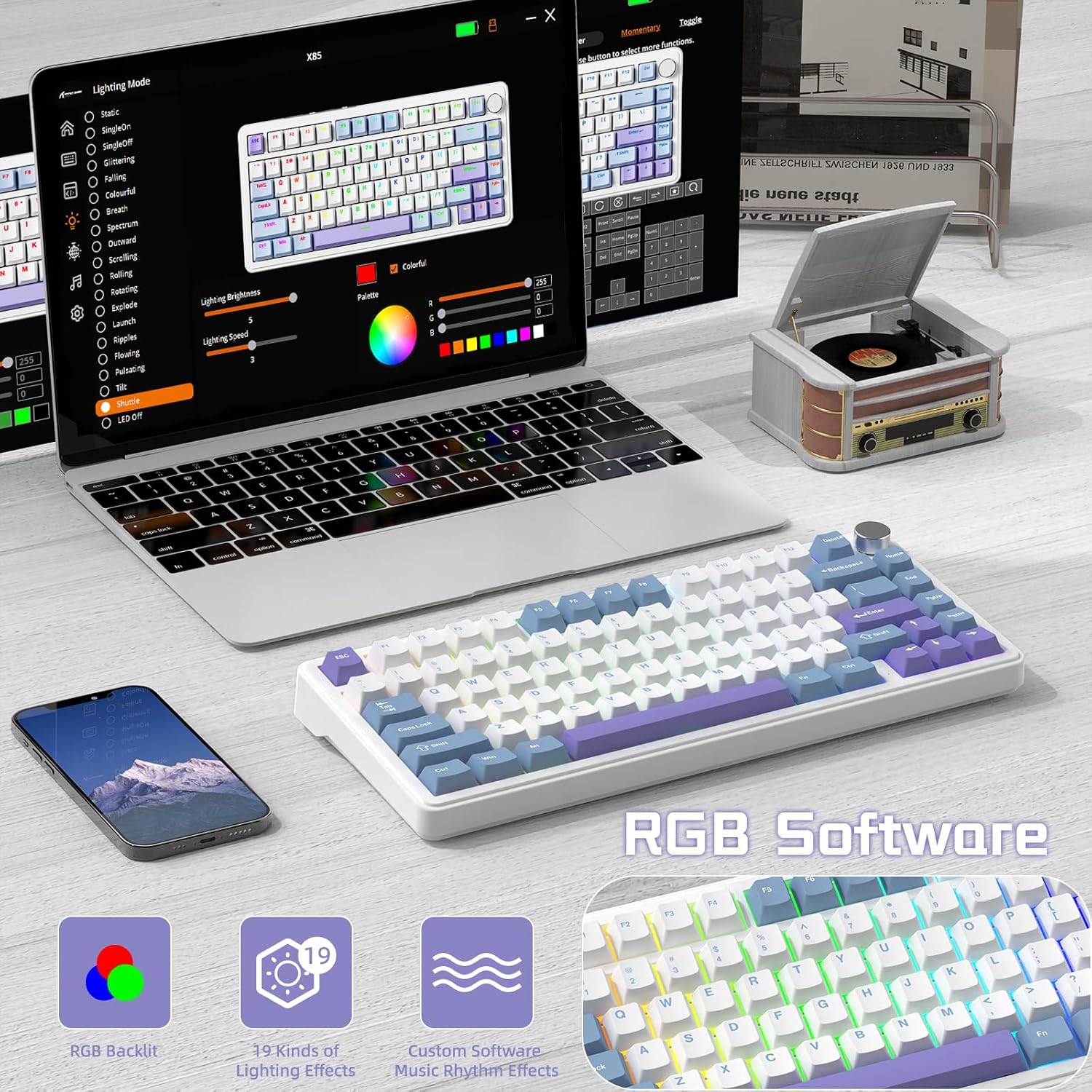
The software interface for customizing RGB lighting and other settings on the ATTACK SHARK X85 keyboard.
- On-Keyboard Controls:
- Use the knob in Light Mode to cycle modes and adjust brightness.
- Refer to the keyboard's quick function keys (usually Fn combinations) for additional lighting effects and speed adjustments.
- Настройка праграмнага забеспячэння:
- Download the official ATTACK SHARK software from the manufacturer's webсайт.
- The software allows for advanced customization of RGB effects, colors, speed, and brightness. It may also offer key remapping and macro creation.
- Note: The software may default to Chinese. Please navigate to settings within the software to change the language to English if needed.
5.3 Перамыкачы з магчымасцю гарачай замены
The X85 features a hot-swappable PCB, allowing you to easily change mechanical switches without soldering. This enables customization of your typing experience.

Demonstration of the hot-swappable feature of the X85 keyboard, showing how switches can be easily removed and replaced.
- Зняць каўпачок клавішы: Use the keycap puller tool to gently remove the desired keycap.
- Зняць перамыкач: Use the switch puller tool to grasp the top and bottom clips of the switch and gently pull it straight up.
- Уставіць новы перамыкач: Align the pins of the new 3-pin mechanical switch with the holes on the PCB. Gently push the switch straight down until it clicks into place. Ensure the pins are not bent.
- Замяніць каўпачок клавішы: Устаўце каўпачок клавішы назад на новы шток перамыкача.
The X85 supports 3-pin mechanical switches. Ensure the replacement switches are compatible to avoid damage.
5.4 100% Anti-Ghosting
The keyboard features 100% anti-ghosting, meaning all simultaneous key presses are registered accurately, which is crucial for fast-paced gaming and typing.
6. Тэхнічнае абслугоўванне
6.1 Чыстка клавіятуры
- Адключыце клавіятуру ад кампутара перад чысткай.
- Выкарыстоўвайце балон са сціснутым паветрам, каб выдзьмуць пыл і смецце паміж клавішамі.
- For surface cleaning, gently wipe the keycaps and chassis with a soft, slightly damp, тканіна без ворса. Пазбягайце празмернай вільгаці.
- Не выкарыстоўвайце агрэсіўныя хімікаты, абразіўныя ачышчальнікі або растваральнікі.
6.2 Сыход за акумулятарам
The X85 keyboard is equipped with a 5000mAh high-capacity battery. To maximize battery life and performance:

Battery life estimates for the ATTACK SHARK X85 keyboard: 35 hours with backlight on, 75 hours with backlight off.
- Перад першым выкарыстаннем цалкам зарадзіце клавіятуру.
- When the battery is low, connect the USB-C cable to charge.
- The keyboard features an auto-sleep power saving technology to conserve battery when idle.
- Пазбягайце ўздзеяння на клавіятуру экстрэмальных тэмператур.
7. Выпраўленне непаладак
| праблема | Магчымае рашэнне |
|---|---|
| Клавіятура не падключаецца праз Bluetooth. |
|
| 2.4 GHz wireless connection is unstable or not working. |
|
| Клавішы не рэагуюць або націскаюцца няправільна. |
|
| RGB backlighting is not working or behaving unexpectedly. |
|
| Multi-function knob is not responding. |
|
8. Тэхнічныя характарыстыкі
| Асаблівасць | Дэталь |
|---|---|
| Марка | АТАКА АКУЛА |
| мадэль | X85 |
| Макет | 75% (81 клавішы) |
| Сувязь | Bluetooth 5.0, 2.4 GHz Wireless, USB-C Wired |
| Ёмістасць батарэі | 5000 мАг |
| Матэрыял клавішы | PBT (полібутылентэрэфталат) |
| Тып перамыкача | Hot-swappable (supports 3-pin mechanical switches) |
| Падсвятленне | RGB (19 modes, 7 monochrome, full color) |
| Анты-прывіды | 100% абарона ад прывідаў |
| Сумяшчальнасць | Windows, Mac |
| Вага прадмета | 1.03 кг |
| Памеры ўпакоўкі | 35.6 х 18.6 х 4.9 см |
9. Гарантыя і падтрымка
The ATTACK SHARK X85 Gasket Mechanical Keyboard comes with a standard manufacturer's warranty. Please refer to the warranty card included in your package or visit the official ATTACK SHARK webсайт для атрымання падрабязных гарантыйных умоў.
For technical support, troubleshooting assistance, or any inquiries regarding your product, please contact ATTACK SHARK customer service through their official webсайт або кантактную інфармацыю, прадастаўленую пры пакупцы.