
BSP D9
BSP D9 Game Controller User Manual
Мадэль: D9
1. Уводзіны
The BSP D9 Game Controller is a versatile gaming accessory designed to enhance your mobile and PC gaming experience. It supports a wide range of devices including iPhones, iPads, Android phones and tablets, PCs, Nintendo Switch, and PlayStation consoles. Featuring advanced Hall Effect joysticks and triggers, programmable back buttons, and a stretchable design, the D9 controller provides precise control and comfortable gameplay across various platforms.
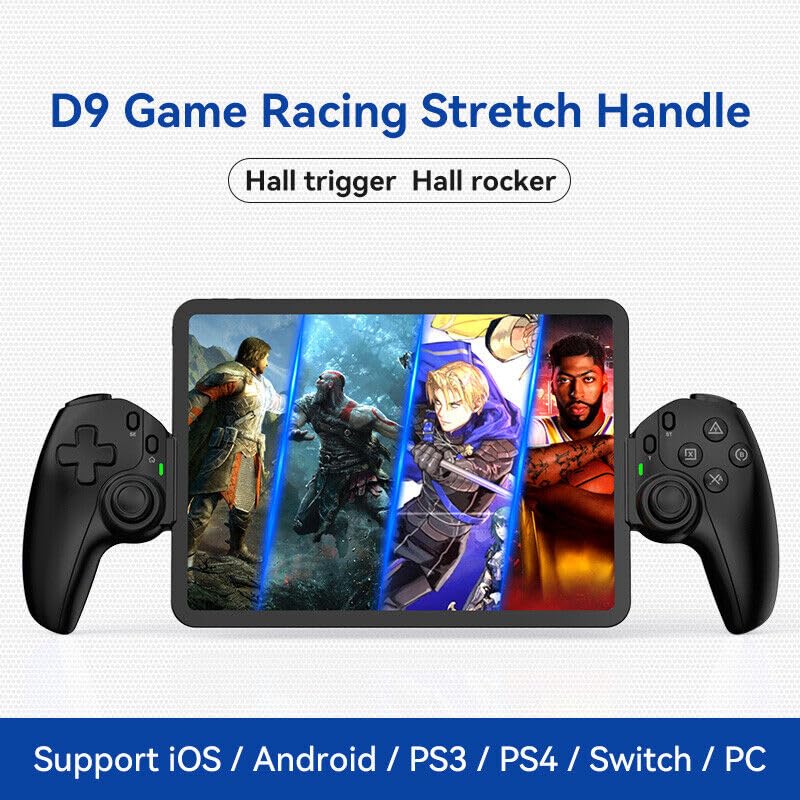
Figure 1.1: The BSP D9 Game Controller attached to a tablet, showcasing its design and compatibility with mobile gaming.
2. Прадукт скончыўсяview: Key Details
Familiarize yourself with the various buttons and components of your D9 Game Controller.

Figure 2.1: Detailed diagram of the D9 controller's button layout, including the Cross Key, SELECT, HOME, START, A/B/X/Y buttons, L1/R1, L2/R2 triggers, M1/M2 back buttons, Left/Right Sticks (L3/R3), Status Indicator, and Charging Indicator.
- Cross Key (D-Pad): Накіраваны ўвод.
- Left Stick/L3: Left analog joystick, press down for L3.
- Кнопка ВЫБАР: Function button, typically for menu selection.
- Кнопка HOME: Power on/off, mode switching, return to home screen.
- Індыкатар стану: Shows connection status and mode.
- Індыкатар зарадкі: Displays battery charging status.
- Right Stick/R3: Right analog joystick, press down for R3.
- Кнопкі A/B/X/Y: Стандартныя кнопкі дзеянняў.
- Кнопка ПУСК: Function button, typically for pausing or starting games.
- Кнопка TURBO: Activates/deactivates turbo function for assigned buttons.
- Кнопкі L1/R1: Плечавыя гузікі.
- Трыгеры L2/R2: Аналагавыя трыгеры.
- Кнопкі M1/M2: Праграмуемыя кнопкі вяртання.
3. Асаблівасці
3.1 Hall Effect Triggers and Joysticks
The D9 controller is equipped with advanced Hall Effect technology for both its triggers and joysticks. This provides superior precision and durability compared to traditional potentiometers.

Figure 3.1: Explanation of Hall Effect Triggers and Joysticks, highlighting 0.1mm accuracy for triggers and benefits like no drift issues, no dead zone, long lifespan, and precise control for joysticks.
- Трыгеры эфекту Хола: Provide 0.1mm accuracy for precise micro-operations in games.
- Джойстыкі з эфектам Хола: Eliminate drift issues, maintain stable trajectory, offer precise positioning, and provide a smooth feel without stuttering.
3.2 Функцыя Турба
The Turbo function allows you to set automatic rapid firing for specific buttons, giving you an advantagе ў хуткіх гульнях.

Figure 3.2: The Turbo function allows setting A/B/X/Y, L1/R1, L2/R2 buttons for rapid fire. Three adjustable turbo speeds are available: 8 shots/s, 15 shots/s, and 25 shots/s.
3.3 Функцыя макрапраграмавання
The M1 and M2 back buttons can be programmed to execute complex key combinations with a single press, reducing repetitive actions and extending controller lifespan.

Figure 3.3: Instructions for setting and canceling macro programming on the M1 and M2 back buttons. Macros can be assigned to A/B/X/Y/L1/R1/L2/R2/Cross Key combinations.
3.4 Stretchable Design
The controller features a stretchable design to accommodate a wide range of smartphones and tablets, ensuring a secure fit and comfortable grip.

Figure 3.4: The controller supports device lengths from 130mm to 280mm (5-11 inches) and a maximum thickness of 13mm. It is perfectly compatible with iPhone 15 series and supports silicone & clear phone cases.
4. Сумяшчальнасць
The BSP D9 Game Controller offers broad compatibility with various operating systems and gaming platforms, transforming your mobile device into a portable gaming console.

Figure 4.1: The controller supports streaming & cloud gaming (PS Remote Play, Xbox Game Pass, Steam Link, Rainway, NVIDIA GeForce NOW, Moonlight Game Streaming, Apple Arcade), direct play on iOS devices (Genshin Impact, Call of Duty Mobile, Diablo Immortal, Minecraft, Roblox), and direct play on Android devices (Call of Duty Mobile, Diablo Immortal, Minecraft, NBA 2K, Asphalt).
- Аперацыйныя сістэмы: iOS, Android, Windows (PC).
- Кансолі: Nintendo Switch, PlayStation (PS3, PS4, PS5 via remote play).
- Воблачныя гульні: Supports services like Xbox Game Pass, PS Remote Play, Steam Link, NVIDIA GeForce NOW, and more.
- Прамая гульня: Compatible with popular mobile games on both iOS and Android.
5. Настройка
5.1 Зарадка кантролера
- Connect the provided USB-C charging cable to the charging port on the controller.
- Падключыце другі канец кабеля да крыніцы харчавання USB (напрыклад, USB-порт кампутара, насценны адаптар).
- The Charging Indicator light will illuminate during charging and turn off when fully charged.
5.2 Inserting Your Device
- Gently pull the two sides of the controller apart to extend the stretchable mechanism.
- Carefully place your smartphone or tablet into the central slot, ensuring it is securely seated. The controller supports devices with lengths between 130mm and 280mm and a maximum thickness of 13mm.
- The controller is designed to accommodate devices with slim cases.
5.3 Connecting to Your Device (Bluetooth Pairing)
The connection method varies slightly depending on your device's operating system.
Для прылад Android:
- Націсніце і ўтрымлівайце ДОМ button until the Status Indicator light begins to flash rapidly, indicating pairing mode.
- На прыладзе Android перайдзіце па спасылцы Налады > Bluetooth і ўключыце Bluetooth.
- Пошук available devices and select "BSP-D9" or similar from the list.
- Once connected, the Status Indicator light on the controller will become solid.
Для прылад iOS:
- Націсніце і ўтрымлівайце ДОМ button until the Status Indicator light begins to flash rapidly.
- На прыладзе iOS перайдзіце па спасылцы Налады > Bluetooth і ўключыце Bluetooth.
- Пошук available devices and select "Xbox Wireless Controller" or "DUALSHOCK 4 Wireless Controller" (depending on the mode the D9 emulates for iOS compatibility) from the list.
- Once connected, the Status Indicator light on the controller will become solid.
For PC/Switch/PS (Wired/Wireless):
Refer to the specific connection instructions provided with your controller for PC, Switch, or PS modes, as these may involve different button combinations or wired connections.
6. Інструкцыя па эксплуатацыі
6.1 Асноўныя функцыі кнопак
Refer to Section 2, "Product Overview: Key Details," for the layout and basic functions of all buttons (Cross Key, A/B/X/Y, L1/R1, L2/R2, Joysticks, SELECT, START, HOME).
6.2 Using the Turbo Function
- Націсніце і ўтрымлівайце ТУРБА кнопка.
- Пакуль трымае ТУРБА, press the button you wish to assign the turbo function to (e.g., A, B, X, Y, L1, R1, L2, R2). The button will now have turbo enabled.
- To adjust the turbo speed, press and hold ТУРБА and then press the Right Stick (R3) up or down to cycle through the 3 available speeds (8, 15, 25 shots/s).
- To cancel the turbo function for a specific button, press and hold ТУРБА and press the assigned button again.
- To clear all turbo settings, press and hold ТУРБА and then press the SELECT button.
6.3 Programming Macro Buttons (M1/M2)
The M1 and M2 back buttons can be programmed to store a sequence of button presses.
How to Set a Macro:
- Націсніце і ўтрымлівайце ВЫБРАЦЬ кнопка і M1 (or M2) key for 2 seconds. The LED indicator light will flash quickly.
- Press the key(s) you want to set for the macro programming function (e.g., A+B+X+Y).
- After setting the sequence, press the M1 (or M2) key again. The LED light will become solid, indicating that the setting is complete.
- Once set, pressing M1 (or M2) will automatically execute the programmed key combination.
How to Cancel a Macro:
- Націсніце і ўтрымлівайце ВЫБРАЦЬ кнопка і M1 (or M2) key for 2 seconds. The LED indicator light will flash quickly.
- Націсніце M1 (or M2) key again to clear the macro programming. (Note: Do not press other buttons at this time). The LED light will remain solid to confirm the setting is cleared.
7. Тэхнічнае абслугоўванне
- Уборка: Use a soft, dry cloth to clean the controller. Do not use abrasive cleaners or solvents.
- захоўванне: Захоўвайце кантролер у прахалодным, сухім месцы, удалечыні ад прамых сонечных прамянёў і экстрэмальных тэмператур.
- Сыход за батарэяй: Каб падоўжыць тэрмін службы батарэі, пазбягайце частай поўнай разрадкі кантролера. Рэгулярна зараджайце яго, нават калі ён не выкарыстоўваецца працяглы час.
- Пазбягайце кропель: Абараняйце кантролер ад падзенняў і ўдараў, якія могуць пашкодзіць унутраныя кампаненты.
8. Выпраўленне непаладак
| праблема | Магчымая прычына | Рашэнне |
|---|---|---|
| Кантролер не ўключаецца. | Нізкі акумулятар. | Зараджайце кантролер не менш за 30 хвілін. |
| Немагчыма падключыцца праз Bluetooth. | Controller not in pairing mode; Bluetooth interference; device Bluetooth off. | Ensure controller is in pairing mode (flashing LED). Turn off and on Bluetooth on your device. Move closer to the device. |
| Кнопкі або джойсцікі не рэагуюць. | Connection issue; software glitch; physical damage. | Reconnect the controller. Restart your device. If problem persists, contact customer support. |
| Device does not fit in the controller. | Device dimensions exceed supported limits. | Ensure your device length is between 130-280mm and thickness is max 13mm. Remove bulky cases. |
9. Тэхнічныя характарыстыкі
- мадэль: D9
- Марка: БСП
- Падключэнне: Bluetooth, Wired (for PC/Switch/PS, specific modes may vary)
- Supported Device Length: 130 мм - 280 мм (5 - 11 цалі)
- Supported Device Thickness: Да 13 мм
- Joystick/Trigger Technology: Эфект Хола
- Праграмуемыя кнопкі: M1, M2 (back buttons)
- Функцыя турба: Yes, with 3 adjustable speeds
- вытворца: ShenZhen ShanWan Technology Co., Ltd.
- Першая даступная дата: 30 сакавіка 2024 г
10. Гарантыя і падтрымка
For warranty information and technical support, please refer to the documentation included with your purchase or visit the official BSP product support webсайт. Захоўвайце пацвярджэнне пакупкі для прэтэнзій па гарантыі.
Заўвага: Канкрэтныя ўмовы гарантыі і кантактная інфармацыя службы падтрымкі могуць адрознівацца ў залежнасці ад рэгіёна.