

1. Уводзіны
The JoFomp Digital Wall Clock is designed to provide clear and comprehensive timekeeping, environmental monitoring, and alarm functions for various indoor settings. Its large 9-inch LED display ensures excellent visibility, day or night. This manual provides detailed instructions for setup, operation, and maintenance of your new digital clock.

Image: The digital clock shown with its dimensions (8.98" / 22.8cm length, 2.95" / 7.5cm height, 1.38" / 3.5cm depth) and icons representing its multiple functions: Dual Alarm, Temperature, Week, Brightness Control, Drowsiness (Snooze), Humidness, Memory Function, and Date.
2. Змесціва ўпакоўкі
- JoFomp Digital Wall Clock (Model: 5503)
- USB кабель харчавання
- Адаптар сілкавання
- Mounting Nails (x2)
- Кіраўніцтва карыстальніка (гэты дакумент)
3. Інфармацыя па бяспецы
- Ensure the power adapter and cable are undamaged before use.
- Не падвяргайце прыладу ўздзеянню экстрэмальных тэмператур, прамых сонечных прамянёў або высокай вільготнасці.
- Захоўваць у месцах, недаступных дзецям.
- Do not attempt to disassemble or repair the clock yourself. Refer to qualified personnel for service.
- Use only the provided USB cable and adapter, or a compatible 5V/1A power source.
- Утылізуйце батарэйкі адказна ў адпаведнасці з мясцовымі правіламі.
4. Настройка
4.1 Падключэнне харчавання
- Connect the USB power cable to the clock's USB port (located on the back).
- Падключыце другі канец USB-кабеля да прыкладзенага адаптара харчавання.
- Insert the power adapter into a standard wall outlet. The clock display will illuminate.
4.2 Memory Battery Installation (Optional but Recommended)
The clock requires a constant power supply to operate. A memory battery ensures that time data is retained during power outages, preventing the need to reset the time. Two 1.5V AAA batteries are required (not included).
- Знайдзіце батарэйны адсек на задняй частцы гадзінніка.
- Адкрыйце крышку батарэйнага адсека.
- Устаўце дзве батарэйкі тыпу AAA 1.5 В, выконваючы правільную палярнасць (+/-).
- Надзейна зачыніце крышку батарэйнага адсека.
4.3 Варыянты мантажу
The JoFomp Digital Wall Clock can be placed on a desk or mounted on a wall.
- Размяшчэнне на стале: Simply place the clock on any flat, stable surface.
- Насценны мантаж: Use the two provided mounting nails. Insert the nails into the wall at the desired location, ensuring they are level and spaced correctly to fit the hanging holes on the back of the clock. Carefully hang the clock onto the nails.

Image: The back panel of the clock, highlighting the "SET", "UP", and "DOWN" buttons, the memory battery storage compartment, the wall hanging hole, and the USB power outlet.

Image: Two illustrations demonstrating the clock's versatility: one showing it hung on a wall, and another showing it placed on a desktop.
5. Інструкцыя па эксплуатацыі
5.1 Устаноўка часу і даты
- Націсніце і ўтрымлівайце кнопку "НАБОР" button on the back of the clock to enter time setting mode.
- Выкарыстоўвайце "UP" і "УНІЗ" buttons to adjust the hour. Press "НАБОР" to confirm and move to minutes.
- Repeat the process to set minutes, year, month, and day.
- After setting the date, press "НАБОР" to exit the setting mode.
5.2 12/24 Hour Format Switch
In normal time display mode, short press the "UP" button to switch between 12-hour (with AM/PM indicator) and 24-hour formats.
Video: Demonstration of the JoFomp digital clock's features, including switching between 12-hour and 24-hour time formats, changing temperature units, and showing timer and countdown functions. This video highlights the clock's versatility and ease of use.
5.3 Функцыя летняга часу (DST)
To enable or disable DST, short press the "УНІЗ" button in the time display state. The clock will automatically adjust the time by one hour forward or backward as appropriate.

Image: The clock display illustrating the Daylight Saving Time (DST) function, showing how the time shifts by one hour when DST is enabled or disabled, along with visual cues for "Spring Forward" and "Fall Back".
5.4 Рэгуляванне яркасці
The clock features automatic and manual brightness adjustment modes.
- Аўтаматычная яркасць: The built-in light sensor adjusts display brightness based on ambient light.
- Ручная яркасць: You can manually set the brightness level to your preference.
- Рэжым сну: A light-sensitive sleep mode is available for minimal disturbance during rest.

Image: The clock display showing different brightness settings: "L-AU" (Third Gear Auto-Brightness), "L-SL" (Fourth Gear Sleep Mode Auto-Brightness), "L-01" (Low light level), "L-02" (Medium brightness), and "L-03" (High brightness).

Image: A side-by-side comparison of the clock's display brightness during the day (bright) and at night (dimmed), demonstrating its automatic brightness adjustment feature for optimal visibility.
5.5 Dual Alarm Function
Гадзіннік падтрымлівае два незалежныя будзільнікі.
- Націсніце кнопку "НАБОР" button repeatedly until "AL1" or "AL2" appears on the display.
- Press and hold "НАБОР" to enter alarm setting mode.
- Выкарыстоўвайце "UP" і "УНІЗ" to set the alarm hour and minutes.
- Націсніце "НАБОР" to confirm each step.
- To activate/deactivate an alarm, short press the "UP"ці"УНІЗ" button when "AL1" or "AL2" is displayed. An alarm icon will appear when active.
- When an alarm sounds, press any button to activate snooze, or press and hold "НАБОР" to turn off the alarm.

Image: The clock display showing two alarm icons, indicating the dual alarm function. The image also depicts scenarios like "Wake Up Time" and "Exercise Time" to illustrate practical uses of the dual alarms.

Image: A visual representation of the dual alarm feature, showing the clock in two different environments (a kitchen and a gym), suggesting its utility for setting multiple reminders for various daily activities.
5.6 Адлюстраванне тэмпературы і вільготнасці
The clock continuously displays temperature in Celsius (°C) or Fahrenheit (°F) and relative humidity (%).
- To switch between °C and °F, short press the "УНІЗ" button when the temperature is displayed.
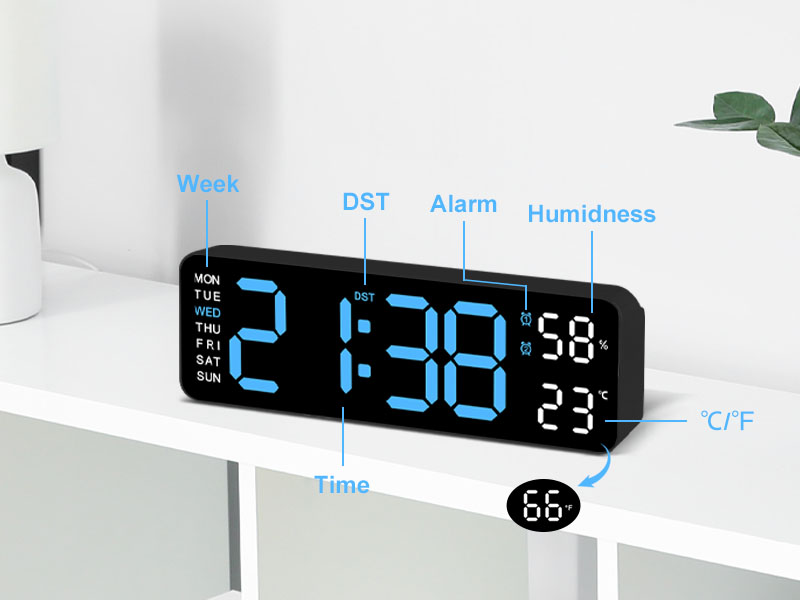
Выява: Падрабязны view of the clock's display, with labels pointing to the Week, DST, Alarm, Humidness, Temperature (°C/°F), and Time indicators, along with a small icon for the temperature sensor.
6. Тэхнічнае абслугоўванне
- Працірайце гадзіннік мяккай сухой тканінай. Не выкарыстоўвайце абразіўныя ачышчальнікі або растваральнікі.
- Avoid placing the clock in areas with excessive dust or moisture.
- If not in use for an extended period, disconnect the power and remove the memory batteries.
7. Выпраўленне непаладак
| праблема | Магчымая прычына | Рашэнне |
|---|---|---|
| Адлюстраванне гадзінніка выключана. | Няма крыніцы харчавання. | Ensure USB cable is securely connected and power adapter is plugged into a working outlet. |
| Time/Date resets after power outage. | Memory batteries not installed or depleted. | Install two new 1.5V AAA batteries in the memory compartment. |
| Temperature/Humidity reading seems inaccurate. | Clock placed near heat/cold source or in direct sunlight. | Relocate the clock to an area with stable ambient temperature and humidity. Allow time for readings to stabilize. |
| Сігналізацыя не гучыць. | Alarm not activated or volume too low (if applicable). | Ensure the alarm is set and activated (alarm icon visible). Check if there's a volume setting (refer to specific alarm setting instructions). |
8. Тэхнічныя характарыстыкі
| Асаблівасць | Дэталь |
|---|---|
| Марка | ДжоФомп |
| Нумар мадэлі | 5503 |
| Тып дысплея | Лічбавы святлодыёд |
| Памер дысплея | 9 цалі |
| Памеры прадукту | 11.8"W x 4"H (approx. 22.8cm x 7.5cm x 3.5cm) |
| Крыніца харчавання | Corded Electric (USB 5V/1A) |
| Акумулятар памяці | 2 батарэйкі 1.5 В ААА (не ўключаны) |
| Асаблівасці | Dual Alarm, Adjustable Brightness (Auto/Manual), Calendar, Large Display, Temperature (°C/°F), Humidity, DST, 12/24H Format, Snooze |
| Тып мацавання | Wall Mount or Desk Placement |
| Матэрыял | Акрыланітрылбутадыенстырол (пластык) |
| Выкарыстанне ў памяшканні/на вуліцы | Толькі ў памяшканні |
9. Гарантыя і падтрымка
JoFomp products are manufactured with high-quality standards. For any issues or inquiries regarding your digital wall clock, please contact JoFomp customer support through the retailer's platform or the official JoFomp webсайт.
Please retain your purchase receipt for warranty claims. Specific warranty terms and conditions may vary by region and retailer.
Для атрымання дадатковай дапамогі наведайце JoFomp Store on Amazon.