
SKY TOPPOWER STP3005
User Manual for SKY TOPPOWER STP3005 DC Power Supply
Adjustable 30V 5A Lab Bench Power Supply with 3-Digit Display
1. Уводзіны
Thank you for choosing the SKY TOPPOWER STP3005 DC Power Supply. This adjustable lab bench power supply is designed for various applications including circuit testing, electrolysis, DIY electronics projects, battery charging, repairing, and research. It offers high accuracy with 0.1V (100mV) and 0.01A (10mA) regulation, a 3-digit LED display, and multiple protection features to ensure safe and reliable operation.
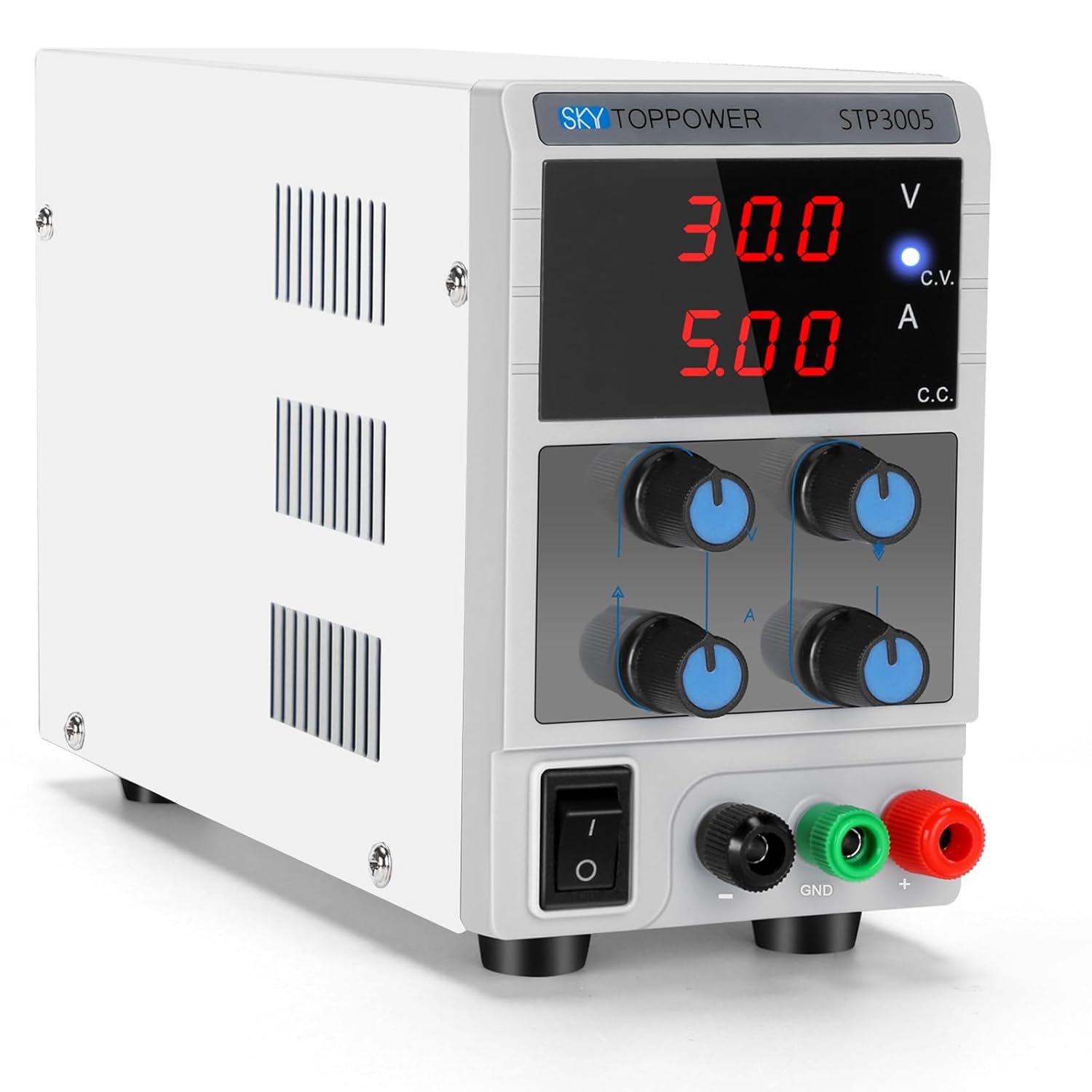
Малюнак 1.1: Спераду view of the SKY TOPPOWER STP3005 DC Power Supply.
Тэхніка бяспекі
- Always connect the grounding wire to a proper ground source to prevent electric shock.
- Ensure the power supply is turned off before connecting or disconnecting any leads or loads.
- Не выкарыстоўвайце прыладу ў вільготных або damp умовы.
- Avoid short-circuiting the output terminals for extended periods, although the unit has short-circuit protection.
- Забяспечце належную вентыляцыю вакол прылады, каб прадухіліць перагрэў.
2. Настройка
2.1 Распакаванне і праверка
Carefully remove the power supply from its packaging. Inspect the unit for any signs of damage that may have occurred during transit. Verify that all accessories, including the power cord and alligator clip leads, are present.
2.2 Размяшчэнне
Place the power supply on a stable, flat surface. Ensure there is adequate space around the unit for proper ventilation. The compact design (approximately 8.89(D)x3.3(W)x5.5(H) inches and 2.75 lbs) allows it to save valuable workbench space.

Figure 2.1: The compact and lightweight design of the power supply.
2.3 Падключэнне харчавання
Connect the provided power cord to the AC input on the rear of the power supply and then to a grounded electrical outlet. Ensure the power switch on the front panel is in the OFF position before plugging in.
3. Інструкцыя па эксплуатацыі
3.1 Пярэдняя панэльview

Малюнак 3.1: падрабязна view of the front panel controls and indicators.
- тtage Дысплей: Паказвае аб'ём выхаднога сігналуtage у вольтах (В).
- Бягучы дысплей: Shows the output current in AmpЭрэс (А).
- C.V. Indicator Light: Illuminates when the unit is operating in Constant Voltagэлектронны рэжым.
- C.C. Indicator Light: Illuminates when the unit is operating in Constant Current mode.
- Выхад Voltage Coarse/Fine Knobs: Адрэгулюйце выходнае аб'ёмtage. Use Coarse for large changes, Fine for precise adjustments.
- Output Current Coarse/Fine Knobs: Adjust the output current limit. Use Coarse for large changes, Fine for precise adjustments.
- Выключальнік сілкавання: Уключае/выключае прыладу.
- Выхадныя тэрміналы: Black (-) for negative, Green (GND) for ground, Red (+) for positive.

Малюнак 3.2: Буйны план view абtage/current adjustment knobs and output terminals.
3.2 Presetting Voltagе і ток
It is recommended to preset the desired voltage and current before connecting your load to prevent damage. The unit features a constant voltage and constant current mode that automatically switches based on the load.
- Папярэдняя налада Voltage:
- Ensure no load is connected to the output terminals.
- Уключыце сілкаванне з дапамогай выключальніка.
- Адрэгулюйце Выхад Voltage Грубыя і Выдатна knobs until the desired voltage is displayed. The C.V. indicator light should be on.
- Presetting Current (Short-Circuit Method):
- After presetting the voltage, turn off the power supply.
- Connect the positive (+) and negative (-) output terminals together using a shorting wire or the provided alligator clip leads (ensure the leads are rated for the maximum current).
- Turn on the power supply. The C.C. indicator light should illuminate, and the voltage display will drop to near zero.
- Адрэгулюйце Output Current Coarse і Выдатна knobs until the desired current limit is displayed.
- Turn off the power supply and remove the shorting wire. The unit is now ready to connect to your load with the preset voltagе і абмежаванне току.
Video 3.1: Demonstration of presetting voltage and current, and connecting a load.
This video illustrates the process of setting the desired voltage and current limits on the power supply. It also shows how to connect a load and observe the unit operating in constant voltage and constant current modes.
3.3 Падключэнне нагрузкі
With the power supply off and voltage/current preset:
- Connect the positive (+) lead from the power supply to the positive terminal of your load.
- Connect the negative (-) lead from the power supply to the negative terminal of your load.
- If required, connect the ground (GND) terminal to the chassis or ground of your circuit.
- Turn on the power supply. The display will show the actual voltage and current being supplied to the load.

Figure 3.3: The power supply demonstrating high accuracy in voltage output, compared with a multimeter reading.

Figure 3.4: The power supply in a laboratory environment, connected to test equipment.
3.4 Пастаянны абtage (CV) and Constant Current (CC) Modes
The STP3005 automatically switches between Constant Voltage (CV) and Constant Current (CC) modes depending on the load conditions:
- Канстанта VoltagРэжым e (CV): When the load current is less than the preset current limit, the unit operates as a constant voltage source. The output voltage remains stable at the preset value, and the C.V. indicator light is on.
- Рэжым пастаяннага току (CC): If the load current attempts to exceed the preset current limit, the unit automatically switches to constant current mode. The output current is maintained at the preset limit, the voltage drops to protect the load, and the C.C. indicator light is on.
3.5 Дадаткі
This power supply is suitable for a wide range of applications:
- Laboratory experiments and research
- Electronic equipment maintenance and repair
- Product line testing
- Battery charging (e.g., lead-acid batteries, LiFePO4 batteries)
- Anodizing processes
- DIY electronics projects
- Educational purposes in schools and universities

Figure 3.5: Instructions for battery charging using the power supply.

Figure 3.6: Wide range of applications for the DC power supply.
4. Тэхнічнае абслугоўванне
4.1 Ачыстка
Каб ачысціць знешнюю частку прылады, выкарыстоўвайце мяккую, damp cloth. Do not use abrasive cleaners or solvents. Ensure the unit is unplugged and turned off before cleaning.
4.2 Вентыляцыя
The power supply has a built-in fan to reduce operational noise and prolong product life. Ensure that the ventilation openings on the sides and rear of the unit are not obstructed. Regular inspection for dust buildup in these areas is recommended.
4.3 Захоўванне
When not in use for extended periods, store the power supply in a cool, dry place, away from direct sunlight and excessive dust.
5. Выпраўленне непаладак
У гэтым раздзеле прыведзены рашэнні распаўсюджаных праблем, з якімі вы можаце сутыкнуцца. Калі ў вас праблемы, якія не пералічаны тут, звярніцеся ў службу падтрымкі кліентаў.
| праблема | Магчымая прычына | Рашэнне |
|---|---|---|
| Няма харчавання/дысплей выключаны | Power cord not connected; Power switch off; Blown fuse. | Check power cord connection; Turn on power switch; Check and replace fuse if necessary (refer to specifications for fuse type). |
| Няма аб'ёму вывадуtagэ/ток | Output terminals not connected; Voltage/current knobs set to zero; Unit in protection mode. | Ensure leads are properly connected; Adjust voltage/current knobs; Check for short circuits or overloads on the load. |
| тtage drops significantly under load | Unit is in Constant Current (CC) mode; Load resistance too low for preset current. | Increase the preset current limit; Verify the load's current requirements. |
| Прылада пераграваецца | Poor ventilation; Excessive load for extended periods. | Ensure ventilation openings are clear; Reduce load or operating time; Allow unit to cool down. |
Функцыі абароны
The SKY TOPPOWER STP3005 includes multiple protection mechanisms:
- Цеплавая абарона: Automatically shuts down if internal temperature exceeds safe limits.
- Limit Current Protection: Prevents current from exceeding the preset limit, protecting both the power supply and the load.
- тtage Overload Protection: Меры засцярогі ад празмернага аб'ёмуtagе ўмовы.
- Абарона ад кароткага замыкання: Protects the unit from damage in case of a short circuit at the output.
- Anti-Reverse Connection Protection: Unique function to protect the equipment and power supply from reverse polarity connections.

Figure 5.1: Illustration of the anti-reverse connection protection feature.
6. Тэхнічныя характарыстыкі
| Асаблівасць | Дэталь |
|---|---|
| Нумар мадэлі | STP3005 |
| Марка | НЕБА ВЕРШЫНЯ |
| Выхад Voltage | 0-30V (Adjustable) |
| Выхадны ток | 0-5A (рэгуляваны) |
| Тып дысплея | 3-Digit LED Digital Display |
| тtage Дакладнасць | 0.1 В (100 мВ) |
| Бягучая дакладнасць | 0.01 А (10 мА) |
| Памеры (Д x Ш x В) | 8.89 х 3.3 х 5.5 цалі (прыблізна) |
| Вага прадмета | 2.75 фунтаў (1.3 кілаграмаў) |
| Тып раздыма | Злучальнік бочкі |
| Краіна паходжання | Кітай |
| Першая даступная дата | 10 жніўня 2018 г |
7. Гарантыя і падтрымка
SKY TOPPOWER is committed to providing high-quality products and excellent customer service. While specific warranty terms may vary by region or retailer, we offer professional technical support services.
For any questions regarding the use, maintenance, or troubleshooting of your STP3005 DC Power Supply, please do not hesitate to contact the SKY TOPPOWER Team. Our customer service is available 24/7 to assist you.
Please refer to your purchase documentation or the official SKY TOPPOWER webсайт, каб атрымаць найбольш актуальную кантактную інфармацыю і падрабязную інфармацыю аб гарантыі.
Ask a question about this manual
Ask about setup, troubleshooting, compatibility, parts, safety, or missing instructions. Manuals+ will review the question and use this page’s manual context to help answer it.