
1. Важныя інструкцыі па бяспецы
Калі ласка, прачытайце і зразумейце ўсю інфармацыю па тэхніцы бяспекі перад выкарыстаннем гэтага прадукта. Невыкананне гэтых інструкцый можа прывесці да паражэння электрычным токам, пажару або сур'ёзных траўмаў.
- Электрабяспека: Always ensure the charger is disconnected from the power outlet before making or breaking connections to the battery. Do not expose the charger to rain or wet conditions.
- Бяспека акумулятара: Акумулятары могуць вылучаць выбухованебяспечныя газы. Забяспечце належную вентыляцыю падчас зарадкі. Карыстайцеся ахоўнымі акулярамі і ахоўным адзеннем. Пазбягайце іскраў або полымя паблізу акумулятара.
- OBD2 Scanner Safety: Do not attempt to connect or disconnect the scanner while the vehicle's ignition is on or the engine is running. This could damage the vehicle's electronic system or the scanner.
- Агульныя меры засцярогі: Keep out of reach of children. Do not operate if the product or cables are damaged. Use only as intended.
2. Прадукт скончыўсяview
2.1 MOTOPOWER MP00205B 12V Battery Charger/Maintainer
The MOTOPOWER MP00205B is an automatic 12-volt battery charger and maintainer designed for lead-acid, flooded, or sealed maintenance-free batteries (AGM and gel cell). It features a compact and durable design, utilizing pulse charging technology to optimize battery performance and extend life. The charger incorporates multiple safety protections, including spark-free technology and automatic shut-off to prevent overcharging.

Figure 1: MOTOPOWER MP00205B 12V Battery Charger Maintainer in use.
2.2 MOTOPOWER MP69040 OBD2 Diagnostic Scanner
The MOTOPOWER MP69040 is an OBD2 diagnostic scanner designed to support all OBDII protocols, including KWP2000, J1850 VPW, ISO9141, J1850 PWM, and CAN. It is compatible with most 1996 US-based, 2003 EU-based, and 2008 Asian-based vehicles, as well as newer OBD2 and CAN vehicles. The scanner features a 2.8-inch TFT color screen and a user-friendly interface for efficient vehicle diagnostics.
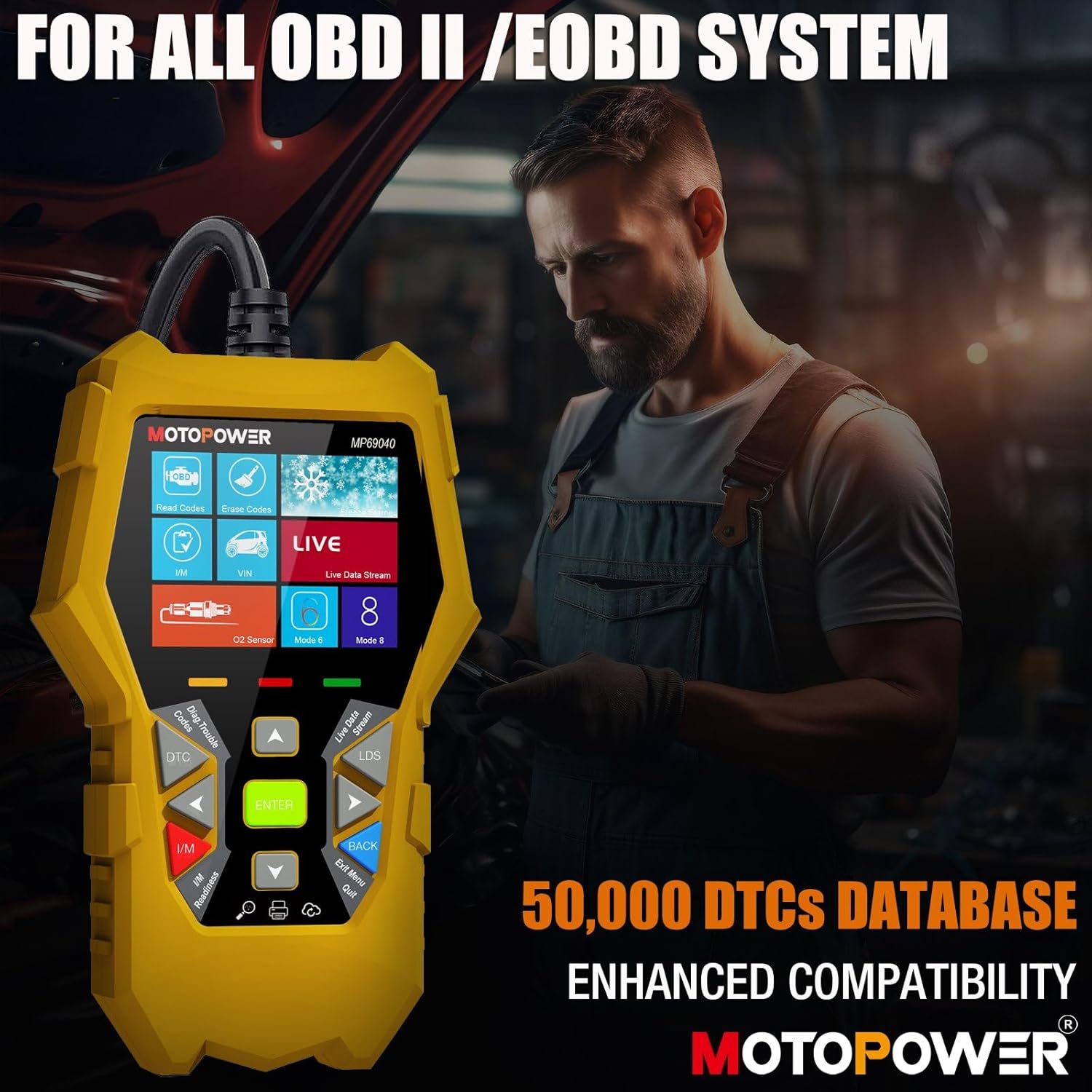
Figure 2: MOTOPOWER MP69040 OBD2 Diagnostic Scanner.
3. Змесціва ўпакоўкі
Праверце наяўнасць усіх прадметаў у камплекце:
- MOTOPOWER MP00205B 12V Battery Charger/Maintainer
- Алігатар Клamp Harness (50amp)
- Ring Terminal Harness (7.5amp fuse protected)
- MOTOPOWER MP69040 OBD2 Diagnostic Scanner

Figure 3: MP00205B Charger and its accessories.
4. MOTOPOWER MP00205B Charger/Maintainer Setup and Operation
4.1 Падключэнне зараднай прылады
- Пераканайцеся, што зарадная прылада адключана ад разеткі пераменнага току.
- Выберыце прыдатны раз'ём:
- Алігатар Клamps: Злучыць чырвоны склamp да станоўчай (+) клемы акумулятара і чорнага клamp да мінусавай (-) клемы батарэі.
- Кальцавыя тэрміналы: If permanently installing, connect the red ring terminal to the positive (+) battery post and the black ring terminal to the negative (-) battery post.
- Connect the SAE quick-release connector from the chosen harness to the charger's output cable.
- Plug the charger into a standard 120V AC power outlet.
4.2 Працэс зарадкі
The MP00205B operates automatically. Once connected and powered, it will begin its multi-stagПрацэс электроннай зарадкі:
- Desulfating: If the battery is deeply discharged or sulfated, the charger may enter a desulfation stage to recover the battery.
- Зарадка: The charger delivers a steady current to bring the battery to a full charge.
- паглынанне: The charger switches to a constant voltage, gradually reducing current as the battery approaches full capacity. This stage includes pulse charging technology to maximize battery performance.
- Charged/Maintain: Once fully charged, the charger automatically switches to maintenance mode, providing a float charge at 13.6V to keep the battery at optimal levels indefinitely without overcharging.
The LED indicators on the charger will show the current charging stage. The device features spark-free technology for enhanced safety during connection and disconnection.

Figure 4: Charger indicating Pulse Boost Technology and charging stagэс.

Figure 5: Charger displaying automatic operation and safety protections.
5. MOTOPOWER MP69040 OBD2 Scanner Setup and Operation
5.1 Падключэнне сканера
- Locate the vehicle's 16-pin Data Link Connector (DLC), typically under the dashboard on the driver's side.
- Пераканайцеся, што запальванне аўтамабіля выключана.
- Plug the scanner's OBD2 cable into the vehicle's DLC.
- Turn the vehicle's ignition to the ON position (engine can be off). The scanner will power on automatically.
5.2 Асноўныя функцыі
The MP69040 scanner provides various diagnostic functions through its user-friendly interface:
- Прачытайце коды: Атрымлівае дыягнастычныя коды няспраўнасцей (DTC) з камп'ютара аўтамабіля.
- Сцерці коды: Clears DTCs from the vehicle's computer. Note: Clearing codes does not fix the underlying problem.
- Жывыя даныя: Displays real-time data streams from the vehicle's sensors, such as Engine RPM, Fuel Pressure, and more.
- I/M гатоўнасць: Правярае стан манітораў, звязаных з выкідамі, каб вызначыць, ці гатовы транспартны сродак да праверкі на выкіды.
- Vehicle Identification (VIN): Reads the Vehicle Identification Number and other vehicle information.
- Бібліятэка DTC: Provides definitions for generic and manufacturer-specific codes.
- Абнаўленне: Supports lifetime free online updates for the latest functions and vehicle compatibility.

Figure 6: MP69040 Scanner user interface.

Figure 7: Key features of the MP69040 Scanner.

Figure 8: Live Data display on the MP69040 Scanner.
6. Тэхнічнае абслугоўванне
- Уборка: Працірайце прылады мяккай сухой тканінай. Не выкарыстоўвайце абразіўныя ачышчальнікі або растваральнікі.
- захоўванне: Store both the charger and scanner in a cool, dry place away from direct sunlight and extreme temperatures. Ensure cables are neatly coiled to prevent damage.
- Праверка кабеля: Regularly inspect all cables and connectors for any signs of damage, fraying, or corrosion. Replace if necessary.
7. Выпраўленне непаладак
7.1 MP00205B Charger/Maintainer
- Зарадная прылада не ўключаецца: Check the AC power connection. Ensure the outlet is functional. Verify the battery connections are secure.
- Індыкатар зарадкі не загараецца: Пацвердзіце аб'ём батарэіtage is above 2V. If the battery is severely discharged, it might take a few minutes for the charger to detect it. Ensure proper polarity.
- Charger not maintaining charge: Ensure the charger remains connected to both the AC outlet and the battery. Check for any loose connections.
7.2 MP69040 OBD2 Scanner
- Сканер не ўключаецца: Ensure the OBD2 cable is securely connected to the vehicle's DLC. Verify the vehicle's ignition is in the ON position.
- Памылка сувязі: Check the vehicle's ignition status. Ensure the OBD2 cable is not damaged. Try connecting to a different vehicle (if available) to rule out a vehicle-specific issue. Verify the vehicle is OBDII compliant.
- Замарожаны экран: Disconnect the scanner from the vehicle, wait a few seconds, and reconnect.
8. Тэхнічныя характарыстыкі
8.1 MOTOPOWER MP00205B Charger/Maintainer
| Спецыфікацыя | Каштоўнасць |
|---|---|
| Уваходны кнtage | 120V AC (Standard) |
| Выхад Voltage | 12 Вольты пастаяннага току |
| Выхадны ток | 1000 мА (1 А) |
| Даўжыня кабеля | Up to 8.5FT (18AWG UL standard) |
| Функцыі бяспекі | Spark-free, Overcharge Protection |
| Сертыфікаты | CE, FCC, UL |
8.2 MOTOPOWER MP69040 OBD2 Scanner
| Спецыфікацыя | Каштоўнасць |
|---|---|
| Дысплей | 2.8-цалевы каляровы экран TFT |
| Пратаколы, якія падтрымліваюцца | KWP2000, J1850 VPW, ISO9141, J1850 PWM, CAN |
| Сумяшчальнасць з аўтамабілем | 1996 US-based, 2003 EU-based, 2008 Asian-based and newer OBD2/CAN vehicles (excluding new energy/hybrid) |
| DTC Database | 50,000+ codes |
| Мовы | 10 убудаваных моў |
9. Гарантыя і падтрымка
MOTOPOWER products are designed for reliability and performance. For warranty information, technical support, or service inquiries, please contact MOTOPOWER customer support through their official website or the retailer where the product was purchased. Please have your product model number and purchase date available when contacting support.