
Уводзіны
This manual provides comprehensive instructions for the installation, operation, and maintenance of your Jortan 2MP IP NVR 4-Channel Wireless Security Camera Kit. This system is designed for ease of use with its integrated wireless and Plug and Play features, making it suitable for both experienced users and DIY enthusiasts. It offers remote viewing capabilities via a free smartphone application, ensuring you can monitor your property from anywhere.
The kit includes a 4-channel NVR and four 2MP wireless IP cameras, along with necessary power supplies and accessories. The integrated wireless system allows the NVR and cameras to connect automatically upon power-up, eliminating the need for complex network configurations or video cabling.
Змест пакета
Калі ласка, пераканайцеся, што ўсе пералічаныя ніжэй прадметы прысутнічаюць у вашай упакоўцы:
- 1 х 4-канальны NVR (сеткавы відэарэгістратар)
- 4 x 2MP Wireless IP Cameras
- 4 х адаптара харчавання для камер
- 1 х адаптар харчавання для NVR
- 1 х USB-мыш
- 1 х пульт дыстанцыйнага кіравання
- Necessary Cables (e.g., Ethernet cable for NVR internet connection)
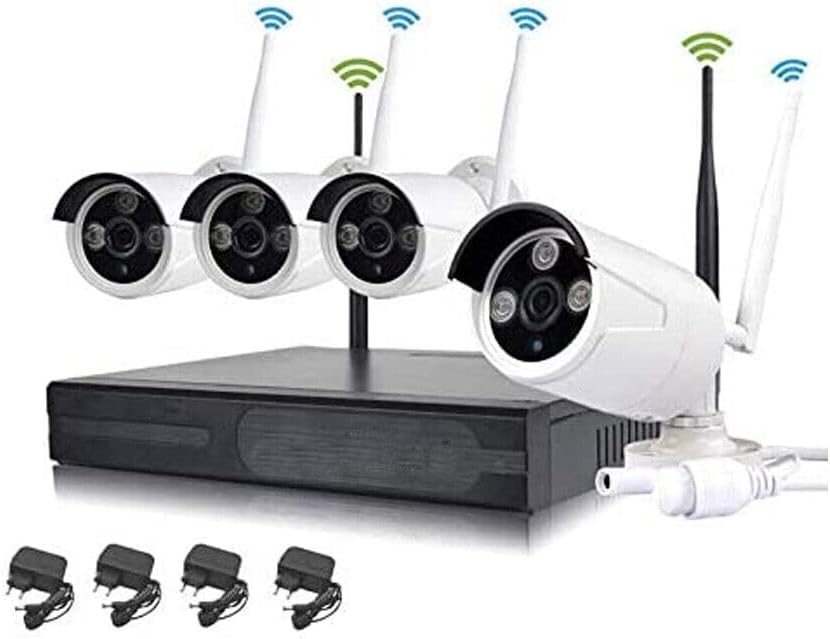
Image: Complete Jortan 4-Channel Wireless Security Camera Kit showing the NVR, four cameras, and individual power adapters.
Інструкцыя па наладзе
1. Падключэнне відэарэгістратара
- Падключыце NVR:
- Падключыце ўключаную USB-мыш да USB-порта на відэарэгістратары.
- Connect the NVR to a monitor or TV using an HDMI or VGA cable (not included).
- Connect the NVR to your router using an Ethernet cable for internet access (required for remote viewing). The NVR also features 3 LAN ports which can be used as a network switch.
- Connect the NVR power adapter to the DC12V port and plug it into a power outlet.
- Пачатковая загрузка: The NVR will power on automatically. Follow the on-screen prompts for initial setup, including language selection and password creation.
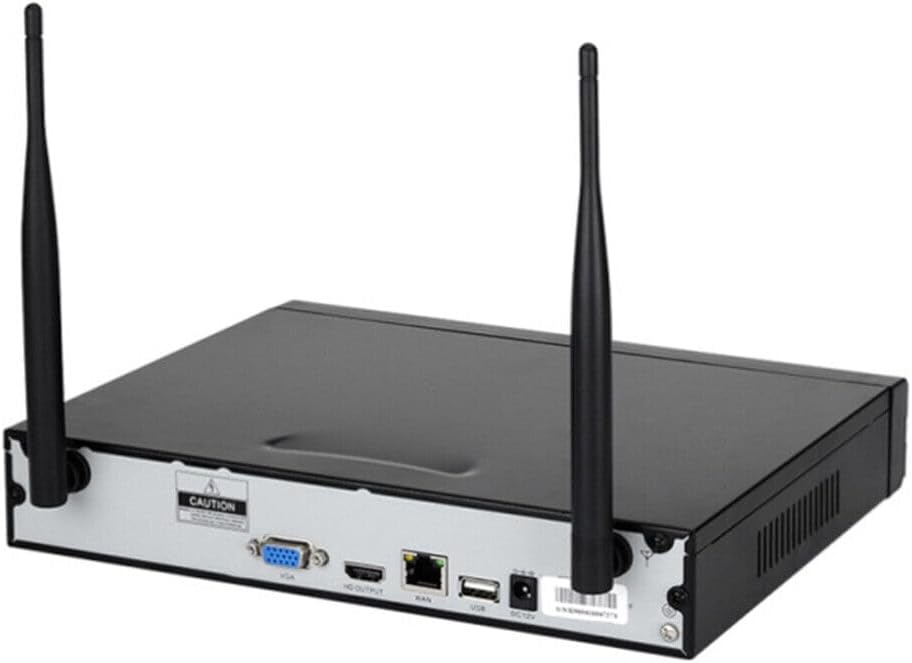
Image: Rear panel of the NVR showing ports for VGA, HDMI, LAN, USB, and DC12V power input.
2. Camera Installation and Power
- Мантаж камер: Choose suitable locations for your cameras, ensuring they have a clear line of sight to the areas you wish to monitor. The cameras are designed for both indoor and outdoor use.
- Power Cameras: Connect each camera to its individual power adapter and plug the adapters into power outlets.
- Automatic Pairing (Plug and Play): Once powered, the cameras will automatically connect to the NVR's integrated wireless system. The NVR screen should display the camera feeds within a few moments. No manual pairing is typically required.

Выява: Крупны план view of three Jortan wireless security cameras, highlighting their design and antennas.
Далёкасць бесправаднога сігналу: The NVR's integrated Wi-Fi, equipped with two antennas, offers a wireless range of approximately 100 meters (328 feet) in open fields and about 60 meters (197 feet) indoors, even through thick walls.
Інструкцыя па эксплуатацыі
1. Мясцовы Viewвання і кантролю
- жыць View: Once cameras are connected, the NVR will display live feeds on the connected monitor.
- Навігацыя па меню: Use the USB mouse or remote control to navigate the NVR's on-screen menu. Right-click to access the main menu for settings, playback, and system information.
- Запіс: The NVR supports continuous recording, scheduled recording, and motion-triggered recording. Configure these options in the system settings. An internal hard drive (not included) is required for recording storage.
- Прайграванне: Доступ да запісанага footage through the playback menu. You can search by date, time, and event.
2. Дыстанцыйнае Viewing (P2P)
The Jortan system features P2P (Peer-to-Peer) technology for easy remote access via a smartphone application. This eliminates the need for static IP addresses or port forwarding on your router.
- Спампаваць прыкладанне: Пошук the official Jortan security camera app on your smartphone's app store (e.g., App Store for iOS, Google Play Store for Android).
- Зарэгістраваць уліковы запіс: Open the app and follow the instructions to create a new user account.
- Дадаць прыладу: On the NVR's monitor, during initial setup or in the system information menu, locate the QR code. In the smartphone app, select "Add Device" or "Scan QR Code" and scan the QR code displayed on the NVR screen.
- View Жывая стужка: Once the device is added, you can view live camera feeds, access recorded footage, and manage system settings remotely from your smartphone.
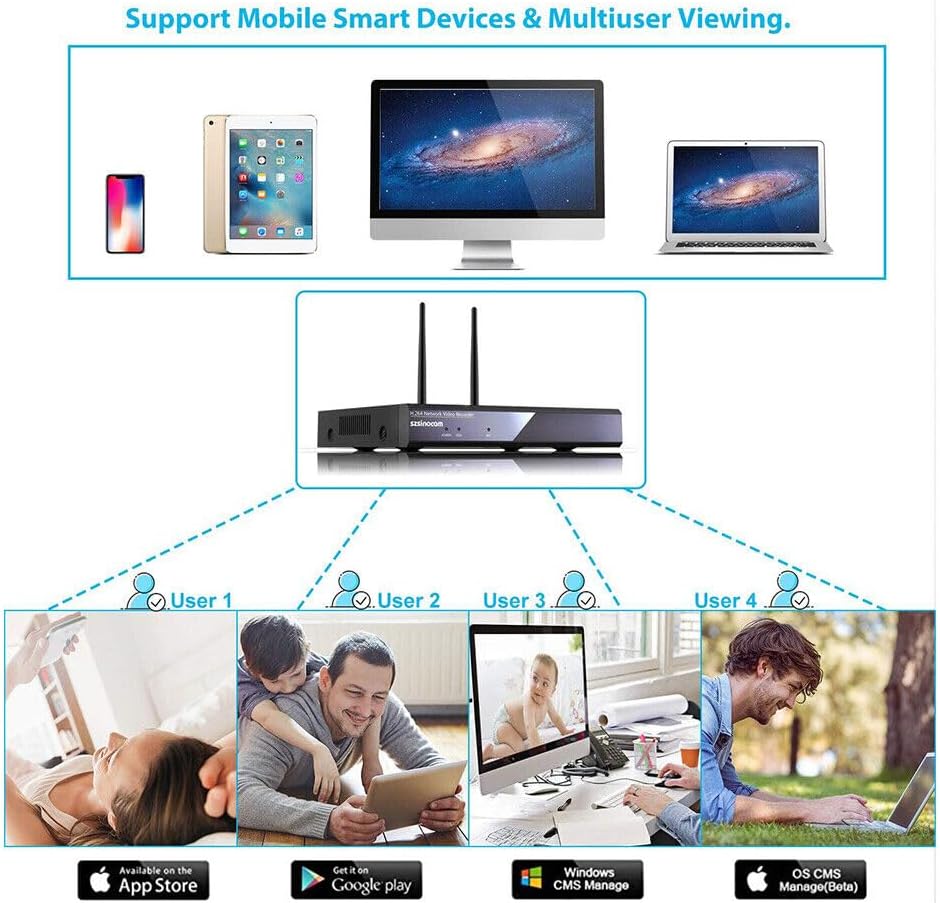
Image: Diagram illustrating how multiple users can view camera feeds on smartphones, tablets, and computers via the mobile application.
Тэхнічнае абслугоўванне
- Рэгулярная ўборка: Periodically clean the camera lenses with a soft, dry cloth to ensure clear image quality.
- Абнаўленні прашыўкі: Праверце вытворцы website or the NVR's system settings for available firmware updates. Keeping your system updated ensures optimal performance and security.
- Кіраванне жорсткім дыскам: If using a hard drive for recording, ensure it has sufficient space. Configure the NVR to overwrite old footage or set up scheduled backups as needed.
- Праверка крыніцы харчавання: Ensure all power adapters are securely connected and free from damage.
Ліквідацыю непаладак
- No image on monitor/TV:
- Пераканайцеся, што відэарэгістратар уключаны, а адаптар сілкавання надзейна падключаны.
- Праверце падключэнне кабеля HDMI/VGA паміж відэарэгістратарам і маніторам.
- Пераканайцеся, што крыніца ўваходнага сігналу манітора выбрана правільна (HDMI/VGA).
- Cameras not displaying on NVR:
- Ensure all cameras are powered on and their power adapters are securely connected.
- Check if cameras are within the wireless range of the NVR. Relocate if necessary.
- Перазапусціце відэарэгістратар і камеры.
- If issues persist, check the NVR's camera management settings to see if cameras are detected but not displaying.
- Дыстанцыйнае viewing not working:
- Ensure the NVR is connected to the internet via an Ethernet cable.
- Праверце, ці мае ваш смартфон актыўнае падключэнне да Інтэрнэту.
- Confirm the QR code was scanned correctly and the device was added to the app.
- Check the NVR's network settings to ensure P2P is enabled.
- Poor wireless signal/intermittent connection:
- Reduce the distance between cameras and the NVR.
- Minimize obstacles (thick walls, metal objects) between cameras and the NVR.
- Ensure NVR antennas are properly oriented.
Тэхнічныя характарыстыкі прадукту
| Вытворца | Jortan |
|---|---|
| Нумар мадэлі | Jortan |
| Памеры прадукту (Д х Ш х У) | 15 х 15 х 10 см (5.9 х 5.9 х 3.9 цалі) |
| Колер | Белы |
| стыль | Сучасны |
| Форма | Circular (Cameras) |
| Тып харчавання | Правадная электрычная |
| Асаблівасці | Integrated Wireless System, P2P Remote Vision |
| Уключаныя кампаненты | NVR, Cables |
| Тэхналогія падлучэння | Бесправадная сувязь |
| Дазвол запісу відэа | 720p |
| Колькасць каналаў | 4 |
| Сумяшчальныя прылады | Смартфоны |
Гарантыя і падтрымка
Specific warranty information for this product is not available in the provided details. Please refer to the retailer's return policy or contact the seller directly for warranty claims and technical support.
For further assistance, please consult the official Jortan webсайт або звярніцеся ў службу падтрымкі кліентаў, калі такая маецца.