
1. Уводзіны
Дзякуй за пакупкуasing the RCA 50-inch UHD 4K LCD TV. This manual provides essential information for setting up, operating, and maintaining your television. Please read this manual thoroughly before using the product to ensure safe and optimal performance. Keep this manual for future reference.
2. Важная інфармацыя па бяспецы
Заўсёды выконвайце гэтыя асноўныя меры бяспекі пры выкарыстанні тэлевізара:
- Не падвяргайце тэлевізар уздзеянню дажджу або вільгаці, каб пазбегнуць пажару або паражэння электрычным токам.
- Не блакуйце вентыляцыйныя адтуліны. Забяспечце дастатковую прастору вакол тэлевізара для належнай цыркуляцыі паветра.
- Пастаўце тэлевізар на ўстойлівую, роўную паверхню, каб ён не ўпаў.
- Use only the power cord supplied with the TV. Do not overload power outlets.
- Адключайце тэлевізар ад сеткі падчас навальніцы або калі ён не выкарыстоўваецца працяглы час.
- Не адкрывайце корпус тэлевізара. Па ўсіх пытаннях абслугоўвання звяртайцеся да кваліфікаванага персаналу.
- Трымайце дробныя дэталі і батарэйкі ў месцах, недаступных для дзяцей.
3. Змесціва ўпакоўкі
Carefully unpack your television and check that all items are included. If any items are missing or damaged, please contact your retailer.

Малюнак 3.1: Камплектуючыя прыналежнасці
- RCA 50-inch UHD 4K LCD TV
- Пульт дыстанцыйнага кіравання (патрабуюцца 2 батарэйкі тыпу ААА, у камплекце)
- Сілавы кабель
- TV Stand Bases (x2)
- Screws for Stand Installation (x4)
- Anti-tip Screw (x1) and Clips (x3)
- Інструкцыя па эксплуатацыі (японская)
4. Настройка
4.1. Physical Setup (Stand / Wall Mount)
You can install your TV on the included stand or mount it on a wall using a VESA-compatible bracket (sold separately).

Figure 4.1: TV Dimensions and Stand Installation
Ўстаноўка падстаўкі:
- Пакладзеце тэлевізар экранам уніз на мяккую, роўную паверхню, каб пазбегнуць пашкоджанняў.
- Сумясціце асновы падстаўкі з адтулінамі для шруб у ніжняй частцы тэлевізара.
- Замацуйце асновы падстаўкі з дапамогай прадугледжаных шруб.
Насценны мантаж:
This TV supports VESA mount standard 400x300mm. Use a compatible wall mount bracket and follow the instructions provided with the bracket. Ensure the wall can support the TV's weight (approximately 9 kg).

Figure 4.2: Wall Mounting Options
4.2. Падключэнне знешніх прылад
Connect your external devices to the appropriate ports on the TV's rear and side panels.

Малюнак 4.3: Парты падключэння тэлевізара

Figure 4.4: Rear Panel and Connection Terminals
| Тып порта | Апісанне |
|---|---|
| HDMI (x3) | Connect to Blu-ray players, game consoles, set-top boxes, etc. HDMI 2 supports ARC. |
| USB (x2) | Connect external USB HDD for recording (FAT32 format compatible). |
| AV-ўваход | Падключыце старыя прылады з дапамогай кампазітных відэа- і стэрэаўдыёкабеляў. |
| Аптычны лічбавы аўдыёвыхад | Падключыце да саўндбару або хатняга кінатэатра для лічбавага аўдыё. |
| лакальная сетка | For service or firmware updates. This TV does not support internet streaming services. |
| mini B-CAS Slot | Insert your mini B-CAS card for digital broadcast reception. |
| BS/CS Antenna Input | Connect to a BS/CS satellite antenna. |
| Terrestrial Digital Antenna Input | Connect to a terrestrial digital antenna. |
| 3.5 мм аўдыё ўваход | Connect external audio sources. |
4.3. Initial Power On and Channel Setup
- Пасля падключэння ўсіх неабходных кабеляў устаўце шнур харчавання ў электрычную разетку.
- Націсніце кнопку харчавання на пульце дыстанцыйнага кіравання або на тэлевізары.
- Follow the on-screen instructions to perform initial setup, including language selection and channel scanning.
5. Інструкцыя па эксплуатацыі
5.1. Функцыі дыстанцыйнага кіравання
The remote control allows you to access all TV functions. Insert two AAA batteries (included) into the remote control before use.

Figure 5.1: Remote Control Layout and Key Functions
- Магутнасць: Уключае або выключае тэлевізар.
- Лічбавыя кнопкі (0-12): Непасрэдны выбар каналаў.
- Увод: Select input source (HDMI, AV, etc.).
- Гучнасць (+/-): Адрэгулюйце ўзровень гучнасці.
- Канал (уверх/уніз): Паслядоўна пераключайце каналы.
- Directional Buttons (Up/Down/Left/Right) & OK: Навігацыя па меню і пацвярджэнне выбару.
- Меню: Access the main settings menu.
- EPG (электронны тэлегід): Адлюстраванне кіраўніцтва па праграмах.
- запіс: Start recording the current program.
- Элементы кіравання прайграваннем: Play, Pause, Stop, Fast Forward, Rewind for recorded content.
5.2. Background Program Recording
Your RCA TV is equipped with dual tuners, allowing you to record one digital broadcast program while watching another. An external USB Hard Disk Drive (HDD) is required for recording (FAT32 format compatible, up to 6TB).

Figure 5.2: Dual Tuner Recording Function

Figure 5.3: External HDD Recording
Крокі запісу:
- Connect a FAT32-formatted external USB HDD to one of the TV's USB ports.
- Access the program guide (EPG) to select a program for recording.
- Use the remote control to set a recording timer or initiate instant recording.
- The TV supports series recording and automatically adjusts for broadcast time changes or extended final episodes.
5.3. Налады выявы і гуку
Аптымізуйце свой viewпалепшыць якасць відэа, змяніўшы параметры выявы і гуку.
Якасць малюнка:
This TV features a high-performance image processing engine that reproduces fine details and natural colors. It supports UHD 4K resolution and HDR content for enhanced contrast and vibrant colors.
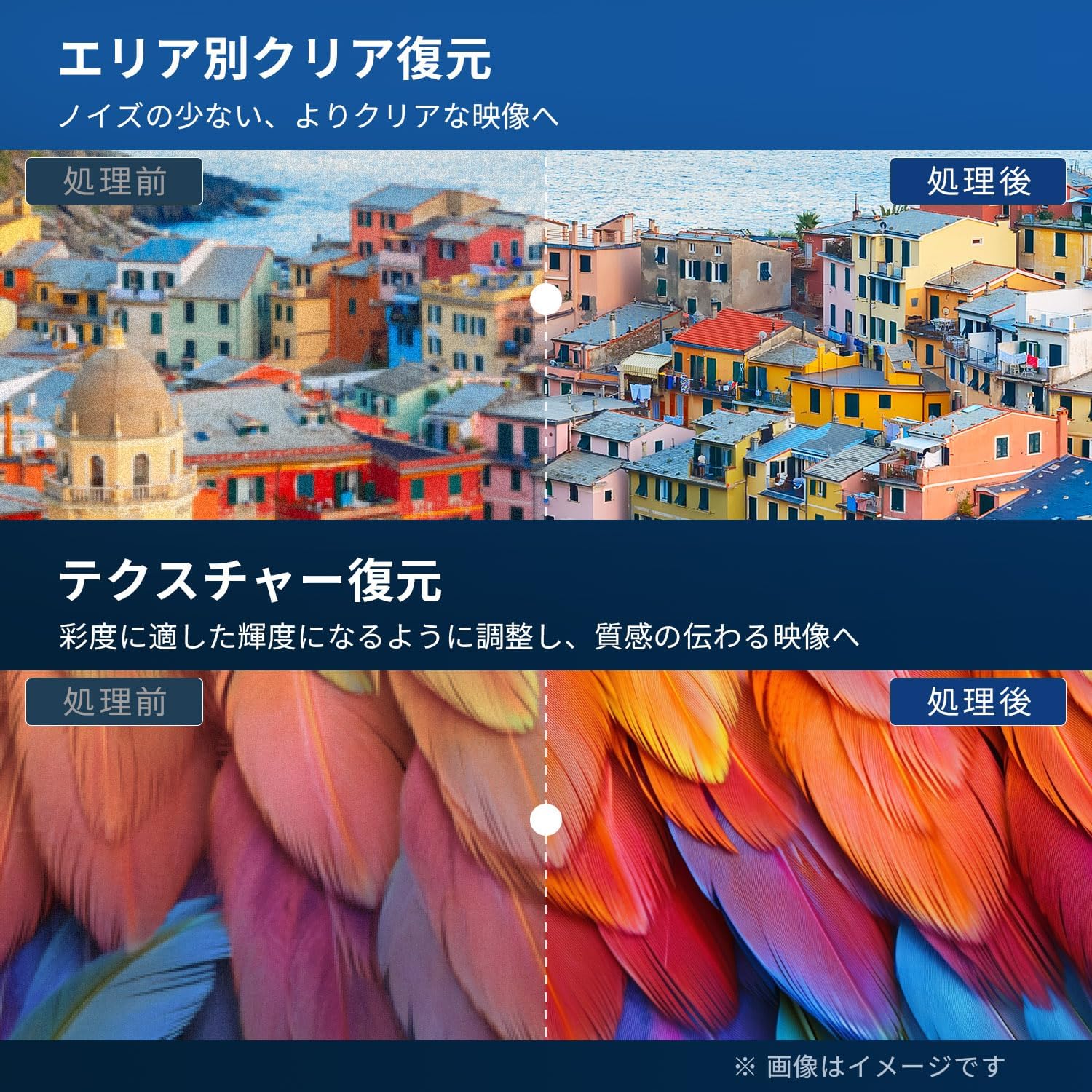
Figure 5.4: Image Processing for Clarity and Texture

Figure 5.5: High-Performance Multi-Speed Processing for Motion Clarity
Рэжым гульні:
Activate Game Mode to reduce input lag and image processing delay, providing a smoother and more responsive gaming experience, especially for fast-paced games like FPS and fighting games.
Dolby Audio:
Experience immersive, high-quality sound with built-in Dolby Audio technology. Adjust sound modes in the audio settings menu to suit your preferences.

Figure 5.6: Dolby Audio for Immersive Sound
6. Тэхнічнае абслугоўванне
Правільнае абслугоўванне забяспечвае даўгавечнасць і прадукцыйнасць вашага тэлевізара.
- Ачыстка экрана: Gently wipe the screen with a soft, lint-free cloth. For stubborn marks, use a screen cleaner specifically designed for LCD/LED displays. Do not spray cleaner directly onto the screen.
- Уборка шафы: Выкарыстоўвайце мяккую сухую тканіну для працірання корпуса тэлевізара. Не выкарыстоўвайце абразіўныя ачышчальнікі, воск або растваральнікі.
- Вентыляцыя: Пераканайцеся, што вентыляцыйныя адтуліны на задняй панэлі тэлевізара не заблакаваныя.
- Шнур харчавання: Рэгулярна правярайце шнур харчавання на наяўнасць пашкоджанняў. У выпадку пашкоджання звярніцеся ў службу падтрымкі кліентаў для замены.
7. Выпраўленне непаладак
Перш чым звяртацца ў службу падтрымкі кліентаў, паспрабуйце наступныя рашэнні для распаўсюджаных праблем:
| праблема | Магчымае рашэнне |
|---|---|
| Няма ўлады | Check if the power cord is securely plugged into the TV and the outlet. Press the power button on the remote or TV. |
| Няма выявы, але гук ёсць | Праверце крыніцу ўваходнага сігналу. Пераканайцеся, што знешнія прылады ўключаны і падключаны правільна. |
| Няма гуку, але выява ёсць | Check the volume level. Ensure Mute is not activated. Check audio cables for external devices. |
| Пульт дыстанцыйнага кіравання не працуе | Замяніце батарэйкі. Пераканайцеся, што паміж пультам дыстанцыйнага кіравання і ІЧ-датчыкам тэлевізара няма перашкод. |
| Дрэнная якасць выявы / скажоная выява | Check antenna connection. Adjust picture settings in the menu. Try a different input source. |
| Немагчыма запісваць праграмы | Ensure an external USB HDD is connected and formatted to FAT32. Check available storage space. Verify tuner reception. |
| TV freezes or becomes unresponsive | Unplug the TV from the power outlet, wait for 1 minute, then plug it back in and power on. |
8. Тэхнічныя характарыстыкі
| Асаблівасць | Дэталь |
|---|---|
| Нумар мадэлі | RCA-NS-50Q1 |
| Памер экрана | 50 цаляў |
| Тэхналогія адлюстравання | Святлодыёдны модуль |
| дазвол | 4K UHD (3840 x 2160) |
| Частата абнаўлення | 60 Гц |
| Суадносіны бакоў | 16:9 |
| Viewing кут | 178 градусаў |
| Час водгуку | 2 мс |
| Каэфіцыент кантраснасці | 200:1 |
| Максімальная яркасць | 220 кд/м² |
| Падтрымка HDR | HDR |
| Цюнеры | Dual Terrestrial/BS/110-degree CS Digital Tuners (ISDB-T) |
| Запіс | External USB HDD Recording (FAT32 compatible, up to 6TB) |
| Аўдыё | Dolby Audio, Built-in Speakers (Max Output: 10W) |
| Сувязь | HDMI (x3), USB (x2), AV Input, Optical Digital Audio Out, LAN, 3.5mm Audio Input |
| Стандарт мацавання VESA | 400 х 300 мм |
| Электразабеспячэнне | Пераменны ток 100-240 В, 50/60 Гц |
| Энергаспажыванне | 120 Вт |
| Памеры (з падстаўкай) | 111.8 см (Ш) х 69.6 см (В) х 21.5 см (Г) |
| Вага (з падстаўкай) | Прыбл. 9 кг |
| Функцыі Smart TV | None. This TV does not support internet connection or streaming services. |
9. Гарантыя і падтрымка
9.1. Гарантыя на прадукт
This RCA television comes with a Трохгадовая гарантыя from the date of purchase, covering manufacturing defects. Please retain your proof of purchase for warranty claims. Note that some specific components may have a 12-month quality guarantee.

Малюнак 9.1: Інфармацыя аб гарантыі
9.2. Падтрымка кліентаў
For any inquiries, technical assistance, or warranty claims, please contact our customer support team. Our offices are located in Tokyo, and our customer service team provides nationwide support.

Figure 9.2: RCA Customer Support Network
Спосабы сувязі:
- LINE Support: Scan the QR code below to add our after-sales service account on LINE for quick assistance.
- Падтрымка па электроннай пошце: Send your inquiries to our dedicated email address. We aim to respond within 24 hours.

Scan for LINE Support: https://lin.ee/AOq4pQs

электронная пошта: tutu@tutuelec.com