
1. Уводзіны
The KINGBOLEN BM520 is a versatile 6V/12V/24V car battery tester designed to provide comprehensive health reports for various battery types. This device accurately assesses battery status, cranking performance, and charging system efficiency, making it an essential tool for both professional mechanics and DIY enthusiasts. Its user-friendly interface and robust features ensure reliable diagnostics for a wide range of vehicles.
2. Асаблівасці прадукту
- Comprehensive Battery Testing: Provides detailed health reports for 6V, 12V, and 24V automotive batteries, including regular flooded, AGM flat plate, AGM spiral, GEL, and EFB batteries. Supports 100-2000 CCA and 2AH-200AH capacities.
- Multiple Test Functions: Includes Battery Test, Cranking Test, Charging Test, and Load Test to evaluate overall battery health and system performance.
- Абарона ад зваротнай палярнасці: Features a reversible access design, allowing connection to positive or negative terminals without affecting test results or damaging the device.
- Advanced Diagnostic Features: Built-in multimeter for voltage and resistance testing, and a waveform test to monitor charging/discharging stability.
- Кіраванне дадзенымі: Supports waveform detection, recording, and playback (up to 5 memory records), along with a screenshot function (up to 10 images) for data analysis.
- Зручны дысплей: Equipped with a 2.8-inch HD color screen for clear and concise display of test reports and battery status.
- Пажыццёвыя бясплатныя абнаўленні: Software updates are provided free of charge for the lifetime of the product, compatible with Windows, Mac, Linux, and Android operating systems.

Выява: Зверхуview of the KINGBOLEN BM520's multi-functional analyzer menu, showing options like Status of Charge, Cranking Test, Charging Test, Loading Test, Ripple Test, Theme Select, Multimeter, Screen Capture, and Data Storage.
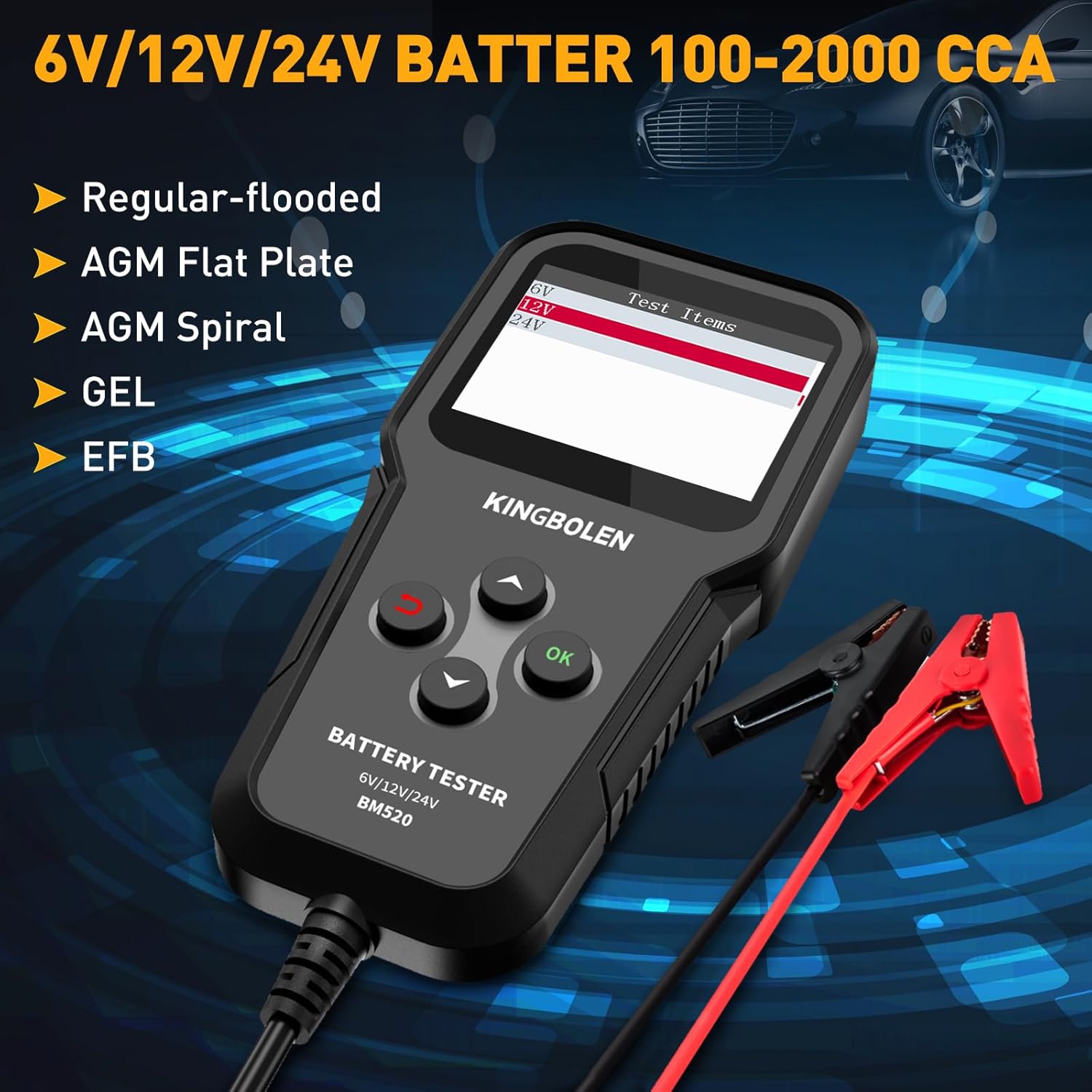
Image: The KINGBOLEN BM520 displaying supported battery types: Regular-flooded, AGM Flat Plate, AGM Spiral, GEL, and EFB, for 6V/12V/24V batteries with 100-2000 CCA.
3. Настройка
Before using the KINGBOLEN BM520, ensure your vehicle's engine is turned off. Connect the tester's clampда клем акумулятара. Чырвоны індыкатарamp падключаецца да станоўчага (+) вываду, а чорны клеммаamp connects to the negative (-) terminal. The device will power on automatically once connected.

Image: The KINGBOLEN BM520 connected to a car battery, demonstrating its automatic identification of positive and negative terminals, preventing damage from incorrect connections.
4. Інструкцыя па эксплуатацыі
4.1. Тэст батарэі
- Connect the BM520 to the vehicle battery.
- From the main menu, select "Battery Test".
- Choose the appropriate battery type (e.g., Regular Flooded, AGM Flat Plate) from the options.
- Enter the battery's Cold Cranking Amps (CCA) rating as specified on the battery label. Use the up/down buttons to adjust the value and press OK to confirm.
- The tester will perform the diagnosis and display the battery's State of Health (SOH), State of Charge (SOC), Internal Resistance (R), and Voltagе (V).
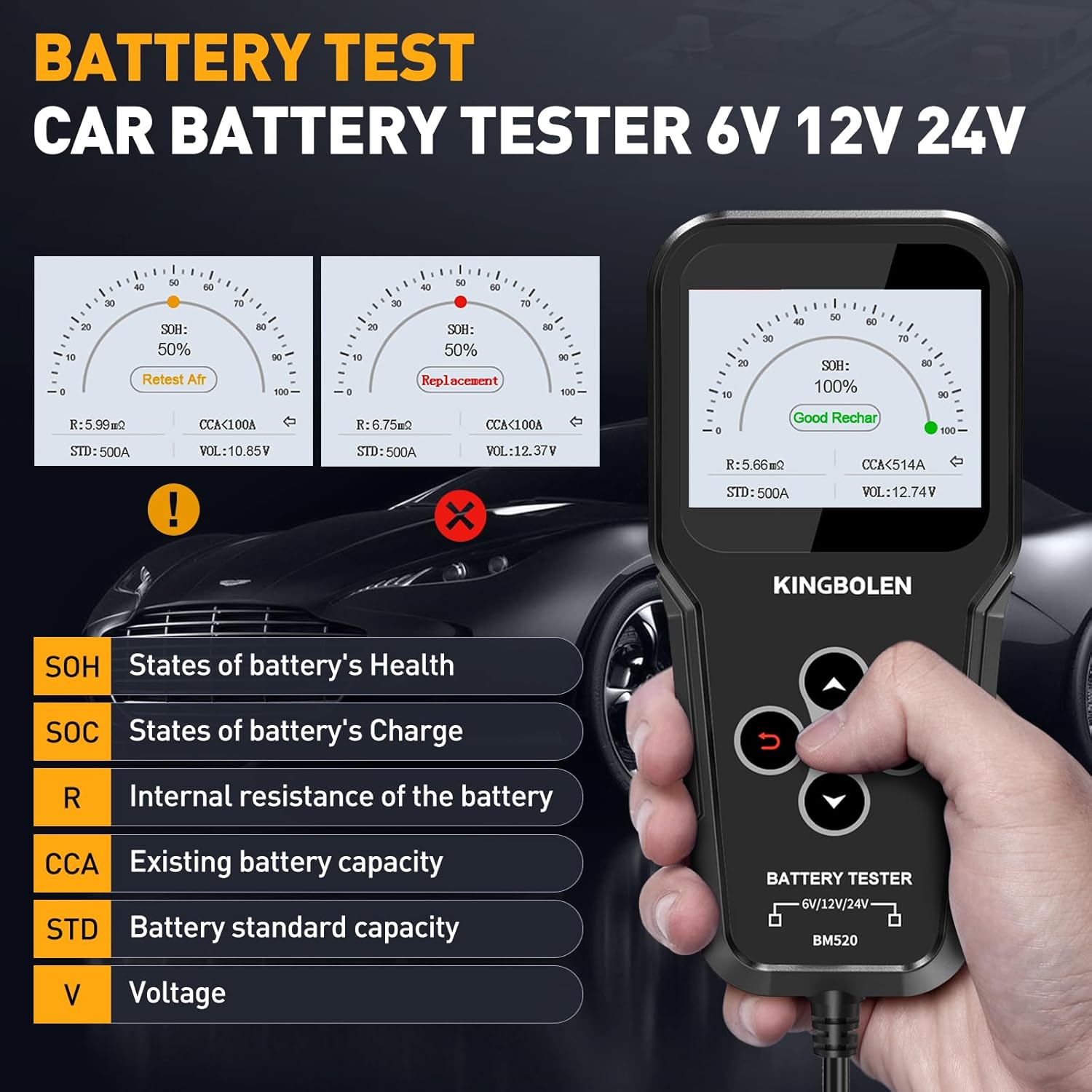
Image: The KINGBOLEN BM520 displaying battery test results, including State of Health (SOH), State of Charge (SOC), Internal Resistance (R), Existing Battery Capacity (CCA), Standard Battery Capacity (STD), and Voltagе (V).
4.2. Тэст пракручвання
The Cranking Test evaluates the vehicle's starting system.
- From the main menu, select "Cranking Test".
- Выконвайце падказкі на экране, каб запусціць рухавік.
- The tester will analyze the actual cranking voltage and time, providing a diagnosis of the starting system's condition.
4.3. Тэст зарадкі
The Charging Test assesses the performance of the vehicle's charging system, including the alternator.
- From the main menu, select "Charging Test".
- Follow the instructions on the screen to increase the engine speed to 2500 RPM for 5 seconds.
- The BM520 will diagnose the charging system's voltage status and ripple, indicating if it's normal or requires attention.

Image: The KINGBOLEN BM520 connected to a car, showing the display during a Charging Test (top) and a Cranking Test (bottom), indicating the steps and results for each.
4.4. Waveform Test
The Waveform Test allows real-time monitoring of battery voltagе змены.
- From the main menu, select "Waveform".
- The device will display a real-time graph of the battery's voltage, helping to identify any instability during charging or discharging.
- The BM520 supports recording and playback of up to 5 waveform data sets.

Image: The KINGBOLEN BM520 screen showing multimeter functions, a starter test chart, and a real-time voltage waveform graph, highlighting its diagnostic capabilities.
4.5. Screenshot Function
To capture important test results or waveforms, use the screenshot function.
- Press and hold the "Up" and "Down" buttons simultaneously for 5 seconds to take a screenshot.
- The device can store up to 10 screenshots.

Image: Illustration of the KINGBOLEN BM520's screenshot function, showing how to press the 'Up' and 'Down' arrows simultaneously to capture the screen. The device can store up to 10 images.
4.6. Падтрымліваюцца мовы
The KINGBOLEN BM520 supports multiple languages for user convenience. You can select your preferred language from the setup menu.
Video: This video demonstrates how to use the KINGBOLEN BM520 battery tester, including selecting battery type, adjusting CCA values, performing battery tests, cranking tests, and charging tests, and navigating language settings.
5. Тэхнічнае абслугоўванне
5.1. Абнаўленне праграмнага забеспячэння
The KINGBOLEN BM520 offers lifetime free software updates to ensure optimal performance and compatibility with new battery technologies. To update the device:
- Connect the BM520 to your computer via a USB cable.
- The device will appear as a removable disk.
- Copy and paste the downloaded update files into the removable disk.
- No driver installation or update application is required.
The device is compatible with Windows, Mac, Linux, and even Android phones.

Image: The KINGBOLEN BM520 connected to a laptop via USB, illustrating the lifetime free update process and highlighting compatibility with various operating systems like Windows, Mac, Linux, and Android.
6. Пошук і ліквідацыя няспраўнасцей і важныя заўвагі
- Рухавік выключаны: Always ensure the vehicle engine is turned off before performing any battery tests.
- Няма ўбудаванай батарэі: The BM520 does not require an internal battery; it draws power directly from the vehicle's battery.
- Loose Connection Warning: The device provides an on-screen reminder if the clamp connection is loose, ensuring accurate readings.
- Звязацца са службай падтрымкі: If you encounter any questions or issues during the testing process, please contact KINGBOLEN customer support for assistance.
7. Тэхнічныя характарыстыкі
| Спецыфікацыя | Каштоўнасць |
|---|---|
| Марка | КІНГБОЛЕН |
| мадэль | KBL520 (BM520) |
| Крыніца харчавання | Battery Powered (from vehicle) |
| стыль | Тэстар батарэі |
| Колер | Чорны |
| Мін. Аперацыйная Voltage | 4.9В |
| Верхняя мяжа тэмпературы | 65 градусы па Цэльсіі |
| Тып вымярэння | Voltmeter, Ohmmeter |
| Падтрымліваюцца стандарты | CCA, IEC, EN, DIN, CA, BCI, MCA, SAE, GB, JIS |
| Дыяпазон ёмістасці акумулятара | 100-2000 CCA / 2AH-200AH |
8. Гарантыя і падтрымка
The KINGBOLEN BM520 comes with a 2-year warranty, ensuring peace of mind with your purchase. We are committed to providing reliable products and excellent customer service.
For any technical assistance, questions regarding operation, or warranty claims, please contact KINGBOLEN customer support. Our engineers are available to help you within 24 hours.