
Уводзіны
Thank you for choosing the SQQBZZ 11.5-inch Portable DVD Player. This device is designed to provide portable entertainment with a 9.5-inch swivel HD screen, suitable for various environments including travel and home use. This manual provides essential information for the safe and efficient operation of your DVD player.
Змест пакета
Калі ласка, пераканайцеся, што ўсе пералічаныя ніжэй прадметы ўваходзяць у ваш пакет:
- 1 x 11.5-inch Portable DVD Player
- 1 х пульт дыстанцыйнага кіравання
- 1 х адаптар сілкавання (AC)
- 1 х аўтамабільная зарадная прылада
- 1 х AV-кабель 3-у-1
- 1 x User's Guide (this manual)

Малюнак 1: Камплектацыя. The image displays the portable DVD player, remote control, AC power adapter, car charger, and AV cable, which are all included in the product package.
Прадукт скончаныview
Familiarize yourself with the various ports and controls of your portable DVD player.

Figure 2: Side Panel Ports. This image highlights the USB port, SD card slot, earphone port, AV OUT, AV IN, ON/OFF switch, and DC IN power port located on the side of the DVD player.
- Порт USB: Для падключэння USB-флэш-назапашвальнікаў для прайгравання медыяфайлаў files.
- Слот для SD-карты: For inserting SD cards to play media files.
- Earphone Port (3.5mm): Для падлучэння навушнікаў для праслухоўвання ў індывідуальным рэжыме.
- AV-выхад: Audio/Video output for connecting to an external display (e.g., TV, projector).
- AV IN: Audio/Video input for connecting external devices (e.g., another DVD player).
- Пераключальнік уключэння/выключэння: Галоўны выключальнік харчавання прылады.
- DC IN: Power input port for connecting the AC adapter or car charger.
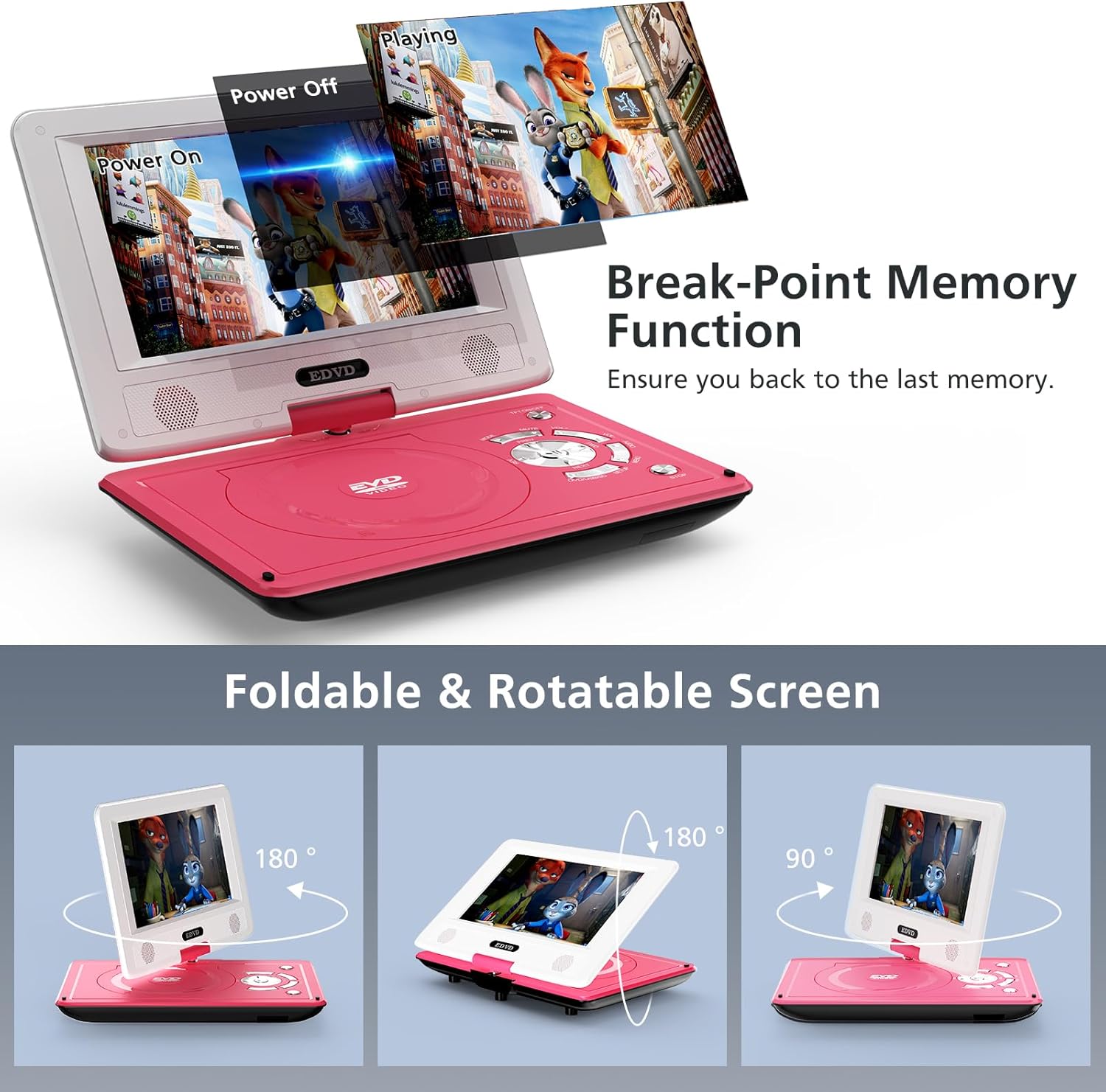
Figure 3: Foldable and Rotatable Screen. The screen can rotate 270 degrees and flip 180 degrees, allowing for various viewing angles or folding into a tablet-like form factor.
The player features a 9.5-inch HD swivel screen that can rotate 270° and flip 180°, providing flexible viewing options. It also includes a break-point memory function, allowing playback to resume from where it was last stopped.
Настройка
- Распакуйце: Акуратна дастаньце ўсе кампаненты з упакоўкі.
- Зарадзіць акумулятар: Before first use, fully charge the internal battery using the provided AC power adapter. Connect the adapter to the DC IN port and a power outlet. The charging indicator light will typically show red while charging and turn green when fully charged.
- Уключэнне: Slide the ON/OFF switch to the "ON" position. Then, press the power button on the player or remote control to turn on the device.
Інструкцыя па эксплуатацыі
Playing DVDs/CDs
- Адкрыйце латок для дыскаў: Gently press the "OPEN" button or latch to open the disc compartment.
- Уставіць дыск: Place a compatible DVD or CD onto the spindle with the label side facing up. Ensure the disc is securely seated.
- Зачыніць латок для дыскаў: Close the disc compartment until it clicks shut.
- Аўтаматычнае прайграванне: The player will automatically detect and begin playing the disc. If a menu appears, use the directional buttons on the player or remote to navigate and select your desired option.
- Падтрымліваюцца фарматы: The player supports DVD, CD, DVD±R, CD-R(RW), SVCD-R(RW), DVD±RW, VCD. Дыскі Blu-ray не падтрымліваюцца.

Figure 4: Disc Insertion and Supported Formats. The player supports various DVD and CD formats, and is region-free. The disc tray opens by pressing the 'OPEN' button.
Playing Media from USB/SD Card
- Устаўце прыладу захоўвання дадзеных: Устаўце флэш-назапашвальнік USB у порт USB або SD-карту ў слот для SD-карты.
- Выберыце крыніцу: Use the "MODE" button on the player or remote to switch to USB or SD mode.
- Праглядзіце Files: Перамяшчайцеся па сваім files using the directional buttons and select the desired media file (VOB, AVI, MPEG, MP3, WMA, JPEG).
- Пачаць прайграванне: Press the "PLAY" button to begin playback.
- Заўвага аб сумяшчальнасці: Падтрымлівае відэа толькі з дазволам 720*480 fileвыява з дазволам 2650*1440 files. Does not support 1080P, 4K, or Blu-ray content.
Sync Screen to TV / External Display
каб view кантэнт на большым экране:
- Падключэнне AV-кабеля: Use the provided 3-in-1 AV cable. Connect one end to the AV OUT ports on the portable DVD player (Yellow for Video, White for Left Audio, Red for Right Audio).
- Падключэнне да тэлевізара: Connect the other end of the AV cable to the corresponding AV IN ports on your television or projector.
- Выберыце ўваход тэлевізара: On your TV, select the correct AV input source. The content from your portable DVD player will now be displayed on the external screen.

Figure 5: Sync Screen to TV. The portable DVD player can be connected to a television using the AV cable to display content on a larger screen.
Зарадка і акумулятар
The portable DVD player is equipped with a built-in Lithium Polymer battery, offering 4-6 hours of continuous playback.
- Адаптар пераменнага току: Use the certified AC power adapter for charging at home or any standard power outlet.
- Аўтамабільная зарадная прылада: Use the high-quality car charger for convenient charging during car trips.
- Індыкатар батарэі: Monitor the battery icon on the screen to check the charge level.
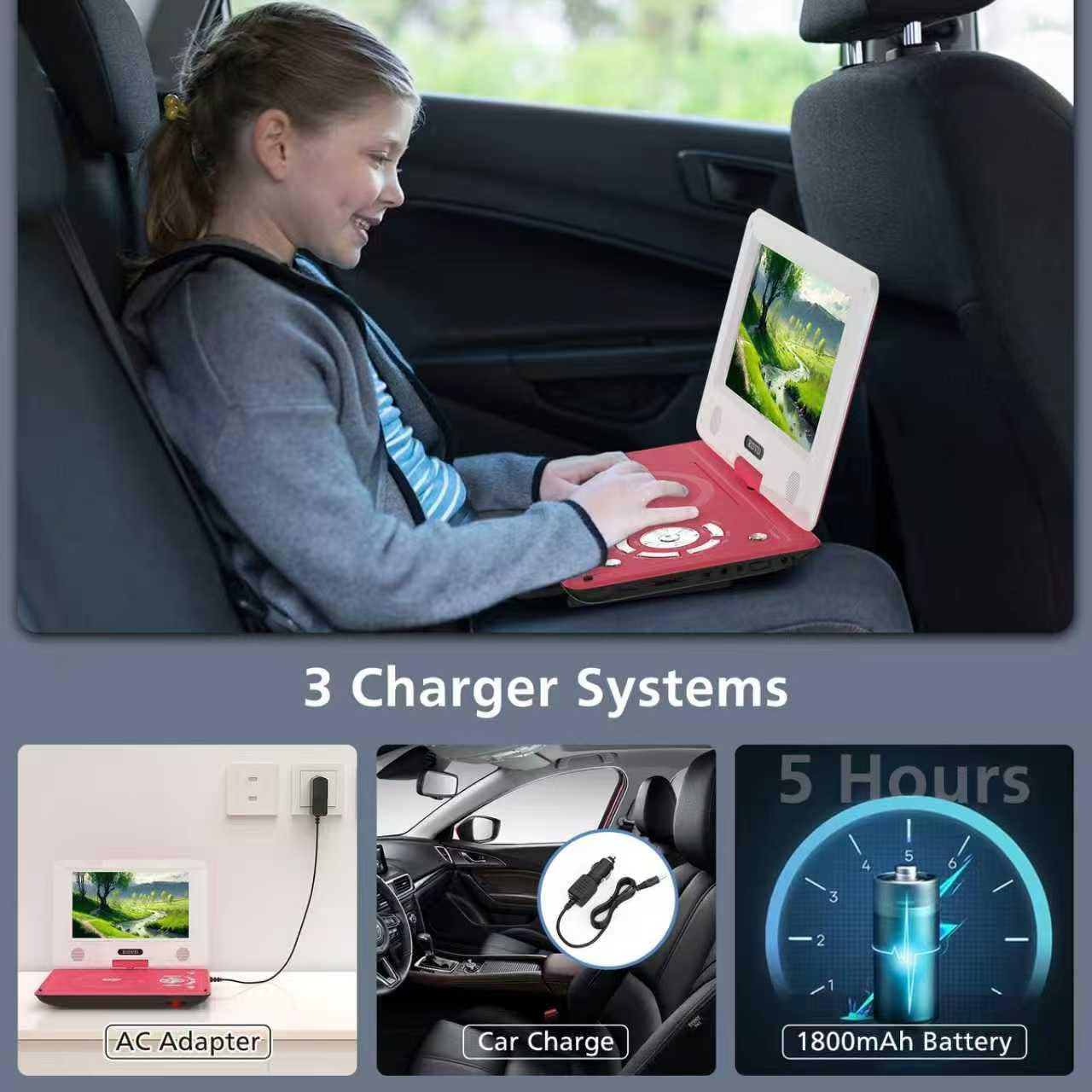
Figure 6: Multiple Charging Options. The portable DVD player can be charged via an AC adapter for home use or a car charger for on-the-go power, providing approximately 4-6 hours of battery life.
Тэхнічнае абслугоўванне
- Уборка: Выкарыстоўвайце мяккую сухую тканіну для чысткі экрана і знешняй паверхні плэера. Не выкарыстоўвайце вадкія ачышчальнікі або абразіўныя матэрыялы.
- Сыход за дыскамі: Handle discs by their edges. Store them in their cases to prevent scratches. Clean dirty discs with a soft, lint-free cloth, wiping from the center outwards.
- захоўванне: Калі плэер не выкарыстоўваецца працяглы час, захоўвайце яго ў прахалодным, сухім месцы, удалечыні ад прамых сонечных прамянёў і экстрэмальных тэмператур.
- Тэрмін службы батарэі: To prolong battery life, avoid fully discharging the battery frequently. Charge it regularly, even if not in active use.
Ліквідацыю непаладак
| праблема | Магчымая прычына | Рашэнне |
|---|---|---|
| Плэер не ўключаецца. | Battery is depleted; ON/OFF switch is off. | Charge the battery. Ensure the ON/OFF switch is in the "ON" position. |
| Дыск не знойдзены. | Disc is dirty, scratched, or incompatible. | Clean the disc. Try a different, compatible disc. Ensure disc is inserted correctly. |
| No picture on TV when connected. | Incorrect AV cable connection; wrong TV input selected. | Verify AV cable connections (color-coded). Select the correct AV input on your TV. |
| Няма гуку. | Volume too low; Mute function active; faulty headphones/speakers. | Increase volume. Deactivate Mute. Test with different headphones or check built-in speakers. |
| USB/SD card not recognized. | Несумяшчальны file format; card/drive not properly inserted; corrupted files. | Забяспечыць files are supported (VOB, AVI, MPEG, MP3, WMA, JPEG). Reinsert the device. Try a different USB/SD card. |
Тэхнічныя характарыстыкі
| Памер экрана | 9.5 цалі |
| Тып дысплея | ВК |
| Падтрымліваныя тыпы носьбітаў | CD, DVD, DVD +R(-R), SVCD, VCD, CD-R(RW), DVD±RW |
| Supported Digital Media | USB, SD Card (up to 32GB) |
| Падтрымліваецца File Фарматы | VOB, AVI, MPEG, MP3, WMA, JPEG |
| Падтрымка дазволу відэа | Up to 720*480 (Does not support 1080P, 4K) |
| Image Resolution Support | Да 2650*1440 |
| Тып батарэі | 1 літый-палімерная батарэя (у камплекце) |
| Тэрмін службы батарэі | 4-6 гадзін (бесперапыннае прайграванне) |
| Вага | 2.97 фунта |
| Памеры | 15.63 х 9.29 х 3.31 цалі (упакоўка) |
Гарантыя і падтрымка
Your SQQBZZ Portable DVD Player comes with a 12-MONTH Warranty. For any questions or assistance, please contact our customer support team. We offer 24-HOUR Friendly Customer Support.
Contact information for support can typically be found on the product packaging or the official SQQBZZ webсайт.
Афіцыйнае відэа пра прадукт
Video 1: SQQBZZ 11.5-inch Portable DVD Player Overview. This video provides a visual demonstration of the portable DVD player's features, including its design, ports, and functionality, highlighting its suitability for car and kids' use.