
Amazon Fire TV Soundbar Plus
Amazon Fire TV Soundbar Plus User Manual
Model: Fire TV Soundbar Plus (ASIN: B0D1ZSC62P)
Уводзіны
The Amazon Fire TV Soundbar Plus is a 3.1 channel all-in-one soundbar designed to enhance your home audio experience. It features integrated bass, clear dialogue, and supports advanced audio formats like Dolby Atmos and DTS:X, providing immersive sound for movies, music, and more. This manual provides detailed instructions for setting up, operating, maintaining, and troubleshooting your Fire TV Soundbar Plus.

Малюнак 1: Спераду view of the Fire TV Soundbar Plus, highlighting its key audio technologies.
Настройка
Змест пакета
Перад пачаткам пераканайцеся, што ў скрынцы ёсць усе неабходныя рэчы:
- Fire TV Soundbar Plus
- Пульт дыстанцыйнага кіравання
- Кабель HDMI 2.0
- Сілавы кабель пераменнага току
- 2 батарэйкі ААА
- Набор для насценнага мацавання
- Кароткае кіраўніцтва

Figure 2: Contents included in the Fire TV Soundbar Plus package and product dimensions.
Фізічнае размяшчэнне
The soundbar measures approximately 6.4 cm (height) x 94 cm (width) x 13.2 cm (depth) and weighs 4 kg. For optimal audio performance, place the soundbar centrally in front of your television. Ensure there are no obstructions in front of the soundbar. The included wall mount kit allows for wall installation if preferred.
Падключэнне Soundbar
Follow these steps to connect your Fire TV Soundbar Plus to your television:
- HDMI (eARC/ARC) Connection: Connect one end of the included HDMI 2.0 cable to the HDMI (eARC/ARC) port on the back of the soundbar. Connect the other end to the HDMI eARC/ARC port on your television. This connection ensures optimal audio quality and allows your TV remote to control the soundbar's volume.
- Падключэнне сілкавання: Connect the AC power cable to the Power port on the soundbar and then plug it into a wall outlet.
- Optical Connection (Optional): If your TV does not have an HDMI eARC/ARC port, you can use an optical cable (not included) to connect the soundbar to your TV's optical audio output.
- Порт USB-A: The USB-A port is typically used for service or firmware updates and is not for general user connection.

Малюнак 3: Задняя частка view of the soundbar displaying available connection ports.
Першапачатковае ўключэнне
Once connected, the soundbar will typically power on automatically with your TV if using the HDMI eARC/ARC connection. If not, press the Power button on the included remote control.
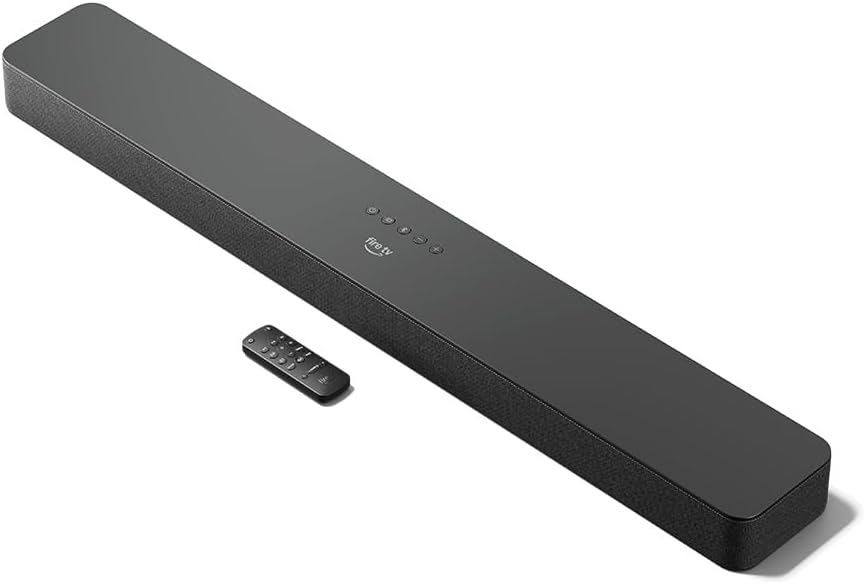
Figure 4: The Fire TV Soundbar Plus and its compact remote control.
Кіраванне Soundbar
Асноўныя элементы кіравання
Use the included remote control to manage your soundbar's functions:
- Кнопка харчавання: Уключае або выключае гукавую панэль.
- Павялічыць/паменшыць гучнасць: Рэгулюе агульны ўзровень гучнасці.
- Кнопка адключэння: Адключэнне або ўключэнне гуку.
- Выбар уводу: Switches between HDMI, Optical, and Bluetooth inputs.
- Рэжымы гуку: Cycles through optimized audio presets.
Гукавыя рэжымы
The Fire TV Soundbar Plus offers several equalizer modes to optimize audio for different content types:
- Рэжым фільма: Enhances cinematic soundscapes with dynamic range and surround effects.
- Рэжым музыкі: Provides balanced audio for music playback, emphasizing clarity and bass.
- Спартыўны рэжым: Optimizes audio for sports broadcasts, often enhancing commentary and crowd noise.
- Начны рэжым: Reduces dynamic range to prevent sudden loud sounds, ideal for late-night viewінж.
The soundbar features a dedicated central channel for dialogue, ensuring clear conversations in all modes, especially beneficial for movies and TV shows.

Figure 5: Internal components illustrating the integrated speakers, tweeters, and subwoofer for rich sound.

Figure 6: The soundbar delivering immersive audio with Dolby Atmos and DTS:X in a home environment.
Паток Bluetooth
You can stream audio from your phone or tablet to the Fire TV Soundbar Plus via Bluetooth. To connect:
- Press the Bluetooth button on the remote control or select Bluetooth input.
- On your mobile device, go to Bluetooth settings and select "Fire TV Soundbar Plus" from the list of available devices.
- Пасля спалучэння гук з вашай прылады будзе прайгравацца праз саўндбар.

Figure 7: Connecting a mobile device via Bluetooth to stream music or podcasts.
Fire TV Integration
For seamless integration with Fire TV devices (sold separately), you can control both your TV and the soundbar with a single remote. Audio settings can be customized directly within the Fire TV interface on selected models.
Тэхнічнае абслугоўванне
To ensure the longevity and optimal performance of your Fire TV Soundbar Plus, follow these maintenance guidelines:
- Уборка: Выкарыстоўвайце мяккую сухую тканіну для чысткі паверхні гукавой панэлі. Не выкарыстоўвайце вадкія ачышчальнікі або абразіўныя матэрыялы, бо яны могуць пашкодзіць пакрыццё.
- Вентыляцыя: Пераканайцеся, што вентыляцыйныя адтуліны саўндбара не заблакаваныя, каб пазбегнуць перагрэву.
- Абнаўленні праграмнага забеспячэння: Periodically check for firmware updates to ensure your soundbar has the latest features and performance improvements. Updates are typically delivered automatically when connected to a Fire TV device or can be performed via USB if available.
Ліквідацыю непаладак
If you encounter issues with your Fire TV Soundbar Plus, refer to the following common problems and solutions:
| праблема | Магчымая прычына | Рашэнне |
|---|---|---|
| Няма гуку з гукавой панэлі. |
|
|
| Гук скажоны або невыразны. |
|
|
| Не працуе пульт дыстанцыйнага кіравання. |
|
|
| Праблемы са спалучэннем Bluetooth. |
|
|
Тэхнічныя характарыстыкі
| Асаблівасць | Дэталь |
|---|---|
| Soundbar Dimensions (LxWxH) | 94 см х 13.2 см х 6.4 см |
| Вага гукавой панэлі | 4 kg (Actual dimensions and weight may vary based on configuration and manufacturing process) |
| Гучныя каналы | 3.1 (integrated subwoofer) |
| Рэжымы эквалайзера | Movie, Music, Sport, Night |
| Падтрымка аб'ёмнага гуку | Dolby Atmos, DTS:X |
| Парты | HDMI (eARC/ARC), Optical, AC Power, USB-A |
| Падтрымка Bluetooth | так |
| Сумяшчальнасць | Смарт-тэлевізары і тэлевізары з прайгравальнікамі струменевага мультымедыя |
| У камплекце | Fire TV Soundbar Plus, remote control, HDMI 2.0 cable, 1 AC power cable, 2 AAA batteries, wall mount kit, Quick Start Guide |
Гарантыя і падтрымка
The Fire TV Soundbar Plus comes with a one-year limited warranty provided by the manufacturer. This limited warranty is in addition to, and does not compromise, consumer rights. Consumers may have additional rights provided by law even after the limited warranty expires. Use of the Fire TV Soundbar Plus is subject to the terms indicated by Amazon.
For further assistance, please refer to the official Amazon support channels or the Quick Start Guide included with your product.
Ask a question about this manual
Ask about setup, troubleshooting, compatibility, parts, safety, or missing instructions. Manuals+ will review the question and use this page’s manual context to help answer it.