
Yimaut IR Remote for Roku Devices and Roku TVs (B0D2CVNT1L)
Yimaut IR Remote Control User Manual
Model: IR Remote for Roku Devices and Roku TVs
Уводзіны
Thank you for choosing the Yimaut IR Remote Control. This manual provides comprehensive instructions for setting up, operating, and maintaining your new remote controls. This pack includes two infrared (IR) remote controls designed for a wide range of Roku devices and Roku-enabled televisions. Please read this manual carefully to ensure optimal performance and longevity of your remotes.

Image: A pair of Yimaut IR remote controls, showcasing their design and button layout. These remotes are designed for ease of use with Roku devices and TVs.
Кіраўніцтва па ўстаноўцы
1. Устаноўка батарэі
Each remote requires 2 х ААА батарэі (не ўваходзіць у камплект).
- Знайдзіце батарэйны адсек на задняй частцы пульта дыстанцыйнага кіравання.
- Адчыніце крышку батарэі.
- Устаўце дзве батарэйкі тыпу ААА, сочачы за правільнай палярнасцю (+ і -), як паказана ўнутры адсека.
- Надзейна зачыніце крышку батарэі.
2. Initial Pairing and Operation
The setup process varies slightly depending on whether you are using a Roku Player (Box, Express, Ultra, Premiere, Soundbar) or a Built-in Roku TV.
For All Built-in Roku TVs (TCL, Hisense, Onn, Sharp, Haier, Insignia, Sanyo, Hitachi, RCA, Philips, Element, LG, JVC, Magnavox, Westinghouse):
- No setup or programming is required. Simply insert batteries, and the remote is ready to use directly with your Built-in Roku TV.

Image: Visual representation of compatibility with various built-in Roku TV brands, emphasizing that no setup is needed for these models.
For Roku Players (Roku Box, Express, Ultra, Premiere, Soundbar):
A simple pairing process is required. Please refer to the instructions included with your remote for specific pairing steps. Generally, this involves a combination of button presses.
- Read the front and reverse side of the instruction sheet carefully for simple pairing.
- After setup, you may need to configure TV volume and power functions. See the "Troubleshooting" section for details on learning these functions from your old TV remote.
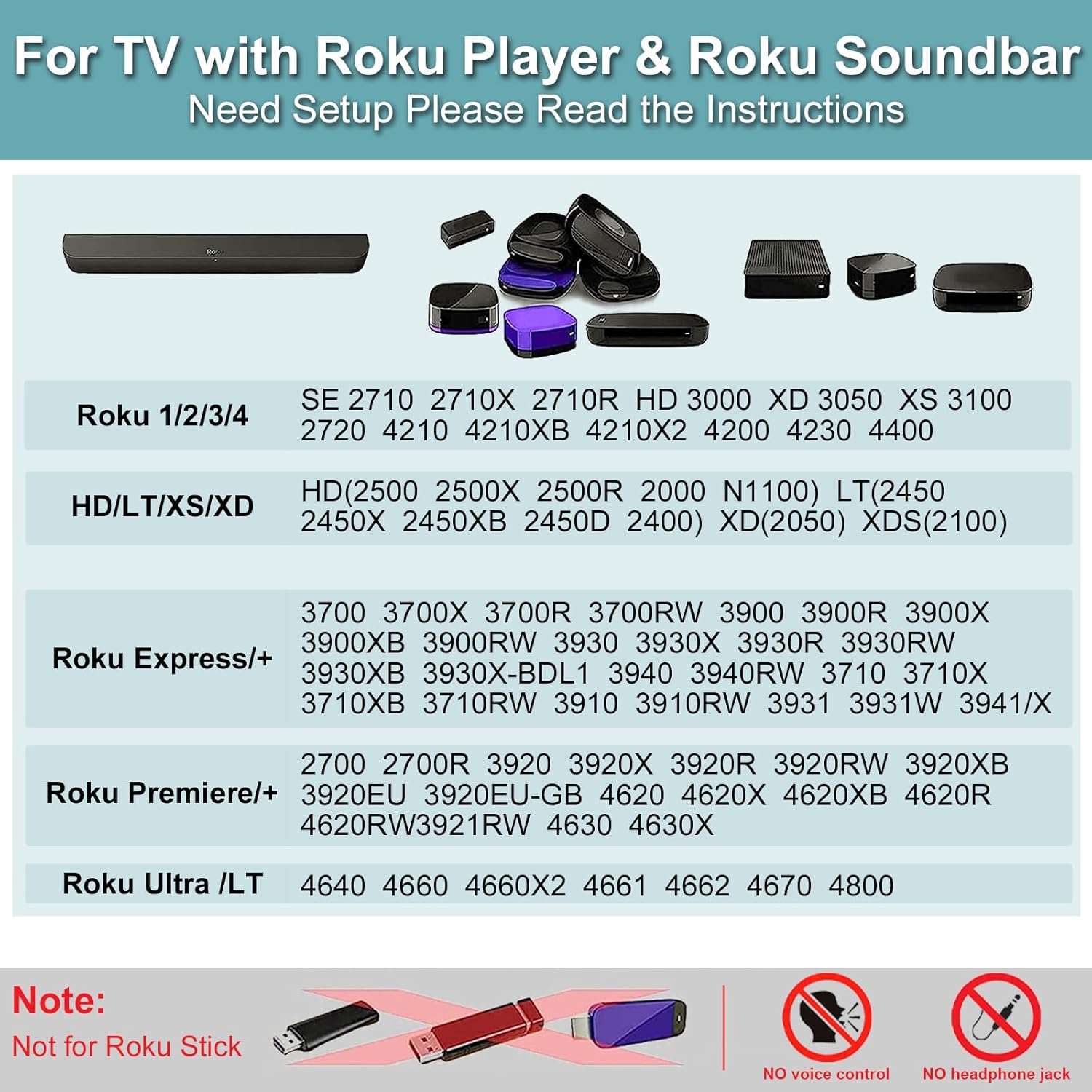
Image: A detailed chart outlining the specific Roku Player models (Roku 1/2/3/4, Express, Premiere, Ultra, Soundbar) that are compatible with this remote.
Заўвага: This is a Standard IR Remote. It does not support Wi-Fi, Bluetooth, voice control, or have a headphone jack. It is NOT compatible with Roku Stick мадэлі.
Інструкцыя па эксплуатацыі
Функцыі аддаленай кнопкі
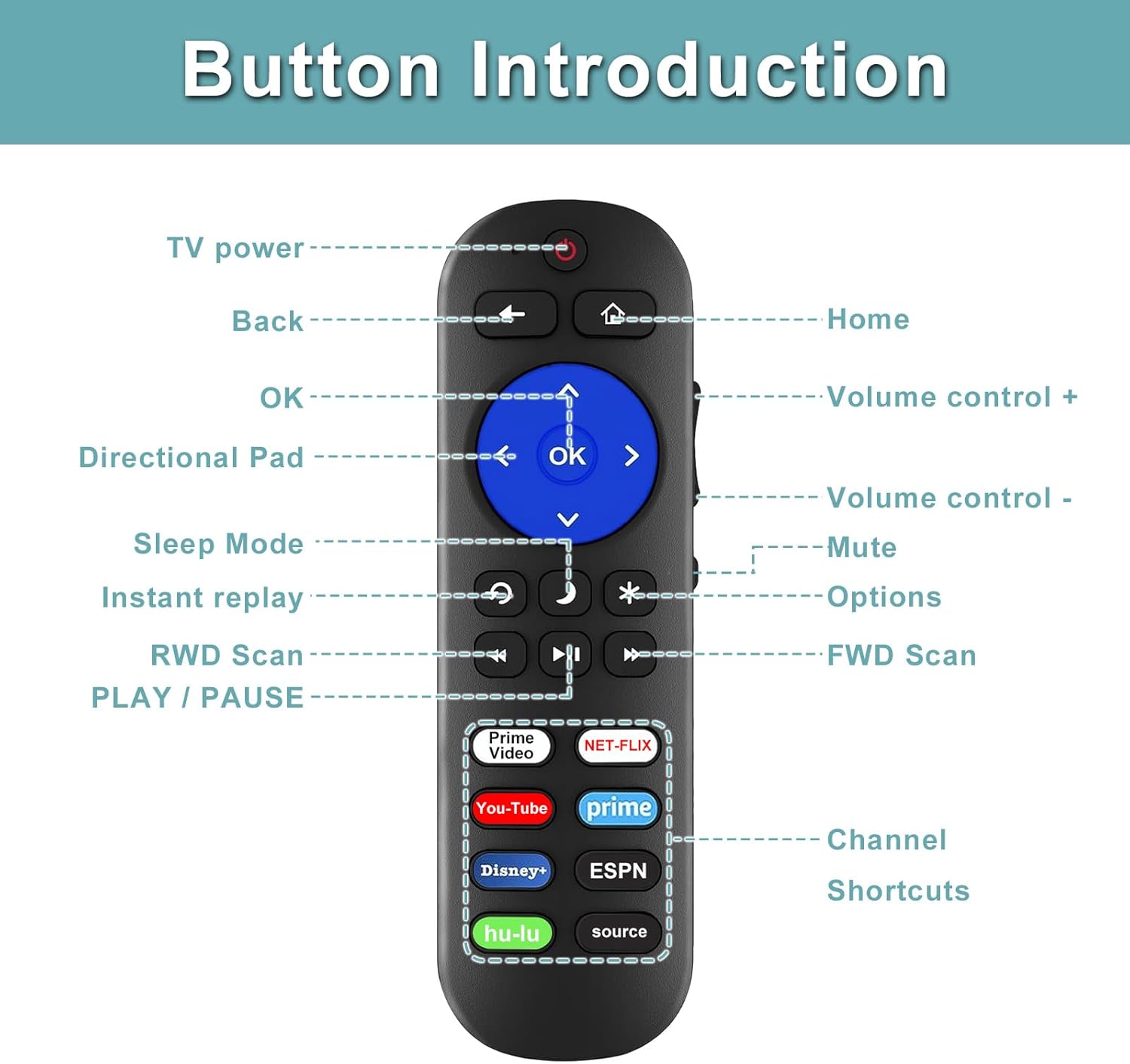
Image: A comprehensive diagram illustrating the function of each button on the Yimaut IR remote control.
| Кнопка | Функцыя |
|---|---|
| Магутнасць (⏻) | Turns the TV power on/off. |
| Назад (←) | Вяртаецца да папярэдняга экрана або меню. |
| Галоўная (⌂) | Вяртаецца на галоўны экран Roku. |
| Directional Pad (Arrows) | Навігацыя па меню і выбары. |
| OK | Пацвярджае выбар або дзеянне. |
| Гучнасць (+/-) | Рэгулюе гучнасць тэлевізара ўверх або ўніз. |
| Выключыць гук (🔇) | Адключэнне або ўключэнне гуку тэлевізара. |
| Рэжым сну (☽) | Activates sleep timer or standby mode. |
| Instant Replay (↻) | Replays the last few seconds of content. |
| Параметры (*) | Доступ да дадатковых опцый або налад. |
| Перамотка назад (⏪) | Перамотвае прайграванне медыяфайлаў назад. |
| Прайграванне/Пауза (⏸) | Прайграе або прыпыняе прайграванне мультымедыя. |
| Перамотка ўперад (⏩) | Хуткае прайграванне медыяфайлаў наперад. |
Channel Shortcut Buttons
The remote features 8 dedicated shortcut buttons for quick access to popular streaming services and input sources. These include:
- Amazon Prime Video
- NETFLIX
- YouTube
- Prime (likely another Prime Video shortcut)
- Дысней+
- ESPN+
- Hulu
- Source (for changing TV input)

Image: A visual comparison emphasizing the Yimaut remote's advantage of having 8 dedicated channel shortcut buttons for quick access to streaming services.
Тэхнічнае абслугоўванне і догляд
- Уборка: Для чысткі пульта выкарыстоўвайце мяккую сухую тканіну. Не выкарыстоўвайце вадкія ачышчальнікі або абразіўныя матэрыялы.
- Замена батарэі: Замяняйце батарэйкі, калі пульт дыстанцыйнага кіравання становіцца павольным або перастае працаваць. Заўсёды замяняйце абедзве батарэйкі адначасова на новыя.
- захоўванне: Захоўвайце пульт у прахалодным, сухім месцы, удалечыні ад прамых сонечных прамянёў і экстрэмальных тэмператур.
- Трываласць: The buttons are tested to support over 165,000 clicks, ensuring long-term durability.
- Бяспека матэрыялаў: The remote is made from 100% safe ABS material, which is harmless.

Image: Illustrates the safety of the remote's materials, highlighting its construction from 100% safe ABS material.
Ліквідацыю непаладак
Агульныя праблемы і рашэнні
- Пульт не адказвае:
- Пераканайцеся, што батарэйкі ўстаўлены правільна з захаваннем палярнасці.
- Замяніце старыя батарэйкі новымі батарэйкамі тыпу ААА.
- Ensure there are no obstructions between the remote and the Roku device/TV's IR receiver.
- Confirm you are within the effective operating range (up to 32 ft/10m).
- Volume or Power buttons not working (for Roku Players):
- After initial setup for Roku Players, you may need to program the remote to control your TV's volume and power.
- This typically involves a learning function where the Yimaut remote learns from your original TV remote. Refer to the specific instructions included with your remote for the learning procedure.
- If you encounter difficulties, please contact customer support for a PDF manual on this process.
- Remote not working with Roku Stick:
- This remote is an IR (Infrared) remote and is not compatible with Roku Stick models, which typically use Wi-Fi Direct or Bluetooth remotes.
- Delayed response:
- The remote has a quick response time of 0.2 seconds. If you experience delays, check battery levels and ensure a clear line of sight to the IR receiver.
Тэхнічныя характарыстыкі
- Тып прадукту: Інфрачырвоны (ВК) пульт дыстанцыйнага кіравання
- Сумяшчальнасць:
- Roku Players: Roku Box, Roku 1 2 3 4 HD LT XS XD, Roku Express/+, Roku Premiere/+, Roku Ultra LT, Roku Ultra, Roku Soundbar.
- Built-in Roku TVs: TCL, Hisense, Onn, Sharp, Haier, Insignia, Sanyo, Hitachi, RCA, Philips, Element, LG, JVC, Magnavox, Westinghouse.
- Not compatible with Roku Stick models.
- Крыніца харчавання: 2 х ААА батарэі (не ўключаны)
- Працоўная адлегласць: Да 32 футаў (10 м)
- Час водгуку: 0.2 секунд
- Button Lifespan: Больш за 5 000 000 клікаў
- матэрыял: 100% Safe ABS
- колер: Чорны
- Памеры ўпакоўкі: 6.81 х 4.17 х 1.06 цалі
- Вага прадмета: 3.84 унцыі

Image: Demonstrates the upgraded transport features of the remote, including its extended range of 32 feet and rapid 0.2-second response time.
Гарантыя і падтрымка
For any questions, troubleshooting assistance, or to request a PDF version of the manual for specific programming instructions (e.g., for TV volume/power learning), please contact Yimaut customer support through the Amazon platform. We are committed to providing excellent service and support for our products.
While specific warranty details are not provided in this manual, please refer to your purchase documentation or contact the seller directly for information regarding product warranty and returns.
Ask a question about this manual
Ask about setup, troubleshooting, compatibility, parts, safety, or missing instructions. Manuals+ will review the question and use this page’s manual context to help answer it.