
1. Уводзіны
This manual provides detailed instructions for the installation, operation, and maintenance of your Dosilkc UltraHD 4K POE Outdoor Bullet Security Camera (Model DS-T461). This 8MP IP network camera offers advanced surveillance features including human/vehicle detection, color night vision, and two-way audio. Please read this manual thoroughly before use to ensure proper setup and optimal performance.

Figure 1: Application Scenarios for the Dosilkc 4K POE Bullet Camera. The camera is suitable for various indoor and outdoor environments such as garages, warehouses, corridors, and courtyards.
2. Інфармацыя па бяспецы
Выконвайце наступныя меры бяспекі, каб прадухіліць пашкоджанне вырабу і забяспечыць бяспеку карыстальніка:
- Ensure the power supply meets the camera's requirements (PoE).
- Не спрабуйце разбіраць або мадыфікаваць камеру. Гэта прывядзе да анулявання гарантыі.
- Install the camera in a secure location to prevent unauthorized removal.
- Пазбягайце працяглага навядзення камеры непасрэдна на моцныя крыніцы святла.
- Keep the camera away from strong electromagnetic interference.
- Выкарыстоўвайце толькі аксэсуары, ухваленыя вытворцам.
3. Змесціва ўпакоўкі
Праверце наяўнасць усіх прадметаў у камплекце:
- Dosilkc UltraHD 4K POE Outdoor Bullet Security Camera
- Кіраўніцтва карыстальніка (гэты дакумент)
- Install Screw Bag
- Waterproof Cable Cover
4. Прадукт скончыўсяview
Familiarize yourself with the components of your security camera.

Figure 2: Camera Components and Dimensions. This diagram labels the lens, microphone, IR LEDs, speaker, SD card slot, and mounting bracket, along with the camera's physical dimensions.
- Аб'ектыў: Захоплівае відэа footage.
- Мікрафон: Убудаваны мікрафон для ўводу гуку.
- ВК-святлодыёды: Infrared LEDs for night vision in low-light conditions.
- Дакладчык: Built-in speaker for two-way audio output.
- Слот для SD-карты: Supports Micro SD cards up to 512GB for local storage.
- Дужка: Adjustable mounting bracket for installation.
5. Настройка і ўстаноўка
5.1 Фізічная ўстаноўка
The camera is designed for both indoor and outdoor use with an IP66 weatherproof housing.

Figure 3: IP66 Weatherproof Housing. The camera's robust design ensures protection against various weather conditions including rain, snow, and high temperatures.
- Выберыце месца: Select a suitable location for optimal surveillance coverage. Consider the camera's 105° diagonal field of view.
- Устанавіце камеру: Use the provided screw bag to securely mount the camera to a wall or ceiling.
- Connect POE Cable: Connect a single Ethernet cable to the camera's POE port. This cable will provide both power and data transmission. Use the waterproof cable cover for outdoor installations to protect the connection.
5.2 Пачатковая канфігурацыя
The camera supports Plug & Play with Hikvision NVRs and is compatible with other NVRs (e.g., Da-hua) via Open Network Video Interface protocol. It also works with third-party software like Blue Iris and iSpy.

Figure 4: Multiple Storage and Compatibility Options. The camera offers flexible storage solutions including NVRs, FTP, NAS, and local SD card, and integrates with various surveillance software.
- NVR Connection:
- For Hikvision NVRs: Connect the camera directly to the NVR's POE port. The camera should be automatically detected.
- For other NVRs: Refer to your NVR's manual for adding ONVIF-compatible IP cameras.
- Інтэграцыя праграмнага забеспячэння: If using third-party software (e.g., Blue Iris, iSpy), follow their respective guides for adding an ONVIF IP camera.
- Налада мабільнай праграмы: Download the recommended mobile application (refer to packaging or quick start guide for app name). Follow the in-app instructions to add your camera and access live view і налады.
Video 1: Camera Setup Guide
This video demonstrates the basic setup process for the Dosilkc 4K POE Bullet Security Camera, including physical installation and initial connection steps.
6. Аперацыя
6.1 У прамым эфіры View і запіс
Доступ у прамым эфіры view through your NVR or mobile application. Recordings can be stored on an NVR, FTP server, NAS server, or a local Micro SD card (up to 512GB, not included).

Figure 5: Superior 4K UHD Image Quality. This image illustrates the enhanced detail provided by the 8MP (3840x2160) resolution compared to lower resolutions.
6.2 Рэжымы начнога бачання
The camera features dual-light full-color technology with three smart night vision modes, selectable via the mobile app:
- IR Night Vision Mode: Standard black-and-white infrared vision.
- Full Color Night Vision Mode: Utilizes white light to provide full-color images in darkness.
- Разумнае начное бачанне: Automatically switches between IR and full-color based on detected motion or alarm settings.
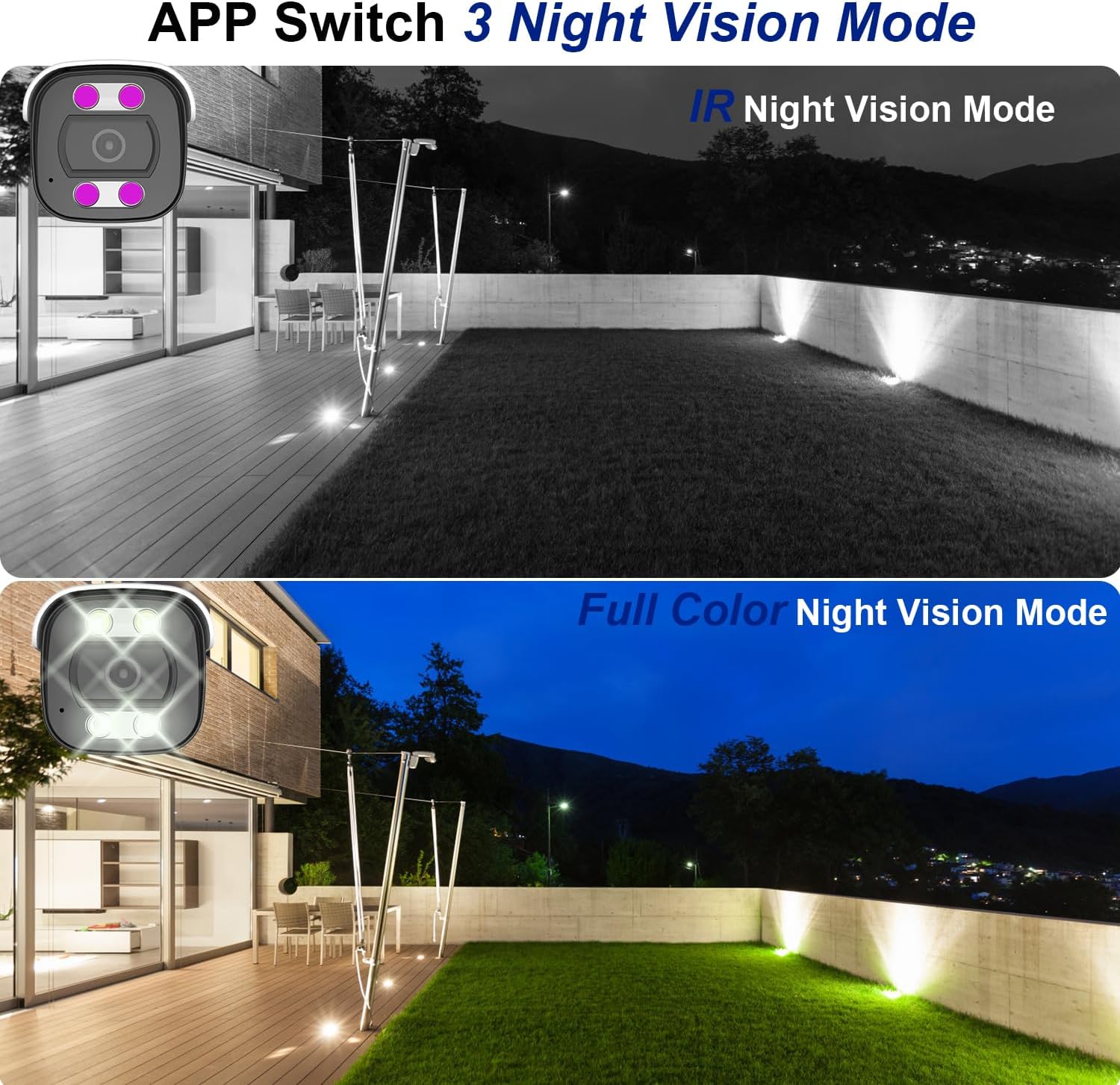
Figure 6: Night Vision Modes. This image demonstrates the difference between traditional IR (black and white) and full-color night vision capabilities.
6.3 Person/Vehicle Detection
The camera is equipped with professional human/vehicle detection functions to reduce false alarms. When a person or vehicle enters the configured detection area, the camera will automatically send real-time video or snapshots to your mobile phone.
- Зона выяўлення: Configure specific zones within the camera's view для выяўлення.
- Адчувальнасць: Adjust the detection sensitivity to optimize performance and minimize unwanted alerts.

Figure 7: Smart Human/Vehicle Detection. The camera identifies human presence and sends an immediate alert to a connected mobile device.
Video 2: Smart Detection Features
This video demonstrates the human and vehicle detection capabilities of the camera, showing how it identifies subjects and triggers alerts.
6.4 Двухбаковае аўдыё
The built-in microphone and speaker allow for two-way communication. You can listen to audio from the camera's location and speak through the camera using the mobile app or NVR interface.

Figure 8: Two-Way Audio Functionality. The camera enables real-time communication, allowing users to speak and listen remotely.
Video 3: Two-Way Audio Demonstration
This video illustrates the two-way audio feature, demonstrating how users can communicate through the camera.
7. Тэхнічнае абслугоўванне
Рэгулярнае тэхнічнае абслугоўванне забяспечвае даўгавечнасць і аптымальную прадукцыйнасць вашай камеры:
- Уборка: Акуратна працярыце аб'ектыў і корпус камеры мяккай губкайamp тканіна. Не выкарыстоўвайце агрэсіўныя хімікаты або абразіўныя ачышчальнікі.
- Абнаўленні прашыўкі: Periodically check for firmware updates through the mobile app or manufacturer's website to ensure the latest features and security patches.
- Праверка кабеля: Regularly inspect the Ethernet cable and waterproof cover for any signs of wear or damage, especially in outdoor installations.
- Кіраванне сховішчам: If using an SD card, periodically review і кіраваць запісаным footagе, каб прадухіліць перапаўненне карты.
8. Выпраўленне непаладак
Вось рашэнні распаўсюджаных праблем, з якімі вы можаце сутыкнуцца:
| праблема | Магчымая прычына | Рашэнне |
|---|---|---|
| Камера не ўключаецца. | No power from PoE switch/NVR; faulty Ethernet cable. | Ensure PoE switch/NVR is powered on. Check Ethernet cable connection and integrity. Try a different PoE port or cable. |
| No video feed. | Network connectivity issue; incorrect NVR/app settings. | Verify network connection. Ensure camera is properly added to NVR/app. Check IP address settings. |
| Poor night vision. | IR LEDs obstructed; incorrect night vision mode. | Прыбярыце ўсе перашкоды з камеры view. Switch night vision mode in the app (IR, Full Color, Smart). |
| False alarms from detection. | Detection sensitivity too high; detection area too broad. | Adjust detection sensitivity and refine the detection area in the camera settings via the app or NVR. |
| Двухбаковая аўдыёсувязь не працуе. | Microphone/speaker disabled; volume too low; network latency. | Check audio settings in the app/NVR. Ensure volume is up. Verify stable network connection. |
Video 4: Advanced Troubleshooting Tips
This video provides additional tips and solutions for common operational issues with the Dosilkc security camera.
9. Тэхнічныя характарыстыкі
| Асаблівасць | Дэталь |
|---|---|
| Нумар мадэлі | ДС-Т461 |
| Дазвол відэазахопу | 4K (3840*2160@20fps) |
| Датчык выявы | 1/3-цалевая CMOS-матрыца з прагрэсіўнай разгорткай |
| Аб'ектыў | 2.8 мм |
| Viewing Angle (FoV) | 105 Degrees (diagonal) |
| Дыяпазон начнога бачання | 88 футы (даступнае каляровае начное бачанне) |
| Аўдыё | Built-in 2-way audio (microphone & speaker) |
| Выяўленне | Выяўленне людзей/транспартных сродкаў |
| Захоўванне | Micro SD Card Slot (up to 512GB), NVR, FTP, NAS |
| Кампрэсія | H.265/H.264 |
| Сувязь | Wired (PoE - Power over Ethernet) |
| Ўстойлівасць да надвор'я | Воданепранікальны IP66 |
| Памеры (Д х Ш х У) | 17.98 х 6.99 х 6.99 см (прыблізна 7.08 х 2.75 х 2.75 цалі) |
| Вага | 481 г |
| Тып мацавання | Ceiling Mount, Screw In |
| Сумяшчальныя прылады | Digital Video Recorder (NVR), Blue Iris, iSpy |
10. Гарантыя і падтрымка
For warranty information and technical support, please refer to the official Dosilkc webсайт або звярніцеся непасрэдна ў службу падтрымкі кліентаў. Захоўвайце чэк аб куплі як пацвярджэнне пакупкі для гарантыйных прэтэнзій.
Інтэрнэт-падтрымка: Visit the Dosilkc official webсайт з часта задаванымі пытаннямі, загрузкай праграмнага забеспячэння і рэсурсамі падтрымкі.
Звязацца са службай падтрымкі: Звярніцеся да ўпакоўкі прадукту або да афіцыйнай webсайт для кантактнай інфармацыі службы падтрымкі кліентаў.