
OKAI EA10A
OKAI Electric Scooter with Seat User Manual
Model: EA10A
Уводзіны
Welcome to the user manual for your new OKAI Electric Scooter with Seat. This manual provides essential information for the safe operation, maintenance, and troubleshooting of your scooter. Please read it thoroughly before your first ride to ensure a safe and enjoyable experience.
The OKAI Electric Scooter with Seat (Model EA10A) is designed for urban commuting and recreational riding, offering a comfortable and efficient way to travel. It features a powerful 350-watt motor, 10-inch tubeless pneumatic tires, a convenient detachable battery, and a robust dual braking system for enhanced safety and control.
Інструкцыі па бяспецы
Your safety is paramount. Always adhere to the following guidelines when operating your electric scooter:
- Always wear a helmet and appropriate safety gear, including knee and elbow pads.
- Familiarize yourself with local traffic laws and regulations regarding electric scooters before riding.
- Не катайцеся пад уздзеяннем алкаголю або наркотыкаў.
- Avoid riding in heavy rain, on slippery surfaces, or through standing water.
- Ensure all components, including the handlebars, seat, and wheels, are securely fastened before each ride.
- Захоўвайце бяспечную адлегласць ад іншых транспартных сродкаў, пешаходаў і перашкод.
- Максімальная вага гэтага самаката складае 100 кг (220 фунты). Не перавышайце гэту вагу.
- Always use both brakes simultaneously for effective stopping.
Прадукт скончаныview
The OKAI Electric Scooter with Seat combines convenience with performance. Key features include:
- Матор: 350-watt motor with 28N.m of torque, enabling efficient acceleration and hill climbing.
- хуткасць: Capable of reaching speeds of up to 15.5 MPH (25 km/h).
- дыяпазон: Offers an impressive range of up to 25 miles on a single full charge.
- шыны: Equipped with 10-inch tubeless pneumatic tires for a smooth and comfortable ride.
- Тармазная сістэма: Features a dual braking system with EBS (Electronic Braking System) and a rear-disc brake for reliable stopping power.
- акумулятар: Comes with a detachable lithium battery, supporting approximately 5.5 hours for a full charge.
- Бяспека: Includes an NFC key system for convenient locking and unlocking.
- Камфорт: Designed with a large, comfortable saddle and a wide 10.6-inch deck for ample foot space.
- Дадатковыя магчымасці: Bright LED headlights and brake lights for visibility, and a practical front basket for carrying personal items.
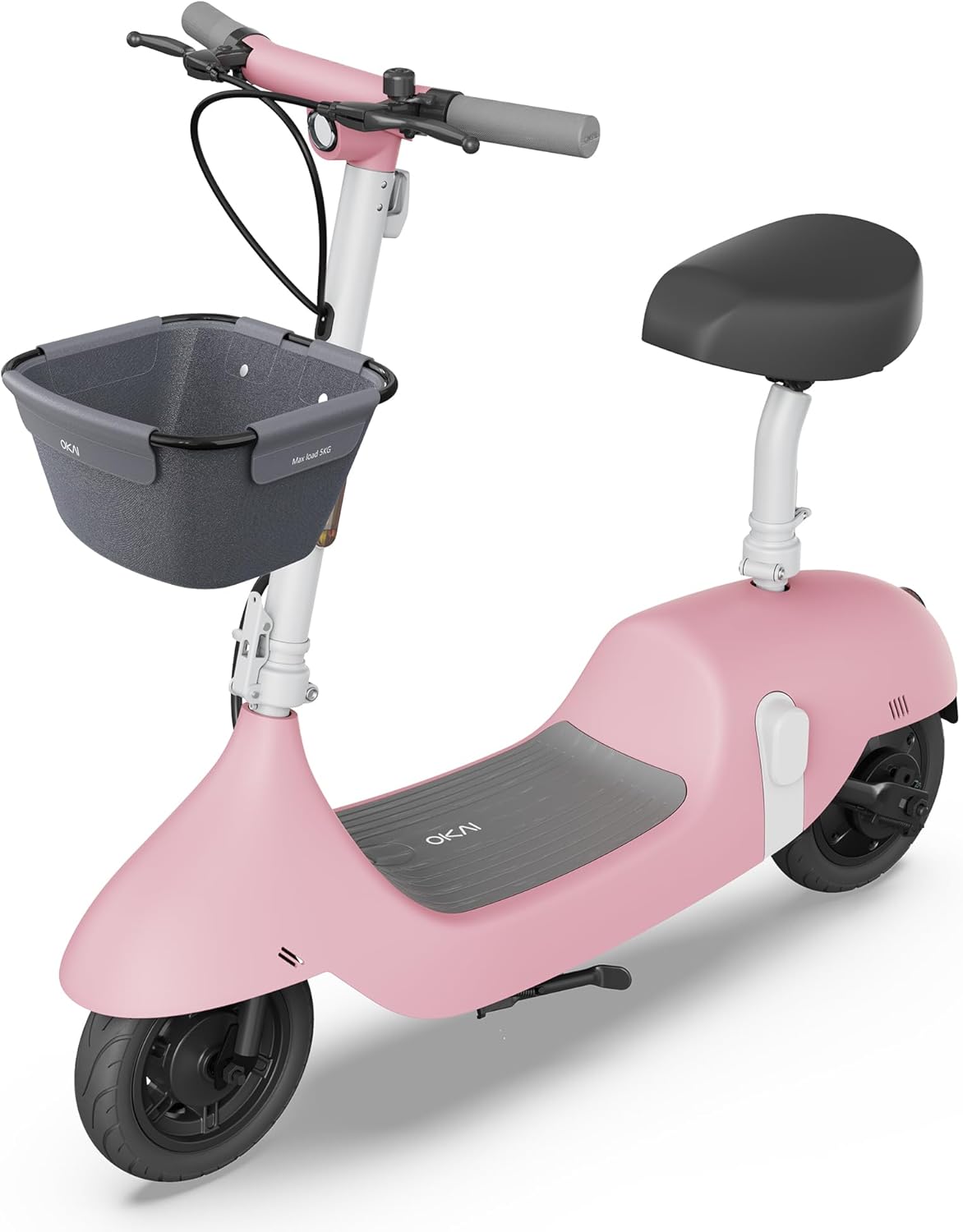
Image: The OKAI Electric Scooter with Seat in pink, showcasing its design with a front basket and comfortable seat.

Выява: Падрабязная view of the 350W power motor and the easily accessible detachable battery compartment.

Image: Illustration highlighting the dual braking system and the practical front-mounted basket.
Ўстаноўка і зборка
Your OKAI Electric Scooter requires minimal assembly. Follow these steps to get started:
- Распакоўка: Асцярожна выміце ўсе кампаненты з упакоўкі. Пераканайцеся, што ўсе дэталі, пералічаныя ў пакавальным лісце, ёсць у наяўнасці і не пашкоджаны.
- Ўстаноўка руля: Attach the handlebar to the scooter's stem. Ensure it is aligned correctly and securely tightened using the provided tools.
- Сядзенне ў зборы: Insert the seat post into the designated slot on the scooter's frame. Adjust the seat height to a comfortable riding position and secure it firmly with the quick-release lever.
- Мацаванне кошыка: If your model includes a front basket, attach it to the handlebar or front frame following the separate instructions provided with the basket.
- Першапачатковая плата: Before your first ride, fully charge the battery. Connect the charger to the scooter's charging port or directly to the detachable battery. The charging time is approximately 6 hours. The display will indicate charging status.
- NFC Key Pairing: The NFC key is typically pre-connected. To lock or unlock the scooter, simply tap the NFC key to the designated area on the scooter's display or body.

Image: Illustration showing the two methods of charging the OKAI Electric Scooter: directly via the scooter's port or by removing and charging the detachable battery.
Інструкцыя па эксплуатацыі
Уключэнне/выключэнне
- To turn on the scooter, press and hold the power button located on the display until it illuminates.
- Каб выключыць, зноў націсніце і ўтрымлівайце кнопку харчавання, пакуль дысплей не выключыцца.
- Alternatively, use the NFC key to lock/unlock the scooter, which also controls power.
Язда на скутэры
- Place one foot firmly on the scooter's deck and use your other foot to push off the ground to gain initial momentum.
- Once moving, gently press the throttle lever (usually on the right handlebar) to engage the electric motor.
- Adjust your speed by varying the pressure on the throttle. The scooter may have multiple speed modes, which can often be selected via the display or app.
- To brake, release the throttle and gently squeeze the brake levers (on both handlebars). The scooter features both electronic and mechanical drum brakes for effective stopping.

Image: Close-up of the handlebar showing the digital display, throttle, and brake levers, illustrating the scooter's controls.
Using the OKAI App
Download the official OKAI app from your smartphone's app store (available for iOS and Android). The app enhances your riding experience by allowing you to:
- View real-time riding data, including current speed, battery level, and trip distance.
- Adjust riding modes and customize certain scooter settings.
- Lock and unlock the scooter remotely for added convenience and security.
- Access firmware updates and direct customer support.

Image: A user interacting with the OKAI app on a smartphone, demonstrating how the app provides scooter controls and real-time data.
Тэхнічнае абслугоўванне
Regular maintenance is crucial for ensuring the longevity, optimal performance, and safe operation of your OKAI Electric Scooter.
- Уборка: Рэгулярна працірайце скутэр рэкламайamp тканіна. Не выкарыстоўвайце струмені вады пад высокім ціскам і не апускайце самакат у ваду, бо гэта можа пашкодзіць электронныя кампаненты.
- Ціск у шынах: Although the tires are tubeless, proper inflation is essential for ride quality, range, and tire lifespan. Check tire pressure periodically and inflate to the recommended PSI (usually found on the tire sidewall).
- тармазы: Inspect the brake levers and cables for proper function and signs of wear. Ensure the brakes engage smoothly and effectively. Adjust brake cable tension if the brakes feel loose or ineffective. If brake pads are worn, they should be replaced by a qualified technician.
- Сыход за батарэяй:
- Пазбягайце поўнай разрадкі акумулятара.
- Charge the battery regularly, ideally keeping it between 20% and 80% for optimal battery health and lifespan.
- Store the scooter in a cool, dry place when not in use for extended periods. If storing for a long time, ensure the battery is charged to about 50-60%.
- Зашпількі: Periodically check all screws, bolts, and quick-release mechanisms to ensure they are tight and secure. Loose fasteners can lead to instability and potential hazards.
Ліквідацыю непаладак
This section provides solutions to common issues you might encounter with your OKAI Electric Scooter.
| праблема | Магчымая прычына | Рашэнне |
|---|---|---|
| Скутар не ўключаецца. | Low or depleted battery; Power button not pressed correctly; NFC key not recognized. | Charge the battery fully; Press and hold the power button firmly for a few seconds; Re-tap NFC key or try another key if available. |
| Зніжэнне далёкасці руху або хуткасці. | Low tire pressure; Overloaded (exceeding weight limit); Battery degradation; Frequent uphill riding or aggressive acceleration. | Check and inflate tires to recommended pressure; Ensure rider weight is within specified limits; Consult customer support for battery health checks; Adjust riding style to be more conservative. |
| Тормазы адчуваюцца слабымі або неэфектыўнымі. | Brake cable slack; Worn brake pads; Debris in brake mechanism. | Adjust brake cable tension at the lever or caliper; Replace brake pads if worn (consult a professional); Clean any debris from the brake area. |
| Незвычайныя гукі падчас працы. | Loose components (screws, bolts); Debris caught in wheels or motor; Worn bearings. | Check all fasteners and tighten as necessary; Inspect wheels and motor area for obstructions and remove them; If noise persists, contact customer support. |
| Display not working or showing errors. | Loose cable connection; Software glitch; Damage to display unit. | Turn the scooter off and on again; Check connections to the display; If an error code is displayed, refer to the app or contact customer support with the code. |
Тэхнічныя характарыстыкі
Detailed technical specifications for the OKAI Electric Scooter with Seat, Model EA10A.
| Асаблівасць | Дэталь |
|---|---|
| Марка | ОКАЙ |
| Назва мадэлі | EA10A |
| Колер | Ружовы |
| Магутнасць рухавіка | 350-watt (Max 750W) |
| Максімальная хуткасць | 15.5 міль у гадзіну (25 км/г) |
| Максімальная далёкасць | 25 міль |
| Тып батарэі | Detachable Lithium Battery |
| Час зарадкі | Approx. 6 Hours (5.5H fast charging) |
| Памер шын | 10 цалі |
| Тып шыны | Бескамерная пнеўматыка |
| Тормазны стыль | Mechanical Drum Brake + Electronic Brake (EBS) |
| Матэрыял каркаса | Алюміній |
| Памеры прадукту (ДxШxВ) | 45.1 см Д х 21 см Ш х 41 см В |
| Вага прадмета | 58 фунта |
| Абмежаванне вагі | 220 фунта |
| Узроставы дыяпазон | Дарослы |
| Асаблівасці | Seat, Lights, Basket, Rechargeable, NFC Key |

Image: Diagram illustrating the key dimensions of the OKAI Electric Scooter: 45.1 inches in length, 21 inches in handlebar width, and 41 inches in height.
Гарантыя і падтрымка
Інфармацыя аб гарантыі
The OKAI Electric Scooter comes with a Limited Warranty. Please refer to the warranty card included in your product packaging for specific terms and conditions, including coverage duration, what is covered, and how to make a claim. Retain your proof of purchase for warranty purposes.
Падтрымка кліентаў
For any questions, technical assistance, or warranty claims, please contact OKAI customer support. Our team is ready to assist you with any issues or inquiries.
- Інтэрнэт-падтрымка: Visit the official OKAI website for comprehensive FAQs, troubleshooting guides, and support resources.
- электронная пошта: Find the customer service email address on your product packaging or the official OKAI webсайт.
- тэлефон: A customer service phone number may also be available on your product packaging or the official OKAI webсайт.
Вы таксама можаце наведаць в OKAI Store on Amazon для атрымання дадатковай інфармацыі аб прадукце і абнаўленняў.
Ask a question about this manual
Ask about setup, troubleshooting, compatibility, parts, safety, or missing instructions. Manuals+ will review the question and use this page’s manual context to help answer it.