
FREEWOLF M96
Кіраўніцтва карыстальніка бесправадной гульнявой клавіятуры FREEWOLF M96
Мадэль: M96
Уводзіны
The FREEWOLF M96 Wireless Gaming Keyboard is designed for versatile use, offering both Bluetooth and 2.4G wireless connectivity. It features a mechanical feel, RGB LED backlighting, a digital display screen, and durable PBT keycaps. This manual provides detailed instructions to help you set up, operate, and maintain your keyboard for optimal performance.
Прадукт скончаныview
The FREEWOLF M96 keyboard combines advanced features with a user-friendly design. Key components include:
- Падвойнае падключэнне: Supports Bluetooth (BT1, BT2) and 2.4G wireless modes for seamless switching between multiple devices.
- Экран лічбавага дысплея: Provides real-time information on battery capacity, connection mode, and charging status.
- Multimedia Control Knob: Allows for easy adjustment of volume and backlight settings.
- Каўпачкі клавіш PBT: Durable, spherical keycaps designed for comfortable typing and longevity.
- RGB LED Backlight: Customizable lighting effects to enhance your gaming or typing experience.
- Працяглая батарэя: Equipped with a 3000 mAh battery for extended use.
- Эрганамічны дызайн: Features adjustable feet for optimal typing comfort.

Выява: Зверхуview of the FREEWOLF M96 Wireless Keyboard, highlighting its 90% US layout, PBT keycaps, Bluetooth/2.4G connectivity, LED backlight, 3000 mAh battery, multimedia knob, LED screen, and compatibility with Win/Mac/Linux/iOS/Android systems.

Выява: Крупны план view of the PBT color blocking keycaps, emphasizing their durability and longer lifespan.
Настройка
1. Зарадка клавіятуры
Before first use, it is recommended to fully charge the keyboard. Connect the provided USB-C cable to the charging port on the keyboard and the other end to a USB power source (e.g., computer USB port, wall adapter).
- The digital display screen will indicate the charging status.
- Поўная зарадка звычайна займае некалькі гадзін.

Выява: Збоку view of the keyboard illustrating the power switch, Type-C charging port, and the 2.4G/BT1/BT2 mode switch. The Type-C port is for charging only and cannot be used for wired connection.
2. Падключэнне праз бесправадную сетку 2.4G
- Locate the 2.4G wireless receiver (USB dongle), usually stored in a compartment on the keyboard's underside.
- Падключыце прыёмнік 2.4G да даступнага USB-порта вашага кампутара.
- Slide the mode switch on the keyboard to the "2.4G" position.
- The keyboard should automatically connect to your device. The display screen will show the 2.4G connection status.
3. Падключэнне праз Bluetooth
The keyboard supports two Bluetooth channels (BT1 and BT2) for connecting to multiple devices.
- Slide the mode switch on the keyboard to either "BT1" or "BT2" position.
- На вашай прыладзе (камп'ютары, планшэце, смартфоне) уключыце Bluetooth і пачніце пошук новых прылад.
- Select "FREEWOLF M96" (or similar name) from the list of available devices.
- If prompted, enter the pairing code displayed on your device.
- Once connected, the digital display screen will show the active Bluetooth channel (BT1 or BT2).
To switch between connected Bluetooth devices, simply slide the mode switch to the desired BT1 or BT2 channel.
Video: Demonstrates the dual-mode connectivity of the FREEWOLF M96 Wireless Gaming Keyboard, showing how to switch between 2.4G wireless and Bluetooth connections (BT1, BT2) for seamless multi-device operation.
Інструкцыя па эксплуатацыі
1. Экран лічбавага дысплея
The integrated electronic display provides essential information at a glance:
- Ёмістасць батарэі: Паказвае бягучы працэнт акумулятараtage.
- Рэжым злучэння: Паказвае, ці знаходзіцца клавіятура ў рэжыме 2.4G, BT1 або BT2.
- Стан зарадкі: Displays an icon when the keyboard is charging.
- Індыкатар разраду батарэі: Папярэджвае вас, калі батарэя разраджаная.

Выява: Падрабязная view of the digital display screen on the FREEWOLF M96 keyboard, showing indicators for power display, connection status (2.4G, BT1, BT2), charging, and low battery.
2. Multimedia Control Knob
The knob located on the top right of the keyboard offers dual functionality:
- Default Function (Volume Control):
- Павярніце па гадзіннікавай стрэлцы, каб павялічыць гучнасць.
- Павярніце супраць гадзіннікавай стрэлкі, каб паменшыць гучнасць.
- Press the knob to mute/unmute audio.
- Кіраванне падсветкай:
- Press and hold the knob for five seconds to switch to backlight control mode.
- In backlight control mode:
- Rotate clockwise to increase backlight brightness.
- Rotate counter-clockwise to decrease backlight brightness.
- Press the knob to switch between different backlight effects/modes.

Image: Illustration of the advanced dial control, detailing its default functions for volume (volume up, volume down, mute) and its backlight control functions (backlight brightness up, backlight brightness down, light effect switching) when pressed and held for 5 seconds.
3. Backlight Control (Function Keys)
In addition to the knob, you can control the backlight using function key combinations:
- FN + N: Пераключыце рэжым падсвятлення
- FN + Up Arrow / Down Arrow: Адрэгулюйце яркасць падсвятлення
- FN + Left Arrow / Right Arrow: Рэгуляванне хуткасці падсветкі
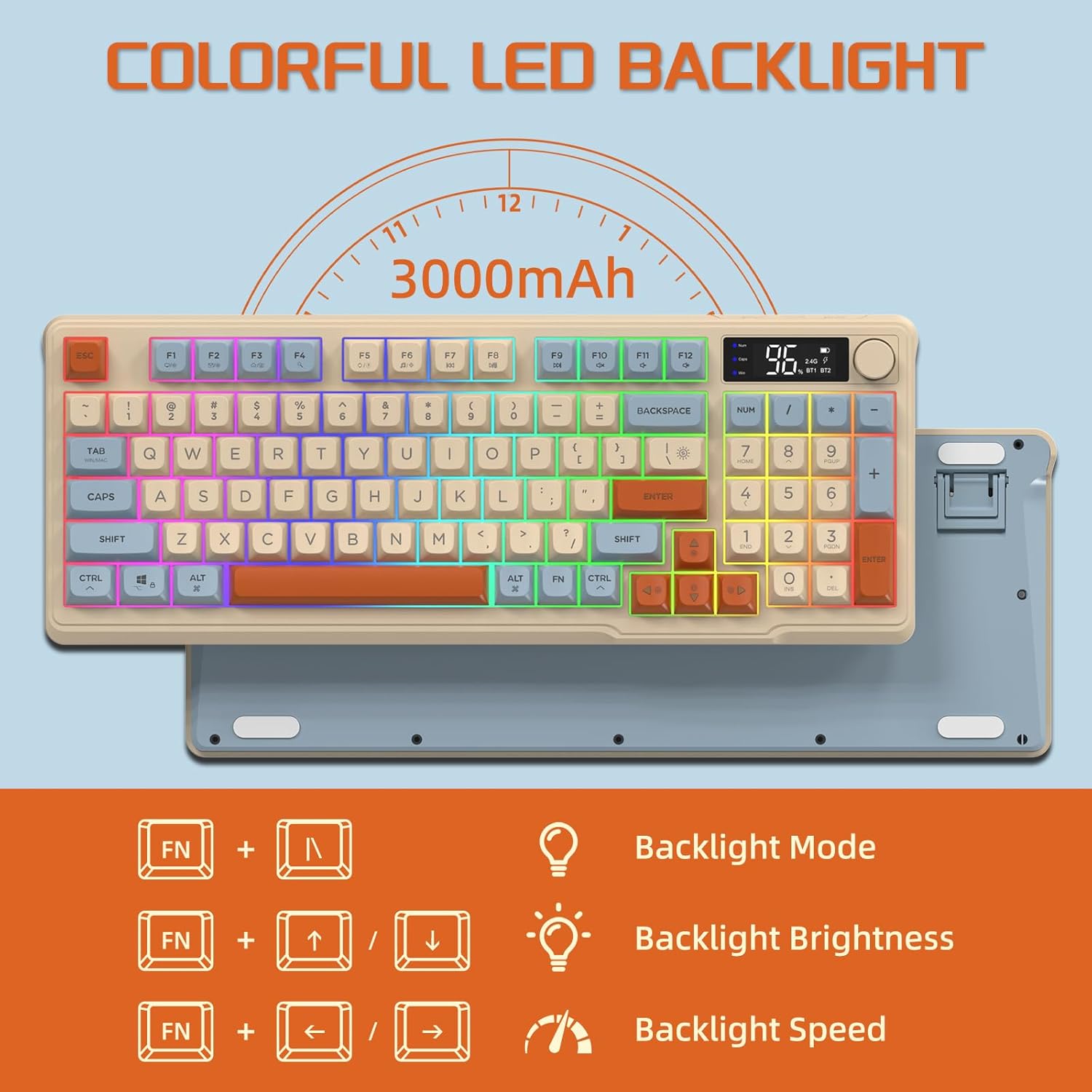
Image: The keyboard displaying the key combinations for controlling the colorful LED backlight, including changing backlight mode, brightness, and speed using the FN key with N, arrow keys.
4. Рэжымы энергазберажэння
The keyboard is designed with power-saving features to extend battery life:
- Sleep Mode (3 minutes inactivity): After 3 minutes of inactivity, the keyboard enters sleep mode, and the backlight turns off.
- Deep Sleep Mode (10 minutes inactivity): After 10 minutes in sleep mode, the keyboard enters deep sleep. The first key press will be ignored to wake the keyboard, and the second key press will activate it.
5. Сумяшчальнасць
The FREEWOLF M96 keyboard is compatible with a wide range of operating systems, including Windows, Mac, and Linux, ensuring broad usability.
Тэхнічнае абслугоўванне
1. Уборка
- Выключыце клавіятуру перад чысткай.
- Выкарыстоўвайце мяккую безворсовую тканіну, злёгку dampпрамыйце паверхню вадой або мяккім ачышчальным растворам.
- For cleaning between keycaps, use compressed air or a small brush.
- Пазбягайце выкарыстання агрэсіўных хімікатаў або абразіўных матэрыялаў.
2. Сыход за батарэяй
- Пазбягайце частай поўнай разрадкі акумулятара.
- Захоўвайце клавіятуру ў прахалодным, сухім месцы, калі яна не выкарыстоўваецца працяглы час.
- Выкарыстоўвайце толькі зарадны кабель, які ўваходзіць у камплект, або сумяшчальны кабель USB-C.
Ліквідацыю непаладак
| праблема | Магчымая прычына | Рашэнне |
|---|---|---|
| Клавіятура не рэагуе. | Low battery; incorrect connection mode; receiver not plugged in (2.4G); Bluetooth not paired. | Charge the keyboard; switch to correct mode (2.4G/BT1/BT2); ensure 2.4G receiver is connected; re-pair Bluetooth. |
| Не працуе падсветка. | Backlight turned off; low battery; brightness set to minimum. | Check backlight settings using the knob or FN key combinations; charge the keyboard. |
| Keys not registering or ghosting. | Software conflict; low battery; interference. | Restart your device; charge the keyboard; move closer to the receiver/device; check for driver updates. |
| Нестабільнае злучэнне Bluetooth. | Перашкоды; адлегласць ад прылады; нізкі зарад батарэі. | Reduce interference (other wireless devices); move keyboard closer to device; charge keyboard. |
Тэхнічныя характарыстыкі
| Асаблівасць | Дэталь |
|---|---|
| Марка | ВОЛЬНЫ ВОЎК |
| Нумар мадэлі | М96 |
| Тэхналогія падлучэння | Bluetooth, бесправадная сувязь 2.4G |
| Апісанне клавіятуры | Mechanical feel with PBT keycaps |
| Колькасць ключоў | 94 keys (US Layout) |
| Падсвятленне | RGB LED падсвятленне |
| Ёмістасць батарэі | 3000 мАг |
| Асаблівасці | Electronic display, multimedia control knob, power saving modes |
| Сумяшчальныя прылады | PC (Windows, Mac, Linux), iOS, Android |
| Колер | Blueberry (Myrtille) |
| Памеры прадукту | 385mm (15.16 inch) x 145mm (5.71 inch) x 40mm (1.57 inch) |

Image: Diagram illustrating the product dimensions of the FREEWOLF M96 keyboard: 385mm (15.16 inches) length, 145mm (5.71 inches) width, and 40mm (1.57 inches) height.
Гарантыя і падтрымка
This FREEWOLF M96 Wireless Gaming Keyboard comes with a standard manufacturer's warranty. Please refer to the product packaging or the seller's information for specific warranty terms and conditions. For technical support or further assistance, please contact the retailer or manufacturer directly.
For the latest information and support, visit the official FREEWOLF webсайт або звярніцеся ў службу падтрымкі кліентаў.
Ask a question about this manual
Ask about setup, troubleshooting, compatibility, parts, safety, or missing instructions. Manuals+ will review the question and use this page’s manual context to help answer it.