
Уводзіны
This manual provides essential instructions for the safe and efficient operation of your Abestop AT6301 Lab Power Supply. The AT6301 is a high-precision DC power supply designed for laboratory, educational, and DIY applications, offering a stable and reliable power source. It features a 2.8-inch TFT LCD, 4-digit display, and multiple protection functions to ensure safe usage.

Малюнак 1: Abestop AT6301 Lab Power Supply in operation, displaying voltage and current, alongside a clamp meter for external measurement. This image highlights the device's precise output capabilities.
Асноўныя характарыстыкі:
- Выхадны дыяпазон: 0-60V / 0-10A, with a maximum output power of 300W.
- Высокая раздзяляльнасць: 10mV / 1mA for precise adjustments.
- Дысплей: 2.8-inch TFT LCD with 4-digit display for clear readings.
- Порт для зарадкі USB: 5V/1A output for convenient device charging.
- Функцыі абароны: Уключае Over Voltage Protection (OVP) and Over Current Protection (OCP) for enhanced safety.
- Функцыі памяці: 4 groups of data memory (M1-M4) for quick recall of settings.
- Выхадная форма сігналу: Supports waveform output with 10 editable points.
- Астуджэнне: Intelligent temperature-controlled fan ensures stable long-term operation.
- Падключэнне: Інтэрфейс сувязі USB з падтрымкай SCPI.
- Кампактны дызайн: Lightweight and portable, suitable for various environments.
Тэхніка бяспекі
Заўсёды выконвайце наступныя правілы бяспекі, каб пазбегнуць траўмаў або пашкоджання прылады:
- Ensure the power cord is properly grounded to avoid electric shock.
- Не выкарыстоўвайце прыладу ў вільготных або damp умовы.
- Не адчыняйце casing or attempt to repair the unit. Refer servicing to qualified personnel.
- Праверце ўвод тtage matches local power supply specifications.
- Пазбягайце кароткага замыкання выхадных клем.
- Забяспечце належную вентыляцыю, каб прадухіліць перагрэў.

Малюнак 2: The Abestop AT6301 features comprehensive protection mechanisms, including overvoltage, overcurrent, short-circuit, overtemperature, and overload protection, ensuring safe operation.
Настройка
1. Распакаванне і праверка:
Carefully remove the power supply from its packaging. Inspect the unit for any signs of physical damage. Ensure all accessories, including the power cord and test leads, are present.
2. Падключэнне магутнасці:
- Connect the provided power cord to the power input socket on the rear panel of the device.
- Падключыце другі канец шнура харчавання да заземленай разеткі пераменнага току.
- Ensure the power switch on the rear panel is in the OFF position before connecting to the mains.
Малюнак 3: Rear panel connections of the AT6301, including the power input, fuse, power switch, and USB communication port. Note the intelligent temperature control fan for efficient cooling.
3. Пачатковае ўключэнне:
Flip the power switch on the rear panel to the ON position. The LCD screen on the front panel should illuminate, displaying the startup sequence and default settings.
Інструкцыя па эксплуатацыі
1. Пярэдняя панэль надview:

Малюнак 4: Падрабязны view of the AT6301 front panel, indicating the functions of each control and display element for easy operation.
2. Налада Voltagе і ток:
- Націсніце V кнопка для выбару абtage adjustment. Use the adjustment knob to set the desired voltage.
- Націсніце I button to select current adjustment. Use the adjustment knob to set the desired current limit.
- The display will show the set values (Set) and the actual output values.
3. Кантроль выхаду:
Націсніце Уключэнне/Выключэнне button to enable or disable the output. The button will illuminate when the output is active. Long press the Уключэнне/Выключэнне button to activate the automatic output function.
4. Над Voltage Protection (OVP) and Over Current Protection (OCP):
To set OVP or OCP limits, press the respective OVP or OCP button and use the adjustment knob to set the maximum allowable voltage or current. These features protect your connected device from damage.
5. Memory Functions (M1-M4):
The AT6301 allows you to save and recall up to 4 groups of frequently used voltagе і бягучыя налады.
- To save a setting: Adjust voltage and current to the desired values. Long press the Памяць button, then select a memory location (M1-M4) using the adjustment knob and confirm.
- To recall a setting: Short press the Памяць button, then select the desired memory location (M1-M4) and confirm.
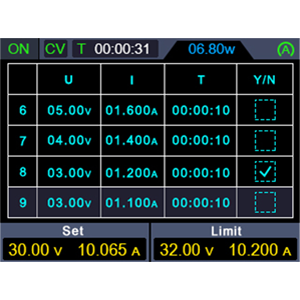
6. Waveform Output List:
The device supports a waveform output list with 10 editable points. Each point allows modification of output voltage, current, and waveform duration.
- Long press the shortcut output button (often labeled with a list icon or similar) to enter the waveform editing interface.
- Use the adjustment knob and navigation buttons to modify the parameters for each of the 10 points.
- Confirm your settings to activate the waveform output.

Малюнак 5: The AT6301 displaying a waveform output, illustrating its capability for programmable output sequences.
7. USB Charging Port:
The front USB port provides 5V/1A output, suitable for charging mobile devices or powering low-current USB accessories.

Малюнак 6: The integrated USB port allows for convenient charging of external devices.
Тэхнічнае абслугоўванне
1. Ачыстка:
To maintain the performance and appearance of your power supply, regularly clean the exterior with a soft, dry cloth. Do not use abrasive cleaners or solvents. Ensure the device is powered off and unplugged before cleaning.
2. Вентыляцыя:
Ensure that the ventilation openings on the sides and rear of the unit are clear of obstructions to allow for proper airflow. The intelligent temperature-controlled fan requires unobstructed space to operate effectively.

Малюнак 7: The intelligent cooling fan actively dissipates heat, crucial for maintaining optimal performance and longevity.
3. Замена засцерагальніка:
If the power supply fails to turn on, check the fuse located on the rear panel near the power input.
- Disconnect the power cord from the mains supply.
- Using a small flat-head screwdriver, gently pry open the fuse holder.
- Remove the old fuse and replace it with a new fuse of the same type and rating (e.g., 5A).
- Close the fuse holder securely.
Ліквідацыю непаладак
| праблема | Магчымая прычына | Рашэнне |
|---|---|---|
| Няма харчавання / Прылада не ўключаецца |
|
|
| Няма аб'ёму вывадуtagэ/ток |
|
|
| Unstable output readings |
|
|
| Порт USB не зараджаецца |
|
|
Тэхнічныя характарыстыкі
| Параметр | Каштоўнасць |
|---|---|
| Нумар мадэлі | AT6301 |
| Марка | Абестоп |
| Выхад Voltage | 0-60 Вольт |
| Выхадны ток | 0-10 Ampэрэс |
| Выходная магутнасць | 300 ват |
| Выхад порта USB | 5 В/1 А |
| дазвол | 10 мВ / 1 мА |
| Дысплей | 2.8-inch TFT LCD, 4-digit |
| Працоўная тэмпература | 0-40 ℃ |
| Memory Groups | 4 груп |
| Інтэрфейс сувязі | USB (падтрымка SCPI) |
| Памеры (Д х Ш х У) | 14 x 23 x 9 centimeters (approx. 5.5 x 9.1 x 3.5 inches) |
| Вага прадмета | 1.5 кілаграма (прыблізна 3.3 фунта) |
| Колер | Чорны |
| Краіна паходжання | Кітай |
| Адпаведнасць тэхніцы бяспекі | CE |
Інфармацыя аб гарантыі
Abestop products are manufactured to high-quality standards. This product comes with a standard manufacturer's warranty against defects in materials and workmanship. Please refer to the warranty card included with your product or contact customer support for specific warranty terms and conditions. Keep your purchase receipt as proof of purchase for warranty claims.
Падтрымка кліентаў
For technical assistance, troubleshooting, or any questions regarding your Abestop AT6301 Lab Power Supply, please contact Abestop customer support.
- Інтэрнэт-падтрымка: Visit the official Abestop webсайт з часта задаванымі пытаннямі, дакументацыяй па прадуктах і кантактнымі формамі.
- Падтрымка па электроннай пошце: Звярніцеся да ўпакоўкі прадукту або да афіцыйнай webсайт для адраса электроннай пошты службы падтрымкі кліентаў.
- Падтрымка па тэлефоне: Contact numbers may be available on the official Abestop webсайт для вашага рэгіёну.
When contacting support, please have your product model number (AT6301) and purchase information readily available.