
1. Уводзіны
This manual provides essential information for the safe and efficient operation of the Jumo 703031/50-001-000-00-065-22/050, 061, Dtron 08.1 Temperature Controller. Please read these instructions thoroughly before installation, operation, or maintenance to ensure proper functionality and safety.
2. Інфармацыя па бяспецы
Папярэджанне: Improper installation or operation can lead to personal injury or equipment damage. Ensure all electrical connections are made by qualified personnel and comply with local regulations and safety standards.
- Disconnect power before performing any installation, wiring, or maintenance procedures.
- Do not operate the device if it appears physically damaged or if any internal components are exposed.
- Refer to the provided wiring diagrams for correct electrical connections to prevent short circuits or overloads.
- Ensure the operating environment is free from excessive moisture, dust, and corrosive gases.
3. Прадукт скончыўсяview
The Jumo Dtron 08.1 is a robust temperature controller designed for precise temperature regulation in various industrial applications. It features a compact design with clearly labeled terminal blocks for easy integration into control systems.
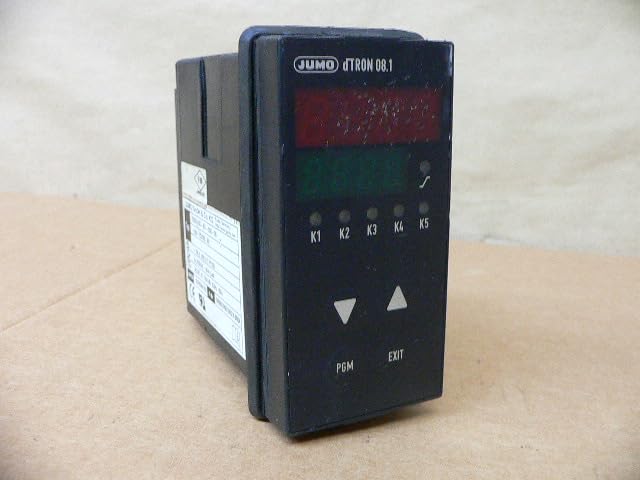
Малюнак 1: Пярэдняя частка view of the Jumo Dtron 08.1 Temperature Controller, highlighting the terminal blocks and the product information label.
The controller is typically designed for panel mounting and includes screw terminals for secure electrical connections. The integrated product label provides critical information such as the specific model number, input/output specifications, and relevant certifications.
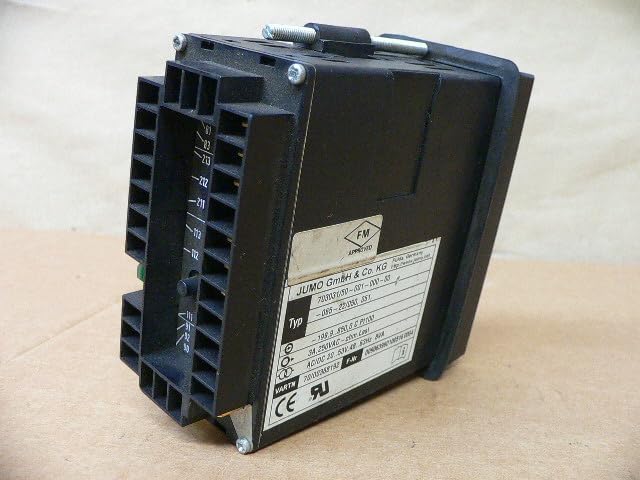
Малюнак 2: Буйны план view of the product label on the Jumo Dtron 08.1 Temperature Controller, showing detailed specifications including model number, temperature range, and electrical ratings.
Key specifications identifiable from the product label include:
- мадэль: 703031/50-001-000-00-065-22/050, 061
- Дыяпазон тэмператур: -199.9 to 850.0 °C (for Pt100 sensor type)
- выхад: 3A, 250VAC (resistive load)
- крыніца харчавання: AC/DC 20...53V, 48...63Hz, 8VA
4. Настройка і ўстаноўка
4.1 Мантаж
The controller is designed for secure panel mounting. Ensure that the chosen mounting location provides adequate space for ventilation, access to wiring terminals, and is free from excessive vibration or heat. Secure the device using the appropriate mounting hardware.
4.2 Электрычныя злучэнні
Before making any electrical connections, ensure the main power supply to the system is completely disconnected and locked out. Refer to the detailed wiring diagram (typically found on the device casing or in a separate wiring guide) for specific terminal assignments. Connect the power supply, temperature sensor (e.g., Pt100), and output load according to the diagram.

Малюнак 3: бок view of the Jumo Dtron 08.1 Temperature Controller, illustrating the various terminal block connections for power, sensor input, and control outputs.
- крыніца харчавання: Connect the AC/DC 20-53V, 48-63Hz power source to the designated power input terminals.
- Уваход датчыка: Connect the Pt100 temperature sensor to the appropriate input terminals. Ensure correct wiring for 2-wire, 3-wire, or 4-wire configurations as specified.
- выхад: Connect the controlled load (e.g., heating element, cooling device, valve) to the 3A, 250VAC output terminals. Observe maximum current ratings.
5. Інструкцыя па эксплуатацыі
Once the controller is correctly installed and powered, it will typically display the current process value (measured temperature). For detailed programming and configuration, refer to the specific programming manual for the Dtron 08.1, which covers setting parameters such as setpoint, control mode (e.g., PID), alarm functions, and calibration. The basic operational steps are:
- Уключэнне: Apply power to the controller. The display should illuminate and show the current temperature.
- Рэгуляванне зададзенага значэння: Use the front panel buttons (if available) or a connected software interface to set the desired target temperature (setpoint).
- Маніторынг: Continuously observe the display for the current process temperature and the status of the control output (e.g., heating/cooling active).
- Маніторынг сігналізацыі: Pay attention to any alarm indicators or messages that may appear, indicating deviations or faults.
6. Тэхнічнае абслугоўванне
The Jumo Dtron 08.1 Temperature Controller is designed for reliability and requires minimal routine maintenance. Regular checks help ensure continued optimal performance:
- Уборка: Keep the front panel and casing clean and free of dust and debris. Use a soft, dry cloth for cleaning. Avoid using abrasive cleaners, solvents, or excessive moisture, which can damage the device.
- Праверкі злучэння: Periodically inspect all electrical connections for tightness. Loose connections can lead to intermittent operation or overheating. Check for any signs of corrosion or damage to wiring.
- Умовы навакольнага асяроддзя: Verify that the operating environment remains within the specified temperature and humidity ranges to prevent premature failure.
- Цэласнасць датчыка: Inspect the temperature sensor and its wiring for physical damage or degradation.
7. Выпраўленне непаладак
This section addresses common operational issues. For complex problems or issues not covered here, contact technical support.
7.1 No Display / No Power
- Check all power supply connections to ensure they are secure and correctly wired.
- Праверце, ці крыніца харчавання гучнаяtage and frequency match the controller's requirements (AC/DC 20-53V, 48-63Hz).
- Inspect for any tripped circuit breakers or blown fuses in the power circuit.
7.2 Incorrect Temperature Reading
- Verify that the correct sensor type (e.g., Pt100) is selected and configured in the controller's parameters.
- Check the sensor wiring for breaks, short circuits, or incorrect connections.
- Ensure the temperature sensor is properly installed in the process and is making good thermal contact.
- If multiple sensors are used, confirm the correct sensor is assigned to the input.
7.3 Output Not Activating
- Check the setpoint and process value. The output should activate when the process value deviates from the setpoint according to the configured control mode (e.g., PID, ON/OFF).
- Verify the output wiring to the load. Ensure the load is functioning correctly and is within the controller's output current/voltage рэйтынгі.
- Review controller parameters for output configuration, alarm settings, and any manual override functions.
- Ensure any safety interlocks or external enable signals are active.
8. Тэхнічныя характарыстыкі
| Асаблівасць | Спецыфікацыя |
|---|---|
| Памеры прадукту | 7.09 х 6.3 х 8.27 цалі |
| Вага прадмета | 1.92 фунта |
| Марка | Jumo (Dtron 08.1) |
| Нумар мадэлі | 703031/50-001-000-00-065-22/050, 061 |
| Дыяпазон тэмператур | -199.9 to 850.0 °C (Pt100) |
| Выхад | 3A, 250VAC (resistive load) |
| Электразабеспячэнне | AC/DC 20...53V, 48...63Hz, 8VA |
9. Гарантыя і падтрымка
For detailed warranty information, technical support, and service, please refer to the official Jumo documentation that accompanied your product or contact your authorized Jumo distributor. It is recommended to retain your purchase receipt for any warranty claims.
вытворца: Generic (Jumo)
ASIN: B0D2LLJFC1