
1. Уводзіны і большview
The ExtreLife Magsafe Wallet is designed to enhance your iPhone experience by combining a secure card holder with advanced tracking and viewing capabilities. This wallet features Apple-Certified Find My functionality, allowing you to locate your wallet in real-time. Its strong magnetic attachment ensures a secure connection to your iPhone, while the adjustable stand provides versatile viewing angles. With capacity for up to 6 cards and RFID blocking technology, your essentials are both organized and protected.

Image: The ExtreLife Magsafe Wallet integrates seamlessly with the Apple Find My Network for location tracking.

Image: The wallet features a super strong magnetic force of up to 4200Gs for secure attachment.
Відэа: Оверview of the ExtreLife Find My Wallet, highlighting its ability to prevent loss.
2. Настройка
2.1 Find My Pairing
To utilize the Apple Find My functionality, follow these steps to pair your ExtreLife Magsafe Wallet with your iPhone:
- Пераканайцеся, што ваш iPhone працуе пад кіраваннем iOS 14.5 або больш позняй версіі.
- Turn on your iPhone's Bluetooth.
- Enable Two-Factor Authentication for your Apple ID.
- Enable Location Services on your iPhone.
- Short press the power button on the wallet once to turn it on.
- Адкрыйце праграму «Find My» на вашым iPhone.
- Navigate to the "Items" tab and tap "Add New Item" then "Other Supported Item".
- Bring the wallet close to your iPhone. The app should detect the "ExtreLife Find Wallet Stand".
- Tap "Connect" and follow the on-screen prompts to name your wallet and link it to your Apple ID.

Image: Visual guide for pairing your wallet with the Find My app.
Video: Detailed instructions on how to pair your ExtreLife Magsafe Wallet with your iPhone's Find My app.
Video: Demonstrates the Find My functionality for the Magsafe Wallet with various iPhone models.
Video: Shows the Magsafe Wallet working with Apple Find My features.
3. Інструкцыя па эксплуатацыі
3.1 Card Storage
The wallet features 3 individual card slots designed to hold up to 6 cards securely. A convenient thumb slot allows for easy access to your most frequently used cards.

Image: The wallet's smart card storage design, holding up to 6 cards.

Image: The thumb slot provides easy access to your cards.
3.2 Adjustable Stand Function
The wallet features a sturdy, adjustable hinge that allows it to function as a phone stand. It can be opened smoothly to create a stable stand at viewing angles between 15° and 170°, supporting both portrait and landscape orientations.

Image: The adjustable hinge provides a wide range of stable viewныя вуглы.

Image: The adjustable stand allows for comfortable viewing in various orientations.
3.3 RFID Blocking
The wallet is equipped with special lining that shields your cards from unauthorized scanners, protecting your identity and financial information.

Image: The wallet features an anti-degaussing lining for enhanced security.

Image: RFID blocking technology protects your cards from unauthorized scanning.
4. Сумяшчальнасць
The ExtreLife Magsafe Wallet is compatible with:
- iPhone 17 Pro Max/17 Pro/17 Air/17/16/16 Plus/16 Pro/16 Pro Max
- iPhone 15/15 Pro/15 Plus/15 Pro Max
- iPhone 14 Pro Max/14 Plus/14 Pro/14
- iPhone 13 Pro Max/13 Pro/13
- iPhone 12/12 Pro/12 Max
- Official Magsafe Cases or other magnetic cases.
Не сумяшчальна з: iPhone 13/12 mini and non-magnetic cases.

Image: Detailed compatibility chart for the Magsafe wallet.
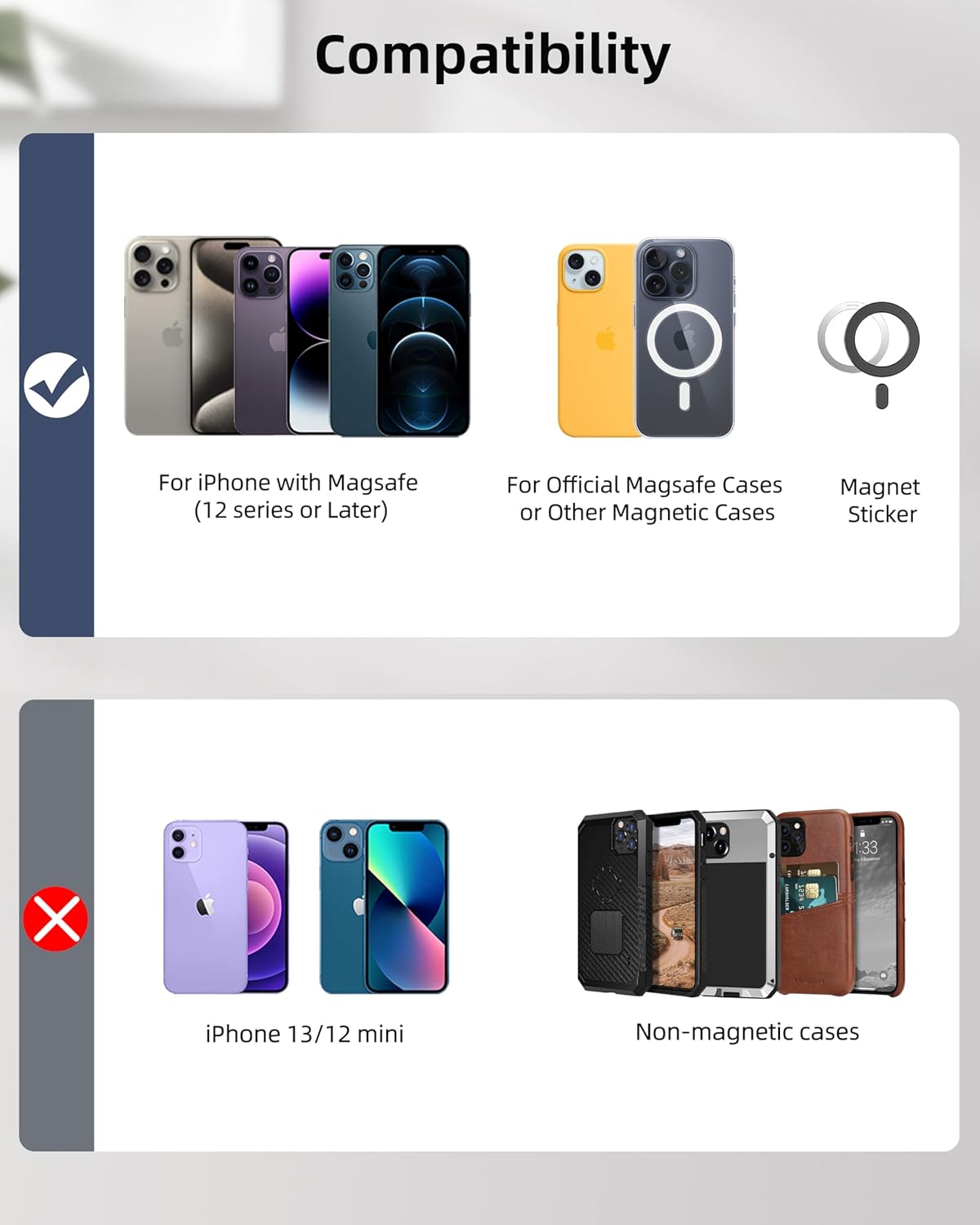
Image: Compatibility overview for various iPhone models and case types.
5. Тэхнічнае абслугоўванне
5.1 Бесправадная зарадка
The wallet supports wireless charging and lasts up to 6 months on a single charge. No special charging cable is required. Use a standard Magsafe wireless charger (not included).
- Індыкатар стану зарадкі: Orange light indicates charging. Green light indicates full charge.
- Становішча зарадкі: Due to opposing magnets between the wallet and some Magsafe wireless chargers, manual adjustment of the wallet's position may be necessary to align its magnetic ring with the charger's central position for optimal charging.

Image: Wireless charging provides up to 6 months of battery life on a single charge.

Image: The wallet supports magnetic wireless charging.
Video: Demonstration of how to wirelessly charge the Find My Magsafe Wallet.
5.2 Забеспячэнне якасці
Video: Shows the aging test process for Magsafe wallets to ensure 100% functionality.
6. Выпраўленне непаладак
6.1 Праблемы са спалучэннем
If you encounter difficulties pairing your wallet with the Find My app:
- Ensure your iPhone's Bluetooth is active and the wallet is within close proximity.
- Perform a factory reset on the wallet: Short press the power button 4 times, then long press for 3 seconds. After the reset, attempt to pair again.
6.2 Locating Your Wallet
The Find My app offers several features to help you locate your wallet:
- Real-time Location: View your wallet's current location on a map.
- Прайграванне гуку: If nearby (within Bluetooth range of 50m/164ft), play a sound on your wallet to help pinpoint its exact location.
- Left-Behind Notification: Receive alerts on your iPhone if you leave your wallet behind.
- Страчаны рэжым: Enable Lost Mode in the Find My app to leave a contact message for anyone who finds your wallet.

Image: Receive notifications if your wallet is left behind.

Image: Left-behind notifications help prevent loss.

Image: Use the 'Play Sound' feature in the Find My app to locate your wallet when it's nearby.
7. Тэхнічныя характарыстыкі
| Асаблівасць | Дэталь |
|---|---|
| Памеры | 4.0 х 2.6 х 0.59 цалі (10.2 х 6.5 х 1.5 см) |
| Вага прадмета | 4.2 унцыі |
| Матэрыял | Faux Leather, Magnet, Steel plate, Battery |
| акумулятар | 1 літый-палімерная батарэя (у камплекце) |
| Тэрмін службы батарэі | Да 6 месяцаў на адной зарадцы |
| Ёмістасць карты | Max 6 cards (3 individual slots) |
| Магнітная сіла | Up to 4200Gs |
| Кут падстаўкі | Adjustable between 15° to 170° |
| Асаблівасці | Card Holder, Magnetic Wallet with Full Find My Functionality, Phone Stand, Wallet Tracker with Adjustable Stand, RFID Blocking |
8. Гарантыя і падтрымка
Your ExtreLife Magsafe Wallet comes with full Find My functionality. If you encounter any problems or have questions, please do not hesitate to contact our friendly customer service team. We are committed to replying within 24 hours and offering a satisfactory solution.
Contact information is typically provided with your product packaging or on the official ExtreLife webсайт.