
Spacekey QIG-D01
Spacekey QIG-D01 Dehumidifier User Manual
Model: QIG-D01
1. Уводзіны
Thank you for choosing the Spacekey QIG-D01 Dehumidifier. This manual provides essential information for the safe and efficient operation of your new appliance. Please read it thoroughly before use and retain it for future reference. This dehumidifier is designed to reduce excess moisture in areas up to 850 square feet, such as basements, bedrooms, bathrooms, RVs, and closets, improving air quality and comfort.

Малюнак 1: Спераду view of the Spacekey QIG-D01 Dehumidifier, showing its white and black design with a digital display and visible water tank.

Figure 2: Visual representation of the dehumidifier's effectiveness in reducing room humidity.

Figure 3: Common issues resolved by maintaining optimal humidity levels with the dehumidifier.
2. Важныя інструкцыі па бяспецы
Каб знізіць рызыку пажару, паражэння электрычным токам або траўмаў, заўсёды выконвайце наступныя асноўныя меры засцярогі:
- Прачытайце ўсе інструкцыі перад выкарыстаннем прыбора.
- Не выкарыстоўвайце асушальнік паветра з пашкоджаным шнуром або вілкай.
- Пераканайцеся, што разетка правільна заземлена.
- Не закрывайце ўваходныя і выпускныя адтуліны для паветра.
- Трымайце прыладу далей ад вады і іншых вадкасцей.
- Адключыце асушальнік паветра ад сеткі перад чысткай або любым тэхнічным абслугоўваннем.
- Не дазваляйце дзецям працаваць з прыладай без нагляду.
- This appliance is equipped with a 45° tip-over protection feature. If the unit is tilted beyond 45 degrees, it will automatically shut off to prevent damage or spills.

Figure 4: Illustration of the dehumidifier's 45° tip-over protection, demonstrating automatic shutdown for safety.
3. Прадукт скончыўсяview
3.1 Components and Design Features
- Асноўны блок з панэллю кіравання
- Water Tank (3.0L / 106 oz capacity)
- Мыйны паветраны фільтр
- Шнур харчавання
- Integrated Handles for portability
- Visual Water Tank for easy monitoring
- 45° Tip-over Protection
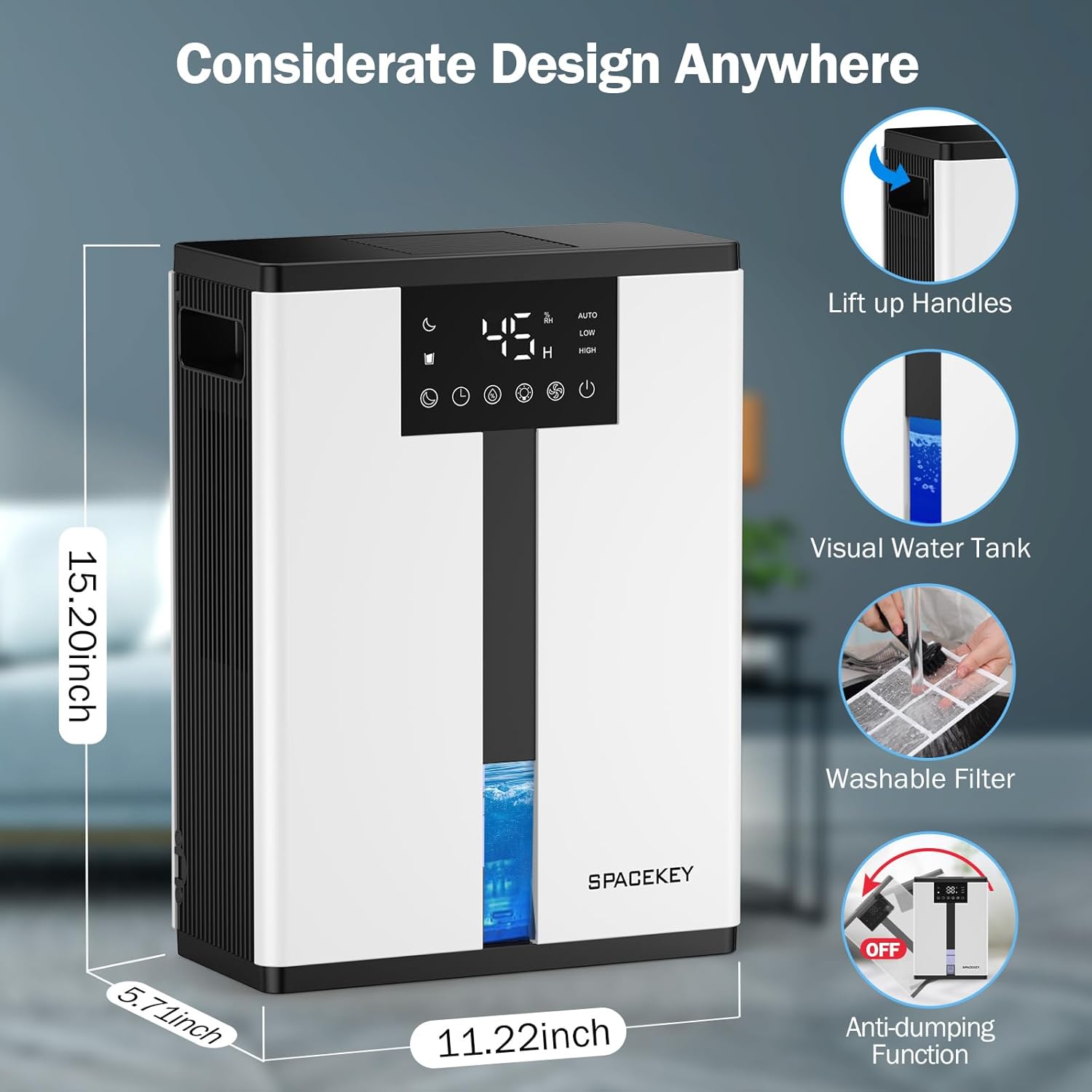
Figure 5: Key design elements and dimensions of the Spacekey QIG-D01 Dehumidifier.
3.2 Advanced Dehumidification Technology
The Spacekey QIG-D01 utilizes semiconductor condensation technology with dual fans and dual semiconductor condensers for enhanced efficiency in moisture removal.
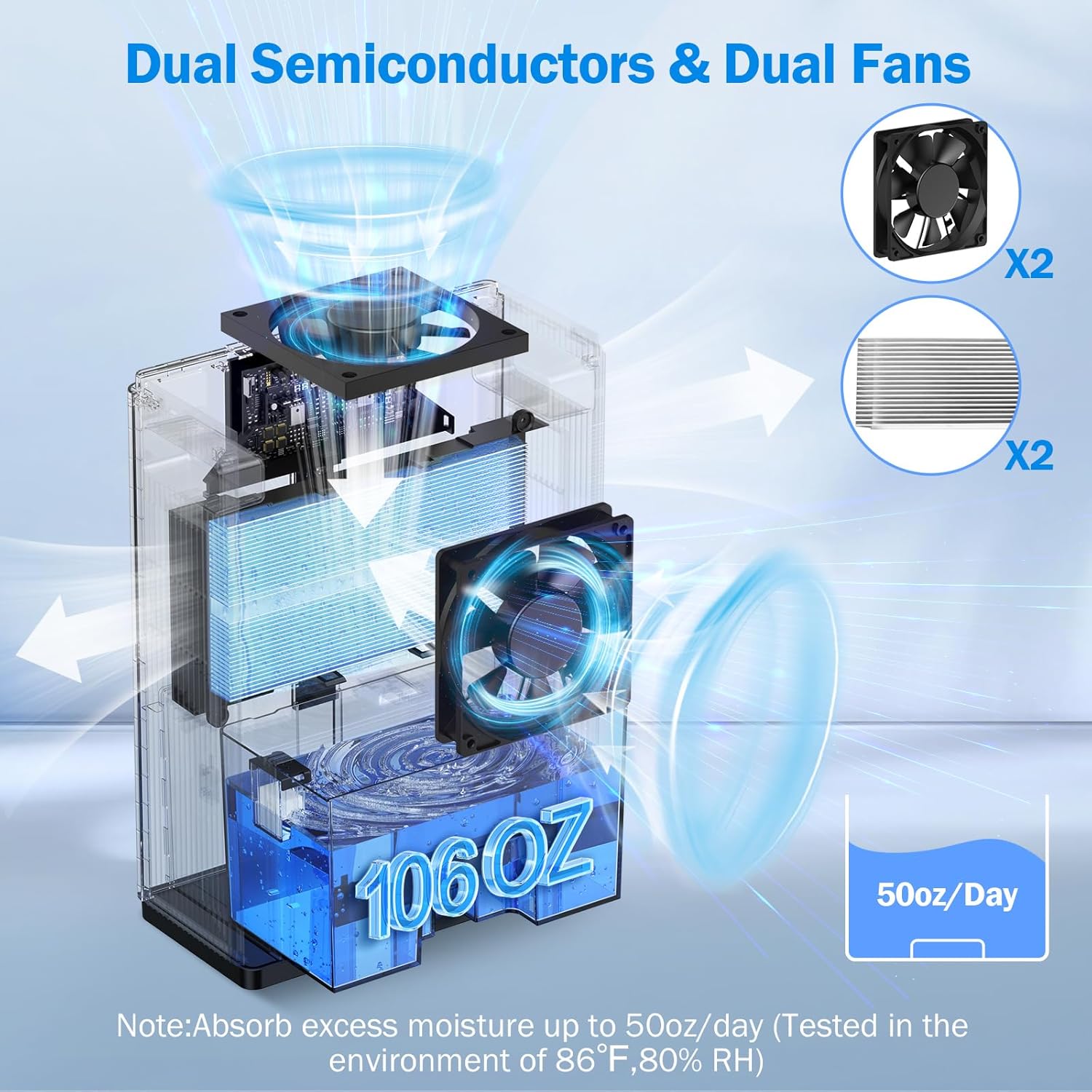
Малюнак 6: Унутраны view of the dual semiconductor and dual fan system for efficient dehumidification.
3.3 Панэль кіравання
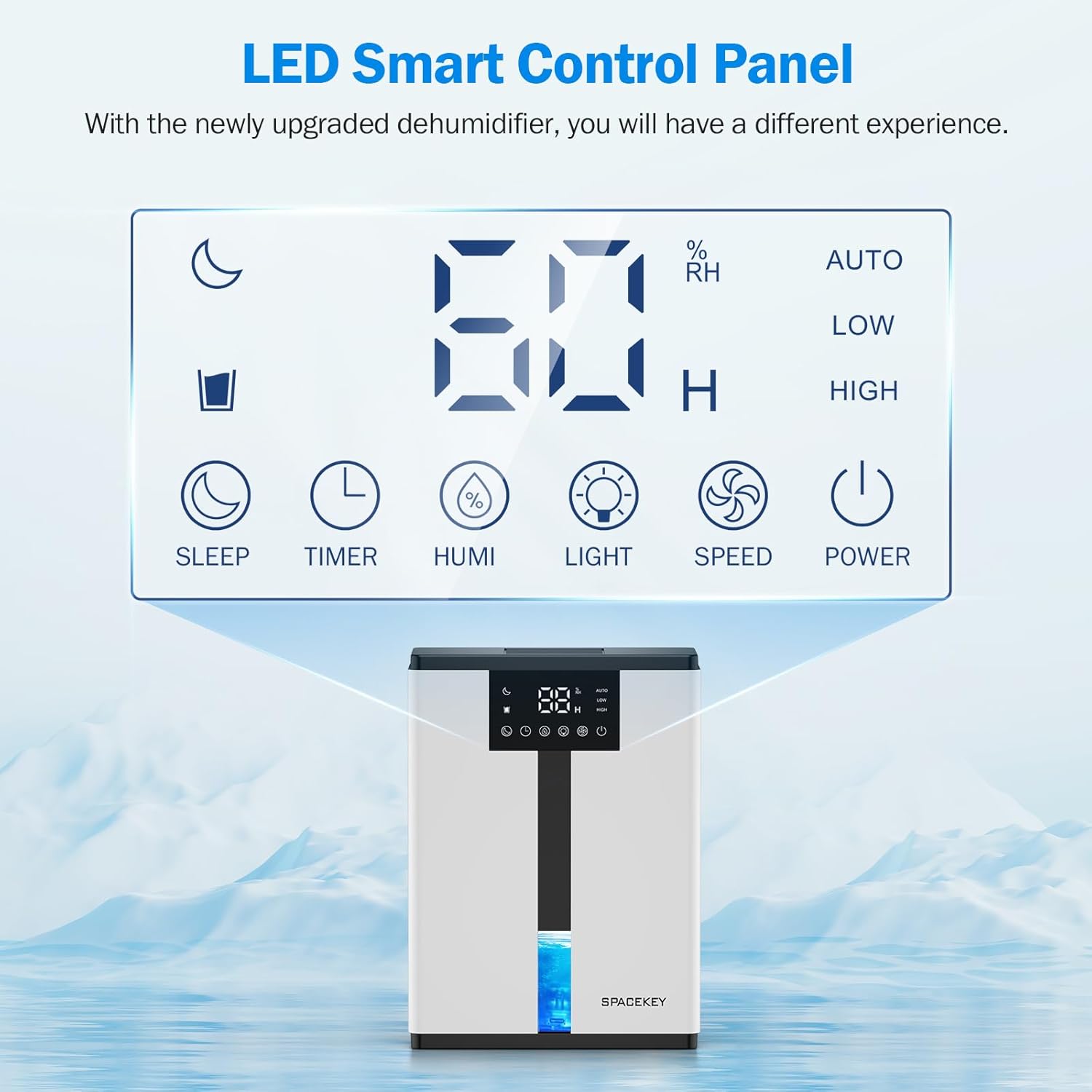
Figure 7: The LED Smart Control Panel, displaying current humidity and various function buttons.
The intuitive LED display shows real-time humidity. Buttons include:
- Рэжым сну: Activates quiet operation and can be used with colorful lights.
- Таймер: Sets operating duration (2H, 4H, 6H, 8H, 12H).
- HUMI: Adjusts target humidity (45%, 55%, 65%, or continuous '00').
- СВЯТЛО: Controls the 7-color ambient light.
- ХУТКАСЦЬ: Selects fan speed (Auto, Low, High).
- Магутнасць: Уключае/выключае прыладу.
4. Інструкцыі па ўсталёўцы
- Распакуйце: Асцярожна дастаньце асушальнік паветра з упакоўкі.
- Размяшчэнне: Place the unit on a flat, stable surface in the desired location. Ensure there is at least 8 inches (20 cm) of space around the air inlets and outlets for proper airflow.
- Падключэнне сілкавання: Падключыце шнур сілкавання да заземленай электрычнай разеткі.
- Першапачатковая праверка: Ensure the water tank is correctly inserted and empty before starting operation.

Figure 8: Recommended placement areas for the dehumidifier, highlighting its suitability for various indoor environments.
5. Інструкцыя па эксплуатацыі
5.1 Уключэнне/выключэнне сілкавання
Націсніце УЛАДА кнопку, каб уключыць або выключыць асушальнік.
5.2 Устаноўка ўзроўню вільготнасці
Націсніце ГУМІ button to cycle through desired humidity levels: 45%, 55%, 65%. The unit will operate until the set humidity is reached, then pause. If set to '00', the unit will operate continuously.

Figure 9: Setting the target humidity level using the HUMI button.
5.3 Рэгуляванне хуткасці вентылятара
Націсніце ХУТКАСЦЬ button to select between Auto, Low, and High fan speeds. Auto mode adjusts fan speed based on current humidity.
5.4 Функцыя таймера
Націсніце ТАЙМЕР button to set an operating duration of 2, 4, 6, 8, or 12 hours. The unit will automatically turn off after the set time.

Figure 10: Using the Timer function to set the operating duration.
5.5 Sleep Mode & Colorful Lights
Націсніце СПАЦЬ button to activate sleep mode for ultra-quiet operation (approx. 30dB). Press the СВЯТЛО button to cycle through 7 colorful ambient lights or select a static color. This feature can be used independently or in conjunction with sleep mode.
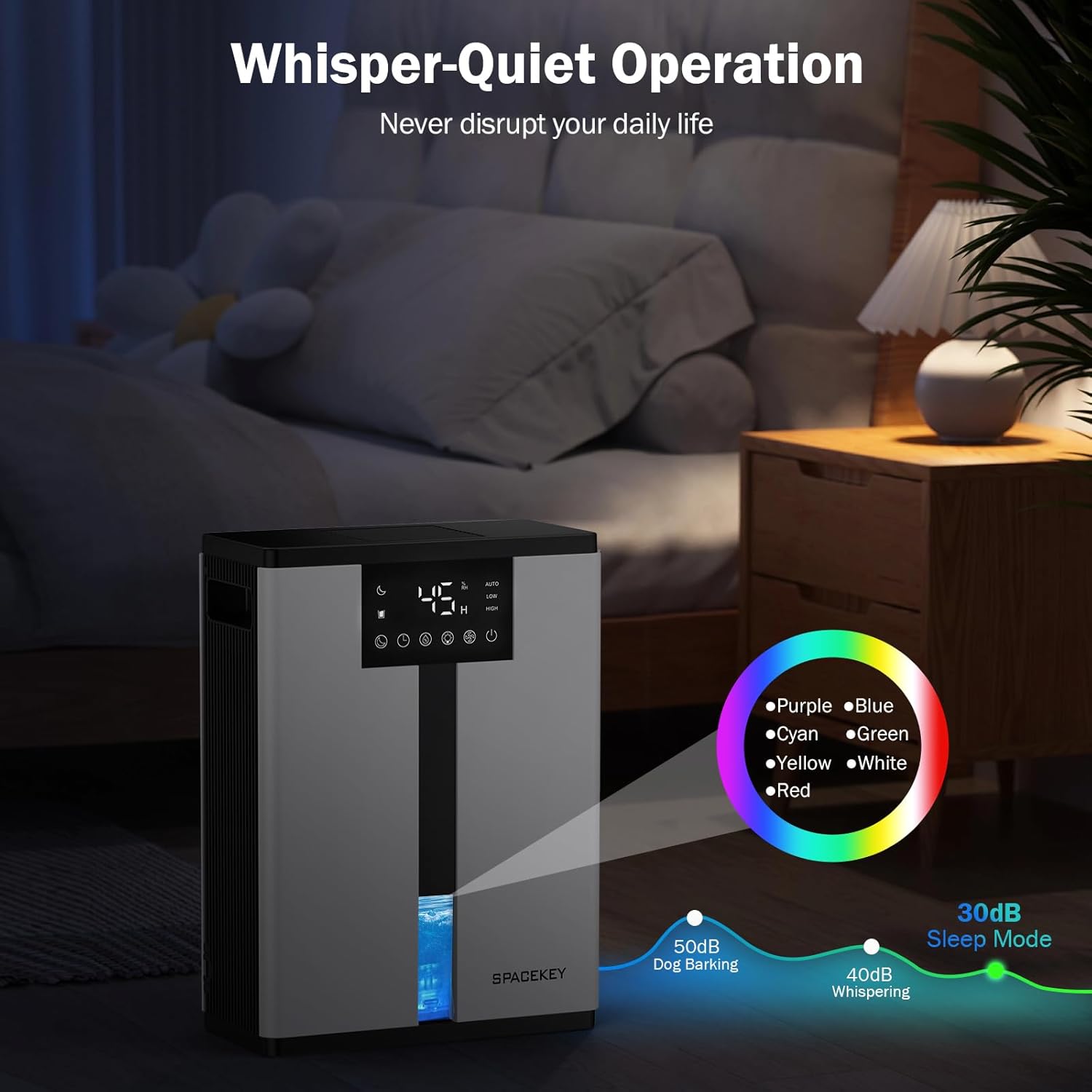
Figure 11: Dehumidifier in Sleep Mode with ambient lighting for a peaceful environment.
5.6 Аўтаматычнае адключэнне
The dehumidifier will automatically shut off and flash a red light with an audible beep when the water tank is full. Empty the water tank to resume operation.
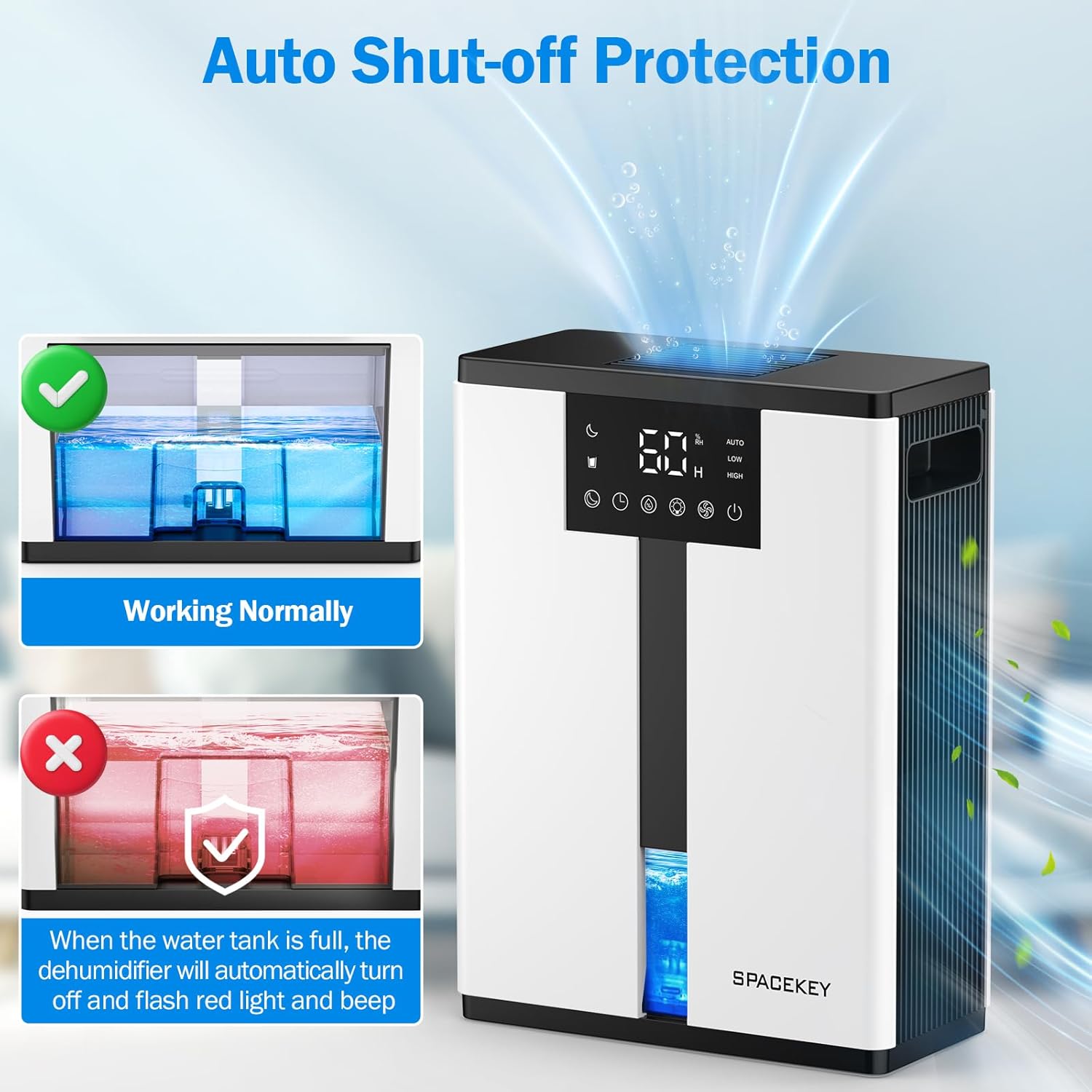
Figure 12: Automatic shut-off mechanism when the water tank is full.
6. Тэхнічнае абслугоўванне
6.1 Апаражненне рэзервуара для вады
- Акуратна выцягніце рэзервуар для вады з пярэдняй часткі прылады.
- Зніміце вечка бака.
- Выліце набраную ваду.
- Replace the lid and reinsert the water tank firmly into the dehumidifier.

Figure 13: Step-by-step guide to emptying the water tank.
6.2 Ачыстка паветранага фільтра
The washable filter should be cleaned regularly (every 2-4 weeks, depending on usage) to maintain optimal performance.
- Адключыце асушальнік ад сеткі.
- Зніміце фільтр з задняй панэлі прылады.
- Прамыйце фільтр пад праточнай вадой, каб выдаліць пыл і смецце.
- Дайце фільтру цалкам высахнуць на паветры, перш чым усталёўваць яго назад.
- Не выкарыстоўвайце асушальнік без фільтра.

Figure 14: Instructions for removing and washing the air filter.
6.3 Знешняя ачыстка
Працярыце знешнюю частку асушальніка мяккім, damp тканіна. Не выкарыстоўвайце абразіўныя ачышчальнікі або растваральнікі.
7. Выпраўленне непаладак
| праблема | Магчымая прычына | Рашэнне |
|---|---|---|
| Асушальнік паветра не ўключаецца. | Няма электрычнасці; шнур харчавання не падключаны да разеткі; рэзервуар для вады поўны або няправільна ўстаўлены. | Праверце падключэнне да электрасеткі; апаражніце і ўстаўце рэзервуар для вады правільна. |
| Вада не збіраецца або нізкі ўзровень асушвання. | Room humidity is already low; air filter is clogged; ambient temperature is too low; unit size is too small for the space. | Ensure humidity is above target; clean air filter; operate in recommended temperature range; consider unit placement or additional units for larger spaces. |
| Агрэгат шумны. | Fan speed is set to High; unit is not on a flat surface. | Switch to Low or Sleep mode; ensure unit is on a stable, flat surface. |
| Red light flashing and beeping. | Бак для вады поўны. | Empty the water tank and reinsert it. |
8. Тэхнічныя характарыстыкі
| Асаблівасць | Дэталь |
|---|---|
| Назва мадэлі | QIG-D01 |
| Марка | Прабел |
| Ёмістасць абязводжвання | Up to 50 oz (approx. 3 pints) per 24 hours (at 86°F, 80% RH) |
| Ёмістасць бака для вады | 3.0 Liters (106 Fluid Ounces) |
| Зона пакрыцця | Да 850 квадратных футаў |
| Энергаспажыванне | 70 Watts (not more than 1.68 kWh/Day) |
| Узровень шуму | Approx. 30dB (in Sleep Mode) |
| Памеры (Д x Ш x В) | 5.71" Г x 11.22" Ш x 15.2" У |
| Вага прадмета | 8.91 фунта |
| Асаблівасці | Automatic Shutoff, Intelligent Humidity Control, 4 Fan Speeds, Timer, 7 Colorful Lights, 45° Tip-over Protection, Washable Filter |
9. Гарантыя і падтрымка кліентаў
Spacekey offers the following support for your dehumidifier:
- Вяртанне грошай на працягу 30 дзён: For any dissatisfaction.
- 2-Year Replacement: For product defects or malfunctions.
- Пажыццёвае абслугоўванне кліентаў: Dedicated support for any questions or issues.
If you have any questions or require assistance, please do not hesitate to contact Spacekey customer support. We aim to reply within 24 hours.


Малюнак 15: Закончанаview of Spacekey's customer support and warranty policies.