
HOBOLITE HB110029
HOBOLITE Iris Portable LED Photography Light Standard Kit
Мадэль: HB110029
Brand: HOBOLITE
1. Уводзіны
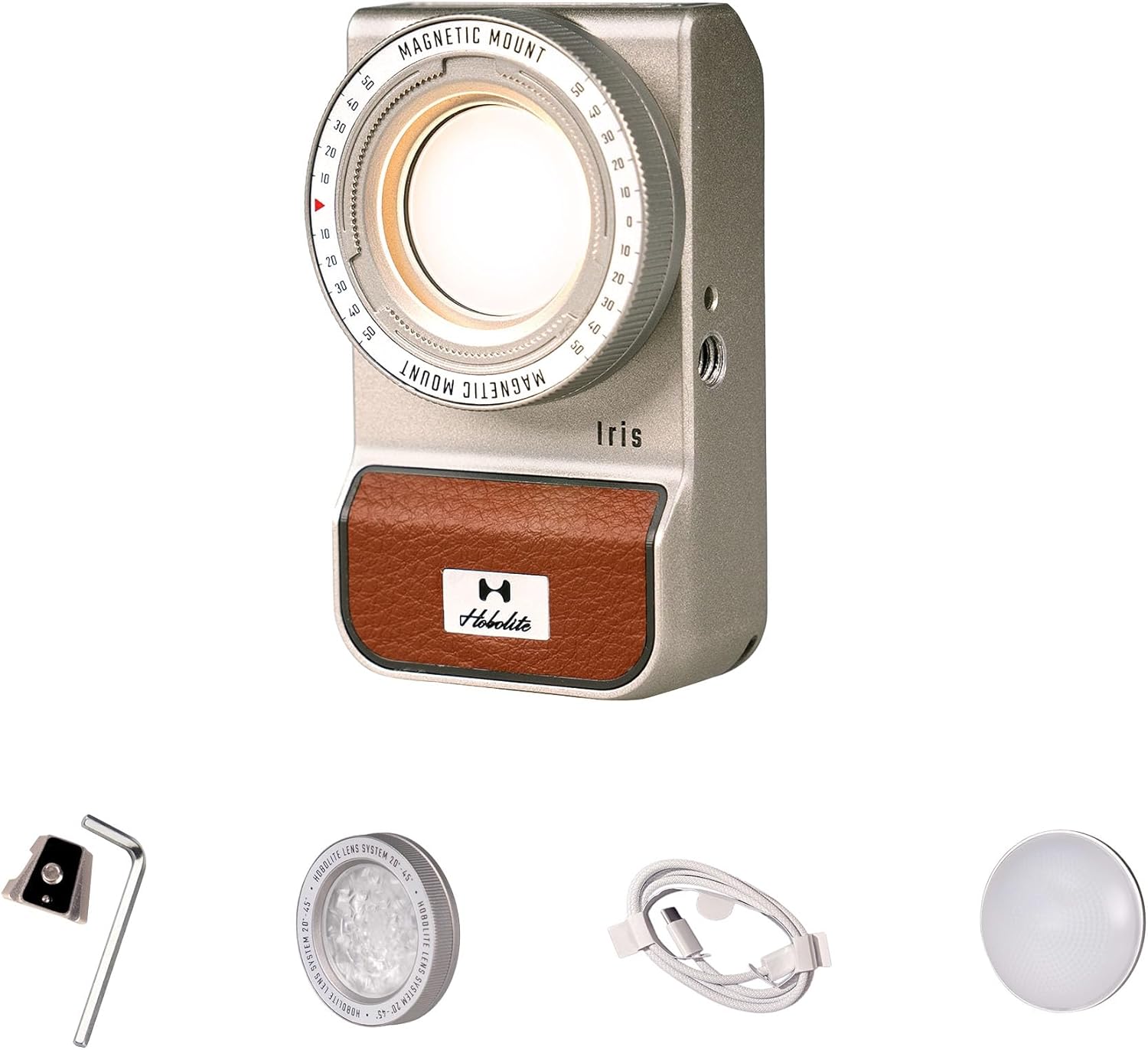
The HOBOLITE Iris is a compact and versatile 5W portable continuous LED lighting kit designed for content creators, photographers, and videographers. Its robust IP54-rated aluminum body ensures durability and resistance to dust and water, making it suitable for various indoor and outdoor environments. Featuring a high-contrast LCD display, precise control knob, and app control capabilities, the Iris light offers seamless adjustment of brightness and color temperature to enhance your creative projects.
2. Змесціва ўпакоўкі
Verify that all items listed below are included in your HOBOLITE Iris Standard Kit:
- 1 x Iris Light
- 1 x Adjustable Lens
- 1 x Frosted Dome
- 1 x V Mount Plate
- 1 х USB-кабель (тыпу C)
- 1 х сумка для захоўвання
- 1 х гаечны ключ

3. Настройка
3.1 Зарадка прылады
Before initial use, fully charge the HOBOLITE Iris light. Connect the provided USB Type-C cable to the charging port on the device and to a compatible USB power adapter (not included). The LCD display will indicate the charging status.

3.2 Варыянты мантажу
The Iris light offers flexible mounting solutions:
- V-Mount Interface: Use the included V-mount plate to connect the light to various camera rigs and adapters.
- 1/4" Screw Hole: Attach the light directly to tripods, light stands, or other accessories using the standard 1/4" screw thread.

3.3 Прымацаванне аксесуараў
The Iris light features an innovative magnetic mount system for quick attachment and detachment of accessories like the Adjustable Lens and Frosted Dome. Simply align the accessory with the front of the light until it snaps into place magnetically.
4. Інструкцыя па эксплуатацыі
4.1 Уключэнне/выключэнне сілкавання
Locate the power button on the side of the Iris light. Press and hold the button for a few seconds to power the device on or off.
4.2 Panel Control
The Iris light is equipped with a high-contrast LCD display and a knurled control knob for direct adjustments:
- Рэгуляванне яркасці: Rotate the control knob to adjust the brightness from 1% to 100%.
- Рэгуляванне каляровай тэмпературы: Press the control knob to switch between brightness and color temperature settings, then rotate to select a color temperature between 2700K and 6500K.
- Навігацыя па меню: Use the knob to navigate through menu options and confirm selections.

4.3 App Control (Bluetooth/NFC)
For enhanced control, download the official HOBOLITE app on your smartphone. The Iris light supports Bluetooth connectivity and NFC for quick pairing. Once connected, you can wirelessly adjust brightness, color temperature, and access various lighting effects from up to 65.6 feet (20 meters) away.
4.4 Lighting Effects and Accessories
The Iris light includes built-in lighting effects and supports optical accessories to expand creative possibilities:
- Каляровыя гелевыя фільтры: Utilize the four included color gel filters (Aurora, Golden Hour, Blue Hour, Spring Pastel) to create specific moods and atmospheres.
- Рэгуляваны аб'ектыў: The adjustable lens allows for focusing the light beam, increasing brightness and creating a more concentrated light source.
- Frosted Dome: The frosted dome diffuses the light, providing a softer and more even illumination.

5. Тэхнічнае абслугоўванне
To ensure the longevity and optimal performance of your HOBOLITE Iris light, follow these maintenance guidelines:
- Уборка: Use a soft, dry cloth to clean the exterior of the light. For stubborn dirt, a slightly damp можна выкарыстоўваць тканіну, а затым неадкладна высушыць. Пазбягайце абразіўных ачышчальнікаў або растваральнікаў.
- захоўванне: When not in use, store the light in its provided storage pouch in a cool, dry place away from direct sunlight and extreme temperatures.
- Воданепранікальнасць: The Iris light has an IP54 rating, meaning it is protected against dust and splashing water. While it can withstand light rain, avoid submerging it in water or exposing it to heavy downpours.

6. Выпраўленне непаладак
If you encounter issues with your HOBOLITE Iris light, refer to the following common solutions:
- Святло не загараецца: Ensure the device is fully charged. Connect it to a power source using the USB-C cable and allow it to charge for at least 30 minutes before attempting to power on again.
- Unable to Connect via App: Verify that Bluetooth is enabled on your smartphone and the Iris light. Ensure the app is up to date. Try restarting both the light and your smartphone.
- Непаслядоўная яркасць/колер: Check for any obstructions on the light's output. If using accessories, ensure they are properly attached. Perform a factory reset if the issue persists (refer to the app or device menu for this option).
- Кароткі тэрмін службы батарэі: Ensure the light is fully charged before use. Battery performance can degrade over time; if significantly reduced, contact support.
For further assistance, please contact HOBOLITE customer support.
7. Тэхнічныя характарыстыкі
| Асаблівасць | Спецыфікацыя |
|---|---|
| мадэль | Iris Standard Kit (HB110029) |
| Магутнасць | 5W |
| Светлавы паток (6500K) | 300LM |
| Увод | AC 100-240V, 50-60Hz, DC 5V |
| акумулятар | 3.7V 2000mAh, 7.4Wh (Lithium Ion) |
| CRI/TLCI | 96 |
| Каляровая тэмпература | 2700K-6500K |
| Зацямненне | 0-100% |
| Метады кантролю | Panel Control or App |
| Бесправадны метад | Bluetooth |
| Max Wireless Distance | 65.6 фута (20 м) |
| Клас абароны | IP54 |
| Вага прадмета | 1.04 фунта |
| Памеры ўпакоўкі | 5.94 х 4.06 х 3.5 цалі |
| Абсталяванне інтэрфейсу | USB тыпу C |
8. Гарантыя і падтрымка
HOBOLITE products are backed by a comprehensive warranty:
- Lights and Light Stands: Up to 36 months warranty period.
- батарэі: Up to 24 months warranty period.
For warranty claims, technical support, or additional product information, please visit the official HOBOLITE webсайт або звярніцеся ў службу падтрымкі кліентаў. Больш падрабязную інфармацыю вы таксама можаце знайсці на HOBOLITE Amazon Store.
Ask a question about this manual
Ask about setup, troubleshooting, compatibility, parts, safety, or missing instructions. Manuals+ will review the question and use this page’s manual context to help answer it.