
1. Уводзіны
This manual provides essential information for the installation, operation, and maintenance of your Diyeeni LGA 1155 DDR3 Motherboard. Please read these instructions carefully before proceeding with installation to ensure proper functionality and to prevent damage.
Змест пакета
- 1 x Diyeeni DDR3 Motherboard
- 1 x I/O Bracket
- Кабель 1 x SATA
- 1 х Кіраўніцтва карыстальніка

Малюнак 1.1: Зверху ўніз view of the Diyeeni LGA 1155 DDR3 Motherboard.
2. Настройка і ўстаноўка
Proper installation is crucial for the stability and performance of your computer system. Always handle the motherboard by its edges and avoid touching components directly to prevent electrostatic discharge (ESD) damage. It is recommended to wear an anti-static wrist strap during installation.
2.1 Усталёўка працэсара
- Знайдзіце раз'ём працэсара LGA 1155 на матчынай плаце.
- Акуратна націсніце на рычаг нагрузкі ўніз і пацягніце яго ўбок, каб адкрыць вечка раздыма працэсара.
- Carefully align the CPU with the socket, ensuring the gold triangle on the CPU matches the indicator on the socket. Do not force the CPU into the socket.
- Lower the load plate and secure it with the load lever.
Важна: Incorrect CPU installation can bend pins, rendering the motherboard unusable. Verify CPU compatibility and alignment carefully.
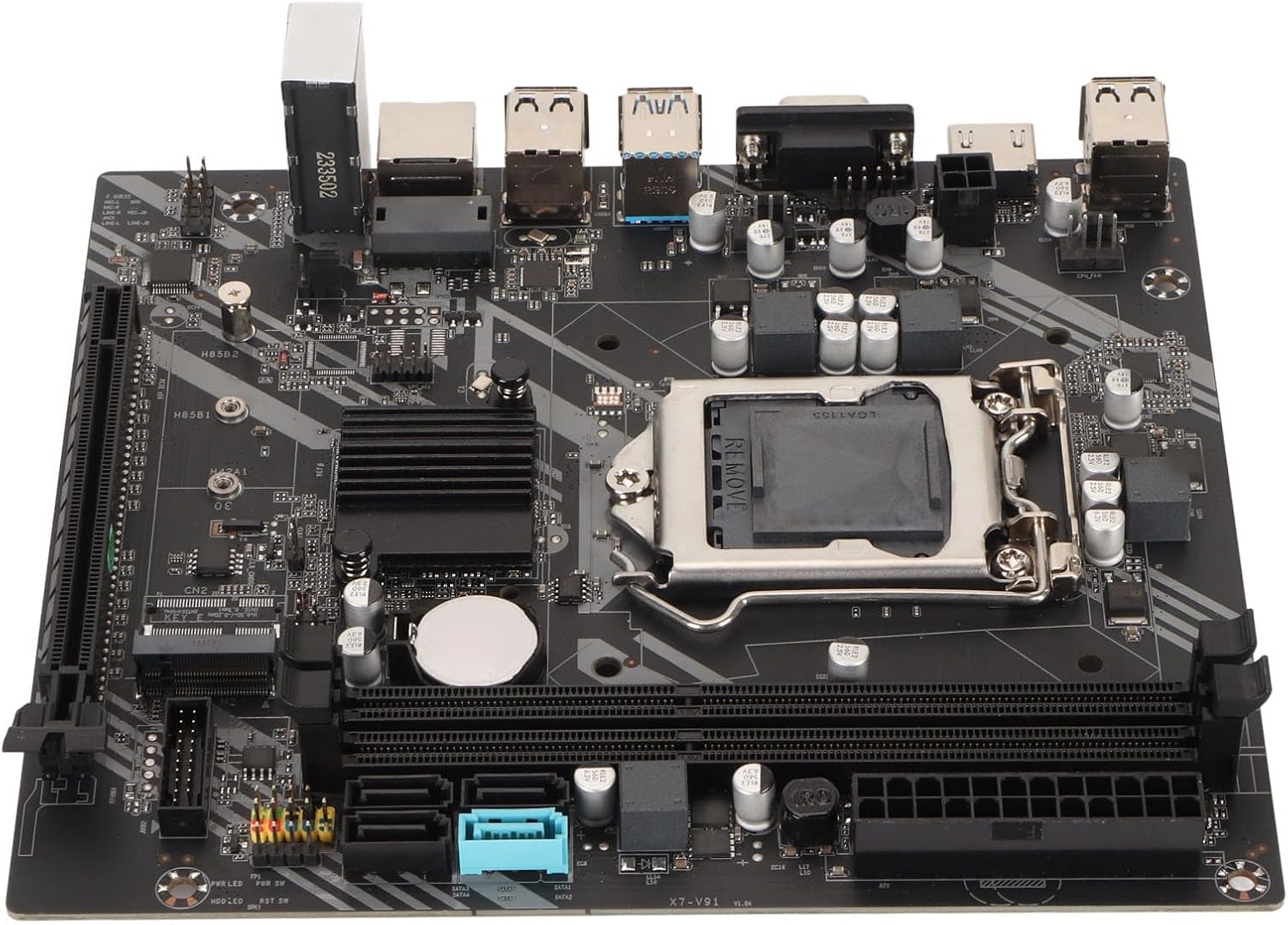
Малюнак 2.1: Буйны план view працэсарнага раздыма LGA 1155 і слотаў для аператыўнай памяці DDR3.
2.2 Усталёўка памяці (RAM)
- Адкрыйце зашчапкі з абодвух канцоў слотаў памяці DDR3.
- Сумясціце выемку на модулі памяці DDR3 з ключом у слоце памяці.
- Моцна націсніце на абодва канцы модуля памяці, пакуль зашчапкі не зафіксуюцца.
2.3 Устаноўка запамінальнай прылады
- Дыскі SATA: Connect SATA data cables from your storage devices (HDDs/SSDs) to the SATA 2.0 or SATA 3.0 interfaces on the motherboard. Connect SATA power cables from your power supply to the drives.
- Цвёрдацельны назапашвальнік M.2 NVMe: Insert the M.2 NVMe SSD into the dedicated M.2 slot (PCIe channel) and secure it with the provided screw.
2.4 Graphics Card Installation (PCIe X16)
- Locate the PCIe X16 graphics card slot.
- Зніміце адпаведную вечка слота пашырэння з корпуса кампутара.
- Align your graphics card with the slot and press down firmly until it is seated correctly and the retention clip locks.
- Замацуеце відэакарту да корпуса шрубай.
2.5 Падключэнне сілкавання
- Connect the 24-pin ATX power connector from your power supply to the 24-pin power interface on the motherboard.
- Connect the 4-pin CPU power connector from your power supply to the 4-pin power socket near the CPU.
2.6 Падключэнні пярэдняй панэлі і ўваходных/выхадных раздымаў
Connect the front panel headers (power button, reset button, HDD LED, power LED) and USB 2.0/3.0 headers to their respective pins on the motherboard. Refer to the motherboard's silkscreen labels for correct pin assignments.

Малюнак 2.2: Пад вуглом view of the motherboard, highlighting expansion slots and connectors.
3. Кіраванне матчынай платай
Once all components are installed and connected, you can power on your system. The Diyeeni LGA 1155 DDR3 Motherboard provides a stable platform for your computing needs.
3.1 Integrated Graphics and Audio
This motherboard features an integrated graphics card and a 6-channel audio chip. For video output, connect your display to the VGA or HD Multimedia Interface (HDMI) port on the I/O panel. For audio, use the integrated audio jacks.

Малюнак 3.1: падрабязна view of the I/O panel, including audio, LAN, and USB ports.
3.2 Падключэнне
- Парты USB: Utilize the 4 x USB 2.0 and 2 x USB 3.0 ports for connecting peripherals.
- Сетка: The integrated RJ45 port provides reliable high-speed internet connectivity.
3.3 Налада BIOS/UEFI
To access the BIOS/UEFI setup utility, press the designated key (usually DEL or F2) during system startup. Here you can configure boot order, system time, and other advanced settings.
4. Тэхнічнае абслугоўванне
To ensure the longevity and optimal performance of your motherboard, consider the following maintenance tips:
- Трымайце яго ў чысціні: Regularly clean dust from inside your PC case, especially around the motherboard and CPU cooler, using compressed air. Dust accumulation can lead to overheating.
- Правільная вентыляцыя: Ensure your PC case has adequate airflow to dissipate heat generated by components.
- Абнаўленні BIOS: Перыядычна правярайце інфармацыю вытворцы website for BIOS/UEFI updates. Updates can improve compatibility, stability, and performance.
- Замена батарэі: The motherboard uses a CR2032 button battery for the CMOS. If you experience issues with system time or BIOS settings resetting, the battery may need replacement.
5. Выпраўленне непаладак
Калі ў вас узніклі праблемы з матчынай платай, звярніцеся да наступных распаўсюджаных крокаў па ліквідацыі непаладак:
- Няма харчавання/няма загрузкі:
- Check all power connections (24-pin ATX, 4-pin CPU) are securely seated.
- Пераканайцеся, што блок харчавання спраўны і ўключаны.
- Праверце падключэнне кнопкі харчавання на пярэдняй панэлі да матчынай платы.
- Няма дысплея:
- Ensure your monitor is connected to the correct video output (either integrated graphics or a dedicated graphics card).
- Пераўсталюйце відэакарту і модулі аператыўнай памяці.
- Паспрабуйце загрузіцца толькі з адной планкай аператыўнай памяці.
- Нестабільнасць/збоі сістэмы:
- Check for proper CPU cooler installation and thermal paste application.
- Ensure RAM modules are correctly seated and compatible.
- Update drivers for your components (chipset, graphics, audio).
- CPU Pin Damage: As noted by some users, incorrect CPU installation can lead to bent pins. Always align the CPU carefully with the socket's orientation marks and avoid applying excessive force. If pins are bent, professional repair may be required.
6. Тэхнічныя характарыстыкі
Below are the detailed technical specifications for the Diyeeni LGA 1155 DDR3 Motherboard:
| Асаблівасць | Спецыфікацыя |
|---|---|
| Тып прадмета | Матчына плата DDR3 |
| Матэрыял | Друкаваная плата |
| Платформа працэсара | For Core 2nd and 3rd Gen |
| Гняздо працэсара | LGA 1155 |
| Тып чыпсэта | Intel H77 Express (Compatible with B75) |
| Тып памяці | DDR3 1600/1333/1066 МГц |
| Слоты памяці | 2 х DDR3 |
| Слот для відэакарты | 1 х PCIe X16 |
| Слот M.2 | 1 x M.2 NVMe (PCIe Channel) |
| Інтэрфейсы SATA | 3 x SATA 2.0, 1 x SATA 3.0 |
| Парты USB 2.0 | 4 (Rear I/O) + 1 x USB 2.0 Pin (Internal) |
| Парты USB 3.0 | 2 (Rear I/O) + 1 x USB 3.0 Pin (Internal) |
| Відэавыхад | 1 x VGA Port, 1 x HD Multimedia Interface (HDMI) |
| порт LAN | 1 порт RJ45 |
| Аўдыячып | Integrated 6 Channel Sound Chip |
| Разеткі | 1 x 4-Pin, 1 x 24-Pin |
| Фаза сілкавання | 3-фазнае сілкаванне |
| Акумулятар CMOS | 1 x CR2032 Button Battery (240mAh) |
| Памеры (прыбл.) | 27 х 21 х 5 см |
| Вага (прыбл.) | 528 г |
7. Гарантыя і падтрымка
For warranty information, technical support, and further assistance, please refer to the retailer where you purchased this product or visit the official Diyeeni brand store.
Diyeeni Store: https://www.amazon.ca/stores/Diyeeni/page/1195A89A-7EEE-4D74-A4F7-05DAA074380B