
1. Важная інфармацыя па бяспецы
Please read all safety warnings and instructions carefully before assembling and operating your Masterbuilt Gravity Series XT Digital Charcoal Barbecue and Smoker. Failure to follow these instructions could result in property damage, bodily injury, or even death.
- Толькі для вонкавага выкарыстання: Гэта прылада прызначана толькі для выкарыстання на вуліцы. Не выкарыстоўвайце яе ў памяшканні або ў закрытых памяшканнях.
- афармленне: Maintain a minimum distance of 10 feet (3 meters) from combustible materials, walls, or structures.
- Электрабяспека: Always connect to a properly grounded outlet. Do not use extension cords unless absolutely necessary and ensure they are rated for outdoor use and the appliance's power requirements. Keep electrical components dry.
- Гарачыя паверхні: The grill and its components become extremely hot during operation. Use heat-resistant gloves and avoid direct contact with hot surfaces. Keep children and pets away.
- Charcoal Handling: Use only lump charcoal or briquettes. Never use lighter fluid, gasoline, or other volatile liquids to ignite charcoal. Always allow charcoal to cool completely before disposing of ash.
- Небяспека чаднага газу: Burning charcoal produces carbon monoxide, which is odorless and can be deadly. Do not burn charcoal inside homes, vehicles, tents, or any enclosed areas.
- Стабільнасць: Ensure the grill is placed on a level, stable surface to prevent tipping.
2. Прадукт скончыўсяview
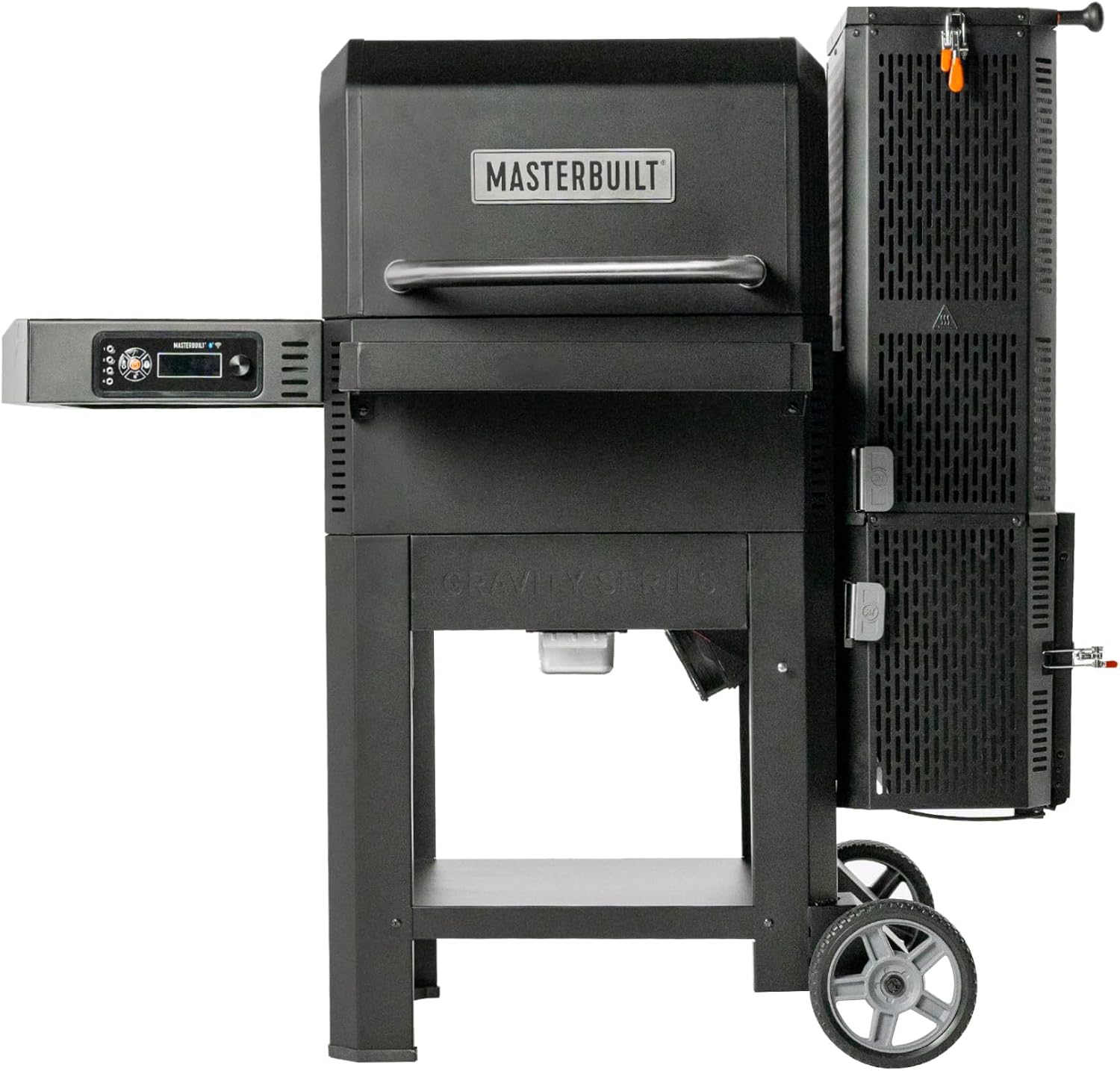
The Masterbuilt Gravity Series XT Digital Charcoal Barbecue and Smoker combines the flavor of charcoal with the convenience of digital control. Its innovative GravityFed™ charcoal hopper allows for extended cooking times, while the DigitalFan™ maintains precise temperature control. With Wi-Fi connectivity, you can monitor and control your cook from anywhere using the Masterbuilt app.

3. Інструкцыя па зборцы
The Masterbuilt Gravity Series XT requires assembly. Due to its weight (approximately 76.2 kg / 168 lbs), it is recommended to have at least two people for assembly. Refer to the separate detailed assembly guide included in your product packaging for step-by-step instructions and diagrams.
Этапы агульнай зборкі:
- Распакуйце ўсе кампаненты і звярніцеся да спісу дэталяў.
- Attach the leg assemblies and wheels to the main body.
- Secure the side shelves and digital control panel.
- Install the GravityFed hopper and ash drawer.
- Place the cooking grates and heat deflectors.
- Пераканайцеся, што ўсе крапежныя элементы надзейна зацягнуты.
4. Усталёўка і першае выкарыстанне
4.1 Initial Burn-In / Seasoning
Before cooking food, perform an initial burn-in to remove any manufacturing oils and season the grates. This process helps prevent rust and creates a non-stick surface.
- Ensure all internal components (grates, heat deflectors) are clean.
- Load the GravityFed hopper with charcoal.
- Set the temperature to 175°C (350°F) and run for 1 hour.
- Increase the temperature to 200°C (400°F) and run for another 30 minutes.
- Дайце грылю цалкам астыць.
4.2 Падключэнне да сілкавання
Plug the power cord into a grounded electrical outlet. The digital control panel will illuminate.
4.3 Wi-Fi Setup and App Connection
The Masterbuilt Gravity Series XT features Wi-Fi technology, allowing control via the Masterbuilt app.
- Download the Masterbuilt app from your device's app store.
- Follow the in-app instructions to create an account and pair your grill.
- Ensure your grill is powered on and within range of your Wi-Fi network.

5. Аперацыя
5.1 Loading Charcoal
The GravityFed™ hopper holds up to 5.4 kg (12 lbs) of lump charcoal or 8.2 kg (18 lbs) of briquettes, allowing for up to 18 hours of low-and-slow cooking.
- Open the lid of the GravityFed hopper.
- Pour charcoal into the hopper. Do not overfill.
- Шчыльна зачыніце вечка бункера.
5.2 Lighting the Charcoal
- Open the ash drawer at the bottom of the hopper.
- Place a fire starter (e.g., tumbleweed, paraffin cube) in the designated area within the ash drawer.
- Запаліце распальвальнік.
- Push the ash drawer back in, ensuring it is fully closed.
- Open the air intake slide at the bottom of the hopper to allow airflow.

5.3 Наладжванне тэмпературы
Use the digital control panel or the Masterbuilt app to set your desired cooking temperature. The DigitalFan™ will automatically adjust airflow to maintain the set temperature, ranging from 107°C (225°F) to 370°C (700°F).
- Павярніце ручку кіравання, каб выбраць патрэбную тэмпературу.
- Націсніце ручку, каб пацвердзіць.
- Monitor the temperature on the display or via the app.
5.4 Cooking Methods
The Gravity Series XT is versatile, supporting various cooking methods:
- Грыль: Use higher temperatures (200°C - 370°C / 400°F - 700°F) for searing and direct grilling. The reversible cast-iron grates are ideal for high-temperature cooking.
- Курэнне: Use lower temperatures (107°C - 135°C / 225°F - 275°F) for long, slow cooks to infuse smoky flavor.
- Смажэнне: Medium temperatures (150°C - 175°C / 300°F - 350°F) are suitable for roasting larger cuts of meat or poultry.


5.5 Using Meat Probes
The grill includes ports for meat probes to monitor internal food temperature. Plug the probes into the designated ports on the control panel and insert them into the thickest part of your food, avoiding bone. Monitor temperatures via the digital display or the Masterbuilt app.
6. Тэхнічнае абслугоўванне
Regular cleaning and maintenance will extend the life of your Masterbuilt Gravity Series XT.
6.1 Cleaning Grates
Clean cooking grates after each use. While warm, scrape off food residue with a grill brush. For a deeper clean, remove grates and wash with warm, soapy water, then rinse and dry thoroughly.
6.2 Выдаленне попелу
Empty the ash drawer after each cook once the grill has completely cooled. Excessive ash buildup can restrict airflow and affect performance.
6.3 Генеральная ўборка
Працярыце знешнія паверхні рэкламайamp cloth and mild detergent. Avoid abrasive cleaners. Ensure all electrical components remain dry.
6.4 Захоўванне
Store the grill in a dry, covered area when not in use. If storing outdoors, use a Masterbuilt-approved grill cover to protect it from the elements.
7. Выпраўленне непаладак
Звярніцеся да гэтага раздзела, каб даведацца пра распаўсюджаныя праблемы і іх рашэнні.
| праблема | Магчымая прычына | Рашэнне |
|---|---|---|
| Grill not reaching set temperature | Insufficient charcoal, ash drawer not fully closed, air intake slide closed, fan malfunction. | Add more charcoal, ensure ash drawer is closed, open air intake, check fan connection, contact support if fan is faulty. |
| Temperature fluctuates widely | Lid or hopper not sealed, strong winds, dirty temperature probe. | Ensure all lids and doors are properly sealed, position grill away from strong winds, clean temperature probe. |
| Праблемы з падключэннем да Wi-Fi | Grill out of Wi-Fi range, incorrect network password, app issues. | Move grill closer to router, re-enter Wi-Fi password, restart app and grill, check router settings. |
| Празмернае задымленне | Too much wood added, improper airflow, grease buildup. | Use wood chunks sparingly, ensure proper airflow, clean grill thoroughly to remove grease. |
8. Тэхнічныя характарыстыкі
Key technical specifications for the Masterbuilt MB20043024 Gravity Series XT.

| Асаблівасць | Дэталь |
|---|---|
| Нумар мадэлі | MB20043024 |
| Марка | Выбудаваны |
| Памеры (Д х Ш х У) | 84 х 153 х 132 см (33 х 60 х 52 цалі) |
| Вага прадмета | 76.2 кг (168 фунтаў) |
| Матэрыял | Нержавеючая сталь |
| Тып паліва | драўняны вугаль |
| Дыяпазон тэмператур | Ад 107°C да 370°C (ад 225°F да 700°F) |
| Charcoal Hopper Capacity | 5.4 kg (12 lbs) lump charcoal / 8.2 kg (18 lbs) briquettes |
| Сувязь | Wi-Fi |
| UPC | 094428285972 |
9. Гарантыя і падтрымка
Masterbuilt products are designed for durability and performance. For information regarding your product's warranty, please refer to the warranty card included with your purchase or visit the official Masterbuilt website. For technical support, replacement parts, or further assistance, please contact Masterbuilt customer service through their webсайт або кантактную інфармацыю, указаную ў дакументацыі да прадукту.