
Уводзіны
The JBL Soundgear Frames are innovative Bluetooth audio glasses designed to provide an immersive audio experience while allowing you to remain aware of your surroundings. Equipped with ultra-slim speakers, an integrated microphone, and touch controls, these frames offer seamless connectivity for music, calls, and video conferences. This manual provides essential information for setting up, operating, and maintaining your Soundgear Frames.
Што ў скрынцы
Carefully unpack your JBL Soundgear Frames and ensure all items are present:
- JBL Soundgear Frames (Onyx)
- Зарадны кабель
- Анучка для чысткі
- Сумка для пераноскі
Заўвага: Дадатковыя аксэсуары могуць прадавацца асобна.
Настройка
1. Зарадка прылады
Before first use, fully charge your JBL Soundgear Frames. Connect the provided charging cable to the charging port on the frames and to a USB power source. The LED indicator will show charging status.

Выява: Збоку view of the JBL Soundgear Frames, highlighting the charging port and internal electronics within the temple arms.
- Час зарадкі: Прыкладна 2 гадзіны для поўнай зарадкі.
- Тэрмін службы батарэі: Up to 8 hours of audio playback on a full charge.
2. Спарванне Bluetooth
To connect your Soundgear Frames to a Bluetooth-enabled device:
- Ensure the Soundgear Frames are charged and powered off.
- Press and hold the power button (usually located on one of the temple arms) until the LED indicator flashes blue, indicating pairing mode.
- На вашай прыладзе (смартфоне, планшэце, камп'ютары) перайдзіце ў налады Bluetooth і ўключыце Bluetooth.
- Select "JBL Soundgear Frames" from the list of available devices.
- Пасля падлучэння святлодыёдны індыкатар загарыцца сінім.
The frames support Bluetooth 5.2 for stable and efficient wireless connectivity.
Інструкцыя па эксплуатацыі
Уключэнне/выключэнне харчавання
- Уключэнне: Націсніце і ўтрымлівайце кнопку харчавання на працягу 2 секунд. Святлодыёдны індыкатар загарыцца.
- Выключэнне: Націсніце і ўтрымлівайце кнопку харчавання на працягу 3 секунд. Святлодыёд пагасне.
Прайграванне музыкі
Use the touch controls located on the temple arms to manage your audio:
- Прайграванне/Паўза: Single tap on either temple arm.
- Наступны трэк: Double tap on the right temple arm.
- Папярэдні трэк: Double tap on the left temple arm.
- Павялічыць гучнасць: Swipe forward on the right temple arm.
- Паменшыць гучнасць: Swipe backward on the right temple arm.
Кіраванне званкамі
The integrated microphone allows for clear hands-free calls:
- Адказ/завяршэнне выкліку: Single tap on either temple arm.
- Адхіліць выклік: Press and hold either temple arm for 2 seconds.
Галасавы памочнік
Activate your device's voice assistant (e.g., Siri, Google Assistant) by triple-tapping on either temple arm.

Image: A person wearing the JBL Soundgear Frames outdoors, demonstrating their use in a real-world setting.
Тэхнічнае абслугоўванне
Уборка
To maintain the clarity of your lenses and the integrity of the frames:
- Выкарыстоўвайце прыкладзеную ачышчальную сурвэтку, каб акуратна працерці лінзы і аправу.
- Для выдалення ўстойлівых плям выкарыстоўвайце спрэй для чысткі лінзаў, спецыяльна прызначаны для акуляраў.
- Avoid using abrasive materials or harsh chemicals, as these can damage the lenses and frame finish.
Захоўванне
When not in use, store your Soundgear Frames in the provided carrying case to protect them from scratches and impacts.
Сыход за батарэяй
To prolong battery life, avoid exposing the frames to extreme temperatures. If storing for an extended period, charge the battery to approximately 50% before storage.
Ліквідацыю непаладак
| праблема | Рашэнне |
|---|---|
| Frames do not power on. | Пераканайцеся, што акумулятар зараджаны. Падключыце да крыніцы харчавання і паспрабуйце яшчэ раз. |
| Немагчыма падключыцца праз Bluetooth. | Make sure the frames are in pairing mode (flashing blue LED). Check your device's Bluetooth settings and forget previous connections if necessary. Restart both devices. |
| Няма гуку або нізкі ўзровень гучнасці. | Check the volume level on both the frames and your connected device. Ensure the frames are properly paired. |
| Сэнсарныя элементы кіравання не рэагуюць. | Ensure the touch surface is clean and dry. Restart the frames. |
Тэхнічныя характарыстыкі
| Асаблівасць | Дэталь |
|---|---|
| Нумар мадэлі | JBLSNDGEARFMSRONX |
| UPC | 050036399845 |
| Колер | Анікс |
| Форма элемента | Круглая |
| Колер лінзы | Чорны |
| Тып аб'ектыва | Непалярызаваны |
| Матэрыял каркаса | Тэрмапластык |
| Пакрыццё кадра | Поўны кадр |
| Сувязь | Bluetooth 5.2 |
| Выступоўцы | Ultra-slim 25mm x 9mm |
| Мікрафон | Інтэграваны |
| Элементы кіравання | Дакранацца |
| Тэрмін службы батарэі | Да 8 гадзін |
| Час зарадкі | Прыкладна 2 гадзіны |
| Воданепранікальнасць | IP54 (Splash and dust resistant) |
| Рэкамендуемае выкарыстанне | Слуханне музыкі |
| Узроставы дыяпазон | Дарослы |
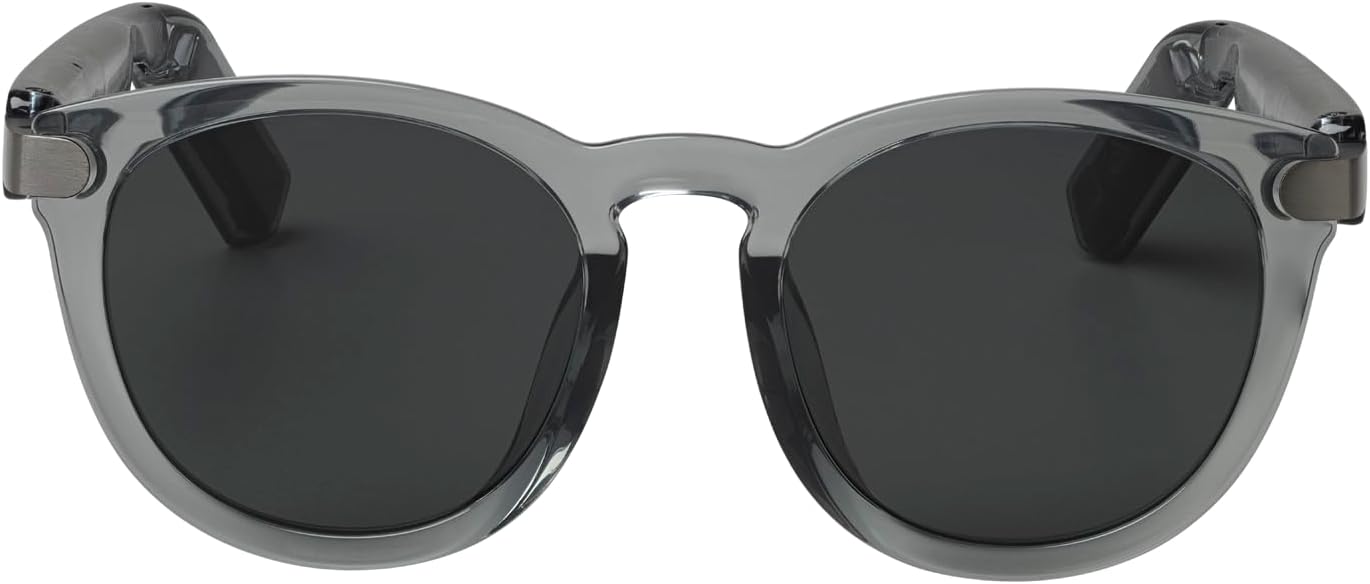
Выява: спераду view of the JBL Soundgear Frames, showcasing the round, full-frame design and black non-polarized lenses.

Выява: Спіна view of the JBL Soundgear Frames, showing the overall structure from the rear.
Гарантыя і падтрымка
JBL products are designed for reliability and performance. For warranty information and customer support, please refer to the warranty card included with your product or visit the official JBL website. You can also find FAQs and additional support resources online.
Інтэрнэт-падтрымка: www.jbl.com/support