
1. Прадукт скончыўсяview
The NEWSKILL Chiron Pro is an ambidextrous wireless gaming mouse designed for precision and comfort. It features a high-performance optical sensor, programmable buttons, and customizable RGB lighting.

Выява: Пад вуглом view of the NEWSKILL Chiron Pro Wireless Gaming Mouse, showcasing its ergonomic shape and design.
2. Змесціва ўпакоўкі
- NEWSKILL Chiron Pro Wireless Gaming Mouse
- Бесправадны прыёмнік USB 2.4 ГГц
- USB-C да USB-A кабель для зарадкі/дадзеных
- Кіраўніцтва карыстальніка (гэты дакумент)
3. Інструкцыі па ўсталёўцы
3.1 Першапачатковая зарадка
Before first use, it is recommended to fully charge the mouse. Connect the provided USB-C cable to the mouse's front port and the USB-A end to a powered USB port on your computer or a USB wall adapter. A full charge takes approximately 2 hours and provides up to 80 hours of usage.

Выява: спераду view мышы, вылучаючы порт зарадкі USB-C.
3.2 Бесправадное злучэнне (2.4 ГГц)
- Locate the USB 2.4GHz wireless receiver. It is typically stored in a compartment on the underside of the mouse.
- Падключыце USB-прыёмнік да вольнага порта USB на вашым кампутары.
- Уключыце мыш з дапамогай перамыкача ON/OFF, размешчанага ў ніжняй частцы мышы.
- Your computer should automatically detect and install the necessary drivers. The mouse is ready for use once the RGB lighting activates.
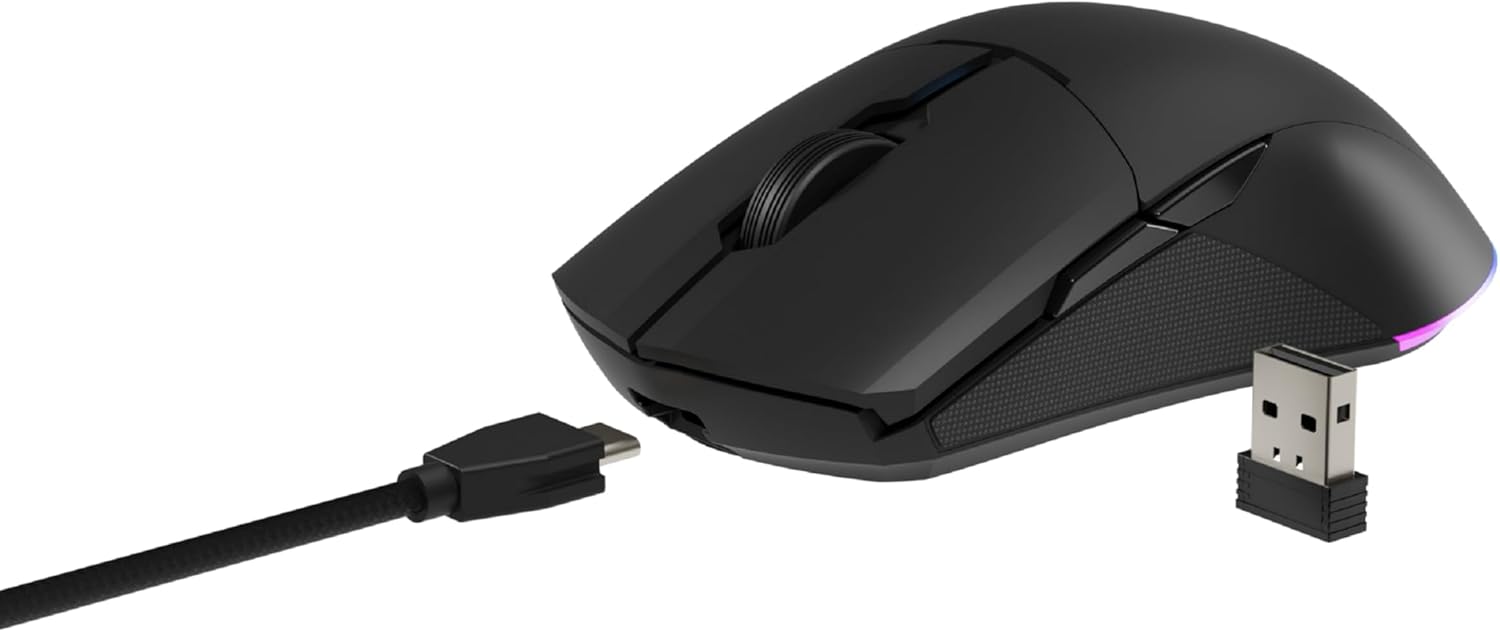
Image: The NEWSKILL Chiron Pro mouse shown with its USB-C cable and the 2.4GHz wireless receiver.
3.3 Правадное злучэнне
The mouse can also be used in wired mode. Simply connect the USB-C cable to the mouse and the USB-A end to your computer. The mouse will function as a wired device and charge simultaneously.
4. Інструкцыя па эксплуатацыі
4.1 Асноўныя функцыі
- Левая кнопка мышы: Першаснае дзеянне.
- Правая кнопка мышы: Дадатковае дзеянне/кантэкстнае меню.
- Кола пракруткі: Пракрутка ўверх/уніз, клік сярэдняй кнопкай мышы.
- Side Buttons (8 programmable): Default functions may vary, but are customizable via software.

Выява: Збоку view of the mouse, showing the textured grip and two side buttons.
4.2 Рэгуляванне DPI
The mouse features a Pixart PMW3335 optical sensor with up to 16000 configurable DPI. The DPI button on the underside of the mouse allows you to cycle through preset DPI levels. For fine-tuning and custom DPI settings, use the advanced software.

Image: Underside of the mouse, showing the DPI button, optical sensor, and ON/OFF switch.
4.3 Налада RGB-падсветкі
The Chiron Pro features customizable RGB lighting. To personalize lighting effects, colors, and brightness, download and install the dedicated NEWSKILL software from the official website. The software also allows for button remapping and macro creation.

Image: The NEWSKILL Chiron Pro mouse displaying its customizable RGB lighting.
5. Тэхнічнае абслугоўванне
5.1 Ачыстка
Каб падтрымліваць аптымальную прадукцыйнасць, рэгулярна чысціце мыш. Выкарыстоўвайце мяккую сухую тканіну для працірання паверхні. Для ўстойлівага бруду злёгкуamp можна выкарыстоўваць тканіну, змочаную ў мяккім мылам, сачыце за тым, каб вадкасць не патрапіла ўнутр мышы. Пазбягайце абразіўных ачышчальнікаў або растваральнікаў.
5.2 Сыход за акумулятарам
To prolong battery life, avoid fully discharging the mouse frequently. Charge the mouse when the battery indicator suggests low power. Store the mouse in a cool, dry place when not in use for extended periods.
6. Выпраўленне непаладак
- Мышка не рэагуе:
Ensure the mouse is turned ON. Check if the USB receiver is securely plugged into a working USB port. If using wired mode, ensure the USB-C cable is properly connected. Try a different USB port. - Праблемы з бесправадным падключэннем:
Ensure the mouse is within range of the USB receiver (typically up to 10 meters). Avoid placing the receiver near other wireless devices that might cause interference. Re-pair the mouse if necessary (refer to software instructions). - DPI or button issues:
Ensure the NEWSKILL software is installed and up-to-date. Check your settings within the software. Reset to default settings if custom configurations are causing issues. - Праблемы з зарадкай:
Verify the USB-C cable is not damaged and is properly connected. Try a different USB port or charging adapter. Ensure the mouse is not in an extremely hot or cold environment during charging. - Missing USB Receiver:
The USB receiver is typically stored in a compartment on the underside of the mouse for safekeeping. Please check this compartment thoroughly. If it is genuinely missing, contact customer support.
7. Тэхнічныя характарыстыкі
| Асаблівасць | Спецыфікацыя |
|---|---|
| Марка | НАВІНКА |
| Назва мадэлі | CHIRON PRO |
| Нумар мадэлі | 10831240 |
| Колер | Чорны |
| Тэхналогія падлучэння | Wireless (2.4GHz), USB (Wired) |
| Тып датчыка | Optical (Pixart PMW3335) |
| DPI | Да 16000 DPI |
| Колькасць кнопак | 8 (праграмуемых) |
| Тэрмін службы пераключальніка | Huano switches (up to 20 million clicks) |
| Рука арыентацыі | Амбідэкстр |
| Тэрмін службы батарэі | Да 80 гадзін |
| Час зарадкі | Прыбл. 2 гадзіны |
| Памеры прадукту | 12.4 х 6.75 х 0.1 см |
| Вага прадукту | 500 г |
| Сумяшчальныя аперацыйныя сістэмы | Windows 10, Windows 7, Windows Vista, Windows XP, Linux |
8. Гарантыя і падтрымка
8.1 Інфармацыя аб гарантыі
NEWSKILL products are covered by a manufacturer's warranty. For specific warranty terms and conditions, please refer to the warranty card included with your product or visit the official NEWSKILL webсайт. Захоўвайце пацвярджэнне пакупкі для прэтэнзій па гарантыі.
8.2 Падтрымка кліентаў
If you encounter any issues or have questions regarding your NEWSKILL Chiron Pro Wireless Gaming Mouse, please visit the official NEWSKILL support website or contact their customer service team. You can find contact information on the NEWSKILL webсайт: www.newskillgaming.com