
1. Уводзіны
The Mastech MS8233B is a compact, handheld digital multimeter designed for measuring AC/DC voltage, DC current, resistance, diode, continuity, and temperature. It features a 2000-count display, data hold function, and low battery indication, making it suitable for various electrical testing applications in domestic and electronics environments.
2. Інфармацыя па бяспецы
To ensure safe operation and service of the meter, please read this manual thoroughly before use. Failure to observe safety warnings can result in severe injury or death.
- Заўсёды пераканайцеся, што лічыльнік знаходзіцца ў добрым працоўным стане перад выкарыстаннем.
- Не наносіце больш за намінальны аб'ёмtage, which is 600V CAT III.
- Будзьце асцярожныя пры працы з voltagвышэй за 30 В пераменнага току (RMS), 42 В пікавага значэння або 60 В пастаяннага току, бо гэта стварае небяспеку паражэння электрычным токам.
- Заўсёды адключайце вымяральныя дроты ад ланцуга перад зменай функцый.
- Неадкладна замяніце батарэйку, калі з'явіцца індыкатар нізкага зараду батарэі.
- Do not operate the meter if the battery cover is not properly closed.
- Прытрымвайцеся мясцовых і нацыянальных кодэксаў бяспекі.
3. Прадукт скончыўсяview
The Mastech MS8233B Digital Multimeter features a clear display, a rotary function switch, and dedicated input jacks for various measurements.

Малюнак 3.1: Фронт view of the Mastech MS8233B Digital Multimeter. This image displays the LCD screen, rotary function switch, input jacks, and control buttons.
3.1 Кампаненты
- ВК-дысплей: Паказвае паказанні вымярэнняў, адзінкі вымярэння і індыкатары функцый.
- Функцыя паваротнага перамыкача: Used to select the desired measurement function (e.g., V~, V-, A-, Ω, Diode, Continuity, Temp).
- Кнопка HOLD: Зафіксуе бягучае паказанне на дысплеі.
- Кнопка падсвятлення: Уключае падсветку дысплея для паляпшэння бачнасці ў цёмных умовах асвятлення.
- VΩmA Input Jack: Дадатны ўваход для аб'ёмуtage, resistance, diode, continuity, and current measurements up to 200mA.
- Уваходны гняздо COM: Агульны (адмоўны) уваход для ўсіх вымярэнняў.
- Уваходны раз'ём 10A: Дадатны ўваход для вымярэнняў высокага току (да 10 А).
4. Настройка
4.1 Устаноўка батарэі
The MS8233B requires 2 LR44 batteries for operation. Ensure the batteries are installed correctly before first use or when replacing them.
- Выключыце мультыметр і адлучыце ўсе вымяральныя дроты.
- Знайдзіце батарэйны адсек на задняй панэлі глюкометра.
- Выкарыстоўвайце адвёртку, каб адкрыць вечка батарэйнага адсека.
- Insert the 2 LR44 batteries, observing the correct polarity (+ and -).
- Замяніце крышку батарэйнага адсека і замацуеце яе шрубай.
5. Інструкцыя па эксплуатацыі
Before taking any measurements, ensure the test leads are properly connected to the meter and the circuit under test.
5.1 Агульныя дзеянні
- Turn the rotary switch from the "OFF" position to the desired measurement function.
- Connect the test leads to the appropriate input jacks and the circuit.
- Прачытайце значэнне вымярэння на ВК-дысплеі.
- To turn off the meter, rotate the switch back to the "OFF" position.
5.2 DC Voltage Measurement (V-)
- Усталюйце паваротны перамыкач на патрэбны ўзровень гучнасці пастаяннага токуtagдыяпазон (напрыклад, 200 мВ, 2 В, 20 В, 200 В, 600 В).
- Падключыце чырвоны выпрабавальны провад да гнязда VΩmA, а чорны - да гнязда COM.
- Падключыце вымяральныя дроты да кампанента або ланцуга, які трэба вымераць.
5.3 AC VoltagВымярэнне (В~)
- Усталюйце паваротны перамыкач на патрэбны ўзровень гучнасці пераменнага токуtagдыяпазон (напрыклад, 200 В, 600 В).
- Падключыце чырвоны выпрабавальны провад да гнязда VΩmA, а чорны - да гнязда COM.
- Падключыце вымяральныя дроты да сеткі пераменнага току.tagэлектронная крыніца.
5.4 DC Current Measurement (A-)
- Set the rotary switch to the desired DC Current range (e.g., 200µA, 2mA, 20mA, 200mA, 10A).
- For currents up to 200mA, connect the red test lead to the VΩmA jack. For currents up to 10A, connect the red test lead to the 10A jack. Always connect the black test lead to the COM jack.
- Connect the meter in series with the circuit to measure the current.
- Увага: Do not attempt to measure currents exceeding 200mA through the VΩmA jack or 10A through the 10A jack.
5.5 Resistance Measurement (Ω)
- Set the rotary switch to the desired Resistance range (e.g., 200Ω, 2kΩ, 20kΩ, 200kΩ, 2MΩ).
- Падключыце чырвоны выпрабавальны провад да гнязда VΩmA, а чорны - да гнязда COM.
- Connect the test leads across the resistor or component to be measured. Ensure the circuit is de-energized.
5.6 Дыёдны тэст
- Усталюйце паваротны перамыкач у становішча «дыёд».
- Падключыце чырвоны выпрабавальны провад да гнязда VΩmA, а чорны - да гнязда COM.
- Падключыце чырвоны вымяральны кабель да анода, а чорны — да катода дыёда. На дысплеі будзе адлюстроўвацца напружанне прамога току.tagэлектронная кропля.
- Reverse the leads. An open circuit (OL) reading indicates a good diode. A reading in both directions or no reading indicates a faulty diode.
5.7 Тэст бесперапыннасці
- Усталюйце паваротны перамыкач у становішча сімвала бесперапыннасці.
- Падключыце чырвоны выпрабавальны провад да гнязда VΩmA, а чорны - да гнязда COM.
- Connect the test leads across the circuit or component. If the resistance is less than approximately 60Ω, the buzzer will sound, indicating continuity.
5.8 Вымярэнне тэмпературы
While the product title mentions temperature, the MS8233B model's detailed specifications do not explicitly list a temperature function. If your specific unit includes this feature, typically you would:
- Set the rotary switch to the Temperature function (usually marked with °C or °F).
- Connect a K-type thermocouple (if included) to the VΩmA and COM jacks, observing polarity.
- Place the thermocouple probe at the point where temperature needs to be measured.
5.9 Функцыя ўтрымання дадзеных
- Press the "HOLD" button to freeze the current reading on the display.
- Press the "HOLD" button again to release the reading and resume live measurements.
5.10 Функцыя падсветкі
- Press the backlight button (often marked with a sun symbol) to turn on the display backlight.
- Press the button again to turn off the backlight.
6. Тэхнічнае абслугоўванне
6.1 Замена батарэі
When the low battery indicator appears on the display, replace the batteries as described in Section 4.1. Always use 2 new LR44 batteries.
6.2 Ачыстка
Працярыце корпус рэкламайamp тканінай і мяккім мыйным сродкам. Не выкарыстоўвайце абразіўныя рэчывы або растваральнікі. Перад выкарыстаннем пераканайцеся, што глюкометр цалкам сухі.
7. Выпраўленне непаладак
- Няма дысплея/Слабы дысплей: Праверце ўстаноўку і зарадку акумулятараў. Пры неабходнасці заменіце акумулятары.
- "OL" or "1" on Display: Indicates an over-range condition or open circuit. Select a higher range or check connections.
- Няправільныя паказанні: Ensure correct function selection, proper lead connection, and that the circuit is de-energized for resistance/diode tests.
- Няма зуммера бесперапыннасці: Check if the resistance is above 60Ω or if the function is correctly selected.
8. Тэхнічныя характарыстыкі
The following table outlines the technical specifications for the Mastech MS8233B Digital Multimeter.
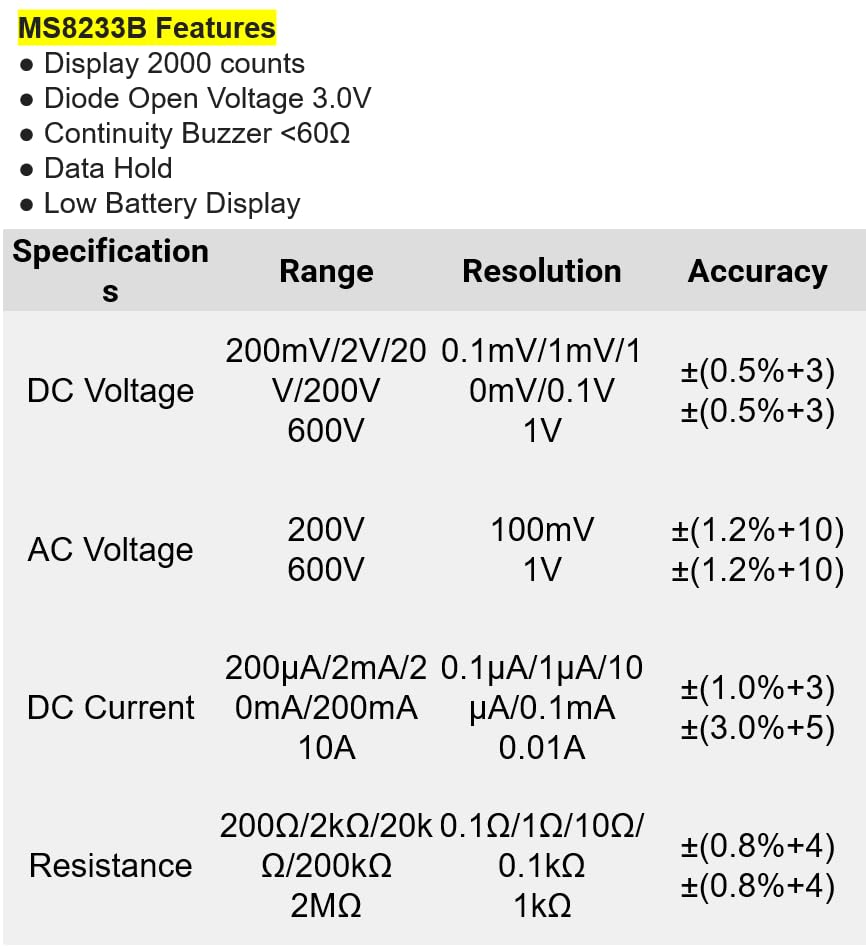
Малюнак 8.1: Detailed specifications for the Mastech MS8233B, including ranges, resolutions, and accuracies for various measurements.
| Спецыфікацыя | Каштоўнасць |
|---|---|
| Дысплей | 2000 графаў |
| Дыёд адкрыты аб'ёмtage | 3.0В |
| Бесперапыннасць зумер | <60Ω |
| Утрыманне дадзеных | так |
| Дысплей з нізкім узроўнем зарадкі | так |
| DC Voltagе далёкасць | 200 мВ, 2 В, 20 В, 200 В, 600 В |
| Пераменнага токуtagе далёкасць | 200В, 600В |
| Дыяпазон пастаяннага току | 200 мкА, 2 мА, 20 мА, 200 мА, 10 А |
| Дыяпазон супраціву | 200Ω, 2kΩ, 20kΩ, 200kΩ, 2MΩ |
| Рэйтынг бяспекі | CAT III 600В |
| Крыніца харчавання | 2 батарэйкі LR44 (у камплекце) |
| Памеры прадукту | 20 х 15 х 25 см |
| Вага прадмета | 1 кілаграм |
| Вытворца | МАСТЭЧ |
| Нумар мадэлі тавару | YQ-MS8233B |
| Краіна паходжання | Тайвань |

Малюнак 8.2: A comparison table showing features across various Mastech digital multimeter models, including the MS8233B.
9. Гарантыя і падтрымка
For warranty information, technical support, or service inquiries, please refer to the documentation provided with your purchase or contact your retailer. Keep your purchase receipt as proof of purchase for any warranty claims.