
1. Уводзіны
This manual provides essential information for the safe and effective operation of your Mastech MS8301A Digital Multimeter. Please read this manual thoroughly before using the device to ensure proper functionality and to prevent potential hazards. Keep this manual for future reference.
2. Інфармацыя па бяспецы
Always adhere to the following safety precautions to avoid electric shock or personal injury, and to prevent damage to the multimeter or the equipment under test.
- Прачытайце інструкцыі: Understand all instructions and safety information before use.
- Намінальны выпtage: Не наносіце больш за намінальны аб'ёмtage, as marked on the multimeter, between the terminals or between any terminal and ground.
- Выпрабавальныя провады: Праверце вымяральныя дроты на наяўнасць пашкоджанай ізаляцыі або аголенага металу. Замяніце іх, калі яны пашкоджаныя.
- Circuit Disconnection: Адключыце сілкаванне ланцуга і разрадзіце ўсе высокавольтныяtage кандэнсатараў перад праверкай супраціву, бесперапыннасці, дыёдаў або ёмістасці.
- Выбар функцыі: Пераканайцеся, што перамыкач функцый знаходзіцца ў правільным становішчы для вымярэння, якое выконваецца.
- Жывыя схемы: Do not measure current on a live circuit with the test leads connected in parallel.
- Працоўнае асяроддзе: Do not operate the multimeter in explosive gas, vapor, or damp асяроддзях.
- Сродкі індывідуальнай абароны: Always wear appropriate personal protective equipment, such as safety glasses, when working with electrical circuits.
- Рэйтынг бяспекі: This device is rated for CAT III 600V. Do not exceed this rating.
3. Прадукт скончыўсяview
3.1 Асаблівасці
The Mastech MS8301A Digital Multimeter offers a range of features for various electrical measurements:
- Дысплей: 2000 графаў
- Утрыманне дадзеных: Зафіксуе паказанні, якія адлюстроўваюцца, для зручнага запісу.
- Тэстар акумулятара: For 1.5V and 9V batteries.
- Кампактны дызайн: Product Size: 150mm x 74mm x 48mm (5.9" x 2.9" x 1.7")
- Лёгкі: Product Weight: 220g (0.48lb)

Image: Detailed features and specifications of the Mastech MS8301A multimeter, including display count, data hold, battery test function, and physical dimensions.
3.2 Кампаненты
The Mastech MS8301A package typically includes the following components:
- Mastech MS8301A Digital Multimeter Unit
- Вымяральныя дроты (чырвоны і чорны)
- AAA Batteries (2x1.5V)
- Calibration Certificate (if applicable)
- Кароткае кіраўніцтва
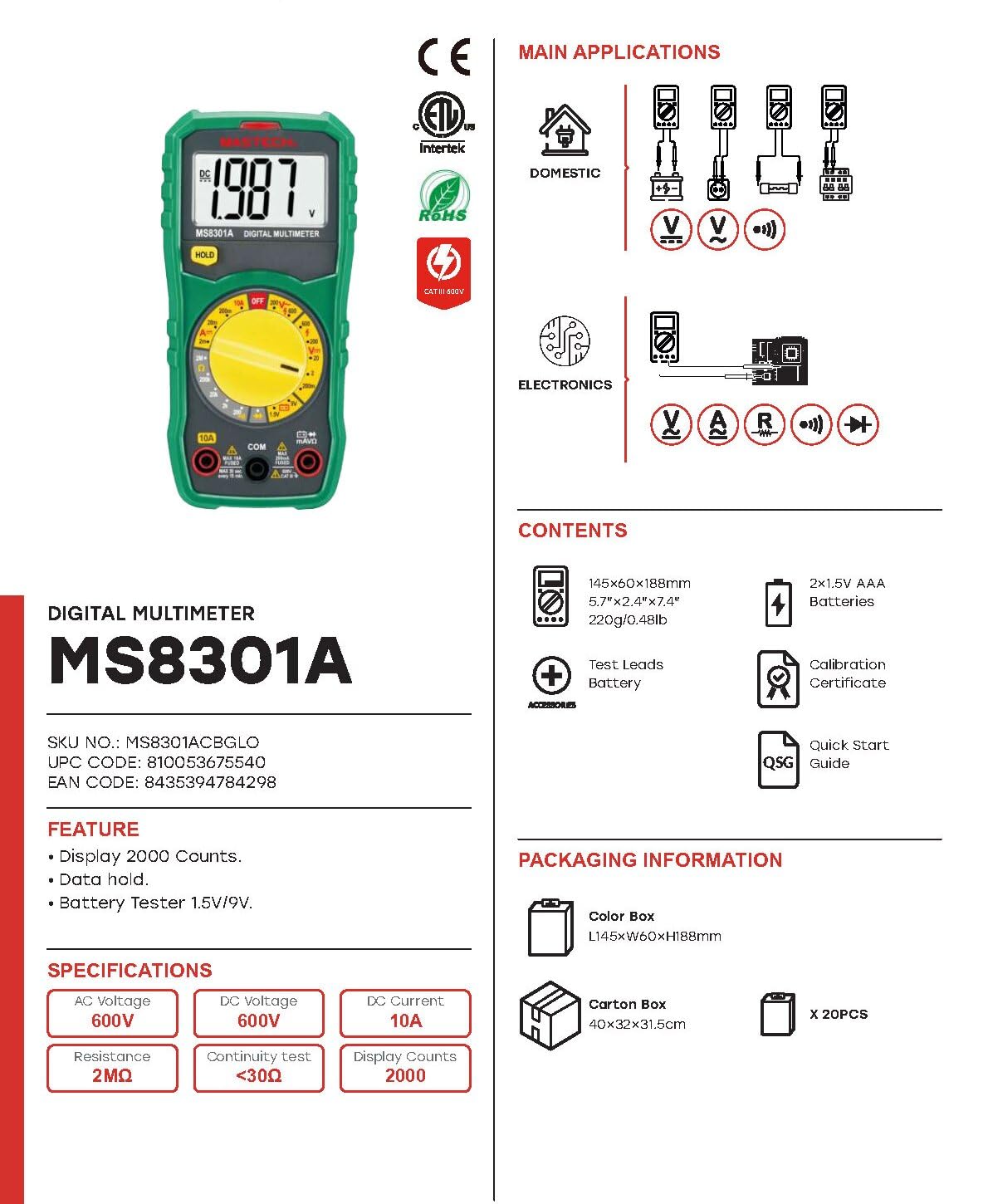
Image: The Mastech MS8301A Digital Multimeter showing its front panel, rotary switch, display, input jacks, and a list of included accessories such as test leads and batteries.
4. Настройка
4.1 Устаноўка батарэі
- Ensure the multimeter is turned off and disconnect any test leads.
- Знайдзіце вечка батарэйнага адсека на задняй панэлі мультыметра.
- Адкруціце фіксуючы(-я) шрубу(-ы) і зніміце вечка.
- Insert two 1.5V AAA batteries, observing the correct polarity (+ and -) as indicated inside the compartment.
- Закрыйце батарэйны адсек і замацуйце яго шрубай (шрубамі).
4.2 Падключэнне вымяральных правадоў
Connect the test leads to the appropriate input jacks on the multimeter:
- Устаўце чорны вымяральны провад у COM (звычайны) гняздо.
- Для большасці вымярэнняў (аб'ёмtage, Resistance, Diode, Continuity, Temperature, Battery Test), insert the чырвоны вымяральны провад у VΩmA дамкрат.
- For high current measurements (up to 10A), insert the чырвоны вымяральны провад у 10А дамкрат.
5. Інструкцыя па эксплуатацыі
Before taking any measurement, ensure the test leads are correctly connected and the rotary switch is set to the desired function.
5.1 Вымярэнне пастаяннага току Voltagе (V=)
- Set the rotary switch to the desired V= range (e.g., 20V for measuring up to 20V DC).
- Падключыце чырвоны вымяральны кабель да станоўчага (+) полюса ланцуга, а чорны — да адмоўнага (-).
- Прачытайце тtage значэнне на дысплеі.
5.2 Вымярэнне AC Voltagе (V~)
- Set the rotary switch to the desired V~ range (e.g., 200V for measuring up to 200V AC).
- Падключыце вымяральныя дроты да сеткі пераменнага току.tagэлектронная крыніца.
- Прачытайце тtage значэнне на дысплеі.
5.3 Measuring DC Current (A=)
- Важна: Disconnect power to the circuit before connecting the multimeter in series.
- Set the rotary switch to the desired A= range (e.g., 200mA or 10A). Remember to move the red lead to the 10A jack for high current.
- Open the circuit where current is to be measured.
- Connect the multimeter in series with the circuit, ensuring the current flows through the multimeter.
- Apply power to the circuit and read the current value on the display.
5.4 Вымярэнне супраціўлення (Ом)
- Важна: Ensure the circuit is de-energized and all capacitors are discharged before measuring resistance.
- Set the rotary switch to the desired Ω дыяпазон.
- Падключыце вымяральныя дроты да кампанента, які трэба вымераць.
- Прачытайце значэнне супраціву на дысплеі.
5.5 Праверка дыёдаў (→|)
- Важна: Пераканайцеся, што дыёд адключаны ад ланцуга.
- Усталюйце паваротны перамыкач у Дыёдны тэст становішча.
- Падключыце чырвоны вымяральны кабель да анода, а чорны — да катода дыёда. На дысплеі будзе адлюстроўвацца напружанне прамога току.tagэлектронная кропля.
- Памяняйце правады месцамі. На дысплеі павінна адлюстроўвацца «OL» (разамкнуты контур), калі дыёд спраўны.
5.6 Праверка бесперапыннасці ())))
- Важна: Пераканайцеся, што ланцуг абясточаны.
- Усталюйце паваротны перамыкач у Тэст бесперапыннасці становішча.
- Connect the test leads across the component or wire to be tested.
- If the resistance is below approximately 30Ω, the buzzer will sound, indicating continuity. The display will also show the resistance value.
5.7 Battery Test (1.5V/9V)
- Усталюйце паваротны перамыкач у 1.5В or 9V battery test position, corresponding to the battery type.
- Падключыце чырвоны вымяральны шнур да станоўчага (+) вываду акумулятара, а чорны — да адмоўнага (-) вываду.
- Прачытайце аб'ём батарэіtage на дысплеі.
5.8 Утрыманне дадзеных
Press the "HOLD" button to freeze the current reading on the display. Press it again to release the hold function and resume live readings.
6. Тэхнічныя характарыстыкі
| Вымярэнне | Дыяпазон | дазвол |
|---|---|---|
| DC Voltage | 200 мВ / 2 В / 20 В / 200 В / 600 В | 100µV / 1mV / 10mV / 100mV / 1V |
| Пераменнага токуtage | 200В / 600В | 100 мВ / 1 В |
| Пастаянны ток | 2mA / 20mA / 200mA / 10A | 1µA / 10µA / 100µA / 10mA |
| Супраціў | 200Ω / 2kΩ / 20kΩ / 200kΩ / 2MΩ | 0.1Ω / 1Ω / 10Ω / 100Ω / 1kΩ |
| Тэст бесперапыннасці | Buzzer sounds at <30Ω | — |
| Дыёдны тэст | Наперад выпtagэлектронная кропля | — |
| Тэст акумулятара | 1.5В / 9В | — |
Агульныя характарыстыкі
- Дысплей: 2000 графаў
- крыніца харчавання: 2 батарэйкі 1.5 В ААА
- Памеры: 150 мм х 74 мм х 48 мм (5.9 цалі х 2.9 цалі х 1.7 цалі)
- Вага: 220 г (0.48 фунта)
- Рэйтынг бяспекі: CAT III 600В
- матэрыял: Акрыланітрылбутадыенстырол (АБС)
- колер: Сіні

Image: A table detailing manual ranging specifications for various Mastech digital multimeters, including the MS8301A, showing display counts, safety ratings, and measurement capabilities.
7. Тэхнічнае абслугоўванне
7.1 Замена батарэі
When the battery low indicator appears on the display, replace the batteries immediately to ensure accurate readings. Follow the steps outlined in Section 4.1 for battery installation.
7.2 Ачыстка
Працярыце корпус рэкламайamp тканінай і мяккім мыйным сродкам. Не выкарыстоўвайце абразіўныя рэчывы або растваральнікі. Перад выкарыстаннем пераканайцеся, што мультыметр цалкам сухі.
7.3 Захоўванне
If the multimeter is not used for an extended period, remove the batteries to prevent leakage and damage to the device. Store in a cool, dry place away from direct sunlight.
8. Выпраўленне непаладак
| праблема | Магчымая прычына | Рашэнне |
|---|---|---|
| Няма дысплея або дысплей цьмяны | Dead or low batteries; incorrect battery polarity. | Замяніце батарэйкі; праверце арыентацыю батарэек. |
| Адлюстравана "OL" (перагрузка) | Measurement exceeds selected range; open circuit. | Select a higher range; check for open circuit in the component or leads. |
| Няправільныя паказанні | Incorrect function selected; poor test lead connection; damaged test leads. | Verify function switch position; ensure secure lead connection; inspect and replace damaged leads. |
| Няма гукавога сігналу бесперапыннасці | Open circuit; resistance too high. | Check for breaks in the circuit; ensure resistance is below 30Ω. |
9. Гарантыя і падтрымка
Mastech products are designed for reliability and performance. For specific warranty information, please refer to the warranty card included with your product or contact Mastech customer support. Keep your purchase receipt as proof of purchase.
For technical support or service inquiries, please visit the official Mastech webсайт або звярніцеся ў іх аўтарызаваныя сэрвісныя цэнтры.