
1. Інфармацыя па бяспецы
Please read all safety instructions carefully before assembly and operation to prevent injury or damage to the product.
- Ensure the desk is assembled on a flat, stable surface.
- Do not exceed the maximum load capacity of 80 kg (dynamic).
- Трымайце дзяцей і хатніх жывёл далей ад стала падчас рэгулявання вышыні.
- Пры рэгуляванні вышыні стала пераканайцеся, што няма перашкод над ім або пад ім.
- Не сядайце і не станьце на раму стала.
- Only use the power adapter provided with the desk.
- Regularly check all screws and bolts to ensure they are tightened.
2. Прадукт скончыўсяview
The FLEXISPOT Electric Standing Desk frame is designed for ergonomic versatility, allowing seamless transitions between sitting and standing positions. It features a robust steel construction and a digital control panel for easy height adjustments and memory presets.
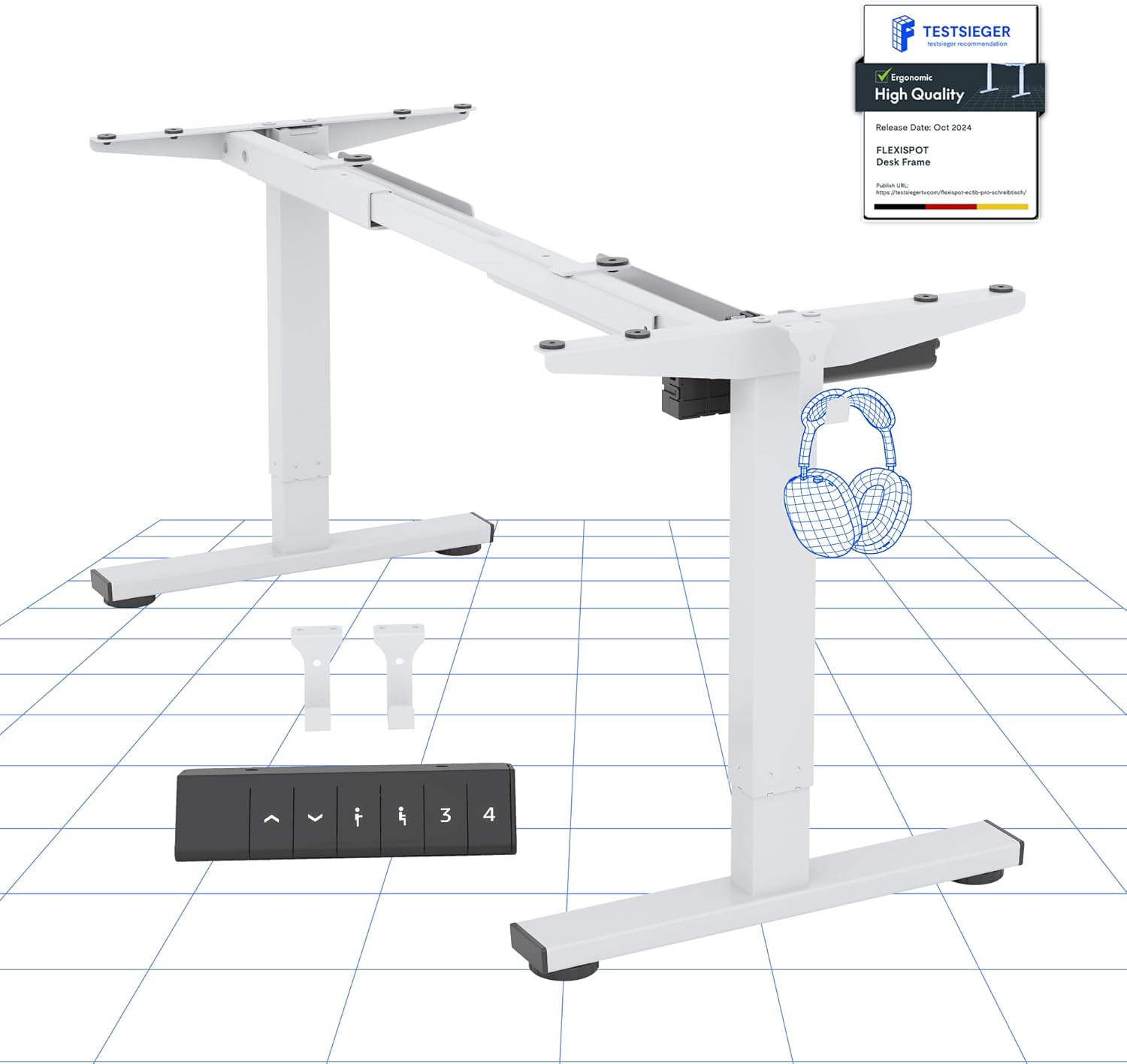
Выява 2.1: Канецview of the FLEXISPOT Electric Standing Desk Frame and its digital control panel.
Ключавыя кампаненты:
- Рэгуляваныя ножкі: Два-сtage lifting columns for smooth height transitions.
- Папярочка: Connects the legs and supports the desktop.
- Ногі: Provide stability and include anti-slip pads.
- Лічбавая панэль кіравання: For height adjustment and memory functions.
- Матор: Powers the height adjustment mechanism.
- Блок кіравання: Houses the electronic components.
3. Інструкцыі па ўсталёўцы
Follow these steps to assemble your FLEXISPOT Electric Standing Desk frame. A desktop (not included) is required for full functionality.
3.1 Desktop Compatibility
The desk frame is designed to accommodate desktops with the following dimensions:
- Даўжыня: Ад 100 см да 160 см (39.4 цалі да 63 цаляў)
- Шырыня: Ад 50 см да 80 см (19.7 цалі да 31.5 цаляў)

Image 3.1: Illustration of the adaptable desktop size range for the desk frame.
3.2 Этапы зборкі
- Распакуйце кампаненты: Carefully remove all parts from the packaging and verify against the parts list (refer to your included physical manual for a detailed list).
- Assemble Feet: Attach the feet to the bottom of each lifting column using the provided screws.
- Падключыце перакладзіну: Extend the crossbar to the desired width for your desktop. Securely attach the crossbar to the lifting columns.
- Усталюйце блок кіравання і рухавік: Mount the control box and motor according to the instructions in your physical manual, ensuring all cables are connected correctly.
- Падключыце панэль кіравання: Secure the digital control panel to the underside of your chosen desktop in an accessible location.
- Мантаваць працоўны стол: Carefully place your desktop onto the assembled frame. Align the pre-drilled holes (if any) or mark and drill new pilot holes. Secure the desktop to the frame using appropriate screws.
- Кабельнае кіраванне: Organize and secure all cables to prevent tangling and ensure safe operation.
- Першапачатковае ўключэнне: Падключыце адаптар сілкавання да блока кіравання, а затым да разеткі.
4. Інструкцыя па эксплуатацыі
Your FLEXISPOT Electric Standing Desk is equipped with a user-friendly digital control panel for effortless height adjustment.
4.1 Функцыі лічбавай панэлі кіравання

Малюнак 4.1: Падрабязны view лічбавай панэлі кіравання.
- Кнопкі ўверх/уніз (▲ / ▼): Press and hold to manually adjust the desk height up or down. The current height is displayed on the LED screen.
- Папярэднія налады памяці (1, 2, 3, 4): These buttons allow you to save and recall up to four preferred height settings.
- 'M' Button (or 'Set' button, if present): Used to save a height into a memory preset.
4.2 Налада папярэдніх налад памяці
- Адрэгулюйце вышыню стала на патрэбную вышыню з дапамогай кнопак «Уверх»/«Уніз».
- Press the 'M' button (or 'Set' button). The LED display will show 'S-'.
- Within 3 seconds, press one of the number buttons (1, 2, 3, or 4) to save the current height to that preset. The display will show the number you pressed, confirming the setting.
4.3 Сістэма прадухілення сутыкненняў
The desk is equipped with an advanced anti-collision system. If the desk encounters an obstacle during height adjustment, it will automatically stop and reverse slightly to prevent damage or injury. This feature enhances safety during operation.

Image 4.2: Visual representation of the anti-collision system and other features.
5. Тэхнічнае абслугоўванне
Proper maintenance ensures the longevity and optimal performance of your standing desk.
- Уборка: Працярыце каркас стала і панэль кіравання мяккай губкайamp тканінай. Пазбягайце абразіўных ачышчальнікаў або растваральнікаў.
- Кабельнае кіраванне: Periodically check that all cables are securely fastened and not pinched or damaged.
- Зашпількі: Ensure all screws and bolts remain tight. Retighten if necessary.
- Накладкі супраць слізгацення: Verify that the anti-slip pads on the feet are intact and providing stable contact with the floor.
6. Выпраўленне непаладак
If you encounter issues with your desk, refer to the following common problems and solutions:
| праблема | Магчымая прычына | Рашэнне |
|---|---|---|
| Стол не рухаецца. | Power cable disconnected, motor cable loose, overload. | Check all cable connections. Reduce weight on the desk. Perform a reset (see below). |
| Стол рухаецца няроўна. | Uneven load, loose connections. | Distribute weight evenly. Check all connections. Perform a reset. |
| Адлюстраваны код памылкі. | Канкрэтная сістэмная памылка. | Refer to your physical manual for specific error code meanings. Often, a reset can resolve temporary errors. |
| Anti-collision system triggers frequently. | Sensitivity too high, minor obstructions. | Ensure clear path for desk movement. Some models allow sensitivity adjustment (refer to physical manual). |
6.1 Працэдура скіду
A reset can often resolve minor operational issues. The exact procedure may vary slightly; refer to your physical manual for precise steps. A common reset method involves:
- Press and hold the Down (▼) button until the desk reaches its lowest position and then slightly rises or makes a sound.
- Release the button, then press and hold it again until the desk moves down slightly, then up, and stops. This indicates a successful reset.
If problems persist after troubleshooting, please contact customer support.
7. Тэхнічныя характарыстыкі
Detailed technical specifications for the FLEXISPOT Electric Standing Desk frame:

Image 7.1: Detailed desk dimensions and performance metrics.
| Асаблівасць | Дэталь |
|---|---|
| Марка | ФЛЕКСІСПОТ |
| мадэль | B0D3Q89YP2 |
| Дыяпазон рэгулявання вышыні | 71.5 cm - 116 cm (28.1 inches - 45.7 inches) |
| Максімальная грузападымальнасць | 80 кг (176 фунтаў) |
| Adaptable Desktop Length | 100 cm - 160 cm (39.4 inches - 63 inches) |
| Adaptable Desktop Width | 50 cm - 80 cm (19.7 inches - 31.5 inches) |
| Матэрыял | Легаваная сталь |
| Панэль кіравання | Digital with 6 buttons and 4 memory presets |
| Энергаспажыванне ў рэжыме чакання | < 0.5 Вт |
| Anti-Collision System | так |
| Сертыфікаты | CE/BIFMA/ROHS |
8. Гарантыя і падтрымка
FLEXISPOT is committed to providing high-quality products and customer satisfaction.
8.1 Інфармацыя аб гарантыі
- Гарантыя на раму: 5 гады
- Гарантыя на рухавік: 3 гады
These warranties cover manufacturing defects and malfunctions under normal use. Please retain your proof of purchase for warranty claims.
8.2 Тэхнічная падтрымка
FLEXISPOT offers free lifetime technical support for your product. If you have any questions, require assistance with assembly, operation, or troubleshooting, please contact our support team.
For further assistance, please visit the official FLEXISPOT store or contact customer service through your purchase platform.
FLEXISPOT Store: Visit FLEXISPOT on Amazon