
Уводзіны
This manual provides detailed instructions for the installation and maintenance of Generic replacement parts designed for the Roborock P10S Pro vacuum cleaner robot. Regular replacement and proper maintenance of these parts ensure optimal performance and longevity of your robot vacuum.
Прадукт скончаныview
This set of replacement parts includes essential components for your Roborock P10S Pro, designed to maintain its cleaning efficiency.
- Асноўная шчотка: Essential for deep cleaning carpets and hard floors.
- Бакавая шчотка: Designed to sweep debris from edges and corners into the main cleaning path.
- HEPA-фільтр: Captures fine dust, pollen, and allergens, improving air quality.
- Мяшок для пылу: Collects dust and debris, featuring a multi-layer filter system and good sealing to prevent leakage.
- Швабравая тканіна: Made from super absorbent microfiber for effective wet cleaning without leaving water stains.
Кіраўніцтва па ўстаноўцы
Follow these steps to correctly install the replacement parts into your Roborock P10S Pro vacuum cleaner robot. Always ensure the robot is powered off before beginning any installation or maintenance.
1. Усталёўка галоўнай шчоткі
To replace the main brush, turn the robot over. Locate the main brush cover, usually secured by latches. Open the latches, remove the old brush, and insert the new main brush, ensuring it clicks into place. Close the cover securely.
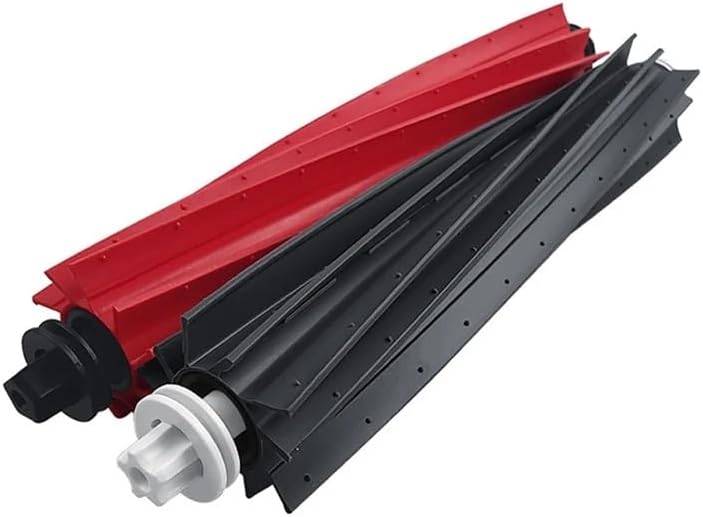
Image shows two main brushes, one red and one black, highlighting their design and compatibility with the Roborock P10S Pro.
2. Усталёўка бакавой шчоткі
Turn the robot over. The side brush is typically held by a screw. Unscrew the old side brush, remove it, and align the new side brush with the post. Secure it with the screw. Ensure the brush rotates freely.

Image displays a black three-armed side brush, indicating its net weight of 8g and a brush arm length of 32mm.
3. Усталёўка HEPA-фільтра
Open the dustbin compartment on your robot. Remove the dustbin, then open the dustbin cover to access the filter. Remove the old HEPA filter and insert the new one, ensuring it sits flush. Close the dustbin cover and reinsert the dustbin into the robot.
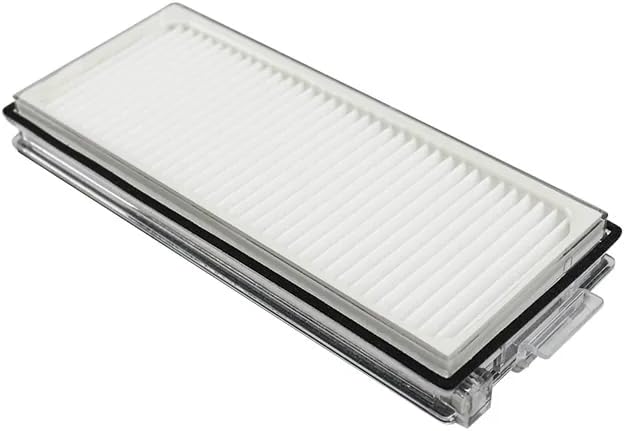
Image shows a rectangular HEPA filter with its pleated white filter material, designed to fit the Roborock P10S Pro dustbin.
4. Dust Bag Installation
If your Roborock P10S Pro uses a dust bag in its auto-empty dock or within the robot itself, open the designated compartment. Carefully remove the full dust bag and dispose of it. Insert the new dust bag, ensuring the opening is properly sealed within the compartment. Close the compartment door.
Note: The provided images do not specifically show a dust bag, but the product description confirms its inclusion. Refer to your Roborock P10S Pro's original manual for precise dust bag compartment location.
5. Усталёўка швабры
Attach the mop cloth to the mop pad holder on the underside of the robot. Ensure the cloth is securely fastened, typically using Velcro or a sliding mechanism, so it does not detach during operation.

Image displays a circular grey microfiber mop pad, designed for effective floor cleaning.
Меркаванні па эксплуатацыі
These parts are designed to seamlessly integrate with your Roborock P10S Pro. Once installed, the robot will operate as usual, utilizing these new components for enhanced cleaning performance. Ensure all parts are correctly installed before starting a cleaning cycle.
Тэхнічнае абслугоўванне
Regular cleaning and timely replacement of parts are crucial for maintaining the efficiency and lifespan of your Roborock P10S Pro.
Інструкцыя па ачыстцы
- Асноўная шчотка: Remove hair and debris tangled around the brush and its ends regularly. Use the cleaning tool provided with your robot.
- Бакавая шчотка: Check for tangled hair or debris. Clean as needed.
- HEPA-фільтр: Tap the filter gently to remove dust. Do not wash with water unless specified by the original robot manufacturer, as this can damage the filter material.
- Швабравая тканіна: After each use, remove the mop cloth and wash it thoroughly with water. It can be hand-washed or machine-washed. Allow it to air dry completely before reattaching.
Графік замены
- Асноўная шчотка: Replace every 6-12 months, depending on usage.
- Бакавая шчотка: Replace every 3-4 months to maintain optimal cleaning performance.
- HEPA-фільтр: Replace every 3-6 months, or more frequently if you have pets or allergies.
- Мяшок для пылу: Replace when full, typically every 4-8 weeks depending on usage and household debris.
- Швабравая тканіна: Replace every 1-3 months, or when wear and tear become visible.
Ліквідацыю непаладак
Калі пасля замены дэталяў у вас узніклі праблемы, звярніце ўвагу на наступнае:
- Дэталь не падыходзіць: Double-check that you have the correct replacement part for the Roborock P10S Pro model. Ensure proper alignment during installation.
- Зніжэнне прадукцыйнасці: Verify that all parts are installed correctly and securely. Ensure no debris is obstructing the brushes or filter.
- Незвычайныя шумы: Remove and re-install brushes to ensure they are not misaligned or obstructed.
For issues related to the robot's functionality beyond part replacement, refer to your original Roborock P10S Pro user manual.
Тэхнічныя характарыстыкі
Below are approximate dimensions and weights for some of the replacement parts. These measurements are provided for reference.

Гэта выява дае поўнае ўяўленнеview of the dimensions and weights for the HEPA filter, side brush, main brushes, dust bag, and mop pad, aiding in identification and compatibility verification.
| частка | Памеры (Д х Ш х У) | Вага |
|---|---|---|
| HEPA фільтр | 110 мм х 42 мм (4.33 цалі х 1.65 цалі) | 11 г |
| Side Brush Arm Length | 32 мм | 8g (approximate, from image 31fKZFWYJ3L) |
| Галоўная шчотка | 197mm (7.75in) length, 35mm (1.37in) diameter | Not specified in image |
| Сумка для пылу | 218 мм х 120 мм | Not specified in image |
| Швабра | 135mm (5.31in) diameter | 13 г |
Гарантыя і падтрымка
As these are Generic replacement parts, warranty and support are typically provided by the seller from whom you purchased the product. Please refer to your purchase documentation or contact the seller directly for any warranty claims or technical assistance.
For issues related to the Roborock P10S Pro robot vacuum itself, please contact Roborock's official customer support.