
Уводзіны
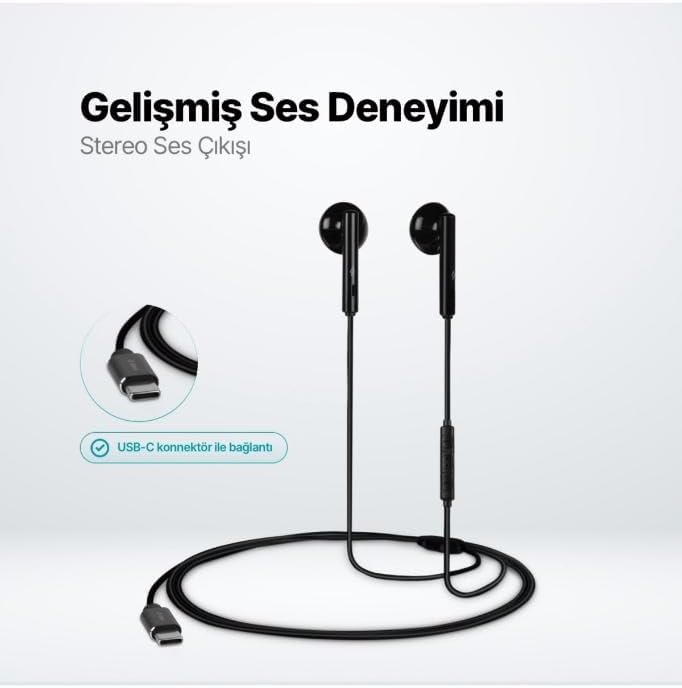
The TTEC Rio 2 Stereo USB-C Headset with Microphone is designed to provide a high-quality audio experience for music and calls. Its comfortable, lightweight design ensures a perfect fit and effective ambient noise isolation, allowing for hands-free communication and entertainment.
Асноўныя характарыстыкі:
- Advanced stereo sound output for an immersive audio experience.
- Integrated microphone for clear phone calls.
- Smart inline controller for easy management of volume, calls, and music playback.
- Lightweight and ergonomic design for extended comfort.
- Universal USB-C connection.
Настройка
To begin using your TTEC Rio 2 headset, follow these simple steps:
- Падключыце гарнітуру: Locate the USB-C port on your device (smartphone, tablet, laptop, etc.). Insert the USB-C connector of the TTEC Rio 2 headset firmly into the device's USB-C port.
- Распазнаванне прылады: Your device should automatically recognize the headset. If prompted, select the TTEC Rio 2 as the audio output and input device.
- Наладзіць Fit: Place the earbuds comfortably in your ears. The ergonomic design ensures a snug fit for optimal sound quality and noise isolation.
Інструкцыя па эксплуатацыі
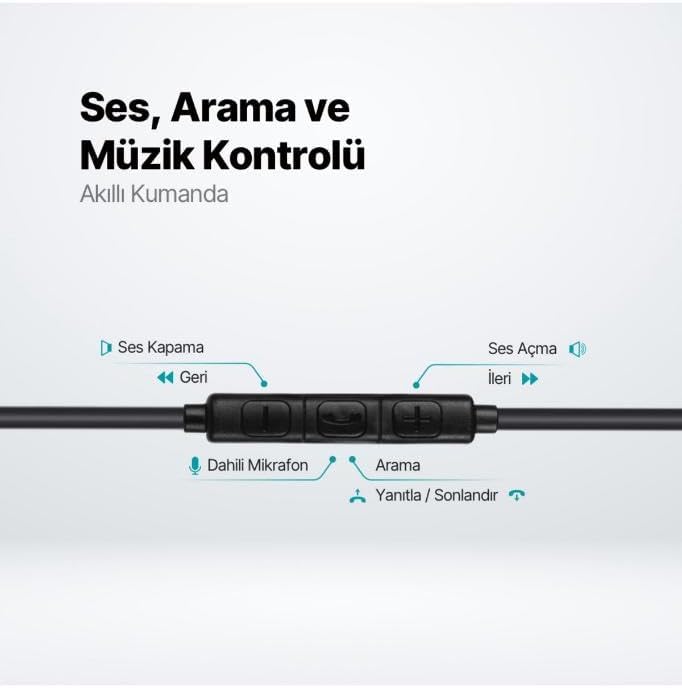
The TTEC Rio 2 headset features an inline smart controller for convenient management of your audio and calls.
Inline Controller Functions:
- Павялічыць гучнасць (+): Press to increase audio volume.
- Памяншэнне гучнасці (-): Press to decrease audio volume.
- Play/Pause/Answer/End Call (Center Button):
- Single press to play or pause music.
- Адно націсканне для адказу на ўваходны званок.
- Адно націсканне для завяршэння актыўнага выкліку.
- Доўгі націск, каб адхіліць уваходны выклік.
- Next Track (Forward Button): Націсніце, каб перайсці да наступнай песні.
- Previous Track (Backward Button): Press to go back to the beginning of the current song or to the previous song.
- Убудаваны мікрафон: Located on the inline controller, it captures your voice for calls and voice commands.
Тэхнічнае абслугоўванне
Proper care will extend the life and performance of your TTEC Rio 2 headset.
- Уборка: Акуратна працярыце навушнікі і кабель мяккай сухой тканінай. Не выкарыстоўвайце агрэсіўныя хімічныя рэчывы або абразіўныя матэрыялы.
- захоўванне: When not in use, store the headset in a clean, dry place. Avoid extreme temperatures. The included cable organizer clip can help prevent tangling.
- Пазбягайце вільгаці: Не падвяргайце гарнітуру ўздзеянню вады або празмернай вільгаці.
- Асцярожна звяртайцеся: Avoid pulling on the cable or applying excessive force to the connectors.

Ліквідацыю непаладак
If you encounter issues with your TTEC Rio 2 headset, refer to the following common solutions:
| праблема | Магчымае рашэнне |
|---|---|
| Няма гуку з гарнітуры. |
|
| Не працуе мікрафон. |
|
| Якасць гуку дрэнная або скажоная. |
|
| Hissing or static noise. |
|
Тэхнічныя характарыстыкі
| Асаблівасць | Дэталь |
|---|---|
| Марка | TTEC |
| Нумар мадэлі | 2KMM14S |
| Сувязь | USB-C |
| Форм-фактар навушнікаў | Укладышы |
| Размяшчэнне вушэй | Укладышы |
| Мікрафон | Убудаваны |
| Памеры ўпакоўкі | 19.8 х 8.5 х 3.1 см |
| Вага прадмета | 40 грамаў |
| ASIN | B0D3XJ5SP7 |
Гарантыя і падтрымка
For warranty information and customer support, please refer to the documentation included with your purchase or visit the official TTEC webсайт. Захоўвайце пацвярджэнне пакупкі для любых гарантыйных прэтэнзій.