
W26 Pro Max
W26 Pro Max Smart Watch with Bluetooth Earphones Microphone Series 8 Compatible Blue User Manual
Model: W26 Pro Max
Уводзіны
This manual provides comprehensive instructions for the W26 Pro Max Smart Watch with Bluetooth Earphones. It covers setup, operation, maintenance, and troubleshooting to ensure optimal use of your device. The W26 Pro Max is a versatile 2-in-1 device, combining a smartwatch with integrated wireless Bluetooth earphones, designed to keep you connected and active.
Змест пакета
Пасля адкрыцця ўпакоўкі пераканайцеся, што ўсе кампаненты наяўныя:
- W26 Pro Max Smart Watch
- Integrated Wireless Bluetooth Earphones
- Зарадны кабель
- Кіраўніцтва карыстальніка (гэты дакумент)
- Additional Watch Strap (if included as a free gift)

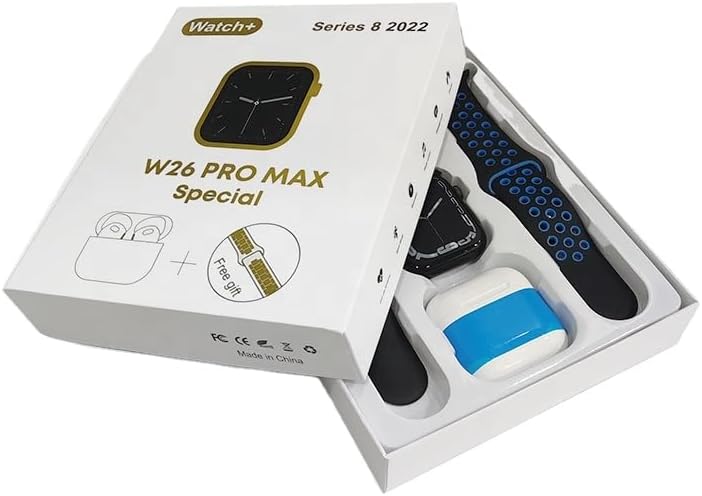
Image: The W26 Pro Max Smart Watch and its accompanying Bluetooth earphones, along with an extra watch strap, are neatly arranged within their retail packaging. The watch face is visible, and the earphones are housed in their charging case.

Выява: зверху ўніз view of the W26 Pro Max Smart Watch and Bluetooth Earphones within their packaging. The watch, earphones, and an additional strap are clearly visible, indicating the complete product set.
Кіраўніцтва па ўстаноўцы
1. Пачатковая зарадка
Before first use, fully charge both the smartwatch and the integrated earphones. Connect the provided charging cable to the watch and a compatible USB power source. The watch display will indicate charging status. Ensure the earphones are properly seated in their charging case within the watch.
2. Уключэнне / выключэнне харчавання
- Уключэнне: Press and hold the side button on the smartwatch until the screen illuminates.
- Выключэнне: Press and hold the side button, then select the "Power Off" option on the screen.
3. Спалучэнне са смартфонам
To unlock full functionality, pair your W26 Pro Max with your smartphone via Bluetooth.
- Пераканайцеся, што Bluetooth уключаны на вашым смартфоне.
- On the W26 Pro Max, navigate to the Bluetooth settings.
- On your smartphone, search for available Bluetooth devices and select "W26 Pro Max" from the list.
- Пацвердзіце запыт на спалучэнне на абедзвюх прыладах, калі будзе прапанавана.
- For optimal performance, download and install the recommended companion application (e.g., "FitPro app" as mentioned in product description) from your smartphone's app store.
4. Earphone Pairing
The integrated earphones automatically pair with the smartwatch when removed from their charging slots. To pair them with another device (e.g., directly with your phone):
- Remove the earphones from the smartwatch.
- Уключыце Bluetooth на прыладзе, з якой вы хочаце спалучыцца.
- Пошук "W26 Pro Max Earphones" (or similar name) in the Bluetooth device list and select to connect.
Інструкцыя па эксплуатацыі
Navigating the Smartwatch
- Сэнсарны экран: Правядзіце пальцам улева/управа, уверх/уніз, каб перамяшчацца па меню і атрымліваць доступ да функцый. Націсніце, каб выбраць.
- Бакавая кнопка: Press to return to the home screen or wake the device. Long press for power options or voice assistant.
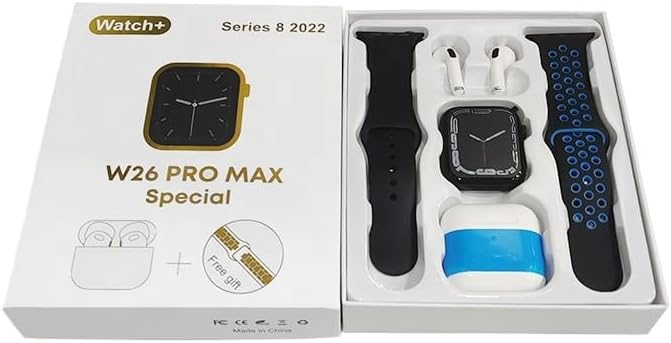
Image: The W26 Pro Max Smart Watch screen shows a voice assistant interface, with text bubbles indicating "Call Linda!" and "What's the weather like today?". This illustrates the voice command functionality.
Асноўныя характарыстыкі
Адсочванне фізічнай формы і здароўя
The W26 Pro Max is equipped with sensors to monitor various health metrics.
- Маніторынг сардэчнага рытму: The optical heart rate sensor continuously tracks your heart rate. View real-time data on the watch or in the companion app.
- Шагомер: Адсочвае вашыя штодзённыя крокі, адлегласць і спаленыя калорыі.
- Адсочванне сну: Кантралюе вашы рэжымы сну, у тым ліку глыбокі сон, лёгкі сон і час абуджэння.

Image: The W26 Pro Max Smart Watch screen displays heart rate information, showing a graph of heart rate over time, current beats per minute (bpm), and blood pressure readings. This demonstrates the health monitoring capabilities.
Выява: Падрабязны view of the W26 Pro Max Smart Watch screen showing heart rate and blood pressure monitoring. The text explains that an optical heart rate sensor is used for precise calculation and data can be viewed on the watch or via the FitPro app.
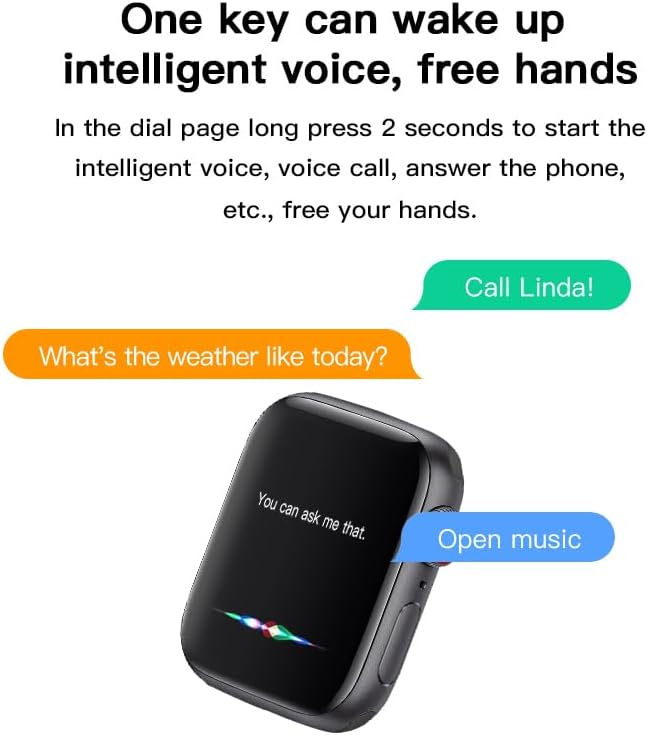
Image: The W26 Pro Max Smart Watch screen displays sleep monitoring data, showing sleep quality (Excellent), percentages of deep sleep, light sleep, and awake time, along with total sleep duration. This highlights the sleep tracking feature.
Камунікацыя і СМІ
- Выклікі Bluetooth: Make and receive calls directly from your smartwatch using the integrated microphone and speaker.
- Апавяшчэнні: Атрымлівайце апавяшчэнні аб званках, паведамленнях і апавяшчэннях праграм са спалучанага смартфона.
- Прайграванне музыкі: Control music playing on your smartphone or listen directly via the integrated earphones.

Image: The W26 Pro Max Smart Watch screen shows music playback controls, including play/pause and skip track buttons, along with a visualizer. This indicates the watch's capability to control audio.
Галасавы памочнік
Long press the side button to activate the intelligent voice assistant. Use voice commands for calls, weather inquiries, music control, and more, providing hands-free operation.
Тэхнічнае абслугоўванне і догляд
- Уборка: Wipe the watch and earphones with a soft, dry, lint-free cloth. For stubborn dirt, slightly dampпрамыйце тканіну вадой. Пазбягайце агрэсіўных хімічных рэчываў або абразіўных матэрыялаў.
- Воданепранікальнасць: The W26 Pro Max has an IP68 rating, meaning it is resistant to dust and can withstand immersion in water up to 1.5 meters for 30 minutes. However, it is not suitable for diving, hot showers, or saunas. Always dry the device thoroughly after exposure to water.
- Сыход за батарэяй: To prolong battery life, avoid fully discharging the device frequently. Charge it regularly and store it in a cool, dry place when not in use for extended periods.
- захоўванне: Захоўвайце прыладу ў прахалодным, сухім месцы, удалечыні ад прамых сонечных прамянёў і экстрэмальных тэмператур.
Ліквідацыю непаладак
| праблема | Магчымая прычына | Рашэнне |
|---|---|---|
| Прылада не ўключаецца. | Нізкі акумулятар. | Зараджайце прыладу не менш за 30 хвілін, перш чым спрабаваць зноў уключыць яе. |
| Немагчыма спалучыць са смартфонам. | Bluetooth is off on phone/watch; device not in pairing mode; interference. | Ensure Bluetooth is enabled on both devices. Restart both devices. Move closer to the phone. Forget previous pairings and try again. |
| Earphones not connecting. | Earphones not properly seated; low earphone battery. | Ensure earphones are fully seated in their charging slots within the watch. Charge the watch to ensure earphones are charging. |
| Недакладныя дадзеныя пра здароўе. | Няправільная пасадка; закаркаванне датчыка. | Пераканайцеся, што гадзіннік шчыльна прылягае да запясця, не занадта туга і не занадта свабодна. Ачысціце датчык на задняй панэлі гадзінніка. |
| Кароткі тэрмін службы батарэі. | Частае выкарыстанне энергаёмістых функцый; стары акумулятар. | Reduce screen brightness, limit notifications, disable unnecessary features. Ensure full charge cycles. |
Тэхнічныя характарыстыкі
| Асаблівасць | Дэталь |
|---|---|
| Нумар мадэлі | W26 Pro Max |
| Дысплей | 1.78" AMOLED Touchscreen |
| Аперацыйная сістэма | Wear OS |
| Сувязь | Bluetooth |
| Ёмістасць батарэі | 280mAh (watch) |
| Тэрмін службы батарэі | Да 3 дзён (пры тыповым выкарыстанні) |
| Воданепранікальнасць | IP68 |
| Асаблівасці | Integrated Bluetooth Earphones, Heart Rate Sensor, Pedometer, Sleep Tracker, Microphone, Speaker, Voice Assistant |
| Ёмістасць памяці | 16 Мб |
| Памеры ўпакоўкі | 16.8 х 12.8 х 3 см |
| Вага | 170 г |
Гарантыя і падтрымка
For information regarding warranty coverage and customer support, please refer to the documentation provided with your purchase or contact the retailer where the product was acquired. As this product is manufactured by "Generic", specific warranty details may vary by region and seller.
For technical assistance or further inquiries, please reach out to the customer service channels provided by your point of purchase.
Ask a question about this manual
Ask about setup, troubleshooting, compatibility, parts, safety, or missing instructions. Manuals+ will review the question and use this page’s manual context to help answer it.