
DoHonest ZD72
DoHonest Dash Cam Front and Rear User Manual
Мадэль: ZD72
Брэнд: DoHonest
1. Уводзіны
This manual provides detailed instructions for the installation, operation, and maintenance of your DoHonest Dash Cam Front and Rear (Model ZD72). Please read this manual thoroughly before using the product to ensure proper function and safety.
The DoHonest 4K Dual Dash Cam is designed to enhance driving safety and provide comprehensive recording capabilities. It features ultra HD 4K front recording and full HD 1080P rear recording, superior night vision, built-in GPS, 5G WiFi connectivity, and reliable accident recording features.

Image: DoHonest Dash Cam ZD72 main unit, rear camera, and smartphone app display.
2. Змесціва ўпакоўкі
Праверце, ці ўсе пералічаныя ніжэй прадметы ўваходзяць у камплект. Калі якія-небудзь прадметы адсутнічаюць або пашкоджаныя, звярніцеся ў службу падтрымкі кліентаў.
- 1 x 4K Front Dash Cam
- 1 x 1080P In-car Rear Camera
- 1 х мацаванне прысоскі
- 1 х 11.5 футаў кабель сілкавання з аўтамабільнай зараднай прыладай
- 1 кабель задняй камеры даўжынёй 23 фута
- 1 х кабель харчавання USB Type-C
- 1 х кабель перадачы дадзеных USB тыпу C
- 1 x 32GB Memory Card (Included)
- 1 х Інструкцыя па эксплуатацыі

Image: Visual representation of the DoHonest Dash Cam ZD72 package contents.
3. Настройка і ўстаноўка
The DoHonest Dash Cam is designed for effortless plug-and-play installation. Follow these steps for proper setup.
3.1 Installing the Front Dash Cam
- Ачысціце лабавое шкло, дзе вы плануеце ўсталяваць відэарэгістратар.
- Прымацуеце прысоску да пярэдняй камеры прыборнай панэлі.
- Securely attach the suction cup mount to the cleaned area on your windshield, ensuring it does not obstruct your view.
- Insert the included 32GB microSD card into the dash cam's memory card slot.
- Connect the 11.5ft Power Supply Cable with Car Charger to the dash cam and plug the other end into your vehicle's cigarette lighter socket.
3.2 Устаноўка задняй камеры
- Determine a suitable location for the rear camera, typically on the rear windshield, ensuring a clear view.
- Clean the chosen area thoroughly.
- Mount the rear camera using its adhesive or screws (if applicable and provided).
- Connect the 23ft Rear Camera Cable to the rear camera and route it neatly to the front dash cam. Plug the cable into the AV-IN port on the front dash cam.

Image: Installation diagram for the DoHonest Dash Cam, showing front and rear camera placement and cable routing.
4. Інструкцыя па эксплуатацыі
4.1 Уключэнне/выключэнне
- The dash cam will automatically power on and begin recording when connected to your vehicle's power supply and the engine starts.
- It will automatically power off when the vehicle's engine is turned off and power supply is disconnected.
4.2 Рэжымы запісу
- цыклічны запіс: The dash cam continuously records video in segments (e.g., 1, 3, or 5 minutes). When the memory card is full, it automatically overwrites the oldest unlocked footage.
- G-сенсор (экстраны запіс): In the event of a sudden impact or collision, the built-in G-sensor will detect the event and automatically lock the current video segment, preventing it from being overwritten by loop recording.
- 24/7 Parking Mode: With an optional hardwire kit (not included), the dash cam can monitor your vehicle even when parked. It uses motion detection to automatically record incidents and features low-voltage protection to prevent draining your car's battery.
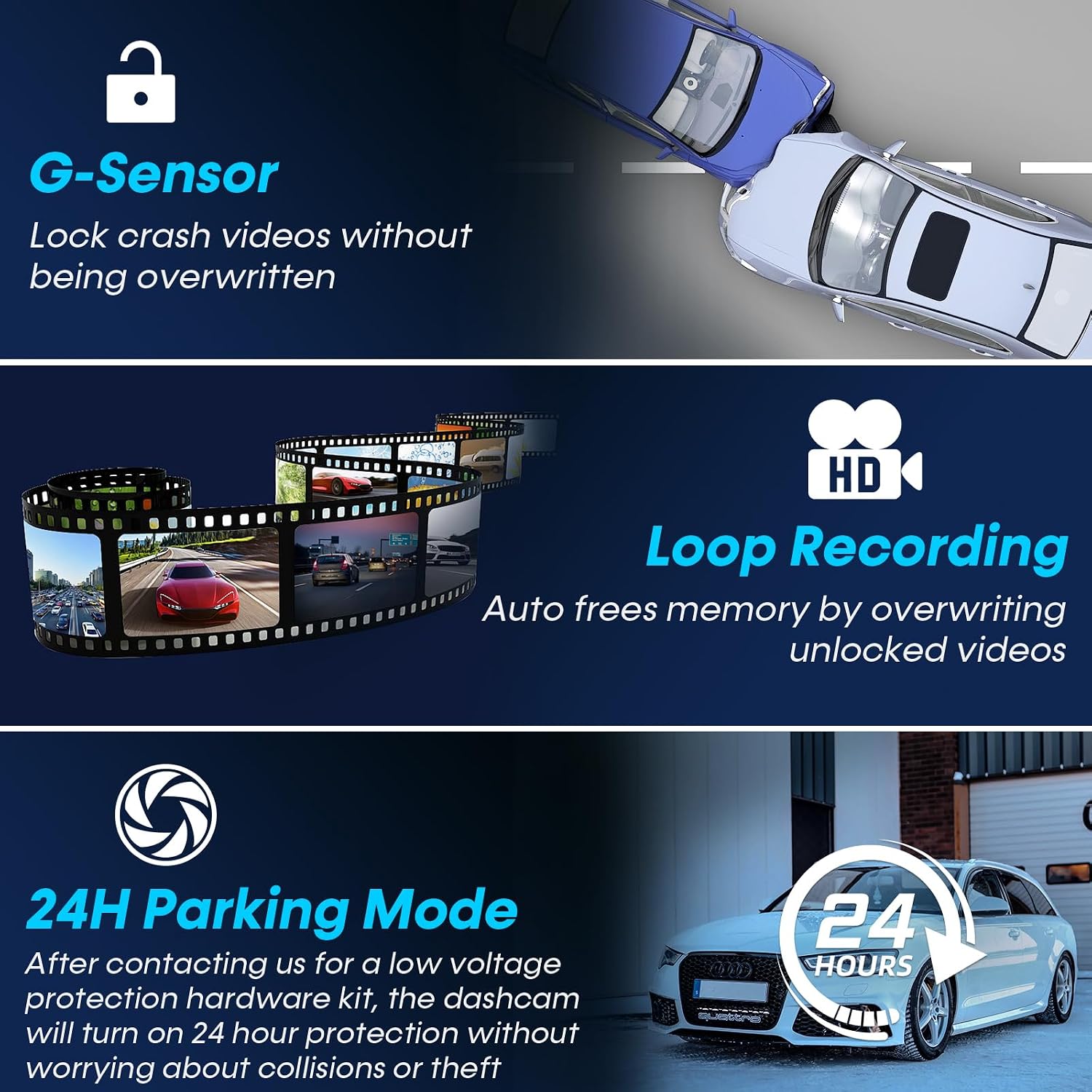
Image: Explanation of G-Sensor, Loop Recording, and 24H Parking Mode features.
4.3 Функцыянальнасць GPS
The built-in GPS module tracks your vehicle's location, speed, and routes. This data can be viewed via the dedicated smartphone app or on a PC/Mac, providing valuable evidence in case of an accident and allowing you to review your journey history.

Image: GPS tracking and 5G WiFi connectivity for the DoHonest Dash Cam.
4.4 5G Wi-Fi and App Control
Connect your dash cam to your smartphone via 5G Wi-Fi for instant video downloads, live view, and easy sharing of footage. The dedicated app allows you to manage recordings and access GPS data directly from your device.
4.5 Начное бачанне
The dash cam features superior night vision with HDR/WDR technology and an F1.5 large aperture lens, enhancing light intake by 45%. This ensures clear footage in low-light conditions and at night, improving visibility and safety.

Image: Demonstration of Super Night Vision capabilities in various lighting conditions.
5. Тэхнічнае абслугоўванне і догляд
- Уборка: Выкарыстоўвайце мяккую сухую тканіну для чысткі аб'ектываў і экрана камеры. Пазбягайце выкарыстання абразіўных ачышчальнікаў або растваральнікаў.
- Карта памяці: Regularly format the microSD card (at least once a month) to ensure optimal performance and prevent data corruption. The dash cam supports up to 512GB microSD cards.
- Абнаўленні прашыўкі: Check the DoHonest official website periodically for any available firmware updates to ensure your dash cam has the latest features and improvements.
- тэмпература: The dash cam is built with heat-resistant aluminum alloy. However, avoid prolonged exposure to extreme temperatures (both hot and cold) to maintain optimal performance and longevity.
6. Выпраўленне непаладак
If you encounter issues with your DoHonest Dash Cam, please refer to the following common solutions.
- Відэарэгістратар не ўключаецца:
- Пераканайцеся, што кабель харчавання надзейна падключаны як да відэарэгістратара, так і да разеткі аўтамабіля.
- Check if the vehicle's power outlet (cigarette lighter) is functioning correctly.
- Recording Issues (e.g., "Card Full" error):
- Format the microSD card regularly within the dash cam's settings.
- Ensure you are using a high-speed (Class 10 or U3 recommended) microSD card.
- Check if loop recording is enabled in the settings.
- Дрэнная якасць відэа:
- Працірайце аб'ектывы камеры мяккай тканінай.
- Пераканайцеся, што з лінзаў знята ахоўная плёнка.
- Праверце налады раздзялення відэа ў меню відэарэгістратара.
- GPS Not Tracking:
- Пераканайцеся, што відэарэгістратар мае чысты view неба для прыёму спадарожнікавага сігналу.
- Verify GPS functionality is enabled in the settings.
- Праблемы з падключэннем Wi-Fi:
- Пераканайцеся, што Wi-Fi відэарэгістратара ўключаны.
- Перазагрузіце відэарэгістратар і смартфон.
- Ensure you are within close proximity to the dash cam for a stable connection.
If the problem persists, please contact DoHonest customer support for further assistance.
7. Тэхнічныя характарыстыкі
| Марка | DoHonest |
| мадэль | ZD72 |
| Дазвол відэазахопу | Front: 4K (2160P), Rear: 1080P |
| Фронт Viewing кут | 170 градусаў |
| Тыл Viewing кут | 150 градусаў |
| Памер дысплея | 3.16 цалі LCD |
| Тэхналогія падлучэння | Wi-Fi (5G), GPS |
| Тып флэш-памяці | microSD |
| Included Memory Card Size | 32 ГБ |
| Max Supported Storage | 512 ГБ |
| Асаблівасці | 4K Front and rear dual cam, Time-lapse, WDR, Loop Recording, G-sensor, Parking Monitor, Built-In GPS/ Wi-Fi/Microphone/Speaker, Super Night Vision, Motion Sensor, Easy to Install, App Control, 360 Degree, Screen Saver, Live Speed, Voice Alert, Built-In Super Capacitor, Support 512GB SD Card Max, APP for iOS & Android, 2 Year Reliable Warranty |
| Тып мацавання | Мацаванне лабавога шкла |
| Памеры прадукту | 5.08 х 7.6 х 4.5 см; 540 г |

Image: Key specifications and design features of the DoHonest Dash Cam ZD72.
8. Гарантыя і падтрымка
The DoHonest Dash Cam ZD72 comes with a 2 Year Reliable Warranty. This warranty covers manufacturing defects and ensures the product meets its specified performance standards.
For technical support, warranty claims, or any questions regarding your product, please contact DoHonest customer service. Refer to the contact information provided in the product packaging or on the official DoHonest webсайт.
Ask a question about this manual
Ask about setup, troubleshooting, compatibility, parts, safety, or missing instructions. Manuals+ will review the question and use this page’s manual context to help answer it.