
1. Уводзіны
This manual provides detailed instructions for the safe and efficient operation of your HANLIM Portable CD Player, Model HL-108. Please read this manual thoroughly before using the product and retain it for future reference.

Малюнак 1: Фронт view of the HANLIM Portable CD Player HL-108. This image displays the main unit with its control panel, LCD screen, and integrated handle.
2. Інструкцыі па тэхніцы бяспекі
- Не падвяргайце прыладу ўздзеянню дажджу, вільгаці або экстрэмальных тэмператур.
- Пазбягайце размяшчэння прылады побач з крыніцамі цяпла або пад прамымі сонечнымі прамянямі.
- Не адчыняйце casinг; звяртайцеся да кваліфікаванага персаналу па ўсё абслугоўванне.
- Трымайце прыладу далей ад моцных магнітных палёў.
- Выкарыстоўвайце толькі кабель харчавання, які ўваходзіць у камплект.
- Забяспечце належную вентыляцыю, каб прадухіліць перагрэў.
3. Змесціва ўпакоўкі
Калі ласка, праверце наяўнасць усіх прадметаў:
- HANLIM Portable CD Player HL-108
- Кабель харчавання (1.2 м)
- Пульт дыстанцыйнага кіравання (батарэйкі не ўваходзяць у камплект)
- Кіраўніцтва карыстальніка

Малюнак 2: The HANLIM Portable CD Player HL-108 shown with its included accessories: the power cable, remote control, and user manual.
4. Прадукт скончыўсяview
The HANLIM Portable CD Player HL-108 features a compact design with multiple playback options and connectivity ports.
4.1 Элементы кіравання пярэдняй панэлі
- ВК-дысплей: Паказвае бягучы рэжым, інфармацыю пра трэк і частату FM.
- Кнопка MODE: Switches between CD, FM, Bluetooth, USB, and AUX modes.
- Кнопка ЧАКАВАННЯ: Уключае або выключае прыладу.
- Play/Pause/Scan Button: Plays/pauses media or scans FM radio stations.
- Кнопка «Папярэдні/CH-»: Skips to previous track/station.
- Кнопка «Далей/CH+»: Skips to next track/station.
- Рэгулятар гучнасці: Рэгулюе гучнасць гуку.
- Порт USB: Для прайгравання з USB-назапашвальніка.
- Раз'ём для навушнікаў (3.5 мм): Для прыватнага праслухоўвання.
4.2 Злучэнні задняй панэлі
- AUX IN (3.5 мм): Падключыце знешнія гукавыя прылады.
- Порт мікрафона: Connect a microphone for singing.
- Улада пераменнага току: Connect the power cable for charging or continuous power.
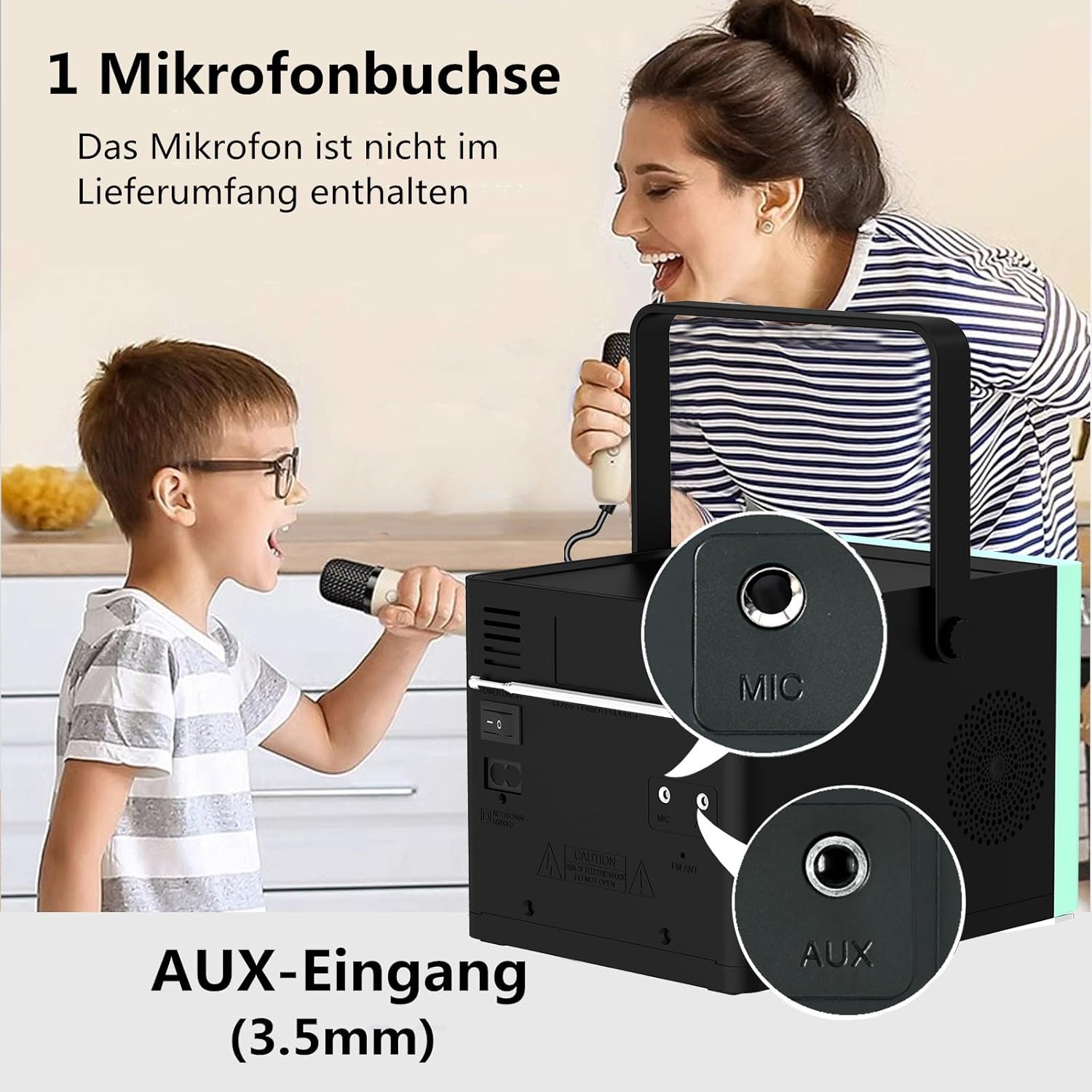
Малюнак 3: Тыл view of the HANLIM Portable CD Player HL-108, highlighting the microphone input and AUX input ports.
5. Настройка
5.1 Уключэнне і зарадка
- Connect the provided power cable to the AC power input on the rear of the unit and plug it into a wall outlet.
- The built-in 2000mAh battery will begin charging automatically. A full charge provides approximately 4.5 to 5 hours of playback at maximum volume.
- Націсніце ЧАКАННЕ кнопка для ўключэння прылады.
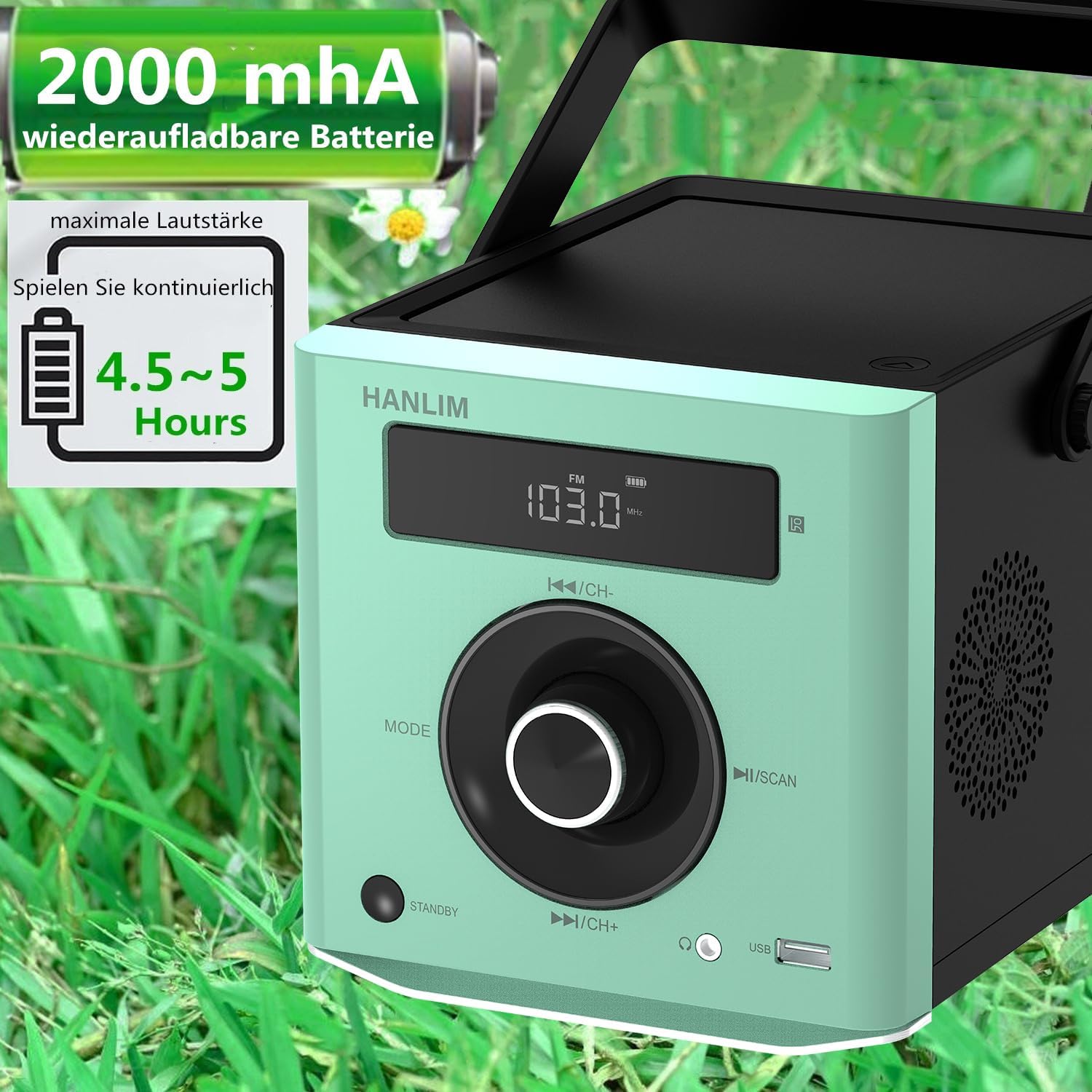
Малюнак 4: The HANLIM Portable CD Player HL-108 displaying battery charge status and indicating 4.5-5 hours of continuous playback.
6. Інструкцыя па эксплуатацыі
6.1 Прайграванне кампакт-дыскаў
- Адкрыйце вечка адсека для кампакт-дыскаў.
- Place a CD (CD/CD-R/CD-RW/MP3 format) onto the spindle, label side up.
- Зачыніце вечка аддзялення для CD.
- Націсніце РЭЖЫМ кнопку, пакуль не з'явіцца надпіс «CD».
- Націсніце Прайграванне/Паўза кнопку, каб пачаць прайграванне.
- Выкарыстоўвайце Папярэдняя/Наступная кнопкі для пропуску трэкаў.
- Функцыя паўтарэння: Press the repeat button on the remote control to cycle through repeat one, repeat all, or random play.
- Continue Playback: The unit will resume playback from where it was last stopped, useful for language learning.
6.2 FM -радыё
- Націсніце РЭЖЫМ button until "FM" is displayed.
- Націсніце і ўтрымлівайце сканаваць button to automatically scan and store available FM stations (87.5-108MHz). Up to 20 stations can be stored.
- Выкарыстоўвайце CH- і CH+ кнопкі для навігацыі па захаваных станцыях.

Малюнак 5: The HANLIM Portable CD Player HL-108 showing the FM radio frequency on its display.
6.3 Злучэнне Bluetooth
- Націсніце РЭЖЫМ button until "Bluetooth" is displayed. The unit will enter pairing mode.
- On your device (phone, tablet, computer), enable Bluetooth and search for "HANLIM HL-108".
- Select the device to pair. Once connected, you will hear a confirmation sound.
- Note: Bluetooth headphones are not supported for connection to this CD player.

Малюнак 6: The HANLIM Portable CD Player HL-108 illustrating its Bluetooth connectivity, USB port, and headphone jack.
6.4 Прайграванне з USB
- Insert a USB flash drive (up to 32GB, supporting MP3/WMA formats) into the USB port.
- Націсніце РЭЖЫМ кнопку, пакуль не з'явіцца «USB».
- Playback will start automatically. Use the Папярэдняя/Наступная кнопкі для навігацыі па трэках.
6.5 AUX ўваход
- Connect an external audio device (e.g., phone, computer) to the AUX IN port using a 3.5mm audio cable (not included).
- Націсніце РЭЖЫМ кнопку, пакуль не з'явіцца надпіс «AUX».
- Кіруйце прайграваннем з падлучанай прылады.
6.6 Раз'ём для навушнікаў
For private listening, connect 3.5mm headphones to the headphone jack on the front panel.
6.7 Microphone Port
Connect a microphone (not included) to the MIC port on the rear panel for singing along to music.
6.8 Налады гуку (эквалайзер)
The unit offers 5 sound qualities: Pop, Jazz, Rock, Classical, and Flat. Use the EQ button on the remote control to cycle through these modes and adjust the audio output to your preference.
7. Тэхнічнае абслугоўванне
- Уборка: Працірайце прыладу мяккай сухой тканінай. Не выкарыстоўвайце абразіўныя ачышчальнікі або растваральнікі.
- Сыход за CD: Трымайце кампакт-дыскі за краю. Працірайце забруджаныя кампакт-дыскі мяккай тканінай без ворса, выціраючы іх ад цэнтра да краёў.
- Сыход за батарэяй: Для аптымальнага тэрміну службы батарэі пазбягайце частай поўнай разрадкі. Пры працяглым захоўванні зараджайце батарэю прыкладна да 50% кожныя некалькі месяцаў.
8. Выпраўленне непаладак
| праблема | Магчымая прычына | Рашэнне |
|---|---|---|
| Прылада не ўключаецца. | Battery is depleted or power cable is not connected. | Connect the power cable and allow the battery to charge, or operate directly from AC power. |
| Няма гуку. | Volume is too low, headphones connected, or incorrect mode selected. | Increase volume, disconnect headphones, or ensure the correct input mode (CD, FM, BT, USB, AUX) is selected. |
| Кампакт-дыск не прайграваецца або прайграванне перарываецца. | Кампакт-дыск брудны, падрапаны або няправільна ўстаўлены. | Clean the CD, try a different CD, or reinsert the CD correctly. Ensure the CD compartment is fully closed. |
| Збой спалучэння Bluetooth. | Device is too far, Bluetooth is off on the device, or unit is not in pairing mode. | Ensure the unit is in Bluetooth mode, your device's Bluetooth is on, and they are within range. Try restarting both devices. |
| Прыём FM-радыё дрэнны. | Слабы сігнал або становішча антэны. | Adjust the unit's position or extend the antenna for better reception. |
9. Тэхнічныя характарыстыкі
| Асаблівасць | Спецыфікацыя |
|---|---|
| Марка | ХАНЛІМ |
| мадэль | HL-108 |
| Памеры прадукту | 15.5 х 20.5 х 16 см (6.1 х 8.1 х 6.3 цалі) |
| Вага прадмета | 1.7 кг (3.75 фунтаў) |
| Выхадная магутнасць | 20 Вт |
| акумулятар | Built-in 2000mAh rechargeable Lithium Ion |
| Тэрмін службы батарэі | Да 5 гадзін (пры максімальнай гучнасці) |
| Падтрымліваемыя фарматы CD | CD, CD-R, CD-RW, MP3 |
| Радыёчастата FM | 87.5-108 МГц |
| Падтрымка USB | Up to 32GB, MP3/WMA formats |
| Сувязь | Bluetooth, USB, AUX (3.5mm), Headphone Jack (3.5mm), Microphone Port |
| Тып дысплея | ВК |
| Асаблівасці | Bluetooth, CD-R/RW Compatible, Equalizer, Portable, Rechargeable |
10. Гарантыя і падтрымка
This HANLIM product comes with a адзін год гарантыі з даты пакупкі. Гэтая гарантыя распаўсюджваецца на вытворчыя дэфекты і дэфекты вырабу пры нармальным выкарыстанні.
For technical support, warranty claims, or service inquiries, please contact your retailer or the HANLIM customer service department through the contact information provided at the point of purchase.