
1. Уводзіны
Thank you for choosing the TONGVEO PTZ HDMI Camera. This manual provides essential information for the proper installation, operation, and maintenance of your camera. Please read this manual thoroughly before using the product to ensure optimal performance and to prevent damage. This camera is designed for high-quality video capture in various settings, including live streaming, video conferencing, education, and worship services.
2. Прадукт скончыўсяview
2.1 Асноўныя магчымасці
- Відэа высокай выразнасці: 1080p resolution at 60 frames per second (fps) for clear and smooth video.
- аптычны зум: 3x optical zoom lens with a 55.8° field of view, allowing for detailed close-ups without loss of quality.
- Pan/Tilt/Zoom (PTZ) Functionality: Silent movement with 350° pan and 180° tilt capabilities, controllable remotely.
- Некалькі выхадаў: HDMI and USB 3.0 for versatile connectivity.
- Лёгкая ўстаноўка: Plug and Play functionality, automatically recognized by computers without driver installation.
- Шырокая сумяшчальнасць: Compatible with Windows, Mac, and popular conferencing software like Zoom, Skype, OBS, Google Hangouts, Cisco WebEx, and Microsoft Teams.
- Пашыраная апрацоўка малюнкаў: Superior white balance and exposure modes, supporting YUV, MJPG, and H.264 video compression formats.
- Пульт дыстанцыйнага кіравання: Includes an infrared (IR) remote control with 10 presets for quick camera positioning.
- Кіраванне джойсцікам: Supports external joystick control via RS485 or RS232 interfaces.
2.2 Змест пакета
Праверце наяўнасць усіх прадметаў у камплекце:
- TONGVEO USB PTZ Camera
- 9.8-футавы кабель USB 3.0
- Адаптар сілкавання пастаяннага току 12 В
- ІЧ-пульт дыстанцыйнага кіравання
- Wall Mount with Screws
- Кіраўніцтва карыстальніка (гэты дакумент)

Image: Package contents including the camera, USB cable, power adapter, remote, wall mount, and user manual.
3. Настройка
3.1 Фізічная ўстаноўка
The TONGVEO PTZ camera offers flexible mounting options to suit various environments:
- Размяшчэнне на працоўным стале: Размясціце камеру на ўстойлівай, роўнай паверхні.
- Мацаванне манітора: Надзейна прымацуйце да верхняй часткі манітора.
- Насценны мантаж: Use the provided wall mount and screws to fix the camera to a wall.
- Мацаванне штатыва: Attach the camera to a standard tripod using the tripod screw hole at the base.
- Мацаванне на столі: Install the camera upside down on the ceiling using a compatible mount (sold separately or included if specified).
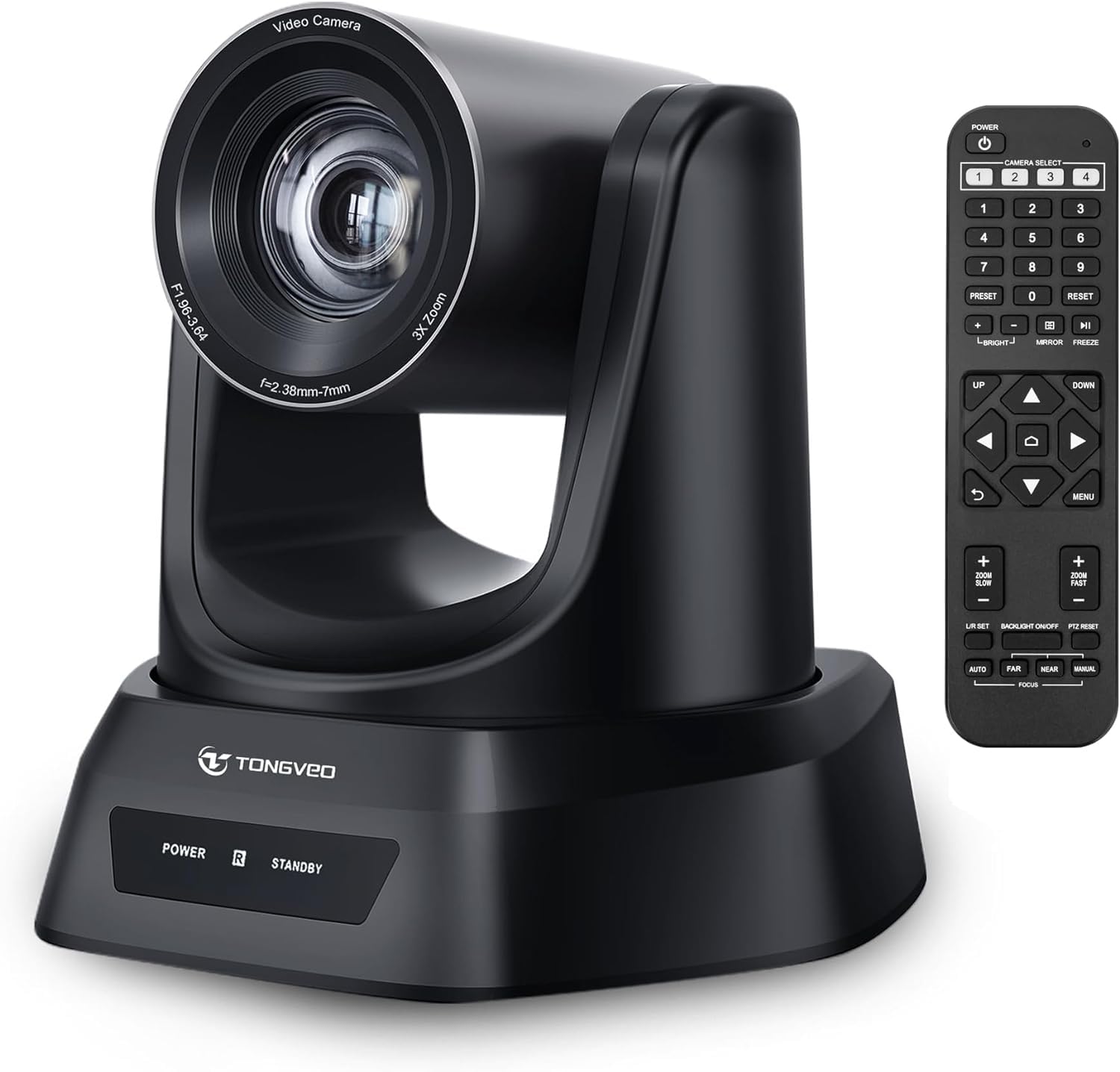
Выява: Зверхуview of the TONGVEO PTZ camera highlighting 3x optical zoom, 1080p 60fps, and pan/tilt capabilities.
3.2 Злучэнні
Connect the camera to your devices using the ports on the rear panel:
- DC 12V Power: Connect the included power adapter to the DC 12V port and then to a power outlet.
- USB 3.0: Connect the USB 3.0 cable from the camera to your computer (PC/Mac) for video and control.
- HDMI: Connect an HDMI cable from the camera to a display (TV/Monitor) or a video switcher (e.g., Blackmagic ATEM) for video output.
- RS232/RS485: These ports are for connecting an external joystick controller for advanced PTZ control. RS485 supports daisy-chaining multiple cameras.

Image: Rear panel of the TONGVEO PTZ camera showing DC 12V, RS485, RS232, USB, and HDMI ports.
3.3 Усталёўка праграмнага забеспячэння
The TONGVEO PTZ camera is a Plug and Play device. No specific drivers are required for most operating systems. Your computer should automatically recognize the camera when connected via USB. It supports the UVC1.1 standard.
4. Аперацыя
4.1 Пульт дыстанцыйнага кіравання
Use the included IR remote control to manage camera functions:
- PTZ Movement: Use the directional buttons to pan (left/right) and tilt (up/down) the camera.
- Маштаб: Adjust the optical zoom in and out. The remote typically offers fast and slow zoom options.
- Прэсеты: The remote allows you to save and recall up to 10 preset positions. To save a preset, move the camera to the desired position, then press the 'SET' button followed by a number (1-10). To recall a preset, press the corresponding number button.
- Camera Select: If multiple TONGVEO cameras are connected, use the camera select buttons to control a specific unit.
4.2 Налады выявы
Access the On-Screen Display (OSD) menu via the remote control to adjust image parameters:
- Фокус: The camera features auto-focus by default. Manual focus adjustment is available through the OSD menu.
- Баланс белага: Adjust for accurate color reproduction under different lighting conditions.
- Уздзеянне: Control brightness and contrast to optimize image visibility.
4.3 Сумяшчальнасць праграмнага забеспячэння
The camera is compatible with a wide range of operating systems and video conferencing applications:
- Аперацыйныя сістэмы: Windows XP, Vista, 7, 8, 8.1, 10, 11; Mac 10.4 or higher.
- прыкладанні: Zoom, Skype, Google Hangouts, Cisco WebEx, Microsoft Teams, GoToMeeting, BlueJeans, OBS, and other UVC-compliant software.

Image: Diagram illustrating the TONGVEO PTZ camera's compatibility with various devices and software platforms.
5. Тэхнічнае абслугоўванне
To ensure the longevity and optimal performance of your TONGVEO PTZ camera, follow these maintenance guidelines:
- Уборка: Для чысткі корпуса камеры выкарыстоўвайце мяккую сухую тканіну. Для аб'ектыва выкарыстоўвайце спецыяльную тканіну для чысткі аб'ектыва і раствор. Пазбягайце абразіўных ачышчальнікаў або растваральнікаў.
- захоўванне: Калі камера не выкарыстоўваецца працяглы час, захоўвайце яе ў прахалодным, сухім месцы, удалечыні ад прамых сонечных прамянёў і экстрэмальных тэмператур.
- Апрацоўка: Handle the camera with care. Avoid dropping or subjecting it to strong vibrations.
- Магутнасць: Disconnect the power adapter when the camera is not in use or during electrical storms.
6. Выпраўленне непаладак
If you encounter issues with your TONGVEO PTZ camera, refer to the following common problems and solutions:
- Няма харчавання:
- Ensure the power adapter is securely connected to the camera and a working power outlet.
- Пераканайцеся, што разетка працуе.
- Няма відэавыхаду:
- Check all cable connections (USB, HDMI) are secure.
- Ensure the correct input source is selected on your display or video switcher.
- Verify the camera is selected as the video input device in your software (e.g., Zoom, OBS).
- Image is Blurry/Out of Focus:
- Allow the camera's auto-focus to adjust.
- Access the OSD menu to manually adjust the focus if needed.
- Пераканайцеся, што лінза чыстая і на ёй няма плям.
- Пульт дыстанцыйнага кіравання не працуе:
- Праверце батарэі ў пульце дыстанцыйнага кіравання і пры неабходнасці заменіце іх.
- Ensure there are no obstructions between the remote and the camera's IR receiver.
- PTZ Movement is Unresponsive:
- Verify the camera is powered on and the remote control is functioning.
- If using a joystick, ensure it is correctly connected via RS232/RS485.
7. Тэхнічныя характарыстыкі
Detailed technical specifications for the TONGVEO PTZ HDMI Camera (Model TV-NV3H-UK):
| Асаблівасць | Спецыфікацыя |
|---|---|
| Нумар мадэлі | TV-NV3H-UK (819988df-b012-4f6a-b3ce-5c96af8001c3) |
| Марка | ТОНГВЭО |
| Аптычны зум | 3x |
| Эфектыўнае дазвол відэа | 1080 Pixels (1080p 60fps) |
| Тэхналогія фотадатчыка | CMOS |
| Optical Sensor Size | 1/2.7-цалевы |
| Максімальная фокусная адлегласць | 10 міліметра |
| Мінімальная фокусная адлегласць | 5 міліметра |
| Фармат захопу відэа | MP4 (Supports YUV, MJPG, H.264) |
| Панскі рух | 350° |
| Рух нахілу | 180° |
| Сувязь | HDMI, USB 3.0, RS232, RS485 |
| Крыніца харчавання | 12 В пастаяннага току |
| Стабілізацыя выявы | няма |
| Працоўная тэмпература | -10°C да +50°C |
| Памеры ўпакоўкі | 28 х 21 х 19 см |
| Вага | 2 кілаграмаў |

Выява: Ніжняя частка view of the TONGVEO PTZ camera showing model number (TV-V3H) and other regulatory information.
8. Гарантыя і падтрымка
The TONGVEO PTZ HDMI Camera comes with a Гарантыя 3 год. For any questions, technical assistance, or warranty claims, please contact TONGVEO customer service. Our support team is available to respond to your inquiries within 24 hours.
Please refer to the contact information provided on the TONGVEO official webсайт або дакументацыю па куплі, каб атрымаць найбольш актуальную інфармацыю аб каналах падтрымкі.