
1. Прадукт скончыўсяview
The SJOYBRING Wireless Double Din Carplay & Android Auto Car Stereo is a 7-inch full HD capacitive touchscreen unit designed to enhance your in-car entertainment and connectivity. It features wireless Apple CarPlay and Android Auto, Bluetooth, 4-channel RCA output, high power output, subwoofer support, and includes a backup camera.
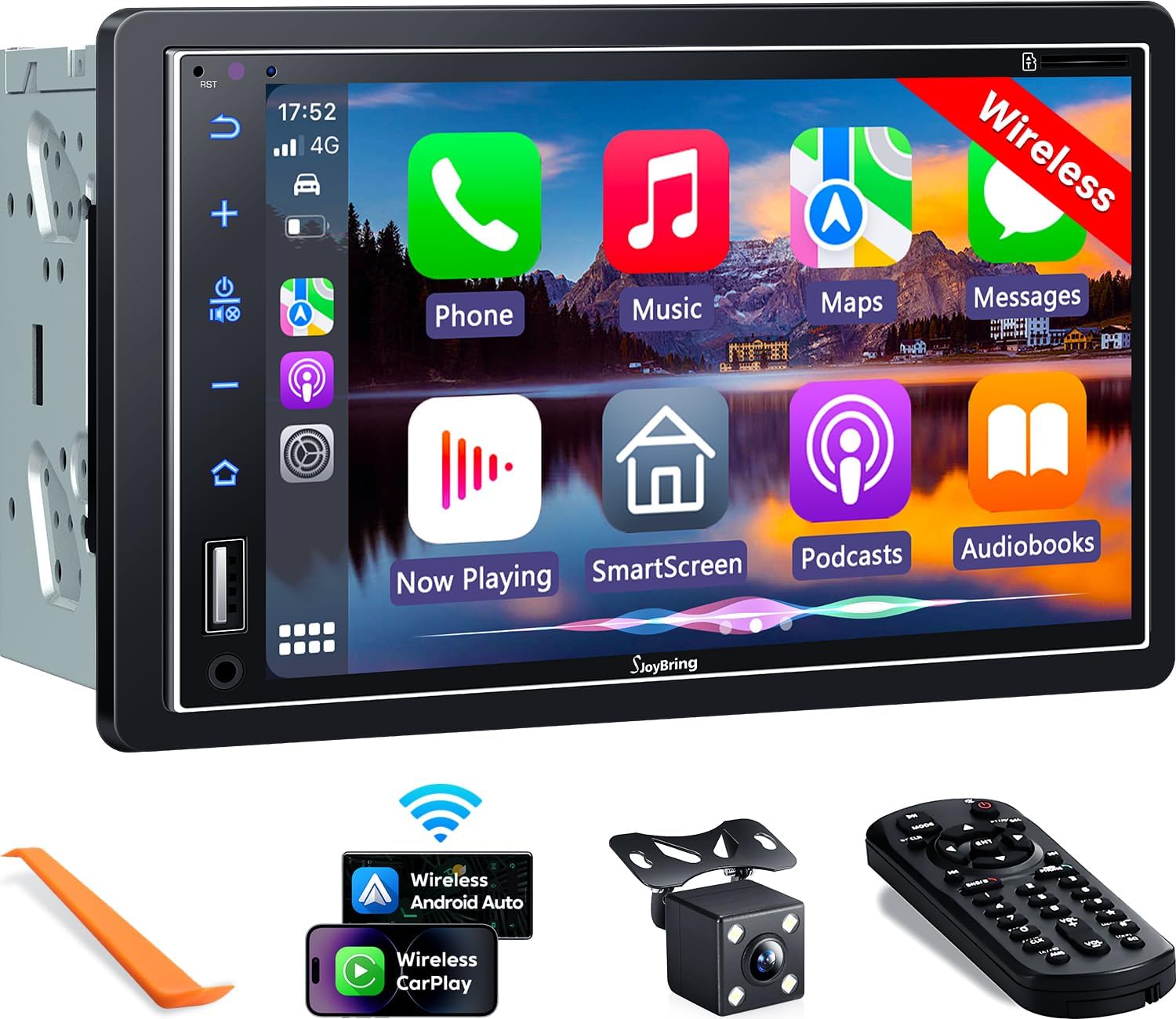
Выява 1.1: Спераду view of the SJOYBRING car stereo displaying the CarPlay interface.
2. Змесціва ўпакоўкі
Праверце, ці ўсе пералічаныя ніжэй прадметы ўваходзяць у вашу ўпакоўку:
- Head Unit (Car Stereo)
- Каркас
- Тыл View Камера
- Кабель рэзервовай камеры
- Электраправодка
- Пульт дыстанцыйнага кіравання
- Кіраўніцтва карыстальніка (гэты дакумент)
- Мантажныя кранштэйны
- Інструмент для разборкі
- Шрубы (розных памераў)

Image 2.1: Visual representation of the SJOYBRING car stereo package contents.
3. Настройка і ўстаноўка
3.1 Important Installation Tips
- The standard size of this unit is 170mm x 97mm. Ensure your vehicle's dashboard opening matches this size.
- If the stereo size does not fit your dash, an additional suitable dash kit may be required (not included).
- Read this instruction manual thoroughly before beginning installation.
- Some vehicles may require additional accessories for installation, such as a wire harness adapter and a radio antenna adapter specific to your car model (not included).
3.2 Электрычная схема
Глядзіце наступную схему для правільнага падключэння электраправодкі. Няправільнае падключэнне можа пашкодзіць прыладу або электрычную сістэму вашага аўтамабіля.

Image 3.1: ISO Standard Double DIN wiring and dimension diagram.
3.3 Ззаду View Падключэнне камеры
The included HD night vision rear view camera provides a 170° ultra-wide viewing angle and is waterproof. Connect the camera as shown in the diagram below. The display will automatically switch to the rear view калі транспартны сродак знаходзіцца на задняй перадачы.

Image 3.2: One-step wiring connection for the rear camera.
4. Інструкцыя па эксплуатацыі
4.1 Бесправадныя Apple CarPlay і Android Auto
Connect your smartphone to the car stereo via Bluetooth and Wi-Fi for wireless Apple CarPlay or Android Auto functionality. This allows access to navigation, music, messages, and other phone features directly on the stereo's screen. Voice control via Siri or Google Assistant is supported for safer operation.
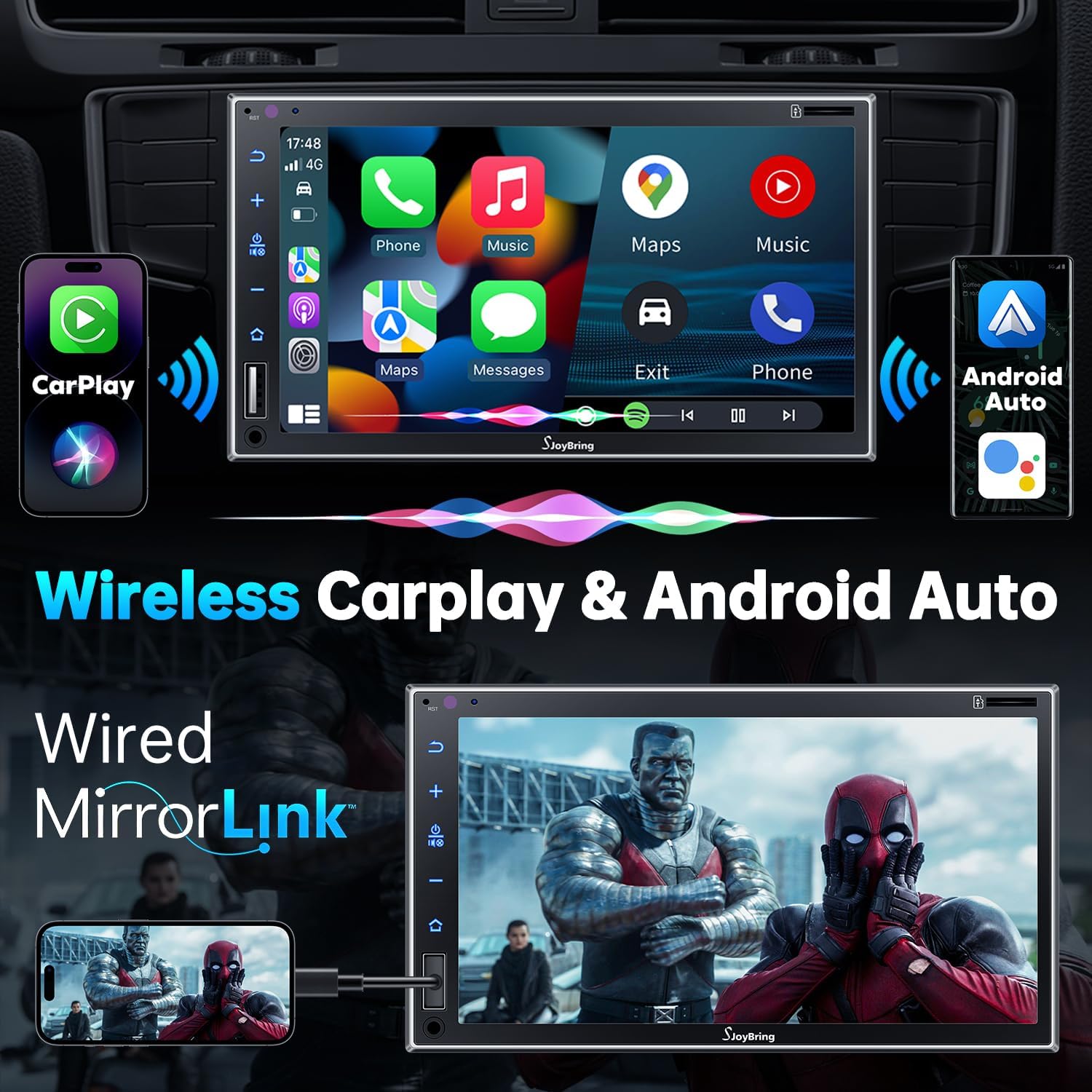
Image 4.1: Wireless Apple CarPlay and Android Auto in operation.
4.2 Wired Mirror Link
The unit supports wired mirror link for both iOS and Android phones (no version limit). Use a USB connection to mirror your smartphone's screen, displaying apps like Google Maps, Spotify, or YouTube on the 7-inch HD touchscreen.

Image 4.2: Wired Mirror Link functionality.
4.3 Функцыі гуку
- 4.2-Channel Audio Output: Features 4 channels of pre-amplifier (RCA) for front right, front left, rear right, and rear left speakers, allowing for precise sound adjustment.
- Выхад сабвуфера: Includes two high RMS power subwoofer outputs for enhanced bass effects.
- 10-дыяпазонны эквалайзер: An integrated 10-band audio equalizer allows customization of the music effect.

Image 4.3: 4.2 Channel Audio Output diagram.

Image 4.4: 10-Band Equalizer interface.
4.4 Злучэнне Bluetooth
Utilizes the latest Bluetooth technology with an independent Bluetooth module and antenna for a strong and stable connection, ensuring clear calls and uninterrupted music playback.

Image 4.5: Latest Bluetooth technology for stable connection.
4.5 Кіраванне на рулі (SWC)
The unit supports steering wheel controls, allowing you to manage audio functions without taking your hands off the wheel. Refer to the wiring diagram for SWC connections and the unit's settings for programming.

Малюнак 4.6: Інтэрфейс налады кіравання на рулі.
4.6 FM & AM Radio
Access FM radio frequencies from 87.5 to 107.9 MHz and AM radio frequencies from 530 to 1710 KHz. The unit allows for station presets and scanning.

Image 4.7: FM & AM Radio interface.
5. Тэхнічнае абслугоўванне
To ensure the longevity and optimal performance of your SJOYBRING car stereo, follow these maintenance guidelines:
- Ачыстка экрана: Выкарыстоўвайце мяккую тканіну без ворса, каб акуратна працерці сэнсарны экран. Для выдалення ўстойлівых плям злёгкуampПрацярыце тканіну вадой або сродкам для ачысткі экрана. Пазбягайце агрэсіўных хімічных рэчываў або абразіўных матэрыялаў.
- Выдаленне пылу: Regularly clean dust from the unit's vents and buttons using a soft brush or compressed air.
- Кантроль тэмпературы: Avoid exposing the unit to extreme temperatures for extended periods.
- Праверка праводкі: Перыядычна правярайце ўсе злучэнні правадоў, каб пераканацца ў іх надзейнасці і адсутнасці пашкоджанняў.
6. Выпраўленне непаладак
If you encounter issues with your SJOYBRING car stereo, refer to the following common troubleshooting steps:
- Няма харчавання: Check all power connections, including the ACC (accessory) and 12V constant power wires. Ensure the vehicle's fuse for the stereo is not blown.
- Няма гуку: Verify speaker connections are correct. Check the volume level and ensure the mute function is not activated. Confirm the audio source is properly selected.
- Праблемы з падключэннем Bluetooth: Ensure Bluetooth is enabled on both the stereo and your smartphone. Delete previous pairings and attempt to re-pair. Move closer to the unit if interference is suspected.
- CarPlay/Android Auto не падключаецца: For wireless connection, ensure both Bluetooth and Wi-Fi are active on your phone and the stereo. For wired mirror link, try a different USB cable or port.
- Не адлюстроўваецца камера задняга віду: Check the camera's power and video signal connections. Ensure the reverse gear trigger wire is correctly connected to the vehicle's reversing light circuit.
- Сэнсарны экран не рэагуе: Паспрабуйце перазагрузіць прыладу. Калі праблема не знікне, звярніцеся ў службу падтрымкі кліентаў.
If these steps do not resolve the issue, please contact SJOYBRING customer support for further assistance.
7. Тэхнічныя характарыстыкі
| Нумар мадэлі | 7825d65e-cac9-443c-8d2b-17a564819d91 |
| Дысплей | 7 Inch Full HD Capacitive Touchscreen (1024 x 600 resolution) |
| Сувязь | Wireless Apple CarPlay, Wireless Android Auto, Bluetooth, Wired Mirror Link (USB) |
| Рэжым выхаду гуку | Стэрэа |
| Канфігурацыя канала аб'ёмнага гуку | 4 Channel (RCA Pre-amp выхады) |
| Выхад сабвуфера | 2 High RMS Power Outputs |
| Эквалайзер | 10-дыяпазонны эквалайзер |
| Максімальная выхадная магутнасць | 60W х 4 |
| Рабочы выпtage | 12 В пастаяннага току |
| Радыёчастоты | FM: 87.5~107.9 МГц, AM: 530~1710 кГц |
| Кадзіроўка відэа | H.264, H.265/HEVC, MPEG-4 |
| Вага прадмета | 2.7 фунта |
| Памеры ўпакоўкі | 9.25 х 6.3 х 5.94 цалі |
| Вытворца | СОЙБРЫНГ |
8. Гарантыя і падтрымка
8.1 Інфармацыя аб гарантыі
For specific warranty details regarding your SJOYBRING car stereo, please refer to the warranty card included in your product packaging or contact SJOYBRING customer support directly. Warranty terms typically cover manufacturing defects for a specified period from the date of purchase.
8.2 Падтрымка кліентаў
If you have any questions, require technical assistance, or need to report an issue, please contact SJOYBRING customer support. Contact information can usually be found on the manufacturer's official webсайце або на ўпакоўцы прадукту.
Manufacturer: SJOYBRING
For the most up-to-date support information, visit the official SJOYBRING store on Amazon: SJOYBRING Store