
Logitech 2023
Кіраўніцтва карыстальніка бесправадной эрганамічнай клавіятуры Logitech Wave Keys
Model: 2023 Graphite
Уводзіны
Welcome to the user manual for your Logitech Wave Keys Wireless Ergonomic Keyboard. This keyboard is designed to provide a comfortable and natural typing experience, promoting better posture and reducing strain during long periods of use. Its unique wavy design and cushioned palm rest are engineered for ergonomic support, making it an ideal choice for multi-device users seeking enhanced comfort and productivity.
The Logitech Wave Keys keyboard offers versatile connectivity options, including Bluetooth and the Logi Bolt Receiver, allowing seamless switching between multiple devices. It is compatible with a wide range of operating systems, including Windows, macOS, iPadOS, and ChromeOS.

Figure 1: Logitech Wave Keys Wireless Ergonomic Keyboard, Graphite model, featuring its distinctive wavy keyframe and integrated cushioned palm rest.
Кіраўніцтва па ўстаноўцы
Follow these steps to set up your Logitech Wave Keys keyboard:
- Уключэнне: Ensure the keyboard has sufficient battery life. The keyboard requires 1 Lithium Polymer battery (included).
- Choose Your Connection Method:
- Прыёмнік Logi Bolt: Insert the Logi Bolt USB receiver into an available USB port on your computer. The keyboard should automatically connect.
- Bluetooth:
- Turn on Bluetooth on your device (laptop, tablet, or smartphone).
- On the keyboard, press and hold one of the Easy-Switch keys (F1, F2, or F3) for 3 seconds until the LED light above the key starts blinking rapidly. This indicates pairing mode.
- On your device, select "Logitech Wave Keys" from the list of available Bluetooth devices to complete the pairing process.
- Install Logi Options+ App (Recommended): For full customization and to unlock all features, download and install the Logi Options+ App from the official Logitech website. This app allows you to personalize shortcuts and optimize your workflow.
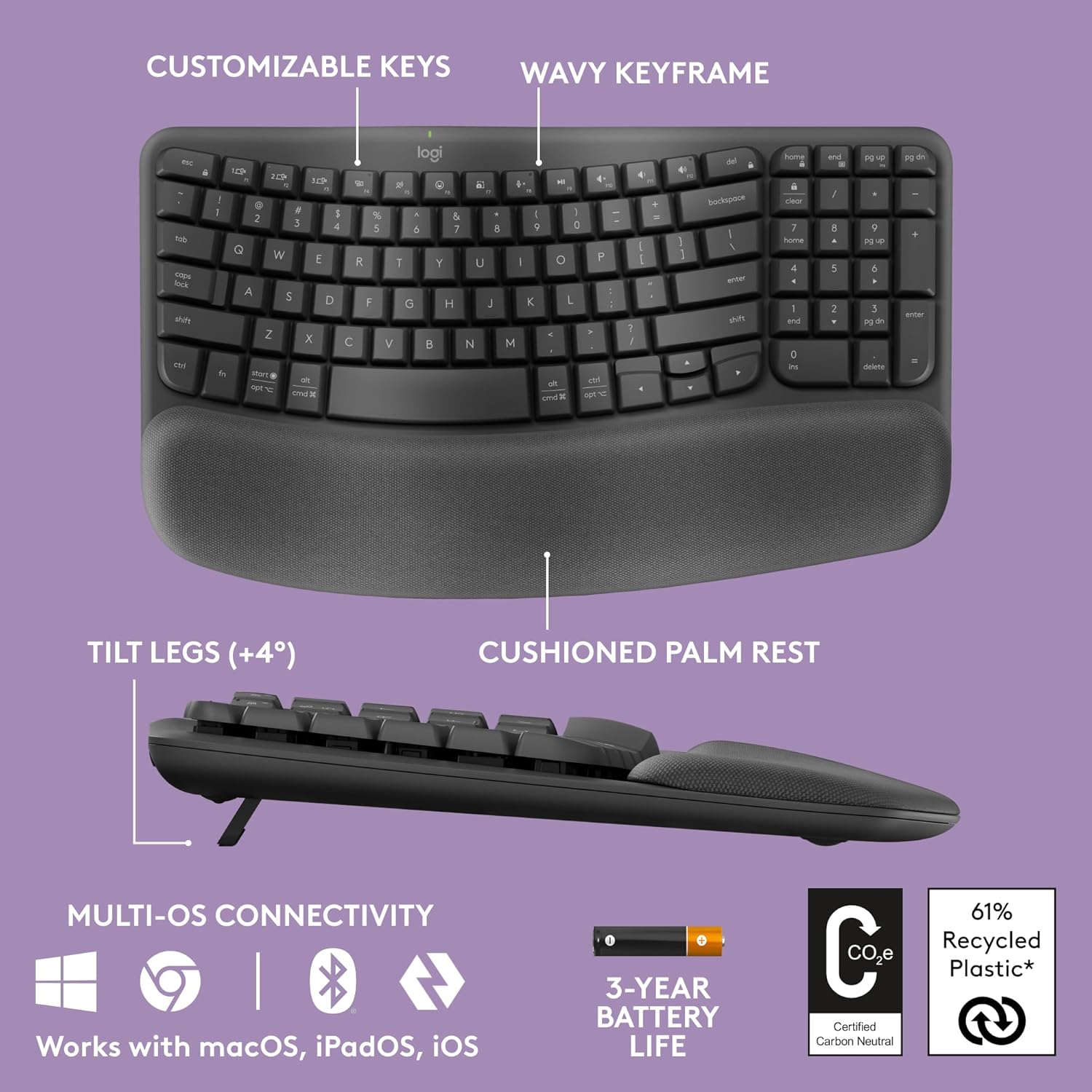
Figure 2: Key features of the Logitech Wave Keys keyboard, highlighting its ergonomic design elements and connectivity options.
Інструкцыя па эксплуатацыі
Эрганамічны дызайн і камфорт
The Logitech Wave Keys keyboard is designed with your comfort in mind:
- Wavy Keyframe: The unique wavy design naturally positions your hands, wrists, and forearms for a more relaxed typing posture.
- Мяккая падстаўка для далоняў: The integrated memory foam palm rest provides continuous support, reducing pressure on your wrists during extended typing sessions.
- Кампактны памер: The compact layout allows you to position your mouse closer to your body, promoting a more natural shoulder alignment compared to full-sized keyboards.

Figure 3: The cushioned palm rest provides essential support for your wrists, enhancing comfort during typing.
Функцыянальнасць лёгкага пераключэння
The Easy-Switch feature allows you to seamlessly switch between up to three connected devices (e.g., laptop, tablet, smartphone). Simply press the corresponding Easy-Switch key (F1, F2, or F3) to instantly connect to your desired device.
Logi Options+ App Customization
Enhance your productivity by customizing your keyboard with the Logi Options+ App. This application allows you to:
- Assign custom shortcuts to function keys.
- Adjust keyboard settings.
- Сачыце за станам батарэі.

Figure 4: Personalize your workflow and keyboard settings using the Logi Options+ App.
Тэхнічнае абслугоўванне
To ensure the longevity and optimal performance of your Logitech Wave Keys keyboard, follow these maintenance guidelines:
- Уборка: Выкарыстоўвайце мяккую безворсовую тканіну, злёгку dampened with water or a mild cleaning solution to wipe down the keys and surfaces. Avoid harsh chemicals or abrasive materials. For the palm rest, gently wipe with a damp тканіны і дайце высахнуць на паветры.
- Выдаленне пылу: Выкарыстоўвайце сціснутае паветра, каб выдаліць пыл і смецце паміж клавішамі.
- Замена батарэі: The keyboard has an estimated battery life of up to 3 years. When the battery indicator light signals low power, replace the Lithium Polymer battery as per the instructions in the battery compartment.
- захоўванне: Калі клавіятура не выкарыстоўваецца працяглы час, захоўвайце яе ў прахалодным, сухім месцы, удалечыні ад прамых сонечных прамянёў і экстрэмальных тэмператур.
Ліквідацыю непаладак
If you encounter issues with your Logitech Wave Keys keyboard, refer to the following common solutions:
| праблема | Рашэнне |
|---|---|
| Клавіятура не падключаецца праз Bluetooth. |
|
| Keyboard not responding with Logi Bolt Receiver. |
|
| Клавішы заліпаюць або не рэагуюць. |
|
| Кароткі тэрмін службы батарэі. |
|
Тэхнічныя характарыстыкі
| Асаблівасць | Дэталь |
|---|---|
| Памеры прадукту | 14.8 х 8.62 х 1.18 цалі |
| Вага прадмета | 2.16 фунта |
| Нумар мадэлі | 2023 |
| Батарэі | Патрабуецца 1 літый-палімерная батарэя |
| Марка | Logitech |
| Сумяшчальныя прылады | Ноўтбук, планшэт, смартфон |
| Тэхналогія падлучэння | Bluetooth, Logi Bolt Receiver |
| Апісанне клавіятуры | Мембрана |
| Асаблівасць | Wrist Rest, Ergonomic Design, Easy-Switch |
| Колер | Графіт |
| Колькасць ключоў | 104 |
| Матэрыял | Plastic (61% certified post-consumer recycled plastic for Graphite model) |
| Уключаныя кампаненты | 1 product (Keyboard) |
| Сертыфікаты | United States Ergonomics Approved, Carbon Neutral Certified |
Гарантыя і падтрымка
This product is part of the Amazon Renewed program, meaning it has been professionally inspected and tested to work and look like new. Amazon Renewed products are eligible for replacement or refund under the Amazon Renewed Guarantee if you are not satisfied with your purchase.
For further support, product registration, or to access the latest drivers and software (such as Logi Options+), please visit the official Logitech support website. You can also find additional FAQs and community forums there.
For specific inquiries regarding your Amazon Renewed purchase, please refer to your Amazon order details or contact Amazon customer service directly.
Ask a question about this manual
Ask about setup, troubleshooting, compatibility, parts, safety, or missing instructions. Manuals+ will review the question and use this page’s manual context to help answer it.