
GOODaaa PN-W33S
GOODaaa Solar Power Bank User Manual
Model: PN-W33S
Прадукт скончаныview
The GOODaaa 42800mAh Solar Power Bank is a versatile and robust portable charging solution designed for various devices and outdoor conditions. It features a high-capacity battery, multiple charging outputs including built-in cables and wireless charging for Apple Watches, and integrated utility features like an LED flashlight, red light pointer, and thermometer.

Image: The GOODaaa Solar Power Bank, highlighting its solar panel and integrated charging cables.
Асноўныя характарыстыкі:
- Сумяшчальнасць з некалькімі прыладамі: Equipped with built-in Type C, Lightning, and Micro USB output cables, plus a USB-A input cable. Supports charging up to 6 devices simultaneously.
- Высокая ёмістасць: 42800mAh capacity for extended power supply.
- Бесправадная зарадка: Specifically designed for Apple Watch models (iWatch SE, Ultra/Ultra 2, Series 9/8/7, 6/5/4, 3/2, 1).
- Integrated Utilities: Multi-functional LED red light pointer and a physical thermometer.
- Трывалы дызайн: Shock-resistant corner bumpers, silicone port covers, drop-proof, dust-proof, and water-resistant.
- Аварыйнае асвятленне: Two bright LED flashlights with SOS, Strobe, and Steady modes.
Налада і пачатковае выкарыстанне
Распакоўка і праверка
Upon receiving your GOODaaa Solar Power Bank, carefully open the packaging and inspect the contents. Ensure all items listed in the "What's in the Box" section are present and undamaged.
- GOODaaa Solar Power Bank x1
- Зарадны кабель USB-C да USB-C x1
- Карабін х1
- Кіраўніцтва карыстальніка x1

Image: The GOODaaa Solar Power Bank package contents, including the power bank, USB-C cable, carabiner, and user manual.
Першапачатковая зарадка
For optimal performance, fully charge the power bank before its first use. While the solar panel provides emergency charging, it is recommended to use a wall adapter for a complete initial charge.
- Connect the provided USB-C to USB-C charging cable to the power bank's USB-C input port.
- Падключыце другі канец кабеля да сумяшчальнага насценнага USB-адаптара (не ўваходзіць у камплект).
- The LED indicators on the power bank will illuminate to show charging progress. A full charge is indicated when all LEDs are solid.

Image: The GOODaaa Solar Power Bank connected to a wall adapter for USB charging, alongside an illustration of solar charging.
Інструкцыя па эксплуатацыі
Зарадныя прылады
Паўэрбанк прапануе некалькі спосабаў зарадкі вашых прылад:
Выкарыстанне ўбудаваных кабеляў:
The power bank includes integrated Type C, Lightning, and Micro USB cables. Simply pull out the appropriate cable and connect it to your device. The power bank will automatically begin charging.
Выкарыстанне выходных партоў USB:
For devices requiring a standard USB-A cable, use the USB output port on the power bank. Connect your device's charging cable to the USB output port.
Бесправадная зарадка для Apple Watch:
The power bank features a dedicated wireless charging pad for Apple Watches. This function is compatible with various Apple Watch series (SE, Ultra/Ultra 2, Series 9/8/7, 6/5/4, 3/2, 1).
- Place your Apple Watch directly onto the wireless charging pad on the power bank.
- Press the power button on the power bank to initiate wireless charging.
- Савет: If your Apple Watch has a silicone band, it may create a gap preventing proper connection. Try flipping or removing the band for a better charging experience.

Image: The power bank simultaneously charging multiple devices, including phones, earbuds, and an Apple Watch, using its various built-in cables and wireless charging feature.

Image: Close-up of the power bank's wireless charging pad with an Apple Watch placed on it, illustrating the magnetic connection and charging process.
Выкарыстанне святлодыёднага ліхтарыка
The power bank is equipped with two bright LED flashlights with three modes: Steady, Strobe, and SOS.
- Каб уключыць / выключыць: Націсніце і ўтрымлівайце кнопку харчавання на працягу трох секунд.
- Каб пераключаць рэжымы: Once the flashlight is on, short press the power button to switch between Steady, Strobe, and SOS modes.

Image: Visual representation of the three flashlight modes (SOS, Strobe, Steady) and the power bank being used as a light source in the dark.
Using the Multifunctional LED Red Light Pointer
The integrated red light pointer can be used for presentations, signaling, or even playing with pets.
- Каб уключыць / выключыць: Двойчы пстрыкніце кнопку харчавання.

Малюнак: Examples of the red light pointer being used in various scenarios, such as construction, presentations, and pet interaction.
Using the Built-in Thermometer
The physical thermometer allows you to monitor ambient temperature without consuming battery power from the main unit.
The thermometer is located on the top surface of the power bank. Read the temperature directly from the display.

Image: The power bank's built-in thermometer being used in different outdoor environments like snow camping, desert walking, and night campінж.
Функцыя сонечнай зарадкі
The solar panel on the power bank is designed as an emergency backup solution. It provides a slow charge and is ideal for maintaining battery levels or providing minimal power when no other charging source is available. For primary charging, always use a wall adapter.
To utilize solar charging, place the power bank with the solar panel facing direct sunlight. The charging indicator LEDs will show activity when solar charging is active.

Image: The power bank being solar charged by attaching it to a backpack in direct sunlight, illustrating its outdoor utility.
Тэхнічнае абслугоўванне і догляд
- Уборка: Для чысткі знешніх акумулятараў выкарыстоўвайце мяккую сухую тканіну. Пазбягайце выкарыстання агрэсіўных хімічных рэчываў або абразіўных матэрыялаў.
- захоўванне: Store the power bank in a cool, dry place away from direct sunlight and extreme temperatures. If storing for extended periods, charge the power bank to about 50-70% capacity every 3 months to preserve battery life.
- Воданепранікальнасць: While water-resistant, avoid submerging the device in water. Ensure silicone covers for charging ports are properly sealed to prevent water and dust ingress.
- Абарона ад удараў: The power bank is designed with shock-resistant corner bumpers. However, avoid dropping it from excessive heights or subjecting it to severe impacts.
- тэмпература: The built-in thermometer helps monitor ambient temperature. Avoid using or charging the power bank in environments that are excessively hot or cold to prevent battery damage.
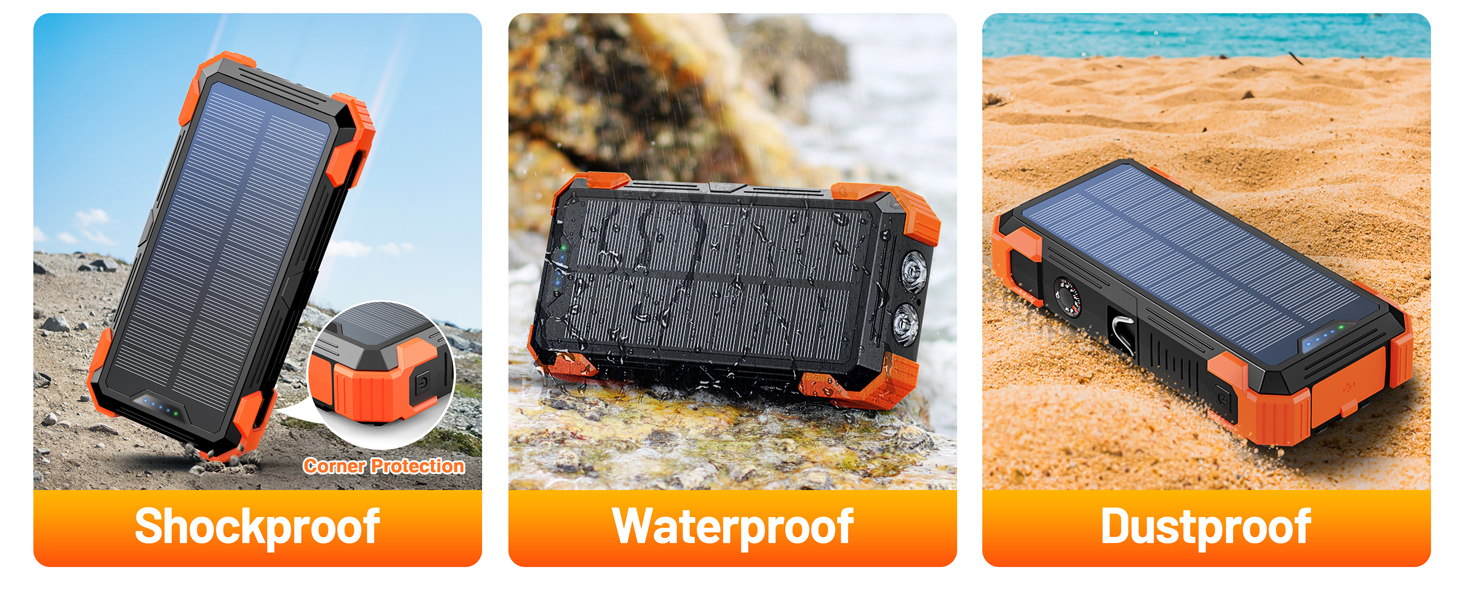
Image: Illustrations demonstrating the power bank's shockproof, waterproof, and dustproof capabilities, highlighting its rugged design.
Ліквідацыю непаладак
| праблема | Магчымая прычына | Рашэнне |
|---|---|---|
| Power bank не зараджаецца | Charging cable is loose or damaged; Wall adapter is not working; Power bank battery is completely depleted. | Ensure the charging cable is securely connected. Try a different cable or wall adapter. Allow the power bank to charge for a longer period, especially if fully depleted. |
| Прылада не зараджаецца ад Power Bank | Device cable is loose or damaged; Power bank is out of charge; Device is incompatible; Wireless charging misalignment (for Apple Watch). | Check cable connections. Ensure the power bank is charged. Verify device compatibility. For Apple Watch wireless charging, ensure proper placement and consider removing the band if it interferes. |
| Flashlight or Red Light Pointer not working | Incorrect button press; Power bank is off or low on battery. | Ensure you are pressing and holding (for flashlight) or double-clicking (for red light) the power button correctly. Charge the power bank. |
| Solar charging is slow or not working | Insufficient sunlight; Solar panel is dirty or obstructed; Solar charging is for emergency use only. | Place the power bank in direct, strong sunlight. Clean the solar panel. Remember solar charging is supplementary; use USB charging for faster, more efficient power. |
Тэхнічныя характарыстыкі
- Нумар мадэлі: PN-W33S
- Ёмістасць батарэі: 42800 мАг
- Памеры прадукту: 7 х 3.5 х 1.3 цалі
- Вага прадмета: 1.2 фунта
- Тып батарэі: Літый-палімерны (патрабуецца 2, у камплекце)
- Парты ўводу: USB-A (built-in cable), USB Type C, Lightning
- Выхадныя парты: Type C (built-in cable), Lightning (built-in cable), Micro USB (built-in cable), USB-A
- Бесправадная зарадка: For Apple Watch only
- Асаблівасці: LED Flashlights (SOS/Strobe/Steady), Built-in Cables, Wireless Charging, Red Light Pointer, Thermometer
- колер: Аранжавы
- вытворца: ТАА «Шэньчжэнь Паннічжэ»
- Краіна паходжання: Кітай
Гарантыя і падтрымка
GOODaaa offers a hassle-free warranty and responsive customer support to ensure your purchase is protected and any concerns are addressed promptly.
For warranty claims or technical assistance, please contact GOODaaa customer service through the retailer's platform or visit the official GOODaaa webсайт для кантактнай інфармацыі.
Заўвага: Калі ласка, захавайце пацвярджэнне пакупкі для пацверджання гарантыі.
Афіцыйнае відэа пра прадукт
Video: An official product video from GOODaaa US demonstrating the features and functionality of the 42800mAh Solar Power Bank.