
T-Wolf GG-G530
Кіраўніцтва карыстальніка гульнявой мышы T-Wolf RoboCop Competitive Gaming Mouse GG-G530
Model: GG-G530
Уводзіны
This manual provides essential information for the setup, operation, and maintenance of your T-Wolf RoboCop Competitive Gaming Mouse GG-G530. Please read this manual thoroughly before using the product to ensure optimal performance and longevity.
Змест пакета
- 1 x T-Wolf RoboCop Competitive Gaming Mouse GG-G530
- 1 х Кіраўніцтва карыстальніка (гэты дакумент)
Асаблівасці прадукту
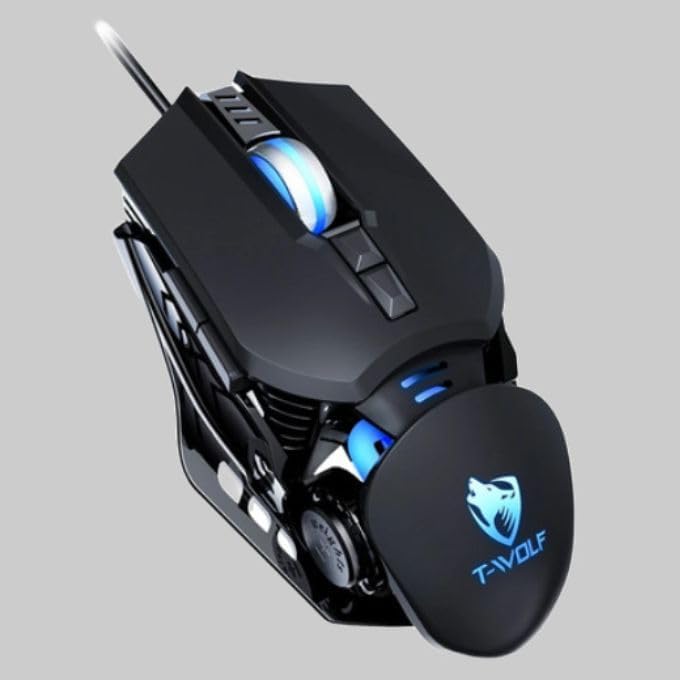
The T-Wolf RoboCop Competitive Gaming Mouse GG-G530 is designed for precision and comfort, suitable for both gaming and office use. Key features include:
- Optical Engine Design: Ensures stable operation and high sensitivity.
- Mechanical Armored Modeling: Distinctive and robust design.
- Symmetrical DIY Counterweight: Allows for adaptable weight adjustment.
- 7 Кнопкі: Includes left click, right click, scroll wheel, DPI switcher, and additional programmable buttons.
- Інтэлектуальнае падключэнне: Plug-and-play functionality with automatic driver installation.
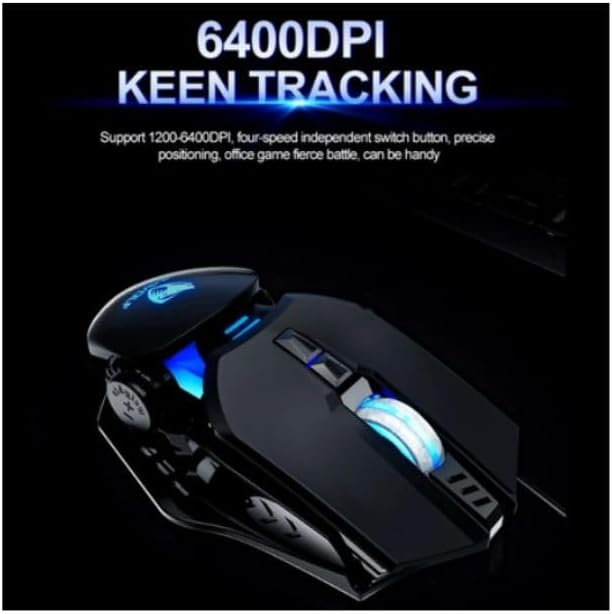
- Рэгуляваны DPI: Four levels of sensitivity (1200/2400/3200/6400 DPI) for precise control.
- Эрганамічны дызайн: Provides comfortable use for extended periods without fatigue.
- Four-Color Light Effect: Dynamic lighting for visual appeal.
- Правадное злучэнне: Reliable USB interface with a 150cm cable.
- Сумяшчальнасць сістэмы: Supports Windows and Mac operating systems.
Настройка
- Падключыце мыш: Insert the USB connector of the T-Wolf RoboCop Gaming Mouse into an available USB port on your computer.
- Аўтаматычная ўстаноўка драйвераў: The operating system will automatically detect the mouse and install the necessary drivers. This process typically takes a few moments. No manual driver installation is required.
- Гатовы да выкарыстання: Пасля ўстаноўкі драйвераў мыш гатовая да неадкладнага выкарыстання.
Інструкцыя па эксплуатацыі
The T-Wolf RoboCop Gaming Mouse features 7 buttons for various functions. Familiarize yourself with their basic operations:
- Левая кнопка мышы: Першасны адбор і ўзаемадзеянне.
- Правая кнопка мышы: Accesses contextual menus and secondary functions.
- Кола пракруткі: Пракручвае дакументы і web старонкі. Можа таксама функцыянаваць як сярэдняя кнопка мышы.
- Кнопка пераключэння DPI: Рэгулюе адчувальнасць мышы (DPI).
- Дадатковыя кнопкі: The remaining buttons can be assigned specific functions through your operating system's mouse settings or compatible third-party software (note: no macro programming is natively supported by the mouse hardware).

Рэгуляванне DPI
The mouse features an adjustable DPI (Dots Per Inch) setting, allowing you to change the cursor sensitivity on the fly. This is particularly useful for different tasks, such as precise aiming in games or fast navigation in general use.
- Знайдзіце DPI Switcher Button, typically positioned behind the scroll wheel.
- Press the DPI Switcher Button to cycle through the available DPI settings: 1200 DPI, 2400 DPI, 3200 DPI, and 6400 DPI.
- Each press will change the sensitivity, allowing you to find the setting that best suits your current activity.
Тэхнічнае абслугоўванне
To ensure the longevity and optimal performance of your T-Wolf RoboCop Gaming Mouse, follow these simple maintenance guidelines:
- Уборка: Выкарыстоўвайце мяккую сухую тканіну для працірання паверхні мышы. Для выдалення ўстойлівага бруду злёгку працярыцеampПрацярыце тканіну вадой або мяккім ачышчальным растворам. Пазбягайце агрэсіўных хімічных рэчываў або абразіўных матэрыялаў.
- Аптычны датчык: Periodically clean the optical sensor on the underside of the mouse with a cotton swab to prevent dust buildup, which can affect tracking performance.
- Сыход за кабелем: Пазбягайце рэзкага згінання або нацягвання USB-кабеля, каб пазбегнуць унутраных пашкоджанняў.
- захоўванне: Калі мыш не выкарыстоўваецца, захоўвайце яе ў чыстым, сухім месцы, удалечыні ад экстрэмальных тэмператур.
Ліквідацыю непаладак
If you encounter issues with your T-Wolf RoboCop Gaming Mouse, refer to the following common solutions:
- Мышка не рэагуе:
- Пераканайцеся, што кабель USB надзейна падключаны да спраўнага порта USB на вашым кампутары.
- Паспрабуйце падключыць мыш да іншага USB-порта.
- Перазагрузіце кампутар.
- Рух курсора няўстойлівы або скачковы:
- Ачысціце аптычны датчык на ніжняй частцы мышы.
- Пераканайцеся, што вы карыстаецеся мышшу на чыстай, небліскучай і аднастайнай паверхні. Рэкамендуецца выкарыстоўваць кілімкі для мышы.
- Рэгуляванне DPI не працуе:
- Ensure you are pressing the correct DPI switcher button.
- The mouse cycles through fixed DPI settings; there is no visual indicator on the mouse itself for the current DPI level, only the change in cursor speed.
- Кнопкі не працуюць:
- Check your operating system's mouse settings to ensure buttons are enabled and configured correctly.
- Test the mouse on another computer to rule out a software or system issue.
Тэхнічныя характарыстыкі
| мадэль | GG-G530 |
| Матэрыял | ABS + Electroplating |
| Сістэма сачэння | Аптычны |
| Злучэнне | Правадная |
| Даўжыня кабеля | 150 см |
| Тып інтэрфейсу | USB |
| Налады DPI | 1200 / 2400 / 3200 / 6400 (рэгулюецца) |
| Колькасць кнопак | 7 |
| Тэрмін службы | Approximately three years |
| Метад працы | Фотаэлектрычная |
| Светлавы эфект | Four-color cycling |
| Памер прадмета | 130 х 80 х 35 мм |
| Вага прадмета | 160 г |
| Падтрымоўваныя сістэмы | Windows, Mac |
Гарантыя і падтрымка
Your T-Wolf RoboCop Competitive Gaming Mouse GG-G530 comes with a 6-месячная гарантыя вытворцы з дня пакупкі.
This warranty covers defects in materials and workmanship under normal use. It does not cover damage caused by accident, misuse, abuse, unauthorized modification, or external causes such as liquid damage.
For warranty claims or technical support, please contact your retailer or the point of purchase. Please retain your proof of purchase for warranty validation.

Ask a question about this manual
Ask about setup, troubleshooting, compatibility, parts, safety, or missing instructions. Manuals+ will review the question and use this page’s manual context to help answer it.