
1. Уводзіны
This manual provides detailed instructions for the installation, operation, and maintenance of your ZUMIMALL ZS-GX2S 3MP Wireless Outdoor Security Camera. Please read this manual thoroughly before using the product to ensure proper functionality and safety.
The ZUMIMALL ZS-GX2S is a solar-powered, wireless outdoor security camera designed for comprehensive surveillance. It features 3MP resolution, 360° pan and tilt capabilities, AI detection, two-way audio, and IP66 weatherproofing, making it suitable for various outdoor environments.
2. Прадукт скончыўсяview
2.1 Змест пакета
Пакет уключае наступныя рэчы:
- ZUMIMALL ZS-GX2S 3MP Wireless Outdoor Security Camera (2 units)
- Solar Panel (2 units)
- Мацаванне кранштэйна для камеры
- Мантажны кранштэйн для сонечнай панэлі
- USB-кабель для зарадкі
- Screw Package (screws and wall anchors)
- Кіраўніцтва па эксплуатацыі
- Tip Sticker ('Hey! YOU ARE ON CAMERA')
2.2 Кампаненты камеры
Familiarize yourself with the main parts of the camera:
- Аб'ектыў камеры: Захоплівае відэа footage.
- Белае святло: Provides illumination for color night vision.
- Датчык PIR: Выяўляе рух.
- Мікрафон: Запісвае гук для двухбаковай сувязі.
- Дакладчык: Выводзіць гук для двухбаковай сувязі і сірэну.
- Антэна Wi-Fi: Enhances wireless connectivity.
- Індыкатар рэжыму: Паказвае стан камеры.
- Ключ скіду: Used to reset the camera.
- Ключ харчавання: Уключае/выключае камеру.
- Слот для SD-карты: Для лакальнага захоўвання відэа (падтрымліваецца да 128 ГБ).
- Порт зарадкі Type-C: For connecting the solar panel or charging.

2.3 Асноўныя магчымасці
- 3MP Full Color Image: Delivers 2K resolution, 1.5 times sharper than standard 1080p, with 4X digital zoom.
- 360° View: Offers 355° horizontal and 120° vertical rotation for comprehensive coverage.
- Solar Powered & 100% Wireless: Equipped with a high-efficiency solar panel and large-capacity rechargeable battery for continuous operation.
- Падключэнне Wi-Fi 2.4G: Features 4dBi dual antennas for stable wireless connection.
- Інтэлектуальнае выяўленне штучным інтэлектам: Advanced PIR sensor and AI algorithms identify persons, pets, vehicles, and parcels, reducing false alarms.
- Абвесткі ў рэжыме рэальнага часу: Sends instant notifications to your mobile app upon motion detection.
- Двухбаковы аўдыё: Дазваляе весці сувязь у рэжыме рэальнага часу праз камеру.
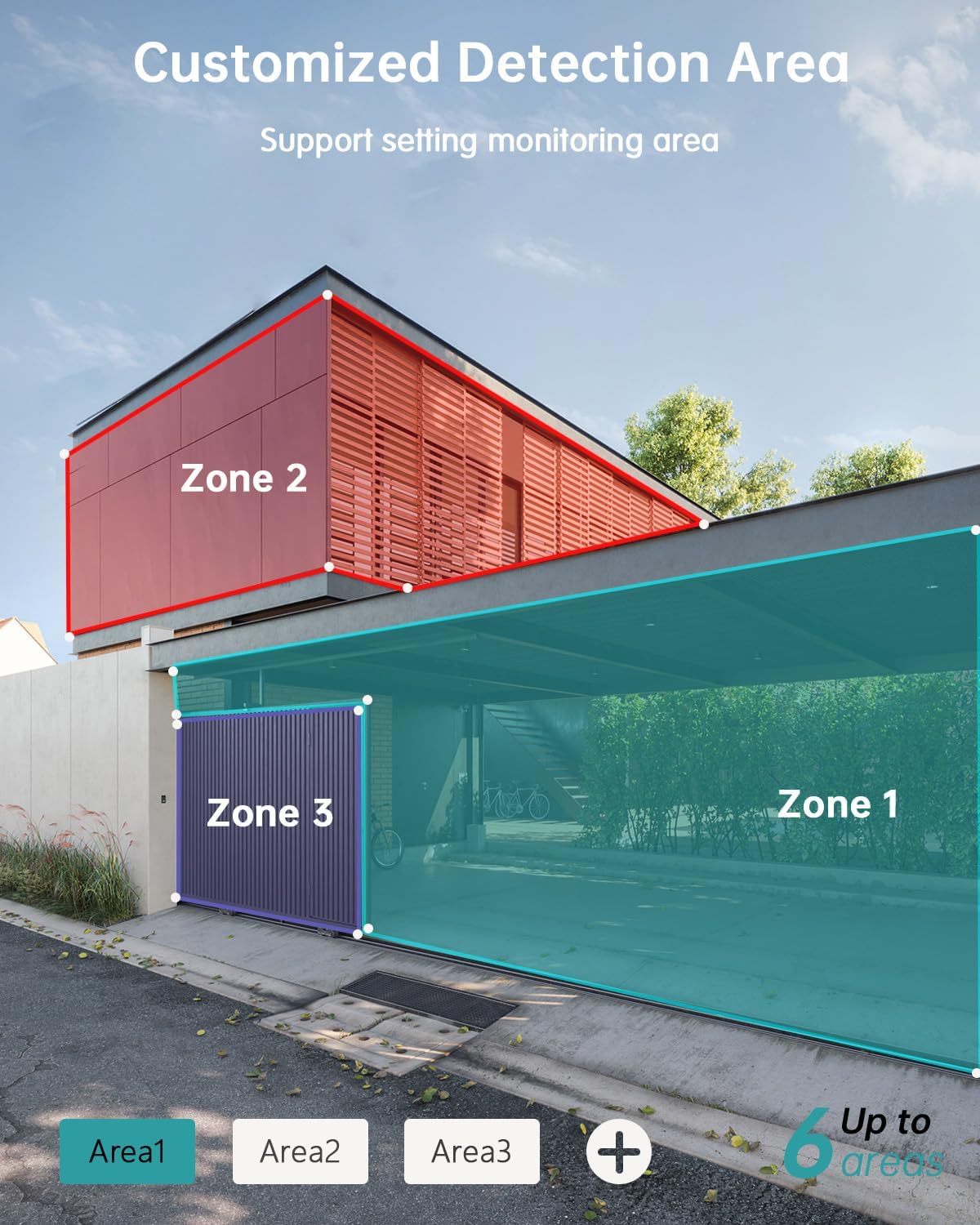
- Customizable Detection Areas: Set specific monitoring zones to focus on critical areas.
- IP66 Воданепранікальнасць: Designed to withstand various weather conditions, including rain, wind, and snow.
- Некалькі варыянтаў захоўвання: Supports local storage via Micro SD card (up to 128GB) and cloud storage.
- Працуе з Alexa: Integrate with Amazon Alexa for voice control and live view на сумяшчальных прыладах.
3. Настройка
3.1 Фізічная ўстаноўка
Before permanent installation, ensure the camera has a strong 2.4G Wi-Fi signal in the desired location. The camera can be mounted on various surfaces including wood, drywall, stucco, or even gutters using appropriate fasteners.
- Attach Mounting Base: Secure the camera's mounting base to your chosen surface using the provided screws and wall anchors.
- Падключэнне сонечнай панэлі: Attach the solar panel to its bracket and position it to receive maximum sunlight. Connect the solar panel's Type-C cable to the camera's charging port. Ensure the cable is neatly managed to prevent damage.
- Мацаванне камеры: Align the camera with the mounting base and slide it down until it locks securely.

3.2 Усталёўка і спалучэнне праграм
The ZUMIMALL app is required to operate your camera. Follow these steps to set up the app and pair your camera:
- Спампаваць прыкладанне: Scan the QR code provided in the manual or on the product packaging, or search for 'ZUMIMALL' in your device's app store.
- Зарэгістраваць уліковы запіс: Open the ZUMIMALL app and follow the on-screen instructions to register a new account or log in if you already have one.
- Дадаць прыладу: In the app, select 'Add Device' or the '+' icon. Follow the prompts to select your camera model.
- Уключэнне камеры: Ensure your camera is powered on.
- Сканаванне QR -кода: The app will display a QR code. Hold your camera's lens towards your phone screen to scan the QR code. You will hear a confirmation sound when successful.
- Падключыцеся да Wi-Fi: Follow the app's instructions to connect the camera to your 2.4G Wi-Fi network.
- Усталяванне завершана: Пасля падключэння вы можаце даць назву камеры і пачаць ёю карыстацца.

4. Аперацыя
4.1 У прамым эфіры View і прайграванне
Атрымайце доступ да жывой трансляцыі і зноўview запісана footage directly from the ZUMIMALL app.
- жыць View: Адкрыйце праграму і абярыце камеру, каб view the real-time feed.
- Прайграванне: Navigate to the 'History' or 'Cloud' section in the app to review запісаныя падзеі.

4.2 Выяўленне руху і абвесткі
The camera's AI detection system identifies specific objects and sends alerts.
- Выяўленне AI: The camera can distinguish between persons, pets, vehicles, and parcels.
- Custom Areas: Set specific detection zones within the app to monitor areas of interest and reduce unnecessary alerts.
- Апавяшчэнні ў рэжыме рэальнага часу: Receive instant alerts on your phone when motion is detected.

4.3 Двухбаковае аўдыё
Engage in real-time conversations through the camera using the app's two-way audio feature.
4.4 Кіраванне PTZ
Control the camera's pan (horizontal) and tilt (vertical) movements directly from the app to adjust your viewкут нахілу.
- Пан: Паварот па гарызанталі на 355°.
- Нахіл: Вертыкальнае кручэнне 120°.

4.5 Варыянты захоўвання
Ваша камера прапануе гнуткія рашэнні для захоўвання запісаных відэаtage.
- Micro SD-карта: Устаўце карту Micro SD (да 128 ГБ) у прызначаны слот для лакальнага захоўвання.
- Воблачнае сховішча: ZUMIMALL offers cloud storage services for convenient access and backup of your recordings.
4.6 Інтэграцыя з Alexa
The ZUMIMALL ZS-GX2S camera is compatible with Amazon Alexa. You can use voice commands to view жывая трансляцыя на сумяшчальных прыладах з падтрымкай Alexa.
5. Тэхнічнае абслугоўванне
5.1 Зарадка акумулятара і сонечнай энергіі
The integrated solar panel is designed to keep your camera's battery charged, providing continuous operation.
- Ensure the solar panel is positioned in an area that receives direct sunlight for several hours daily.
- In periods of low sunlight or high usage, the camera's battery may require manual charging via the USB port.
5.2 Ачыстка
Рэгулярная чыстка дапамагае падтрымліваць аптымальную працу.
- Gently wipe the camera lens and solar panel with a soft, damp сурвэткай для выдалення пылу і смецця.
- Avoid using harsh chemicals or abrasive materials that could damage the camera's surface or lens.
6. Выпраўленне непаладак
If you encounter issues with your ZUMIMALL ZS-GX2S camera, consider the following common solutions:
- Няма харчавання: Ensure the solar panel is receiving adequate sunlight or manually charge the camera using the USB cable.
- Праблемы з падключэннем Wi-Fi: Verify your Wi-Fi network is 2.4Ghz. Check the camera's proximity to the router and ensure a strong signal. Restart your router and camera if necessary.
- Ілжывыя трывогі: Adjust the motion detection sensitivity settings in the app. Utilize the custom detection area feature to exclude irrelevant zones.
- No Recordings: Check if the Micro SD card is properly inserted and formatted. Ensure cloud storage is active if you are using that service.
- Дрэнная якасць выявы: Ачысціце аб'ектыў камеры. Пераканайцеся, што ў полі зроку камеры няма перашкод. view.
- Праблемы з двухбаковай аўдыёсувяззю: Check the volume settings on your phone and in the app. Ensure there are no obstructions blocking the camera's microphone or speaker.
For further assistance, please refer to the ZUMIMALL app's help section or contact customer support.
7. Тэхнічныя характарыстыкі
| Асаблівасць | Дэталь |
|---|---|
| Нумар мадэлі | ZS-GX2S |
| дазвол | 3MP (2K) |
| Крыніца харчавання | Solar Powered (with rechargeable Lithium Ion battery) |
| Сувязь | 2.4G Wi-Fi |
| Дыяпазон павароту/нахілу | 355° па гарызанталі, 120° па вертыкалі |
| Шырокавугольны аб'ектыў | 130° |
| Начное бачанне | 3MP Color Night Vision (with 2 IR and 2 white lights) |
| Лічбавы зум | 4X |
| Выяўленне штучнага інтэлекту | Person, Pet, Vehicle, Parcel |
| Аўдыё | Двухбаковае аўдыё |
| Захоўванне | Карта Micro SD (да 128 ГБ), воблачнае сховішча |
| Ўстойлівасць да надвор'я | IP66 |
| Працоўная тэмпература | Ад -4°F да 120°F (ад -20°C да 50°C) |
| Сумяшчальныя прылады | Smartphone, Amazon Alexa |
| Памеры прадукту | 13.7 х 7.4 х 5.4 цалі |
| Вага прадмета | 4.71 фунта |
8. Гарантыя і падтрымка
ZUMIMALL is committed to providing high-quality products and customer satisfaction. For warranty information, technical support, or any inquiries regarding your ZS-GX2S camera, please refer to the ZUMIMALL app's support section or visit the official ZUMIMALL website. You can also contact ZUMIMALL customer service directly for assistance.