
COCOCAM ZY-Q6
COCOCAM AOV 4G LTE Security Camera User Manual
Model: ZY-Q6 | Brand: COCOCAM
1. Уводзіны
This user manual provides comprehensive instructions for the installation, operation, and maintenance of your COCOCAM AOV 4G LTE Security Camera. Please read this manual thoroughly before using the product to ensure proper functionality and safety.
1.1 Змест пакета
- 1x COCOCAM AOV 4G LTE Security Camera
- 1x сонечная панэль
- 1x Screw Package (for mounting)
- 1x кабель для перадачы дадзеных
- 1x Інструкцыя па эксплуатацыі (гэты дакумент)
- 1x кранштэйны сонечнай панэлі
- 2x AA Batteries (pre-installed or included for initial setup)

Figure 1.1: COCOCAM AOV 4G LTE Security Camera and Solar Panel. The image displays the main camera unit with two antennas, a lens, and four LED lights, alongside a rectangular solar panel connected by a cable.
2. Інфармацыя па бяспецы
- Ensure the camera and solar panel are installed securely to prevent falling.
- Не падвяргайце камеру ўздзеянню экстрэмальных тэмператур па-за межамі яе працоўнага дыяпазону.
- Трымайце прыладу далей ад моцных магнітных палёў.
- Do not attempt to disassemble or repair the camera yourself. Contact support for assistance.
- Ensure all cables are properly connected and protected from environmental damage.
- This device is IP66 rated for water and dust resistance, but avoid submerging it in water.
3. Прадукт скончыўсяview
3.1 Асноўныя магчымасці
- 24/7 Recording & Fast Alarm Trigger: Continuous recording with quick alarm activation.
- Intelligent Sound and Light Alarm: Customizable alarm areas with real-time notifications.
- 30 Meters Night Vision: Clear visibility in low-light conditions with white light and infrared options.
- AI Detection/Tracking: Human form detection and movement tracking up to 30 meters.
- Гнуткія параметры захоўвання: Supports TF card (up to 128GB) and cloud storage.
- Двухбаковы аўдыё: Убудаваны мікрафон і дынамік для сувязі.
- Long-lasting Battery with Solar Panel: 15000mAh rechargeable battery with 8W solar panel for continuous power.
- IP66 Воданепранікальнасць: Designed for outdoor use, resistant to water and dust.
- 3MP High Definition Video: 2304*1296 resolution for clear footage.
- 355° Pan/90° Tilt: Wide area coverage with remote adjustable viewныя вуглы.
- Remote Monitoring and Mobile Compatibility: Access via COCOCAM app on Android/iOS devices.
- Падключэнне 4G LTE: Operates without Wi-Fi, includes a built-in SIM card with trial data.
4. Настройка
4.1 Мантаж камеры і сонечнай панэлі
The camera and solar panel can be mounted on walls or ceilings. Choose a location that provides optimal sunlight exposure for the solar panel and a clear view для камеры.
- Identify a suitable mounting surface.
- Use the provided screw package to secure the camera bracket and solar panel bracket.
- Attach the camera to its bracket and the solar panel to its bracket.
- Падключыце кабель сонечнай панэлі да зараднага порта камеры. Пераканайцеся, што злучэнне надзейнае і воданепранікальнае.

Figure 4.1: Easy installation of the COCOCAM camera and solar panel. The image shows a person installing the camera and solar panel unit under an eave, demonstrating the ease of setup.

Figure 4.2: Self-sustaining power setup with solar panel and battery. This image illustrates the camera and solar panel mounted on a building, highlighting the 8W solar panel and 15000mAh rechargeable battery for continuous power.
4.2 SIM Card and Storage Card Installation
The camera comes with a built-in SIM card for initial use. You can also install an external SIM card or a TF (microSD) card for local storage.
- Locate the SIM card slot and TF card slot on the camera (refer to the product diagram in the quick start guide).
- Insert the TF card (up to 128GB) into the TF card slot with the contacts facing down.
- If using an external SIM card, insert it into the designated slot. Ensure it is properly seated.
- Close the protective cover to maintain IP66 rating.

Figure 4.3: 3G/4G LTE Connection without Wi-Fi. This image highlights the camera's ability to operate using 3G or 4G LTE networks, making it suitable for locations without Wi-Fi, such as farms, construction sites, or RVs.
4.4 App Download and Initial Configuration
Download the COCOCAM app from your device's app store (Android or iOS).
- Пошук "COCOCAM" in the Google Play Store or Apple App Store.
- Усталюйце прыкладанне і стварыце ўліковы запіс.
- Выконвайце інструкцыі ў дадатку, каб дадаць камеру. Звычайна гэта патрабуе сканавання QR-кода на камеры або ўручную ўводу яе ідэнтыфікатара.
- Once connected, you can configure network settings, recording preferences, and alarm settings.

Figure 4.4: COCOCAM app for 24/7 continuous recording. This image shows a smartphone displaying the COCOCAM app interface, with the security camera mounted on a wall in the background, indicating continuous monitoring capabilities.
5. Інструкцыя па эксплуатацыі
5.1 24/7 Recording and Alarm Features
The camera supports continuous recording. When an alarm is triggered, the camera quickly switches to full-frame recording.
- Бесперапынная запіс: The camera records 2 seconds per frame during non-alarm periods.
- Fast Alarm Trigger: Upon detection, the camera initiates full-frame recording within 0.2 seconds.
- Customizable Alarm Areas: Define specific zones within the camera's view для выяўлення руху.
- Intelligent Sound and Light Alarm: The camera can emit sound and light warnings upon detecting suspicious activity.
- Апавяшчэнні ў рэжыме рэальнага часу: Receive instant alerts on your mobile device when an alarm is triggered.
5.2 Кіраванне PTZ (панарамаванне, нахіл, маштабаванне)
The camera offers extensive pan and tilt capabilities, allowing you to adjust the viewing angle remotely via the COCOCAM app.
- Пан: Паварочвайце камеру па гарызанталі да 355°.
- Нахіл: Адрэгулюйце камеру вертыкальна да 90°.
- Лічбавае павелічэнне: Use the app to digitally zoom into the live feed or recorded footage.

Figure 5.1: 355° Pan and 90° Tilt with AI Tracking. This image illustrates the camera's wide range of motion and its ability to track subjects, with icons for two-way audio, AI detection, and AI tracking.
5.3 AI Detection and Tracking
The camera's advanced AI capabilities allow for precise detection and tracking of human forms and vehicles.
- Выяўленне чалавека: Identifies human shapes, reducing false alarms from animals or swaying branches.
- Vehicle Recognition: Distinguishes vehicles for specific alerts.
- Адсочванне AI: The camera can automatically follow detected subjects within its field of view да 30 метраў.
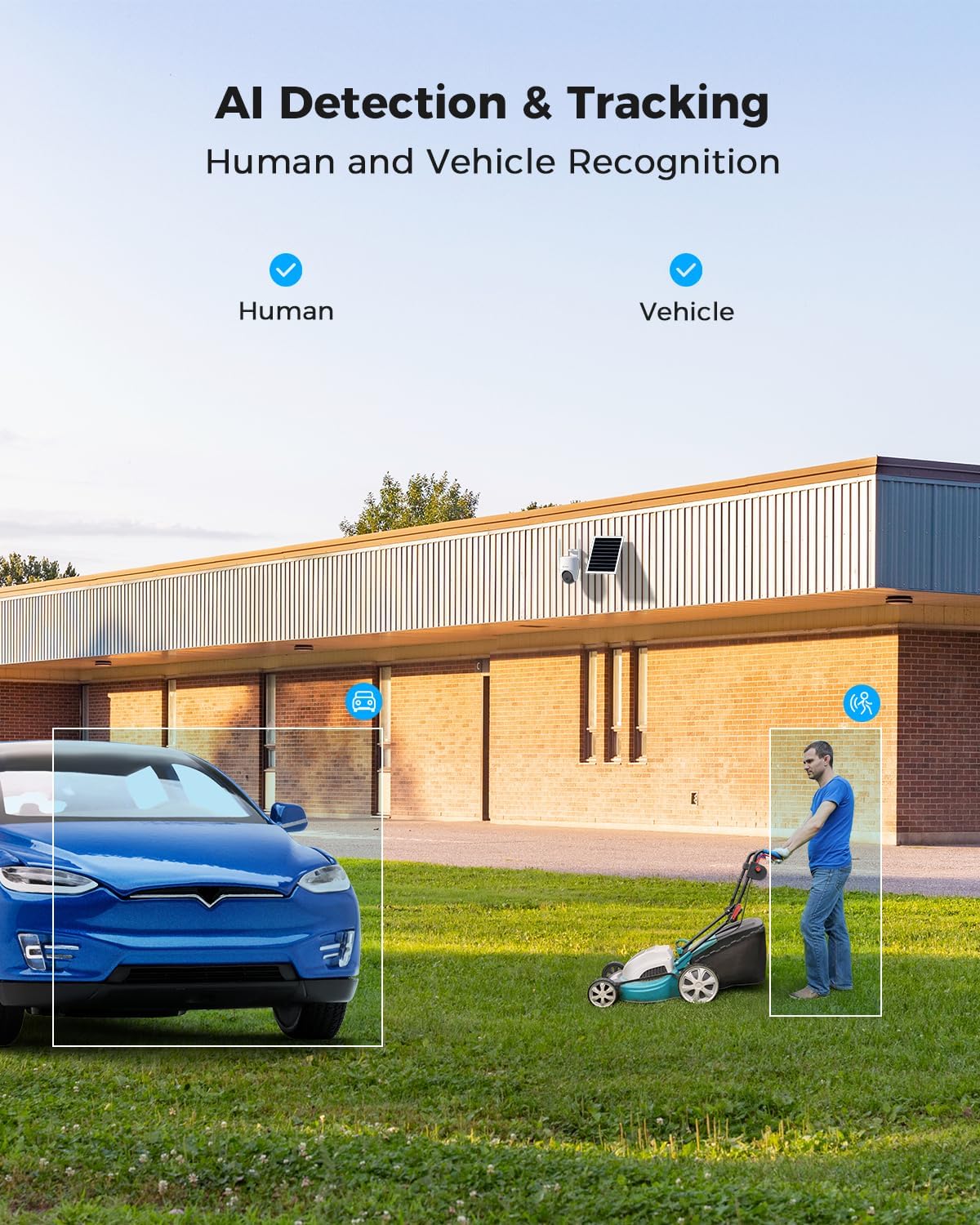
Figure 5.2: AI Detection & Tracking for Human and Vehicle Recognition. The image shows a security camera monitoring an outdoor area, with highlighted boxes indicating detected human and vehicle subjects, demonstrating its AI capabilities.
5.4 Двухбаковае аўдыё
З дапамогай убудаванага мікрафона і дынаміка можна мець зносіны з наведвальнікамі або адпужваць зламыснікаў.
- Access the two-way audio feature through the COCOCAM app.
- Гаварыце ў мікрафон тэлефона, каб перадаваць гук праз дынамік камеры.
- Listen to audio from the camera's surroundings through your phone.
5.5 Начное бачанне
The camera provides clear visibility up to 30 meters in complete darkness.
- Інфрачырвонае начное бачанне: Automatically activates in low-light conditions for black and white video.
- Поўнакаляровы начны бачанне: Utilizes white light LEDs to provide color video at night when activated or upon detection.

Figure 5.3: 30m Night Vision and 2K Full Color Night Vision. This image compares standard black and white night vision with the camera's full-color night vision capability, showing enhanced detail and color in low light.
6. Тэхнічнае абслугоўванне
6.1 Сыход за акумулятарам і сонечнай панэллю
The integrated 15000mAh battery is continuously charged by the 8W solar panel. To ensure optimal performance:
- Ensure the solar panel is positioned to receive maximum direct sunlight throughout the day.
- Regularly clean the surface of the solar panel to remove dust, dirt, or debris that may obstruct sunlight.
- Avoid placing the solar panel in shaded areas.

Figure 6.1: 8W Solar Panel for continuous power. This image focuses on the solar panel, highlighting its 8W power output and the 3-meter cable length for flexible installation.
6.2 Чыстка камеры
- Выкарыстоўвайце мяккі, damp тканіна для працірання аб'ектыва і корпуса камеры.
- Не выкарыстоўвайце агрэсіўныя хімічныя рэчывы або абразіўныя мыйныя сродкі.
- Ensure the camera is dry before prolonged exposure to the elements.
6.3 Абнаўленне прашыўкі
Periodically check the COCOCAM app for available firmware updates. Keeping your camera's firmware updated ensures optimal performance, new features, and security enhancements.
7. Выпраўленне непаладак
| праблема | Магчымая прычына | Рашэнне |
|---|---|---|
| Камера не падключаецца да праграмы. | Incorrect pairing process, weak 4G signal, camera not powered on. | Ensure camera is powered on. Re-attempt pairing process. Check 4G signal strength at installation location. |
| Дрэнная якасць відэа. | Dirty lens, low light conditions, weak 4G signal. | Clean the camera lens. Ensure adequate lighting or verify night vision is active. Check 4G signal strength. |
| Акумулятар не зараджаецца. | Solar panel obstructed, faulty connection, insufficient sunlight. | Ensure solar panel is clean and receives direct sunlight. Check cable connection between solar panel and camera. |
| AI detection not working or too many false alarms. | Incorrect sensitivity settings, detection area not configured. | Adjust AI detection sensitivity in the app. Configure specific detection zones to exclude irrelevant areas. |
| Праблемы з двухбаковай аўдыёсувяззю. | Microphone/speaker obstruction, app permissions, network delay. | Ensure nothing is blocking the camera's microphone or speaker. Check app permissions for microphone access. Verify stable 4G connection. |
8. Тэхнічныя характарыстыкі
| Асаблівасць | Дэталь |
|---|---|
| Назва мадэлі | AOV 4G Camera with 7x24 Recording |
| Нумар мадэлі тавару | ZY-Q6 |
| Марка | КАКАКАМ |
| Дазвол відэазахопу | 1440p (3MP, 2304*1296) |
| Дыяпазон павароту/нахілу | Паварот на 355° / нахіл на 90° |
| Дыяпазон начнога бачання | 30 Meters (Infrared & White Light) |
| Тэхналогія падлучэння | Wireless (4G LTE) |
| Крыніца харчавання | Battery Powered (15000mAh) with 8W Solar Panel |
| Параметры захоўвання | TF-карта (да 128 ГБ), воблачнае сховішча |
| Ўстойлівасць да надвор'я | IP66 |
| Матэрыял | Акрыланітрылбутадыенстырол (АБС) |
| Памеры прадмета (Д х Ш х У) | 20 х 15 х 12 см |
| Вага прадмета | 620 г |
| Батарэі | 2 батарэйкі АА (у камплекце) |
9. Гарантыя і падтрымка
COCOCAM provides a пажыццёвая гарантыя for this product, ensuring long-term reliability and customer satisfaction.
For technical support, troubleshooting assistance, or warranty claims, please contact COCOCAM customer service:
- вытворца: КАКАКАМ
- Афіцыйны Webсайт: www.cococamtech.com
- электронная пошта: service@cococamtech.com
Please have your model number (ZY-Q6) and purchase information ready when contacting support.