
Уводзіны
Thank you for choosing the Edifier STAX Spirit S5 Wireless Planar Magnetic Headphones. These headphones are engineered to deliver an exceptional audio experience, featuring advanced planar magnetic drivers with EqualMass diaphragms for precise sound reproduction and minimal distortion. With Qualcomm Snapdragon Sound technology, LDAC, and LHDC codec support, the S5 provides high-resolution wireless audio. This manual provides detailed instructions for setup, operation, maintenance, and troubleshooting to ensure you get the most out of your new headphones.
Змест пакета
Калі ласка, пераканайцеся, што ўсе пералічаныя ніжэй прадметы ўваходзяць у ваш пакет:
- 1 x Edifier STAX Spirit S5 Headset
- 2 x Cooling Mesh Earpads (pre-installed or spare)
- 1 х зарадны кабель USB Type-C
- 1 x Earpad Pick Tool
- 1 x 3.5mm AUX Audio Cable
- 1 х адаптар з 3.5 мм на 6.35 мм
- 1 x Headphone Carrying Case
- 2 x Earpad Pouches
- 1 х Кіраўніцтва карыстальніка
Прадукт скончаныview
Familiarize yourself with the components and controls of your Edifier STAX Spirit S5 headphones.

Фронт view of the Edifier STAX Spirit S5 headphones, showcasinіх элегантны чорны дызайн і накладныя амбушуры.

A user wearing the Edifier STAX Spirit S5 headphones, demonstrating their comfortable fit and profile падчас выкарыстання.
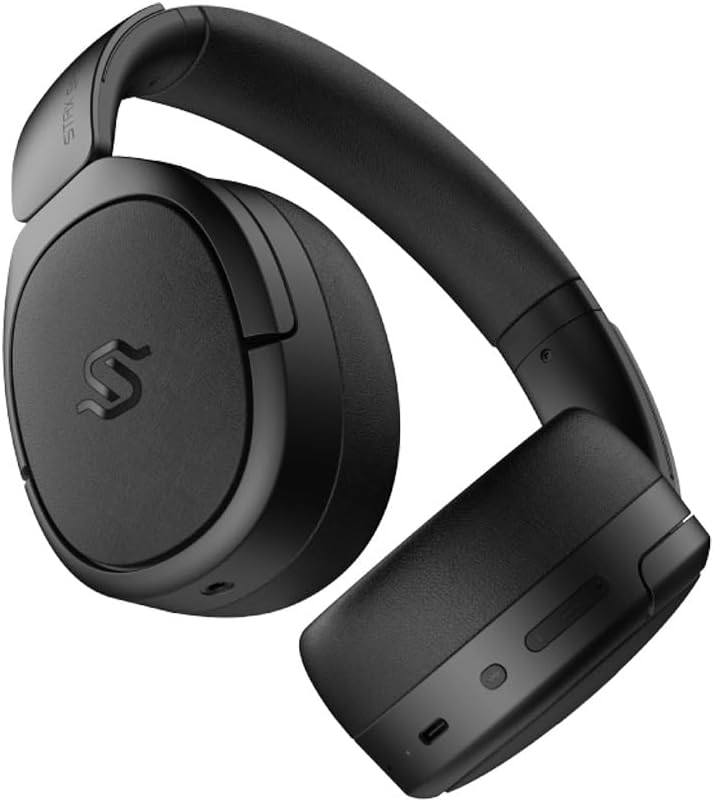
Збоку view of the headphones, highlighting the control buttons and ports located on the right earcup, including the USB-C port.

A detailed close-up of the control buttons on the earcup, showing the power button, volume controls, and the USB-C charging port.

The Edifier STAX Spirit S5 headphones folded compactly, illustrating their portability and ease of storage in the included carrying case.
Настройка
Зарадка навушнікаў
Before first use, fully charge your Edifier STAX Spirit S5 headphones.
- Connect the supplied USB Type-C cable to the charging port on the headphones and the other end to a USB power adapter (not included) or a computer's USB port.
- The LED indicator will show charging status. It typically takes approximately 10 minutes for a quick charge, providing extended playback. A full charge can provide up to 80 hours of battery life.
- Once fully charged, the LED indicator will change (refer to the specific indicator behavior in your quick start guide, if available).
Уключэнне/выключэнне
- Уключэнне: Націсніце і ўтрымлівайце кнопку харчавання прыблізна 3 секунды, пакуль не загарыцца індыкатар.
- Выключэнне: Націсніце і ўтрымлівайце кнопку харчавання прыблізна 5 секунды, пакуль індыкатар не пагасне.
Спалучэнне Bluetooth
The STAX Spirit S5 uses Bluetooth V5.4 for stable and fast transmission.
- Пераканайцеся, што навушнікі адключаны.
- Націсніце і ўтрымлівайце кнопку харчавання прыблізна 5-7 секунд, пакуль індыкатар не пачне хутка міргаць, паказваючы рэжым спалучэння.
- На вашай прыладзе (смартфоне, планшэце, камп'ютары) уключыце Bluetooth і знайдзіце «Edifier STAX Spirit S5» у спісе даступных прылад.
- Select the headphones to connect. Once successfully paired, the indicator light will stop flashing and remain solid or turn off, depending on the model's specific behavior.
- Google Fast Pair: For Android devices, the headphones support Google Fast Pair for quick and seamless connection. Simply power on the headphones near your Android device, and a pairing prompt will appear.
- Падключэнне некалькіх прылад: The S5 can connect to two audio devices simultaneously. After pairing with the first device, put the headphones back into pairing mode and connect to the second device. The headphones will intelligently switch between the two.
Правадное злучэнне
The headphones support both USB-C and 3.5mm AUX wired connections.
- USB-C Audio: Connect the USB Type-C cable from the headphones to a compatible USB-C port on your device for digital audio playback and charging.
- 3.5mm AUX Audio: Connect the 3.5mm AUX cable to the audio input port on the headphones and the other end to your audio source's 3.5mm output. Use the included 3.5mm to 6.35mm adapter for devices with a 6.35mm jack. Note that the headphones must be powered on for passive wired mode.
Інструкцыя па эксплуатацыі
Асноўныя элементы кіравання
The main controls are located on the earcup:
- Кнопка харчавання:
- Press and hold for 3 seconds to Power On.
- Press and hold for 5 seconds to Power Off.
- Press and hold for 5-7 seconds (from off) to enter Bluetooth pairing mode.
- Павялічыць гучнасць (+): Кароткае націск, каб павялічыць гучнасць.
- Памяншэнне гучнасці (-): Кароткі націск, каб паменшыць гучнасць.
- Multi-function Button (often between volume buttons):
- Кароткае націсканне: прайграванне/прыпыненне музыкі.
- Short press: Answer/End call.
- Long press: Reject call.
- Падвойнае націсканне: наступны трэк.
- Трайное націсканне: Папярэдні трэк.
Аўдыётэхналогіі
The STAX Spirit S5 supports various high-fidelity audio codecs for an optimal listening experience:
- Qualcomm Snapdragon Sound: Ensures stable RF connection and efficient power consumption for extended listening.
- LDAC & LHDC: Compatible with Hi-Res Audio and Wireless Hi-Res Audio, delivering exceptional detail and clarity.
- aptX HD, aptX Adaptive, aptX Lossless: Part of the Snapdragon Audio technology, providing high-resolution audio with ultra-low latency (as low as 89ms with aptX Adaptive).
Функцыянальнасць выкліку
The headphones are equipped with dual microphones and Qualcomm cVc technology for clear calls.
- Падаўленне шуму: Integrated Qualcomm cVc actively suppresses ambient noise, enhancing voice clarity during calls.
- Канфідэнцыяльнасць: The closed-back design helps ensure conversation privacy.
Тэхнічнае абслугоўванне
Правільнае абслугоўванне гарантуе даўгавечнасць і прадукцыйнасць вашых навушнікаў.
- Уборка:
- Працярыце навушнікі мяккай сухой тканінай.
- Для амбушюр выкарыстоўвайце злёгку damp тканінай пры неабходнасці, але пазбягайце празмернай вільготнасці.
- Не выкарыстоўвайце агрэсіўныя хімічныя рэчывы, ачышчальныя растваральнікі або моцныя мыйныя сродкі.
- Замена амбушур:
- The STAX Spirit S5 comes with two sets of earpads (mesh and leather).
- To replace, gently pull off the existing earpad. Use the included earpad pick tool if needed to carefully detach it from the earcup.
- Align the new earpad with the earcup and press firmly around the edges until it clicks securely into place.
- захоўванне:
- When not in use, store the headphones in the provided carrying case to protect them from dust, scratches, and impacts.
- Пазбягайце захоўвання пры экстрэмальных тэмпературах або высокай вільготнасці.
- Сыход за батарэяй:
- Каб падоўжыць тэрмін службы батарэі, пазбягайце частай поўнай разрадкі навушнікаў.
- Калі вы захоўваеце прыладу працяглы час, зарадзіце яе прыкладна да 50% перад захоўваннем.
Ліквідацыю непаладак
Калі ў вас узніклі праблемы з навушнікамі, звярніцеся да наступных распаўсюджаных праблем і рашэнняў:
| праблема | Магчымая прычына | Рашэнне |
|---|---|---|
| Навушнікі не ўключаюцься. | Нізкі акумулятар. | Зараджайце навушнікі з дапамогай кабеля USB-C. |
| Немагчыма падключыцца праз Bluetooth. | Навушнікі не ў рэжыме спалучэння; Bluetooth прылады выключаны; перашкоды. | Ensure headphones are in pairing mode (flashing light). Turn Bluetooth off/on on your device. Move closer to the device. Clear previous pairings on your device. |
| Няма гуку або нізкі ўзровень гучнасці. | Volume too low; incorrect audio source; loose cable (wired mode). | Increase volume on headphones and source device. Ensure correct audio output is selected on your device. Check wired connections. |
| Poor audio quality (wireless). | Distance from device; interference; low-quality audio source. | Reduce distance to your device. Avoid strong electromagnetic interference. Use high-quality audio files/streaming services. |
| Мікрафон не працуе падчас званкоў. | Incorrect input device selected; microphone muted. | Ensure the headphones are selected as the input device in your call application settings. Check if the microphone is muted. |
Калі праблема не знікне, звярніцеся ў службу падтрымкі кліентаў Edifier.
Тэхнічныя характарыстыкі
Key technical specifications for the Edifier STAX Spirit S5 headphones:
| Марка | Эдыфікатар |
| Назва мадэлі | S5 |
| Нумар мадэлі | S5spaceblack |
| Колер | Чорны |
| Тэхналогія падлучэння | Правадны, бесправадны (Bluetooth) |
| Тэхналогія бесправадной сувязі | Bluetooth |
| Версія Bluetooth | V5.4 (implied from feature bullets) |
| Раз'ём для навушнікаў | 3.5mm Jack, USB-C |
| Імпеданс | 120 Ом |
| Размяшчэнне вушэй | Надвушная |
| Формаў-фактар | Прыгульны |
| Вага прадмета | 420 грам |
| Склад батарэі | Літый-іённы |
| Акумулятарная батарэя | так |
| Час зарадкі | Approx. 10 minutes (for quick charge) |
| Асаблівасці | Хуткая зарадка |
| Сумяшчальныя прылады | Computer, Laptop, Mobile Phone |
| Канкрэтнае выкарыстанне прадукту | Music, Professional, Studio Listening |
Гарантыя і падтрымка
The Edifier STAX Spirit S5 headphones come with a two-year warranty, ensuring reliable performance and support.
For technical assistance, warranty claims, or further inquiries, please contact Edifier customer support through their official webсайт або прадаўца, у якога вы набылі прадукт. Калі ласка, захавайце пацвярджэнне пакупкі для пацверджання гарантыі.