
Micsig SM-ETO3504
Кіраўніцтва карыстальніка планшэтнага асцылографа Micsig ETO3504 / ETO5004
Model: ETO3504 (SM-ETO3504) / ETO5004
1. Прадукт скончыўсяview
The Micsig ETO Series Tablet Oscilloscopes (models ETO3504 and ETO5004) are advanced portable measurement instruments designed for professional use in laboratories and field environments. These devices feature a 14-inch integrated touch screen, a large-capacity battery, and a multi-tasking operating system, providing a comprehensive solution for waveform analysis.
Асноўныя функцыі ўключаюць у сябе:
- Up to 500MHz bandwidth and 3GSa/s sampстаўка лінга.
- 4 analog channels for multi-signal analysis.
- Глыбіня памяці 360 Мбіт/с для пашыранага захопу сігналаў.
- 14-inch, 1920x1200 resolution touch screen display.
- Integrated 13,500mAh Li-ion battery for portable operation.

Figure 1.1: Micsig ETO Series Tablet Oscilloscope in operation, displaying multiple waveforms.
2. Пачатковая налада
2.1 Распакаванне і праверка
Carefully remove the oscilloscope and all accessories from the packaging. Inspect for any signs of damage. Retain the packaging for future transport or storage.
2.2 Уключэнне і зарадка
The device includes a 13,500mAh Lithium Metal battery. Before first use, it is recommended to fully charge the battery using the provided power adapter. Connect the power adapter to the device's power input and then to a suitable power outlet. The charging indicator will show the charging status.
2.3 Падключэнне зондаў і аксесуараў
The ETO series features 4 analog channels. Connect your probes to the BNC connectors on the device. The Mic-OPI™ probe interface automatically matches probe attenuation, simplifying setup. Ensure all connections are secure.

Малюнак 2.1: Закончанаview of the oscilloscope's rear panel, showing the battery compartment, VESA mounting points, and various interfaces including USB, HDMI, and probe connections.
2.4 Інтэрфейс скончаныview
The oscilloscope is equipped with various interfaces for connectivity and expansion:
- USB 3.0/2.0 Host: Для падлучэння знешніх назапашвальнікаў або перыферыйных прылад.
- USB Device (Type-C): For PC connection and data transfer.
- HDMI: For external display output.
- Трыгерны выхад: For external triggering.
- Grounding Socket: Для бяспечнага зазямлення.
- Mic-OPI™ Probe Interface: For intelligent probe detection and compensation.
3. Інструкцыя па эксплуатацыі
3.1 User Interface and Touch Control
The ETO series features an intuitive operating interface designed for ease of use. The 14-inch full touch-capacitive display allows for direct interaction with waveforms and settings. Use gestures such as pinch-to-zoom, drag-to-pan, and tap-to-select for efficient operation.
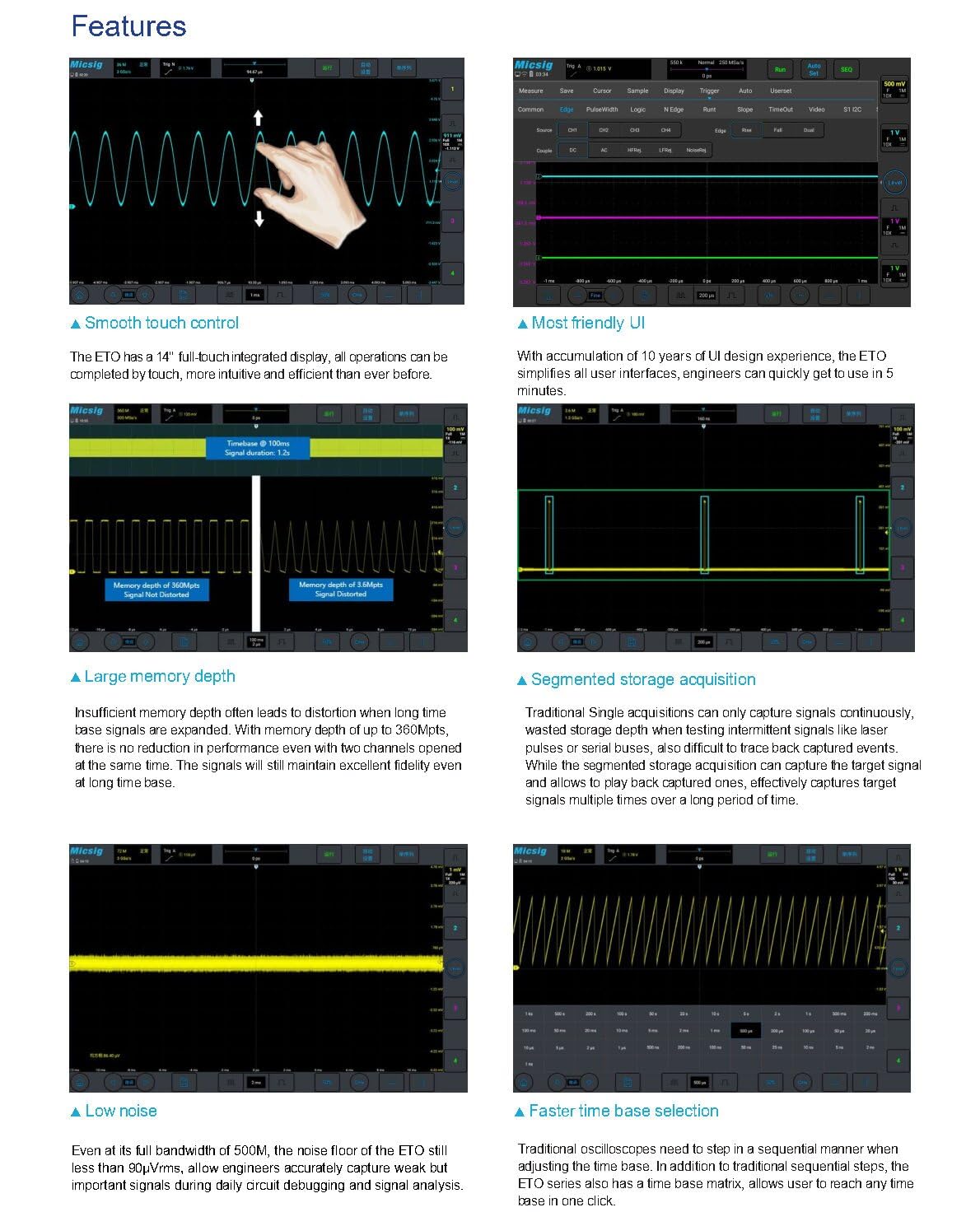
Figure 3.1: Demonstrates smooth touch control for waveform manipulation, intuitive user interface, large memory depth, segmented storage, low noise, and faster time base selection.
3.2 Асноўныя вымярэнні
After connecting your probes and powering on the device, you can begin taking measurements. Adjust the vertical scale (Volts/Div) and horizontal time base (Sec/Div) using the on-screen controls or physical knobs (if available on your model). The oscilloscope automatically displays key waveform parameters.
3.3 Дадатковыя магчымасці
- Hardware Digital Filtering: Apply high-pass or low-pass filters to isolate specific frequency components of a signal.
- Serial Bus Decoding and Analysis: Supports various serial bus protocols including RS-232/422/485, UART, CAN, CAN FD, LIN, SPI, I2C, and ARINC-429, MIL-STD-1553B. Decoded data can be exported to CSV format.
- Multiple Trigger Functions: Offers various trigger types such as edge, pulse width, logic, Nth edge, runt, slope, bus, window, and interval to capture specific events.
- Statistics Measurement: Automatically calculates average, maximum, minimum, and root mean square (RMS) values for up to 50,000 waveform events.
- Пашыраныя матэматычныя функцыі: Includes addition, subtraction, multiplication, division, integration, differentiation, and FFT (Fast Fourier Transform) for detailed signal analysis.
- Разнастайны File Захаванне: Save waveforms and measurement results in binary (.BIN) or CSV format. Images can also be saved.
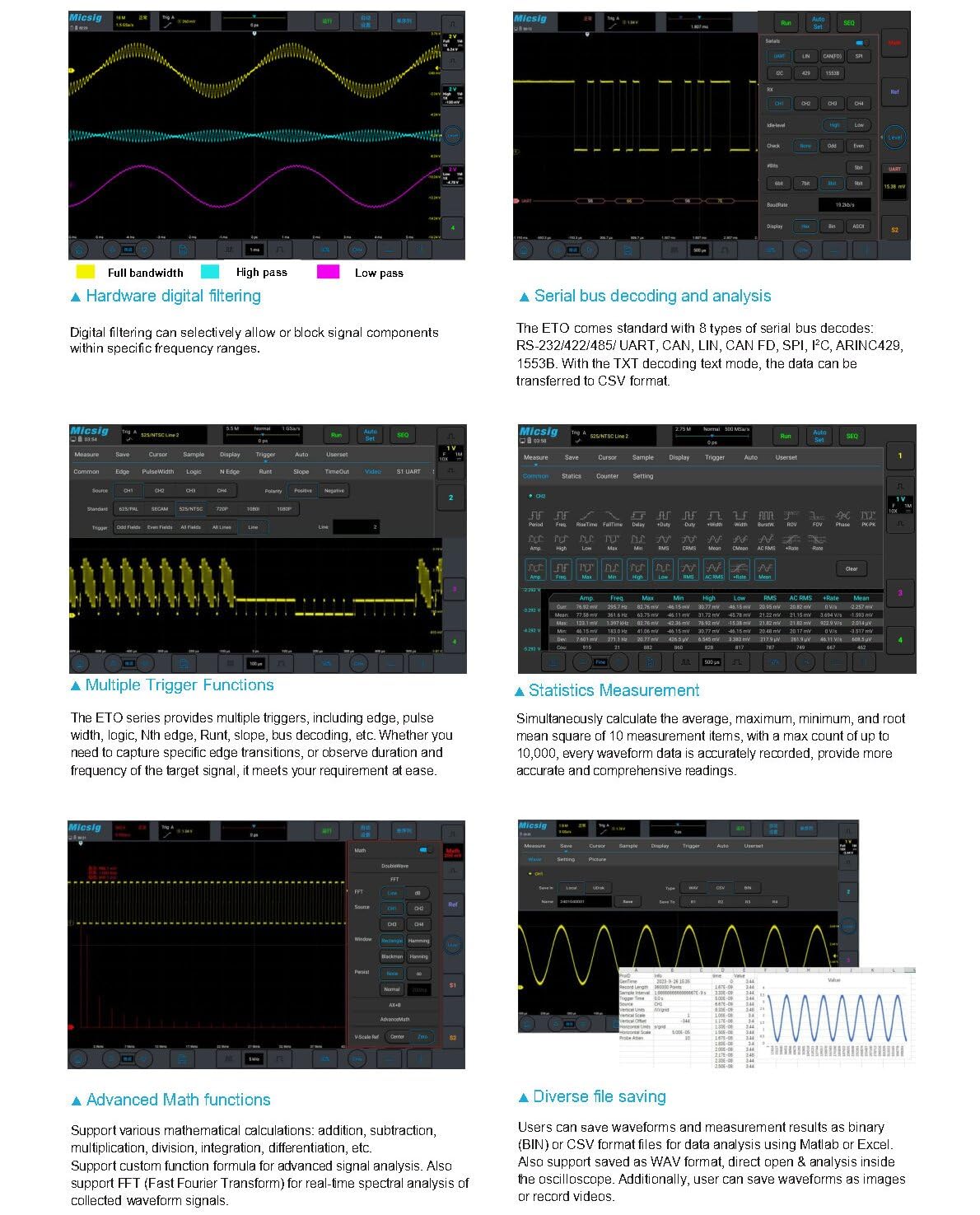
Figure 3.2: Illustrates hardware digital filtering, serial bus decoding, multiple trigger functions, statistics measurement, advanced math functions, and diverse file saving options.
3.4 Пульт дыстанцыйнага кіравання
The ETO series supports remote control via PC software, mobile applications, and HDMI screen projection. This allows for flexible operation and data analysis from a distance, enhancing efficiency in various testing scenarios.
4. Тэхнічныя характарыстыкі
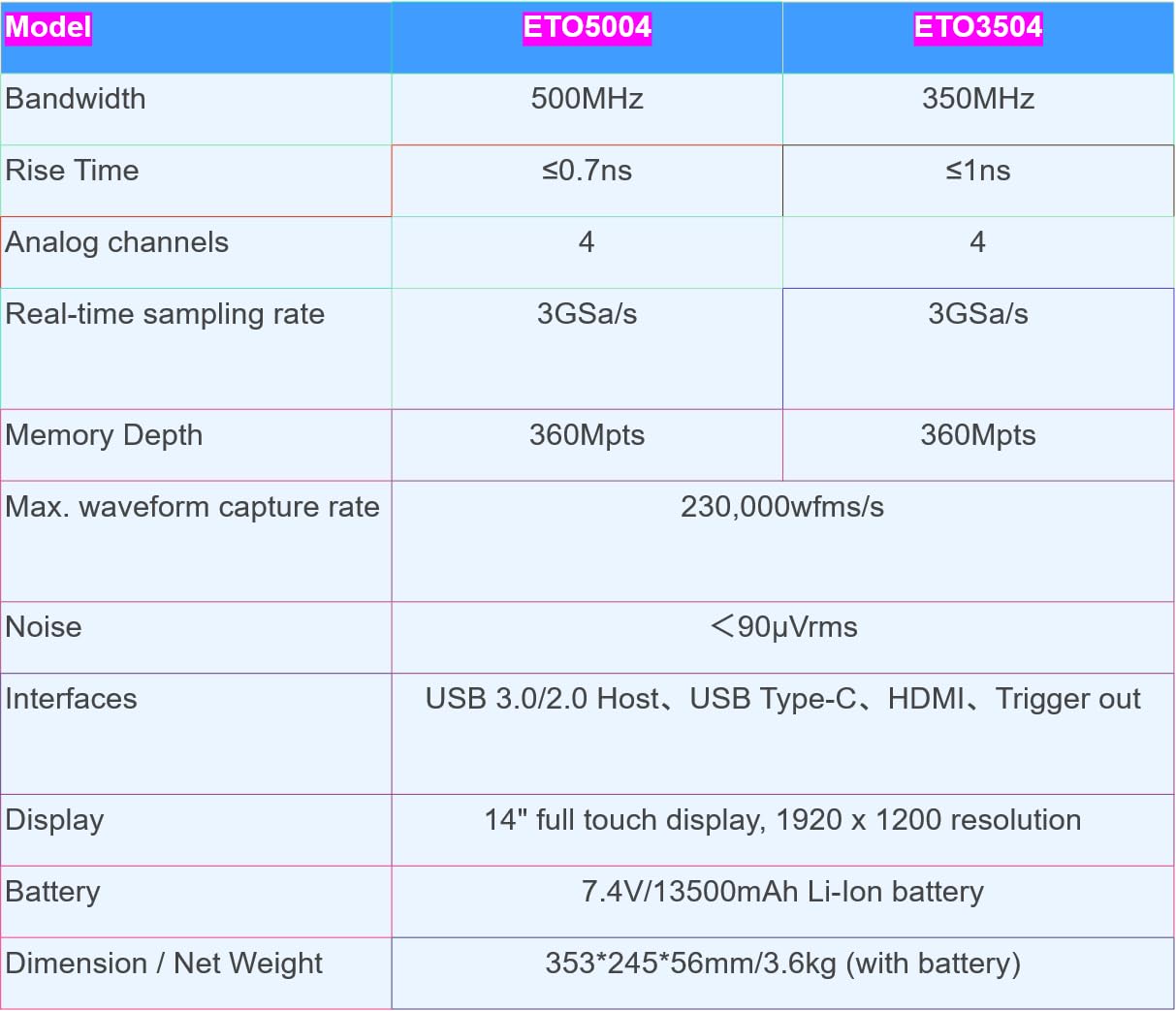
Figure 4.1: Detailed specifications for ETO5004 and ETO3504 models.
| Асаблівасць | ETO5004 | ETO3504 |
|---|---|---|
| Прапускная здольнасць | 500 МГц | 350 МГц |
| Час павышэння | ≤0.7 нс | ≤1 нс |
| Аналагавыя каналы | 4 | 4 |
| У рэжыме рэальнага часу Сampлінг -стаўка | 3 Гвыб/с | 3 Гвыб/с |
| Глыбіня памяці | 360 Мпікс | 360 Мпікс |
| Max. Waveform Capture Rate | 230,000 Вт/с | |
| Шумны пол | <90µVrms | |
| Інтэрфейсы | USB 3.0/2.0 Host, USB Type-C, HDMI, Trigger out | |
| Дысплей | 14 inches, 1920 x 1200 resolution, full touch | |
| акумулятар | 7.4V/13,500mAh Li-ion battery (included) | |
| Памеры / Вага нета | 353*245*56 мм / 3.6 кг (з батарэяй) | |
| Нумар мадэлі тавару | SM-ETO5004 | SM-ETO3504 |
5. Тэхнічнае абслугоўванне
5.1 Ачыстка
Для чысткі прылады выкарыстоўвайце мяккую, damp cloth. Avoid abrasive cleaners, solvents, or strong chemicals that could damage the screen or casing. Ensure the device is powered off and disconnected from all power sources before cleaning.
5.2 Сыход за акумулятарам
For optimal battery life, avoid fully discharging the battery frequently. Store the device in a cool, dry place when not in use for extended periods. If storing for a long time, ensure the battery is charged to approximately 50% to prevent deep discharge.
5.3 Умовы навакольнага асяроддзя
Operate and store the oscilloscope within the specified environmental ranges (temperature, humidity) to ensure proper function and longevity. Avoid exposure to extreme temperatures, direct sunlight, dust, and moisture.
6. Выпраўленне непаладак
If you encounter issues with your Micsig ETO series oscilloscope, consider the following basic troubleshooting steps:
- Няма харчавання: Ensure the power adapter is securely connected and the battery is charged. Check the power switch.
- Дысплей без сігналу: Verify that probes are correctly connected to the input channels and the signal source. Check probe attenuation settings. Adjust vertical and horizontal scales.
- Нестабільная форма хвалі: Adjust the trigger level and trigger source. Ensure the trigger mode is appropriate for the signal.
- Сэнсарны экран не рэагуе: Перазагрузіце прыладу. Калі праблема не знікне, звярніцеся ў службу падтрымкі кліентаў.
- Праблемы з падключэннем: For USB or HDMI connections, ensure cables are properly seated and drivers (if applicable for PC software) are installed.
For more complex issues, refer to the detailed troubleshooting guide available on the Micsig official webсайт або звярніцеся ў службу падтрымкі кліентаў.
7. Гарантыя і падтрымка
This product is manufactured by Shenzhen Micsig Technology Co., Ltd. For specific warranty information, please refer to the warranty card included with your product or visit the official Micsig webсайт. Гарантыйныя ўмовы звычайна распаўсюджваюцца на вытворчыя дэфекты на працягу пэўнага перыяду з даты пакупкі.
For technical support, service, or inquiries, please contact the Micsig Official Store or the manufacturer directly. Contact information can usually be found on the product packaging or the official Micsig webсайт.
вытворца: Shenzhen Micsig Technology Co., Ltd.
Прадавец: Micsig Official Store
Ask a question about this manual
Ask about setup, troubleshooting, compatibility, parts, safety, or missing instructions. Manuals+ will review the question and use this page’s manual context to help answer it.