
Acoyer SRP9232D
Acoyer Universal TV Remote Control User Manual
Model: SRP9232D
Уводзіны
This manual provides detailed instructions for setting up and operating your new Acoyer Universal TV Remote Control. This remote is designed to simplify your home entertainment experience by controlling multiple devices with a single unit. Please read this manual carefully before use to ensure proper functionality and to maximize your remote's capabilities.

Выява: спераду і ззаду view of the Acoyer Universal TV Remote Control.
Сумяшчальныя прылады
Your Acoyer Universal Remote Control is compatible with a wide range of audio and video devices, including:
- TV brands: Samsung, LG, Vizio, Sony, Hisense, Onn, Sharp, RCA, Element, Westinghouse, Sanyo, Emerson, Philips, JVC, Sceptre, Sansui, Panasonic, Magnavox, Skyworth, and more.
- DVD/Blu-ray players
- Media Streaming Players
- Гукавыя панэлі
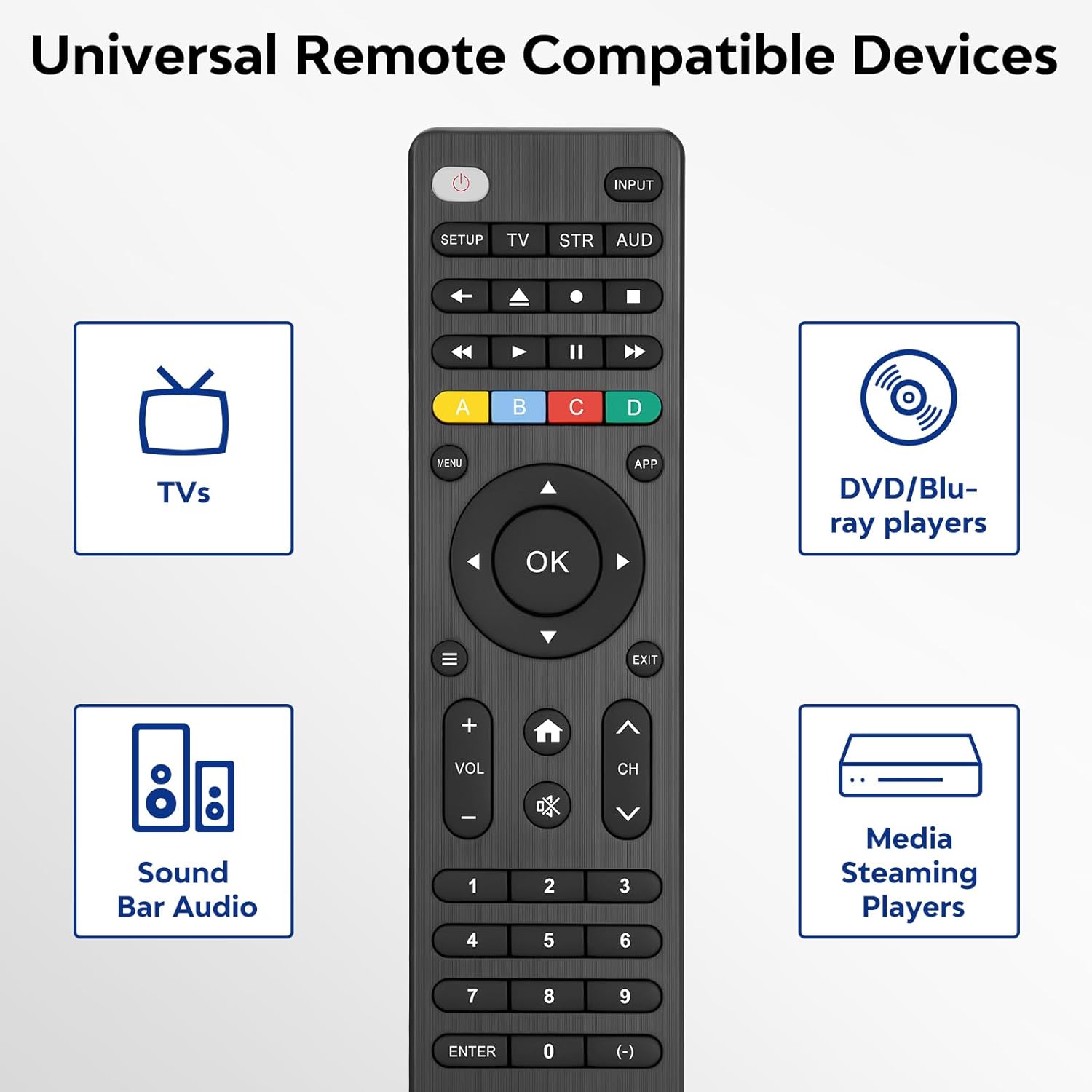
Image: Visual representation of compatible device types.

Image: List of compatible brands including Samsung, LG, Vizio, Sony, Hisense, Philips, and more.
Несумяшчальныя прылады
Please note that this universal remote is НЕ compatible with the following devices:
- Roku Streaming Sticks
- Roku Sound Bar
- Amazon Sound Bar
- Гукавая панэль TCL
- Hisense Sound Bar
- Anker Sound Bar
- Klipsch Sound Bar
- Fire TV Sticks
- TCL Fire TV
- Тэлевізар Insignia Fire
- Пажарны тэлевізар Toshiba
- Amazon Fire Stick
- Fire TV Cube
This product connects and pairs via infrared only. If you are unsure about compatibility, please refer to the product's code list or contact customer support.

Image: Visual representation of devices not compatible with the remote.
Настройка
Direct Code Entry Pairing
Follow these steps to program your universal remote using direct code entry:
- крок 1: Find the device type you need in the provided code list (included in the package). Then, locate and circle all the codes for your specific brand.
- крок 2: Націсніце і ўтрымлівайце НАСТРОЙКА button for 3 seconds until the red light on the remote turns on.
- крок 3: Націсніце і адпусціце TV/STR/AUD button on the remote. The red light will blink once and then remain on.
- крок 4: Enter the first 4-digit code from your code list.
- крок 5: Point the remote at your TV (or other device) and test the buttons to see if the device responds as expected. If the buttons do not control the device, repeat steps 2-4 and enter a different code from your list to test.
Note: If all codes in the program fail, please refer to the instructions on page 7 of your physical user manual for "Automatic Code Search" (including code table and usage instructions).

Image: Visual guide for the direct code entry pairing process.
Інструкцыя па эксплуатацыі
Функцыі кнопак
Familiarize yourself with the functions of each button on your universal remote control:

Image: Detailed layout of remote buttons and their corresponding functions.
| Кнопка | Функцыя |
|---|---|
| Магутнасць | Turns devices ON / OFF |
| Настройка | Выкарыстоўваецца для праграмавання пульта |
| Увод | Выбірае відэаўваходы |
| TV / STR / AUD | Selects the device to control (TV, Streaming Device, Audio Device) |
| Апошні канал | Вяртанне да раней выбранага канала |
| Record / Stop / Fast Forward / Pause / Rewind | Controls media playback |
| ABCD Buttons | Доступ да дадатковых функцый для відэарэгістратараў, кабельных і спадарожнікавых прымачоў |
| Меню | Адлюстроўвае экраннае меню |
| App Hotkey | Доступ да папулярных праграм, такіх як Netflix, Amazon Prime, Hulu і многае іншае |
| OK | Выбірае пункты меню для кіраванай прылады |
| Up / Down / Left / Right Navigation | Перамяшчаецца па меню і параметрах |
| Info / Options | Адлюстроўвае на экране інфармацыю пра шоу/кантэнт |
| Выхад | Exits on-screen menus |
| Home / Guide | Easily access features on today's streaming devices, or Guide on cable/satellite receivers |
| Гучнасць уверх / уніз | Рэгулюе гучнасць |
| Канал уверх / уніз | Мяняе каналы |
| Адключыць гук | Прыглушае гук |
| Лічбы (0-9) | Увядзіце лічбы для прамога выбару канала |
| Увядзіце ключ | Confirms selection (some devices require Enter to be pressed after channel selection) |
| (-) Dash | Used to select digital channels (e.g., 4.1) |
The universal remote control utilizes infrared technology, providing a rapid response time of 0.2 seconds and an effective range of up to 30 feet.

Image: Features of the remote's infrared technology.
Тэхнічнае абслугоўванне
Ўстаноўка акумулятара
The universal remote control requires two (2) AAA alkaline batteries для працы. Батарэйкі ў камплект не ўваходзяць.
- Адкрыйце крышку батарэйнага адсека на задняй панэлі пульта.
- Устаўце дзве батарэйкі тыпу ААА, сачыце за правільнай палярнасцю (+ і -), як паказана ўнутры адсека.
- Надзейна зачыніце крышку батарэйнага адсека.
Warning: Do not mix old and new batteries, or mix different types of batteries together. This can lead to battery leakage or damage to the remote.

Image: Battery compartment and remote dimensions.
Ліквідацыю непаладак
If you encounter issues with your universal remote, try the following troubleshooting steps:
- Пульт не адказвае: Ensure fresh AAA batteries are correctly installed. Check if the red light on the remote illuminates when a button is pressed.
- Прылада не адказвае: Verify that the remote is pointed directly at the device's infrared sensor. Ensure there are no obstructions between the remote and the device.
- Incorrect device control: Re-attempt the programming steps (Direct Code Entry) using a different code from the provided code list for your device brand.
- Абмежаваная функцыянальнасць: Some advanced functions may not be supported by all universal remotes or specific device models. Refer to your device's original manual for specific feature compatibility.
- Red light blinks continuously: This may indicate a programming error or low battery. Re-program the remote or replace the batteries.
Тэхнічныя характарыстыкі
| Асаблівасць | Дэталь |
|---|---|
| Нумар мадэлі | SRP9232D |
| Памеры ўпакоўкі | 6.89 х 3.27 х 0.75 цалі |
| Вага прадмета | 2.05 унцыі |
| Крыніца харчавання | 2 * AAA alkaline batteries (not included) |
| Колер | Чорны |
| Асаблівасць | Універсальны |
| Максімальная колькасць падтрымоўваных прылад | 3 |
| Сумяшчальныя прылады | Sound Bar, Television, VCR, Streaming Device, DVD/Blu-ray Player |
| Вытворца | Acoyer |
| Краіна паходжання | Кітай |
Гарантыя і падтрымка
Acoyer is committed to providing safe, durable, and user-friendly remote control products. We value your experience with our products.
For any questions regarding your order or product, please do not hesitate to contact us. Our customer service team aims to respond to inquiries within 24 hours on working days.
Калі ласка, звярніцеся да дакументацыі па куплі, каб даведацца пра канкрэтныя ўмовы гарантыі.