
1. Уводзіны
The MUSE M-179 P Alarm Clock Radio is designed to provide reliable timekeeping and audio entertainment. This device features an FM PLL radio with the capacity to store 20 preset stations. It includes a time projection function, allowing you to adjust both the angle and rotation of the projected image for optimal viewing. As an alarm clock, it offers a dual alarm system, enabling you to wake up to either your preferred radio station or a standard buzzer. Additional functions include a snooze feature for extra sleep and a sleep timer for falling asleep to music.
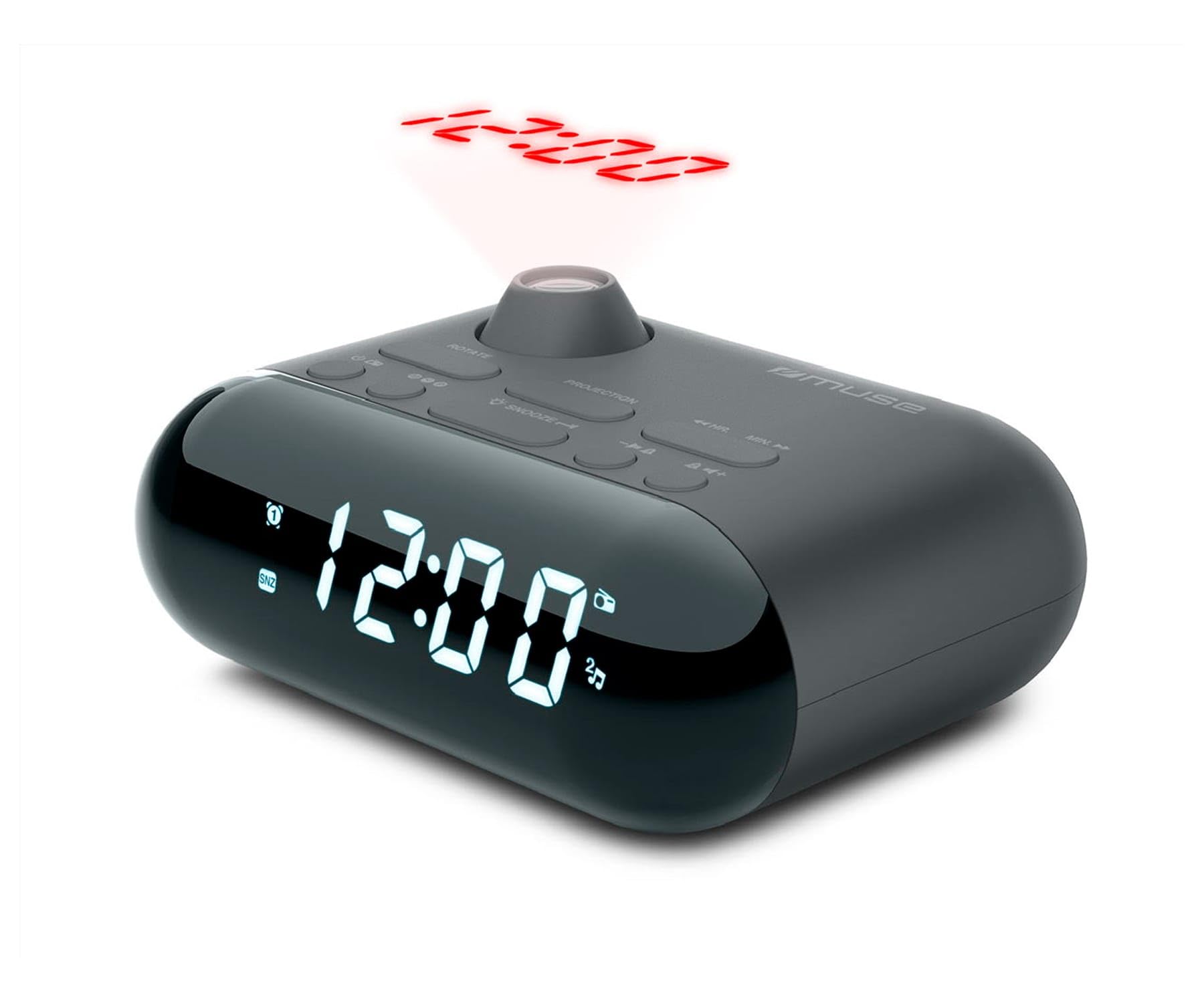
Image showing the front of the MUSE M-179 P Alarm Clock Radio, featuring the LED display and control buttons.
2. Інструкцыі па тэхніцы бяспекі
- Перад эксплуатацыяй прылады ўважліва прачытайце ўсе інструкцыі.
- Захоўвайце гэта кіраўніцтва для выкарыстання ў будучыні.
- Не падвяргайце прыладу ўздзеянню кропель ці пырскаў вады.
- Забяспечце належную вентыляцыю; не закрывайце вентыляцыйныя адтуліны.
- Не размяшчайце прыладу побач з крыніцамі цяпла, такімі як радыятары, абагравальнікі, пліты або іншыя прыборы (у тым ліку ampLifiers), якія вырабляюць цяпло.
- Выкарыстоўвайце толькі насадкі/аксэсуары, указаныя вытворцам.
- Утылізуйце выкарыстаныя батарэі адказна ў адпаведнасці з мясцовымі правіламі.
- Do not attempt to disassemble or modify the unit. Refer all servicing to qualified service personnel.
3. Змесціва ўпакоўкі
Калі ласка, праверце, ці ўваходзяць у вашу ўпакоўку наступныя прадметы:
- MUSE M-179 P Alarm Clock Radio Unit
- 1 x AA Battery (for backup or primary power, depending on model)
- Кіраўніцтва карыстальніка (гэты дакумент)
4. Асаблівасці прадукту
- Alarm Clock Radio: Integrated alarm and radio functions.
- Праекцыя часу: Projects the current time onto a wall or ceiling.
- Двайны сігнал трывогі: Усталюйце два незалежных будзільніка.
- Варыянты абуджэння: Choose to wake up to FM radio or a buzzer sound.
- PLL FM-радыё: Digital tuning for stable radio reception.
- 20 FM Presets: Store up to 20 of your favorite FM radio stations.
- Функцыя затрымкі: Temporarily pause the alarm.
- Таймер сну: Fall asleep to radio with automatic shut-off.
- Убудаваныя гадзіны: Accurate timekeeping.
- Партатыўны дызайн: Compact and easy to move.
5. Элементы кіравання і дысплей
The MUSE M-179 P features an intuitive layout for easy operation. While specific button labels may vary, common controls include:
- Святлодыёдны дысплей: Паказвае бягучы час, стан будзільніка і радыёчастоту.
- Кнопка ўстаноўкі часу: For adjusting hours and minutes.
- Кнопкі сігналізацыі 1/сігналізацыі 2: To set and activate individual alarms.
- Кнопка паўтору/сну: Activates snooze or sets the sleep timer.
- Radio/Tuning Buttons: For scanning and selecting radio stations.
- Рэгулятар гучнасці: Adjusts audio output.
- Projector On/Off & Adjustment: Controls the time projection feature.
6. Настройка
6.1. Падключэнне сілкавання
- Open the battery compartment, usually located on the bottom or back of the unit.
- Insert 1 AA battery, ensuring correct polarity (+/-). This battery powers the unit.
- Надзейна зачыніце батарэйны адсек.
6.2. Пачатковая ўстаноўка часу
- When the unit is first powered on, the display may flash or show a default time.
- Націсніце і ўтрымлівайце УСТАНОВА ЧАСУ button (or similar) until the hour digits begin to flash.
- Выкарыстоўвайце ГАДЗІНА і ХВІЛІНА buttons (or tuning buttons) to adjust the hour. Pay attention to AM/PM indicators if present.
- Прэса УСТАНОВА ЧАСУ зноў, каб пацвердзіць гадзіны і перайсці да налады хвілін.
- Adjust the minutes using the appropriate buttons.
- Прэса УСТАНОВА ЧАСУ one last time to save the current time.
7. Інструкцыя па эксплуатацыі
7.1. Налада сігналізацыі
The M-179 P features two independent alarms (Alarm 1 and Alarm 2).
- Націсніце і ўтрымлівайце ТРЫВОГА 1 кнопку, пакуль не замігаюць лічбы гадзін будзільніка.
- Выкарыстоўвайце ГАДЗІНА і ХВІЛІНА кнопкі, каб усталяваць патрэбны час будзільніка.
- Прэса ТРЫВОГА 1 again to confirm the time and select the wake-up source (radio or buzzer). Use the tuning buttons to toggle between options.
- Прэса ТРЫВОГА 1 once more to save the settings. The alarm indicator will light up on the display.
- Repeat the process for ТРЫВОГА 2 выкарыстоўваючы ТРЫВОГА 2 кнопка.
7.2. Выкарыстанне FM-радыё
- Націсніце РАДЫЁ ВКЛ/ВЫКЛ кнопка для ўключэння радыё.
- Выкарыстоўвайце НАСТРОЙКА +/- кнопкі для ручной рэгулявання частаты.
- Каб аўтаматычна сканаваць станцыі, націсніце і ўтрымлівайце НАСТРОЙКА +/- button. The radio will stop at the next strong signal.
- To save a preset station: Tune to the desired station, then press and hold the ПРАДУСТАЎКА кнопка (ці МЕМ). The preset number will flash. Use НАСТРОЙКА +/- каб выбраць нумар зададзеных налад (1-20), затым націсніце ПРАДУСТАЎКА зноў захаваць.
- Каб выклікаць зададзеныя станцыі: націсніце кнопку ПРАДУСТАЎКА некалькі разоў націскайце кнопку, каб пераключацца паміж захаванымі станцыямі.
- Адрэгулюйце гучнасць, выкарыстоўваючы ГУЧКА +/- кнопкі.
7.3. Time Projection
- Знайдзіце ПРАЕКТАР ВКЛ/ВЫКЛ switch or button. Turn it on to activate the time projection.
- Adjust the projection angle by physically rotating the projector lens housing.
- Калі ёсць, выкарыстоўвайце РАТАЦЫЯ ВЫЯВЫ button or dial to flip the projected time display 180 degrees for optimal viewing on a ceiling or wall.
- Adjust the focus of the projected image by rotating the focus ring around the projector lens.
7.4. Функцыя паўтору будзільніка
Калі гучыць будзільнік, націсніце кнопку СНАОЗ button. The alarm will temporarily stop and sound again after a few minutes (typically 5-9 minutes, depending on the model's default setting).
7.5. Таймер сну
- Пакуль гучыць радыё, націсніце кнопку СПАЦЬ кнопка.
- Неаднаразова націскайце СПАЦЬ button to cycle through available sleep timer durations (e.g., 90, 60, 30, 15 minutes, or OFF).
- Радыё аўтаматычна выключыцца пасля заканчэння абранага часу.
8. Тэхнічнае абслугоўванне
8.1. Уборка
- Працярыце прыладу мяккай сухой тканінай.
- Не выкарыстоўвайце абразіўныя ачышчальнікі, воск або растваральнікі.
8.2. Замена батарэі
- When the display dims or the unit malfunctions, it may be time to replace the battery.
- Open the battery compartment and replace the old AA battery with a new one, observing correct polarity.
- Dispose of the old battery according to local environmental regulations.
9. Выпраўленне непаладак
| праблема | Магчымая прычына | Рашэнне |
|---|---|---|
| Прылада не ўключаецца. | Батарэя разраджаная або няправільна ўстаўленая. | Заменіце батарэйку або праверце палярнасць. |
| Дрэнны прыём радыё. | Антэна не выцягнутая або сігнал слабы. | Extend the FM antenna fully. Reposition the unit for better reception. |
| Сігналізацыя не гучыць. | Сігналізацыя не ўключана або настроена няправільна. | Ensure alarm is set and activated (alarm indicator visible). Check alarm volume. |
| Time projection is blurry. | Фокус не адрэгуляваны. | Rotate the focus ring on the projector lens until the image is clear. |
| Projected time is upside down. | Image rotation needs adjustment. | Press the IMAGE ROTATION button or adjust the dial to flip the display. |
10. Тэхнічныя характарыстыкі
- Марка: МУЗА
- Нумар мадэлі: M-179 P
- Крыніца харчавання: Battery powered (1 AA battery required)
- Тып дысплея: святлодыёд
- Тэхналогія падключэння: Auxiliary (3.5 mm Audio Interface)
- Тып цюнэра: FM
- Падтрымліваюцца радыёдыяпазоны: FM
- Асаблівасці: Built-in clock, Portable
- Памеры прадукту (Д х Ш х У): 15 см х 12.4 см х 6.8 см
- Узровень воданепранікальнасці: Waterproof (Note: This specification should be interpreted with caution for electronic devices. Avoid direct exposure to water.)
- Internal Material: Пластыкавыя
- Рэкамендуемае выкарыстанне: Для выкарыстання ў памяшканнях
- Compatible Devices (Auxiliary): Headphones, Speaker, MP3 player, Laptop
11. Гарантыя і падтрымка
This product is covered by a standard manufacturer's warranty. For detailed warranty information, please refer to the warranty card included in your product packaging or visit the official MUSE website. For technical support, troubleshooting assistance, or to inquire about spare parts, please contact MUSE customer service through their official channels.
Калі ласка, захавайце пацвярджэнне пакупкі для любых гарантыйных прэтэнзій.