
groov e GVEB16
Лічбавыя навушнікі-ўкладышы - кіраўніцтва карыстальніка
Model: GVEB16
Марка: groov e
Уводзіны
Thank you for choosing the groov e Digital Buds. These USB-C earphones are designed to provide a high-quality audio experience for music playback and hands-free calls. This manual will guide you through the setup, operation, and maintenance of your new earphones to ensure optimal performance and longevity.
Змест пакета
- Digital Buds USB-C Earphones
- Earbuds (3X Sizes) - Note: The product description mentions "Includes Earbuds (3X Sizes)", but "whats_in_the_box" only lists "Earphones". Assuming the different sizes are pre-attached or included as accessories with the main earphones.
Прадукт скончаныview
Familiarize yourself with the components of your Digital Buds.
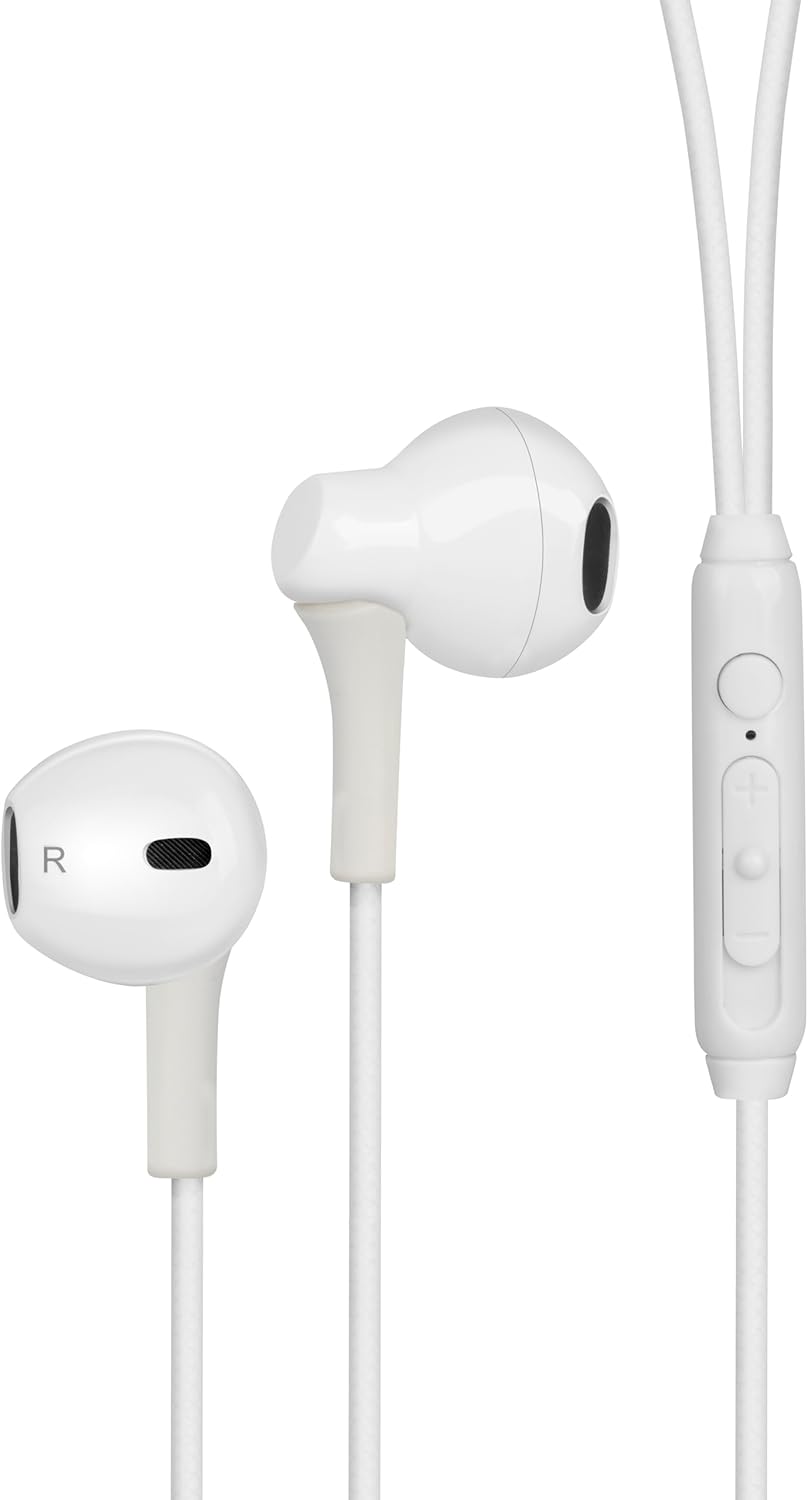
Figure 1: Digital Buds Earphones. This image shows both the left and right earbuds connected by their cable.

Figure 2: In-Line Remote and Microphone. The remote features volume up (+), volume down (-), and a multi-function button for calls and music control. The microphone is integrated into this unit.

Figure 3: USB-C Connector. This connector is used to plug the earphones into compatible devices such as smartphones, tablets, and laptops.
Настройка
- Падключэнне да прылады: Locate the USB-C port on your smartphone, tablet, or laptop. Insert the USB-C connector of the Digital Buds firmly into the device's USB-C port.
- Размяшчэнне навушнікаў: Gently insert the earbuds into your ears. The earbud marked 'L' is for the left ear, and 'R' is for the right ear. Adjust them for a comfortable and secure fit. If necessary, try the different sized ear tips included to find the best fit for optimal sound quality and comfort.
- Першапачатковае прызнанне: Your device should automatically recognize the earphones. You may need to select them as the audio output device in your device's sound settings.
Інструкцыя па эксплуатацыі
Убудаваны пульт дыстанцыйнага кіравання забяспечвае зручнае кіраванне аўдыё і званкамі.
Прайграванне музыкі
- Прайграванне/Паўза: Адзін раз націсніце шматфункцыянальную кнопку.
- Наступны трэк: Двойчы хутка націсніце шматфункцыянальную кнопку.
- Папярэдні трэк: Тры разы хутка націсніце шматфункцыянальную кнопку.
- Павялічыць гучнасць: Націсніце кнопку «+».
- Паменшыць гучнасць: Націсніце кнопку «-».
Кіраванне званкамі
- Адказ/завяршэнне выкліку: Націсніце шматфункцыянальную кнопку адзін раз падчас уваходнага званка або актыўнага званка.
- Адхіліць выклік: Падчас уваходнага званка націсніце і ўтрымлівайце шматфункцыянальную кнопку прыблізна 2 секунды.
Галасавы памочнік
- Актываваць галасавы памочнік: Press and hold the multi-function button for approximately 2 seconds when not on a call or playing music. This will activate your device's default voice assistant (e.g., Google Assistant, Siri).
Тэхнічнае абслугоўванне
Proper care will extend the life of your Digital Buds.
- Уборка: Use a soft, dry, lint-free cloth to wipe the earbuds and cable. For stubborn dirt, slightly dampпрацярыце тканіну вадой. Не выкарыстоўвайце агрэсіўныя хімікаты або абразіўныя ачышчальнікі.
- захоўванне: When not in use, store the earphones in a clean, dry place, preferably in a small pouch or case to prevent tangling and damage.
- Пазбягайце вільгаці: Do not expose the earphones to excessive moisture, rain, or liquids.
- Асцярожна звяртайцеся: Avoid pulling on the cable excessively or bending the USB-C connector at sharp angles.
Ліквідацыю непаладак
Калі ў вас узнікнуць праблемы, звярніцеся да наступных распаўсюджаных праблем і рашэнняў.
| праблема | Рашэнне |
|---|---|
| Няма гуку з навушнікаў. |
|
| Мікрафон не працуе падчас званкоў. |
|
| Кнопкі дыстанцыйнага кіравання не рэагуюць. |
|
Тэхнічныя характарыстыкі
| Асаблівасць | Дэталь |
|---|---|
| Марка | паз |
| Назва мадэлі | Groove Digital Buds - White |
| Нумар мадэлі тавару | GVEB16 |
| Тэхналогія падлучэння | Правадны (USB-C) |
| Размяшчэнне вушэй | У вуха |
| Формаў-фактар | У вуха |
| Метад кантролю | Дыстанцыйны (убудаваны) |
| Уключаныя кампаненты | Навушнікі |
| Матэрыял | Сілікон, пластык |
| Вага прадмета | 1.06 унцыі |
| Памеры ўпакоўкі | 6.61 х 2.36 х 1.26 цалі |
| Сумяшчальныя прылады | Tablets, Mobile phones, Laptops, Desktops |
| Канкрэтнае выкарыстанне прадукту | забавы |
Гарантыя і падтрымка
groov e products are manufactured to high standards and undergo rigorous quality checks. For information regarding warranty coverage, technical support, or customer service, please refer to the warranty card included with your purchase or visit the official groov e webсайт.
Калі ласка, захавайце пацвярджэнне пакупкі для любых гарантыйных прэтэнзій.
Ask a question about this manual
Ask about setup, troubleshooting, compatibility, parts, safety, or missing instructions. Manuals+ will review the question and use this page’s manual context to help answer it.