
Thomson RC112A
Thomson Android TV Remote Control User Manual
Мадэль: RC112A
Прадукт скончаныview
The Thomson RC112A Android TV Remote Control is designed to provide seamless control over your Thomson Android TV. This official replacement remote offers a blend of sophisticated design and practical functionality, ensuring a comfortable and intuitive user experience. It features an ergonomic design, backlit buttons for low-light conditions, integrated voice control via Google Assistant, and a customizable favorite apps button.

Выява: спераду view of the Thomson Android TV Remote Control, showcasinяго элегантны чорны дызайн і размяшчэнне кнопак.
Налада і пачатковае выкарыстанне
1. Устаноўка батарэі
Для працы пульта дыстанцыйнага кіравання патрэбныя дзве (2) батарэйкі тыпу AAA. Пры ўстаўцы батарэек пераканайцеся ў правільнай палярнасці.
- Знайдзіце крышку батарэйнага адсека на задняй частцы пульта дыстанцыйнага кіравання.
- Зрушыце вечка ўніз або ў кірунку, паказаным стрэлкай, каб адкрыць яго.
- Устаўце дзве батарэйкі тыпу AAA, сумяшчаючы станоўчую (+) і адмоўную (-) клемы, як паказана ўнутры адсека.
- Зачыніце вечка батарэйнага адсека, пераканаўшыся, што яна надзейна зашчапілася.
2. Pairing with your Android TV
This remote control connects to your Thomson Android TV via Bluetooth. The pairing process may vary slightly depending on your TV model. Generally, follow these steps:
- Ensure your Thomson Android TV is powered on.
- На тэлевізары перайдзіце да Налады > Пульты дыстанцыйнага кіравання і аксэсуары or Налады Bluetooth.
- Выберыце Дадайце аксэсуар or Спалучыце новую прыладу.
- On the Thomson remote control, press and hold the дадому кнопка і Назад button simultaneously for a few seconds until the LED indicator on the remote starts blinking, indicating it's in pairing mode.
- On your TV screen, select "Thomson RC112A" or a similar name from the list of available devices.
- Confirm the pairing on your TV if prompted. The LED on the remote will stop blinking and remain solid for a moment, indicating successful pairing.
If pairing fails, ensure the remote is close to the TV and repeat the steps. Refer to your TV's user manual for specific pairing instructions if needed.
Кіраванне пультам дыстанцыйнага кіравання
The Thomson RC112A remote control features a comprehensive set of buttons for navigating your Android TV. Below are the primary functions:
- Кнопка харчавання (●): Уключае або выключае тэлевізар.
- Лічбавая клавіятура (0-9): Direct channel selection or input.
- Навігацыйная панэль (Уверх, Уніз, Улева, Управа, ОК): Для навігацыі па меню і выбару.
- Кнопка "Назад" (←): Вяртанне да папярэдняга экрана або меню.
- Кнопка "Дадому" (⌂): Доступ да галоўнага экрана Android TV.
- Павелічэнне/памяншэнне гучнасці (V+/V-): Рэгулюе гучнасць тэлевізара.
- Канал уверх/уніз (P+/P-): Змяняе тэлеканалы.
- Кнопка адключэння гуку (🔇): Адключэнне або ўключэнне гуку тэлевізара.
- Кнопка Памочніка Google (🎤): Актывуе галасавое кіраванне. Націсніце і ўтрымлівайце, каб прамаўляць каманды.
- Favorite Apps Button (⭐): Customizable button to quickly launch your preferred application. Refer to your TV's settings to assign an app to this button.
- Dedicated App Buttons (e.g., YouTube, Netflix, Prime Video, Disney+, Google Play): Прамы доступ да гэтых струменевых сэрвісаў.
Асаблівасці
Эрганамічны дызайн
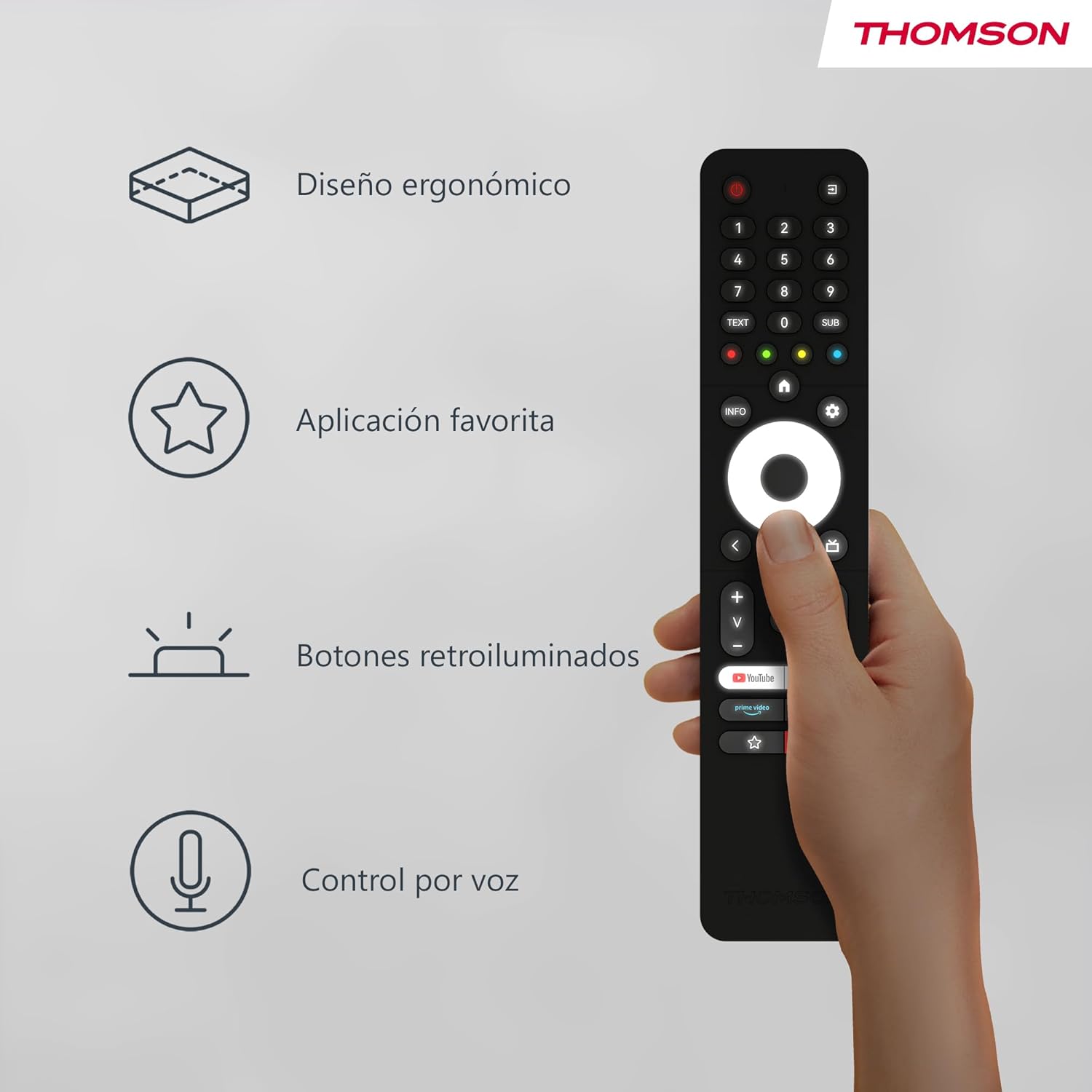
The remote control is designed to fit comfortably in your hand, making prolonged use easy and reducing fatigue. Its sleek profile and balanced weight contribute to a pleasant user experience.
Image: A hand holding the Thomson remote control, illustrating its comfortable ergonomic design and highlighting key features like voice control and favorite apps.
Кнопкі з падсветкай

The buttons on the remote control illuminate, making it easy to locate and press the correct buttons in dimly lit environments. This feature prevents accidental key presses and enhances usability during night-time viewінж.
Выява: Два views of the Thomson remote control side-by-side, one showing the buttons unlit and the other showing them illuminated, demonstrating the backlit feature for low-light use.
Voice Control (Google Assistant)
With the integrated Google Assistant, you can control your TV using voice commands. Press and hold the Google Assistant button, then speak clearly into the remote. You can:
- Adjust volume (e.g., "Volume up", "Set volume to 20").
- Пошук content (e.g., "Find action movies", "Play [Movie Title]").
- Open applications (e.g., "Open Netflix", "Launch YouTube").
- Ask questions (e.g., "What's the weather like?").
- Кіруйце сумяшчальнымі прыладамі разумнага дома.
Тэхнічнае абслугоўванне
Замена батарэі
Replace batteries when the remote's performance degrades or if the LED indicator does not light up during use. Always replace both batteries simultaneously with new AAA alkaline batteries.
Уборка
Для чысткі пульта дыстанцыйнага кіравання выкарыстоўвайце мяккую сухую тканіну. Для ўстойлівага бруду злёгкуampen the cloth with water or a mild, non-abrasive cleaner. Do not use harsh chemicals or abrasive materials, as they may damage the remote's surface or internal components. Avoid getting moisture into the battery compartment or button crevices.
Захоўванне
Захоўвайце пульт дыстанцыйнага кіравання ў прахалодным, сухім месцы, удалечыні ад прамых сонечных прамянёў, экстрэмальных тэмператур і высокай вільготнасці. Калі пульт не будзе выкарыстоўвацца працяглы час, рэкамендуецца выняць батарэйкі, каб прадухіліць уцечку і магчымыя пашкоджанні.
Ліквідацыю непаладак
| праблема | Магчымая прычына | Рашэнне |
|---|---|---|
| Пульт не адказвае. | Разраджаныя або нізкія батарэйкі; пульт не спалучаны; перашкода паміж пультам і тэлевізарам. | Replace batteries; Re-pair the remote with the TV (see "Pairing" section); Ensure no objects are blocking the signal (though Bluetooth is less sensitive to this, direct line of sight can sometimes help with initial pairing). |
| Галасавое кіраванне не працуе. | Microphone blocked; Remote not properly paired for voice; Internet connection issue on TV. | Ensure nothing is covering the microphone hole; Re-pair the remote; Check TV's internet connection. |
| Backlight not illuminating. | Batteries are low; Feature is disabled (if applicable, though usually automatic). | Replace batteries. The backlight feature is typically automatic and activates when the remote is moved or a button is pressed. |
| Favorite app button not launching desired app. | App not assigned or incorrectly assigned. | Go to your TV's settings and re-assign the desired application to the favorite app button. |
Тэхнічныя характарыстыкі
- Марка: Томсан
- Нумар мадэлі: RC112A
- колер: Чорны
- Асаблівасці: Ergonomic, Backlit, Voice Search (Google Assistant)
- Сумяшчальныя прылады: Thomson Android TVs
- Тып батарэі: 2 х ААА батарэі (не ўключаны)
- Максімальны дыяпазон: 10 метраў
- Падключэнне: Bluetooth
Гарантыя і падтрымка
Warranty information for your Thomson RC112A remote control is typically provided with your purchase documentation or can be found on the official Thomson webсайт. Калі ласка, захавайце пацвярджэнне пакупкі для прэтэнзій па гарантыі.
For technical support, troubleshooting assistance beyond this manual, or to inquire about replacement parts, please visit the official Thomson support website or contact their customer service. Contact details are usually available on the manufacturer's official webна сайце або ва ўпакоўцы вашага прадукту.
Заўвага: Інфармацыя аб наяўнасці запасных частак не пазначана ў характарыстыках прадукту.
Ask a question about this manual
Ask about setup, troubleshooting, compatibility, parts, safety, or missing instructions. Manuals+ will review the question and use this page’s manual context to help answer it.