
Уводзіны
Дзякуй за пакупкуasing the Kenko Digital Camera KC-ZM08. This compact digital camera is designed for ease of use, allowing you to capture everyday moments with its 5x optical zoom, touch panel operation, and various convenient features. Please read this manual thoroughly before using the camera to ensure proper operation and to maximize your enjoyment of its capabilities. Keep this manual in a safe place for future reference.
Змест пакета
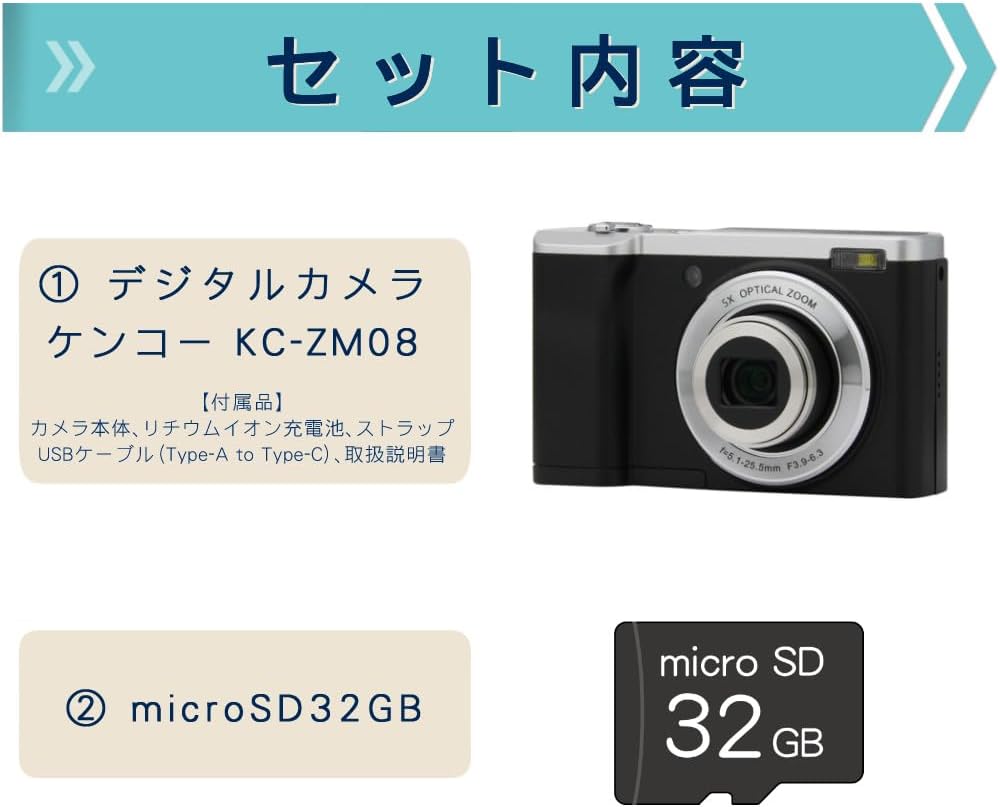
This package includes the Kenko Digital Camera KC-ZM08 and a 32GB microSD card, providing everything you need to start capturing photos and videos.
- Kenko Compact Digital Camera KC-ZM08
- Акумулятарная літый-іённая батарэя
- Папружка
- Кабель USB (тып A - тып C)
- Кіраўніцтва па эксплуатацыі
- microSD Card (32GB)
Асноўныя характарыстыкі
5-кратны аптычны зум

The camera features a 5x optical zoom lens, covering a versatile range from wide-angle 28mm to telephoto 142mm (35mm equivalent). This allows for capturing a wide variety of scenes, from expansive landscapes to distant subjects.
Intuitive Touch Panel Operation

Easily change modes and settings with the responsive touch panel LCD monitor. This intuitive interface simplifies camera operation, making it quick and effortless to adjust your shooting preferences.
Convenient Rear Camera for Selfies

Switch to the rear camera with a single button press for easy selfies. You can capture both photos and videos while viewing yourself on the monitor, ensuring you get the perfect shot.
Shortest Shooting Distance: Approx. 10cm

When shooting at wide-angle, you can get as close as approximately 10cm to your subject, allowing for detailed close-up photography (with the front lens).
Built-in LED Flash and Constant Light

The camera not only has a built-in flash for still images but also features a constant LED light, which is convenient for video recording in low-light conditions.
Запаволены відэазапіс

Easily capture slow-motion videos to add a creative touch to your recordings.
Пакадравая здымка
The camera supports time-lapse shooting, automatically capturing images at set intervals to create dynamic time-lapse videos.
Self-Timer Function
Utilize the self-timer for group photos with friends and family, or for convenient self-portraits.
Webcam Capability
Connect the camera to your computer via USB to use it as a webcam for video calls and live streaming.
Digital Image Stabilization (for Video)
Reduce camera shake during video recording with the built-in digital image stabilization feature, ensuring smoother footage.
Кіраўніцтва па ўстаноўцы
- Зарадзіць акумулятар: Insert the rechargeable lithium-ion battery into the camera. Connect the camera to a USB power source using the provided USB Type-A to Type-C cable. The charging indicator will show the charging status. Ensure the battery is fully charged before first use.
- Устаўце карту microSD: Open the card slot cover and gently insert the provided 32GB microSD card until it clicks into place. Ensure the card is inserted in the correct orientation.
- Прымацаваць раменьчык на запясце: Securely attach the wrist strap to the camera to prevent accidental drops.
- Уключэнне: Націсніце і ўтрымлівайце кнопку харчавання, каб уключыць камеру.
- Пачатковыя налады: Выконвайце падказкі на экране, каб усталяваць дату, час і мову.
Інструкцыя па эксплуатацыі
Фатаграфаванне
- Выберыце рэжым фота: Press the 'MODE' button to select the photo shooting mode.
- Зрабіце кадр: Use the LCD screen to compose your image.
- Фокус: Gently press the shutter button halfway down to focus. The focus frame will turn green when focus is achieved.
- Захоп: Націсніце кнопку спуску засаўкі цалкам, каб зрабіць здымак.
Запіс відэа
- Выберыце рэжым відэа: Press the 'MODE' button to select the video recording mode.
- Пачаць запіс: Press the shutter button to start recording. A red indicator will appear on the screen.
- Спыніць запіс: Націсніце кнопку спуску затвора яшчэ раз, каб спыніць запіс.
Выкарыстанне сэнсарнай панэлі
Tap icons on the LCD screen to navigate menus, change settings like image size, ISO, exposure, and picture quality (Super Fine, Fine, Normal). Swipe to browse through captured media in playback mode.
Switching to Rear Camera
Locate the dedicated button for switching between the front and rear cameras. Press this button to activate the rear camera for convenient selfies or vlogging.
Рэжым прайгравання
Націсніце кнопку прайгравання, каб view your captured photos and videos. Use the navigation buttons or touch screen to scroll through your media.
Тэхнічнае абслугоўванне
- Ачыстка аб'ектыва: Use a soft, lint-free cloth specifically designed for camera lenses to gently wipe away dust or smudges. Do not use harsh chemicals.
- Ачышчэнне арганізма: Працярыце корпус камеры мяккай сухой тканінай. Для выдалення ўстойлівага бруду злёгкуampпрамыйце тканіну вадой, а затым вытрыце насуха.
- Сыход за батарэяй: Захоўвайце акумулятар у прахалодным, сухім месцы, калі ён не выкарыстоўваецца. Пазбягайце поўнай разрадкі акумулятара на працягу доўгага часу.
- захоўванне: When storing the camera for a long time, remove the battery and microSD card. Store the camera in a dry, well-ventilated area away from direct sunlight and extreme temperatures.
Ліквідацыю непаладак
| праблема | Магчымая прычына / рашэнне |
|---|---|
| Камера не ўключаецца. | Battery may be depleted. Charge the battery fully. Ensure the battery is inserted correctly. |
| Нельга рабіць фота/запісваць відэа. | microSD card may be full or not inserted correctly. Check card status or replace. Ensure sufficient battery charge. |
| Выявы размытыя. | Ensure the lens is clean. Check focus by pressing the shutter button halfway. Hold the camera steady during shooting. |
| Сэнсарны экран не рэагуе. | Перазапусціце камеру. Пераканайцеся, што экран чысты і сухі. |
Тэхнічныя характарыстыкі
| Асаблівасць | Дэталь |
|---|---|
| Назва мадэлі | KC-ZM08 |
| Марка | Кенко |
| Аптычны зум | 5x |
| Лічбавы зум | 2x |
| Тэхналогія фотадатчыка | CMOS |
| Эфектыўнае рашэнне | 56 МП |
| Дазвол відэазахопу | 1080p |
| Мінімальная фокусная адлегласць | 28 мм |
| Максімальная фокусная адлегласць | 142 мм |
| Стабілізацыя выявы | Digital (for video) |
| Сумяшчальны File Фарматы | JPEG, MP4 |
| Памер дысплея | 2.8 цаляў |
| Тып ўспышкі | Built-in (Auto, Always On) |
| Сувязь | USB |
| Тып батарэі | Літый-іённы |
| Вага прадукту | 148 grams (excluding accessories, battery) |
| Памеры | Прыблізна 100 х 62 х 32 мм |
Гарантыя і падтрымка
The Kenko Digital Camera KC-ZM08 comes with a 1-year manufacturer's warranty. For technical support, troubleshooting assistance, or warranty claims, please refer to the contact information provided in the separate warranty card or visit the official Kenko webсайт.
Калі ласка, захавайце пацвярджэнне пакупкі для гарантыйных мэт.
Відэа аб прадуктах
Kenko Digital Camera KC-ZM08 Overview
Гэта відэа дае агульны аглядview of the Kenko Digital Camera KC-ZM08, highlighting its compact design and ease of use for everyday photography and casual walks.
Digital Camera KC-ZM08 Features
Кароткі відэа-прэзентацыяasing various features of the KC-ZM08 digital camera.