
DVT-C9F24992D65E215A7DD6011D34514A46
Кіраўніцтва па эксплуатацыі
Tucus Remote Control for JVC RM-SUXQ30UW RM-SUXQ30US UX-Q30S UX-Q30B UX-Q30P UX-Q30B UX-Q30W Micro COMPACT COMPONENT Stereo SYSTEM
Model: DVT-C9F24992D65E215A7DD6011D34514A46 | Brand: Generic
Уводзіны
This manual provides essential information for the setup, operation, and maintenance of your new Tucus replacement remote control. This remote is designed to be compatible with various JVC Micro COMPACT COMPONENT Stereo Systems, including models RM-SUXQ30UW, RM-SUXQ30US, UX-Q30S, UX-Q30B, UX-Q30P, and UX-Q30W. While it is a replacement remote and not the original device's remote, common functions are expected to operate normally. Please review this guide thoroughly to ensure proper use and longevity of your remote control.
Настройка
1. Устаноўка батарэі
Для працы пульта дыстанцыйнага кіравання патрэбныя дзве (2) батарэйкі тыпу АА (не ўваходзяць у камплект). Каб усталяваць іх, выканайце наступныя дзеянні:
- Знайдзіце батарэйны адсек на задняй частцы пульта дыстанцыйнага кіравання.
- Зрушыце вечка батарэйнага адсека ўніз або вонкі, каб адкрыць яго.
- Устаўце дзве батарэйкі тыпу АА, пераканаўшыся, што станоўчая (+) і адмоўная (-) клемы правільна сумяшчаюцца з пазнакамі ўнутры адсека.
- Засуньце вечка батарэйнага адсека на месца, пакуль яна надзейна не зашчоўкне.

Figure 1: Back of the remote control showing the battery compartment cover.
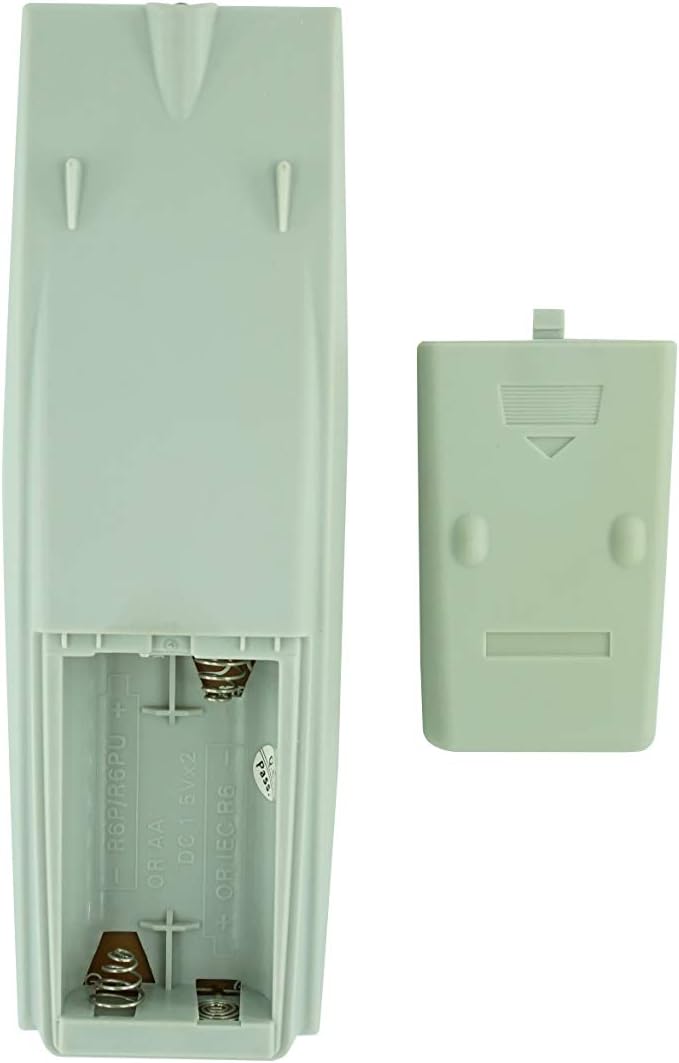
Figure 2: Battery compartment with cover removed, ready for battery insertion.
2. Першапачатковае выкарыстанне
Once batteries are installed, the remote control is ready for use. Point the remote directly at your JVC Micro COMPACT COMPONENT Stereo System. No additional programming is typically required for this replacement remote for the listed compatible models.
Інструкцыя па эксплуатацыі
This remote control provides access to the primary functions of your JVC stereo system. Below is a general overview of common button functions. Please note that while the functionality is guaranteed, the exact button layout may differ slightly from your original remote.

Малюнак 3: Спераду view пульта дыстанцыйнага кіравання з размяшчэннем кнопак.
Асноўныя функцыі:
- РЕЖЫМ ЧЫКАВАННЯ/УКЛ.: Powers the stereo system on or off.
- DISPLAY: Changes or shows display information.
- Гадзіннік/таймер: Accesses clock and timer settings.
- СОН: Sets a sleep timer for automatic power off.
- Лічбавыя кнопкі (0-9, +10): Direct input for track numbers, radio frequencies, etc.
- БАС / ВЫСОКІЯ ЧАСТОТЫ: Рэгулюе ўзровень басоў і высокіх частот.
- Navigation (UP, DOWN, LEFT, RIGHT, SET): Выкарыстоўваецца для навігацыі па меню і выбару.
- Playback Controls (PLAY/PAUSE, STOP, FAST FORWARD, REWIND, SKIP): Кіруе прайграваннем мультымедыя.
- Source Selection (CD, TAPE, FM/AM, AUX/MD): Выбірае крыніцу ўваходнага гуку.
- FM MODE / REV.MODE: Toggles FM stereo/mono or tape reverse mode.
- AUTO PRESET: Automatically scans and saves radio stations.
- PRGM / RANDOM / REPEAT: Controls program, random, and repeat playback modes.
- PTY SEARCH / PTY SELECT: For Program Type search and selection on radio.
- DISPLAY / TA/News / Info: Provides additional display information or traffic/news announcements.
- AHB PRO: Уключае або выключае функцыю Active Hyper-Bass PRO.
- АБ'ЁМ (+/-): Рэгулюе агульны ўзровень гучнасці.
For specific advanced functions, please refer to the original instruction manual of your JVC Micro COMPACT COMPONENT Stereo System.
Тэхнічнае абслугоўванне
Ачыстка пульта дыстанцыйнага кіравання
Каб падтрымліваць знешні выгляд і функцыянальнасць пульта дыстанцыйнага кіравання, рэгулярна яго чысціце:
- Працярыце паверхню мяккай сухой анучай.
- Для ўстойлівага бруду злёгку ачысціцеampПрацярыце тканіну вадой або мяккім неабразіўным ачышчальнікам. Не распыляйце ачышчальнік непасрэдна на пульт дыстанцыйнага кіравання.
- Пазбягайце выкарыстання агрэсіўных хімічных рэчываў, растваральнікаў або абразіўных ачышчальных губак, бо яны могуць пашкодзіць пакрыццё пульта дыстанцыйнага кіравання або ўнутраныя кампаненты.
Замена батарэі
Replace batteries when the remote's response becomes sluggish or it stops functioning. Always replace both batteries at the same time with new ones of the same type (AA). Do not mix old and new batteries, or different types of batteries.
Захоўванне
Калі пульт дыстанцыйнага кіравання не будзе выкарыстоўвацца працяглы час, выміце батарэйкі, каб прадухіліць іх уцечку і магчымае пашкоджанне.
Ліквідацыю непаладак
- Пульт не адказвае:
- Праверце, ці правільна ўстаўлены батарэйкі з захаваннем палярнасці (+/-).
- Заменіце старыя батарэі на новыя.
- Ensure there are no obstructions between the remote control and the stereo system's infrared receiver.
- Пераканайцеся, што вы знаходзіцеся ў зоне дзеяння пульта дыстанцыйнага кіравання.
- Some buttons not working or unexpected behavior:
- This remote is a replacement and while common functions are supported, the button layout or specific advanced functions might not perfectly match your original remote. Refer to the button layout image in the Operating Instructions section.
- Ensure the stereo system is powered on and set to the correct input source.
- Remote appears damaged:
- If the remote has been dropped or exposed to liquids, internal damage may have occurred. In such cases, replacement may be necessary.
Тэхнічныя характарыстыкі
| Марка | Радавыя |
| Вытворца | TUCUS |
| Нумар мадэлі | DVT-C9F24992D65E215A7DD6011D34514A46 |
| Сумяшчальныя мадэлі | JVC RM-SUXQ30UW, RM-SUXQ30US, UX-Q30S, UX-Q30B, UX-Q30P, UX-Q30W Micro COMPACT COMPONENT Stereo SYSTEM |
| Тып матэрыялу | Іншае |
| Крыніца харчавання | 2 батарэйкі АА (не ўключаны) |
| ASIN | B0D79958PW |
| Дата першай даступнасці | 17 чэрвеня 2024 г |
Інфармацыя аб гарантыі
This product comes with a 3-month warranty from the date of purchase. This warranty covers manufacturing defects and ensures the remote control functions as intended for compatible models. Please retain your proof of purchase for any warranty claims.
Падтрымка кліентаў
If you have any questions regarding the compatibility or functionality of this remote control, or if your specific device model is not listed, please contact the seller directly for assistance. The seller stocks a wide range of remote controls and parts and can confirm suitability for your needs.
For general inquiries or to provide feedback, please refer to the contact information provided by your retailer or the seller.
Ask a question about this manual
Ask about setup, troubleshooting, compatibility, parts, safety, or missing instructions. Manuals+ will review the question and use this page’s manual context to help answer it.