
Studebaker SB3720
Studebaker SB3720 Portable Stereo Bluetooth CD Player User Manual
Мадэль: SB3720
Уводзіны
Welcome to your new Studebaker SB3720 Portable Stereo Bluetooth CD Player. This manual provides detailed instructions for setup, operation, and maintenance to ensure optimal performance and longevity of your device. Please read this manual thoroughly before using the product.
Змест пакета
- SB3720 CD Player
- Кіраўніцтва карыстальніка
- Type-C Charging Cable & USB-C Adaptor
The Type-C charging cable and USB-C power adapter that come with the Studebaker SB3720, used for charging the built-in battery and powering the device.
Асноўныя характарыстыкі
- Bluetooth Connectivity for Streaming Music
- MP3 CD and CD-R/RW Compatible CD Player
- FM-стэрэа-радыё
- USB MP3-плэер
- Убудаваная акумулятарная батарэя
- ВК-дысплей
- 2.0 Акустычная сістэма
- Aux-In & Headphone Jacks
- Type-C Charging Cable & USB-C Adaptor (Included)
- Autoplay & Autostop upon CD Door Close and Open
Прадукт скончаныview

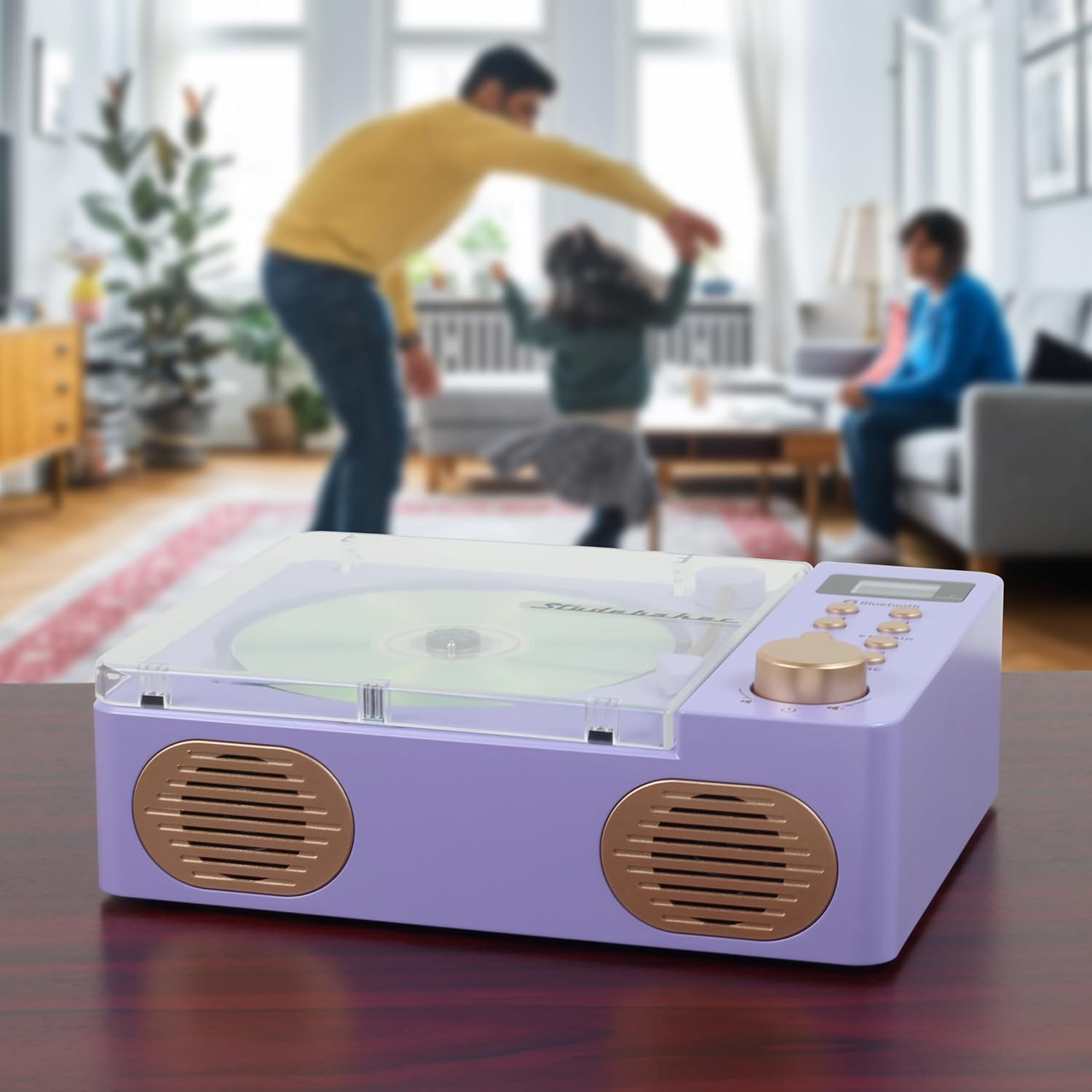
This image displays the Studebaker SB3720 Portable Stereo Bluetooth CD Player in its lilac color. The top-loading CD compartment is visible with a compact disc inserted, alongside the control panel featuring buttons for playback, mode selection, and a volume knob. The front-facing speakers are also visible.

A view of the Studebaker SB3720 CD Player with its transparent lid open, revealing the CD tray and the decorative tonearm. This illustrates how to insert or remove a CD.

The back panel of the Studebaker SB3720, showing the connectivity options: a USB-MP3 port for playing music from a USB drive, an AUX IN port for connecting external audio devices, and a DC IN 5V==1A port for power and charging. A small reset button is also visible.
Налада і першае выкарыстанне
Зарадка акумулятара
Connect the provided Type-C charging cable to the DC IN port on the back of the unit and the USB-C adaptor to a standard power outlet. The unit has a built-in rechargeable battery. The charging indicator (if available) will show the charging status.
Уключэнне/выключэнне
Press and hold the Power button (often integrated with the volume knob) to turn the unit on or off. The LCD display will illuminate when the unit is powered on.
Інструкцыя па эксплуатацыі
Прайграванне кампакт-дыскаў
- Gently open the transparent lid of the CD compartment.
- Place a CD (standard audio CD, MP3 CD, or CD-R/RW) onto the spindle with the label side facing up.
- Шчыльна зачыніце вечка адсека для кампакт-дыскаў.
- Press the 'MODE' button repeatedly until 'CD' mode is selected on the LCD display.
- Press the 'PLAY/PAUSE' button to begin playback.
- Use the 'SKIP/SEARCH' buttons to navigate between tracks.
- Press the 'REPEAT' button to cycle through repeat options (e.g., repeat one, repeat all).
Злучэнне Bluetooth
- Press the 'MODE' button repeatedly until 'Bluetooth' mode is selected. The unit will enter pairing mode, indicated by a flashing Bluetooth icon on the LCD display.
- On your Bluetooth-enabled device (e.g., smartphone, tablet), go to its Bluetooth settings and search for available devices.
- Select 'SB3720' from the list of devices to pair.
- Once paired, the Bluetooth icon on the SB3720's display will stop flashing, and you can stream audio from your device.
FM-радыё
- Press the 'MODE' button repeatedly until 'FM' mode is selected.
- Use the 'SKIP/SEARCH' buttons to manually tune to a desired radio station.
- Press and hold the 'SKIP/SEARCH' buttons to automatically scan for the next available station.
USB MP3-плэер
- Устаўце флэш-назапашвальнік USB з аўдыёфайлам у фармаце MP3 files into the USB-MP3 port on the back of the unit.
- Press the 'MODE' button repeatedly until 'USB' mode is selected.
- Прылада аўтаматычна пачне прайграваць MP3 files з USB-дыска.
- Use the 'PLAY/PAUSE' and 'SKIP/SEARCH' buttons to control playback.
Auxiliary Input (AUX-In)
- Connect an external audio device (e.g., smartphone, MP3 player) to the 'AUX IN' port on the back of the unit using a 3.5mm audio cable (not included).
- Press the 'MODE' button repeatedly until 'AUX' mode is selected.
- Audio from your external device will now play through the SB3720 speakers. Control playback from your external device.
Элементы кіравання і дысплей
- Ручка харчавання/гучнасці: Уключае/выключае прыладу і рэгулюе ўзровень гучнасці.
- Кнопка PLAY/PAUSE: Starts or pauses playback in CD, Bluetooth, or USB modes.
- SKIP/SEARCH Buttons: Skips to the next/previous track or station; press and hold to fast forward/rewind or auto-scan.
- Кнопка REPEAT: Cycles through repeat playback options for CDs or USB.
- Кнопка MODE: Switches between CD, Bluetooth, FM, USB, and AUX modes.
- ВК-дысплей: Shows current mode, track number, time, and other relevant information.
Догляд і абслугоўванне
To maintain the appearance and functionality of your SB3720, follow these guidelines:
- Працірайце прыладу мяккай сухой тканінай. Не выкарыстоўвайце абразіўныя ачышчальнікі, воск або растваральнікі.
- Пазбягайце ўздзеяння прамых сонечных прамянёў, экстрэмальных тэмператур або высокай вільготнасці на прыладу.
- Keep the CD compartment clean and free of dust. If necessary, use a CD lens cleaner disc.
- Do not attempt to disassemble or modify the unit, as this will void the warranty.
Ліквідацыю непаладак
| праблема | Магчымая прычына | Рашэнне |
|---|---|---|
| Прылада не ўключаецца | Battery is depleted; Power cable not connected | Charge the unit using the provided cable and adapter; Ensure power cable is securely connected. |
| CD не прайграваецца | CD inserted incorrectly; CD is dirty or scratched; Incorrect mode selected | Ensure CD is inserted label-side up; Clean or replace CD; Select 'CD' mode. |
| Bluetooth не падключаецца | Unit not in pairing mode; Device Bluetooth off; Already connected to another device | Ensure 'Bluetooth' mode is selected and flashing; Turn on Bluetooth on your device; Disconnect from other devices and try pairing again. |
| З дынамікаў няма гуку | Volume too low; Mute activated; Headphone jack in use | Increase volume; Check if unit is muted; Disconnect headphones. |
Тэхнічныя характарыстыкі
| Асаблівасць | Спецыфікацыя |
|---|---|
| Памеры прадукту | 8.27 х 6.3 х 2.75 цалі |
| Вага прадмета | 2.12 фунта |
| Марка | Студэбэйкер |
| Назва мадэлі | Рэтра CD-плэер з Bluetooth |
| Колер | Бэз |
| Тэхналогія падлучэння | Bluetooth |
| Асаблівасць | Auto Power-Off, Bluetooth, Lightweight, Portable, Rechargeable |
| Вытворца | Spectra Merchandising Intl. |
Гарантыя і падтрымка кліентаў
For warranty information, technical assistance, or to inquire about replacement parts, please refer to the contact details provided with your purchase documentation or visit the official Studebaker webсайт. Захоўвайце пацвярджэнне пакупкі для прэтэнзій па гарантыі.
Ask a question about this manual
Ask about setup, troubleshooting, compatibility, parts, safety, or missing instructions. Manuals+ will review the question and use this page’s manual context to help answer it.